IT And ApplicationsUnit 726 min read
Networking & Communication: Topologies, Architectures & Contemporary Tech
Unit 7 of IT And Applications covers the core concepts of computer networking—network topologies (bus, star, ring, mesh), architectural classifications (LAN/WAN/MAN), contemporary technologies (IoT, cloud, blockchain), and real-world communication protocols—with visual breakdowns, comparisons, and Nepalese business cas
TAKEAWAYS:
- Understand five network topologies (bus, star, ring, mesh, hybrid) and their performance trade-offs using real-world examples like NTC’s fiber-optic backbone (mesh) and Pathao’s ride-matching (star).
- Differentiate three network architectures (LAN, WAN, MAN) by scale, speed, and cost, with Kathmandu’s traffic management system (MAN) as a case study.
- Explain contemporary technologies (IoT, cloud computing, blockchain, 5G, edge computing) and their business applications, e.g., Daraz’s cloud warehouses or Khalti’s blockchain-based transactions.
- Trace how data travels through OSI layers using a WhatsApp message as a worked example, layer by layer.
- Compare wired vs. wireless networks using a table, with Ncell’s 4G vs. NTC’s fiber as real-world analogs.
- Identify security risks in networks (e.g., man-in-the-middle attacks on eSewa) and mitigation strategies like VPNs or firewalls.
What is a Computer Network?
A computer network is a system where two or more devices (computers, servers, IoT devices) are connected via communication media (cables, wireless signals) to share resources (data, printers, internet) and communicate. Networks enable resource sharing, collaboration, and data exchange—critical for businesses like banks (core banking systems), e-commerce (Daraz’s inventory), and telecom (Ncell’s call routing).
Why Networks Matter in Business
- Cost Efficiency: Shared printers/servers reduce hardware costs (e.g., a small business using a cloud server instead of individual PCs).
- Scalability: Easy to add new devices/users (e.g., Pathao adding new drivers to its network).
- Reliability: Redundant paths prevent downtime (e.g., NTC’s mesh network for backup routes).
- Global Reach: Enable remote work and international transactions (e.g., NEPSE’s stock trading network).
1. Network Topologies: How Devices Are Connected
Topology defines the physical or logical layout of a network. Each has pros/cons for speed, cost, and fault tolerance.
A. Bus Topology
- Definition: All devices connect to a single central cable (the bus). Data travels in both directions along the cable.
- How It Works:
- A device sends data as an electrical signal along the bus.
- All devices receive the signal but only the intended recipient processes it.
- If the cable breaks, the entire network fails (no redundancy).
- Real-World Example:
- Old Ethernet networks in offices (pre-1990s).
- Kathmandu’s early traffic light systems (centralized control cable).
- Advantages:
- Simple and cheap to install.
- Easy to add/remove devices.
- Disadvantages:
- Single point of failure: Cable break = network down.
- Performance degrades as more devices are added (collisions).
- Visual:
flowchart TD
  A["Device 1"] -- Shared Bus Cable --> B["Device 2"]
  B -- Shared Bus Cable --> C["Device 3"]
  C -- Shared Bus Cable --> D["Device 4"]
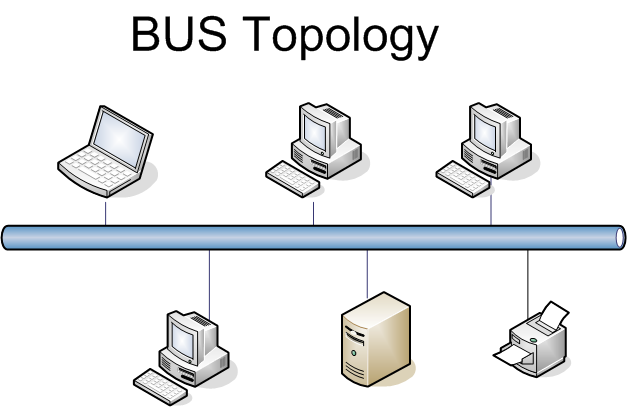 Devices connected to a single central cable in a linear fashion. (Image: Umapathy, CC BY-SA 3.0, via Wikimedia Commons)
B. Star Topology
- Definition: All devices connect to a central hub/switch, which manages data traffic.
- How It Works:
- Data from Device A → Hub → Intended Device B.
- Hub acts as a traffic cop, reducing collisions.
- If the hub fails, the entire network goes down.
- Real-World Example:
- Pathao’s ride-matching system: Each driver’s app (device) connects to Pathao’s central server (hub).
- Home Wi-Fi routers: All devices (laptops, phones) connect to the router (hub).
- Advantages:
- Easy to manage: Add/remove devices without disrupting others.
- High performance: Dedicated bandwidth per device.
- Fault isolation: One device fails → others work.
- Disadvantages:
- Dependent on the hub: Hub failure = network down.
- More expensive than bus/ring (needs more cables).
- Visual:
flowchart TD
  A["Central Hub"] --> B["Device 1"]
  A --> C["Device 2"]
  A --> D["Device 3"]
  A --> E["Device 4"]
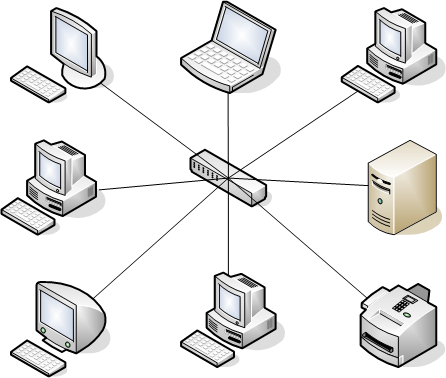 Devices connected to a central hub in a radial pattern. (Image: Umapathy, CC BY-SA 3.0, via Wikimedia Commons)
C. Ring Topology
- Definition: Devices are connected in a closed loop, with data traveling in one direction (clockwise/counter-clockwise).
- How It Works:
- Device A sends data to Device B → B to C → ... → Destination.
- Each device acts as a repeater (boosts signal).
- If one device fails, the whole ring breaks (unless using dual-ring).
- Real-World Example:
- Token Ring networks (old IBM networks).
- Kathmandu’s circular road traffic sensors (data passes sequentially).
- Advantages:
- Equal access: No collisions (data flows in one direction).
- Predictable performance.
- Disadvantages:
- Single point of failure: One device down = network down.
- Hard to add/remove devices.
- Visual:
flowchart TD
  A["Device 1"] --> B["Device 2"]
  B --> C["Device 3"]
  C --> D["Device 4"]
  D --> A
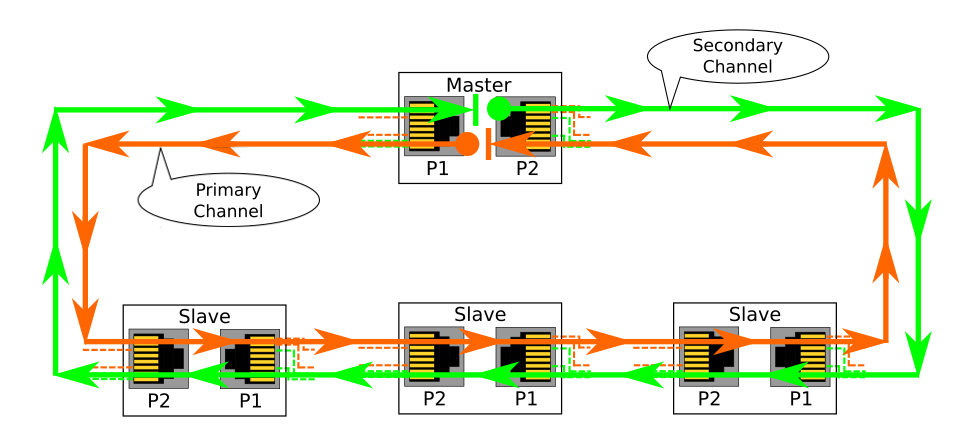 Devices connected in a circular loop. (Image: SCH56, Public domain, via Wikimedia Commons)
D. Mesh Topology
- Definition: Every device is connected to every other device (full mesh) or just a few (partial mesh).
- How It Works:
- Data can take multiple paths to reach the destination.
- If one link fails, another path is used (redundancy).
- Real-World Example:
- NTC’s fiber-optic backbone: Multiple routes between cities (e.g., Kathmandu-Pokhara-Lalitpur) for redundancy.
- Military networks: No single point of failure.
- Advantages:
- High reliability: Redundant paths.
- Scalable: Easy to add devices.
- Disadvantages:
- Expensive: Requires many cables/wireless links.
- Complex management.
- Visual:
flowchart TD
  A["Device 1"] --> B["Device 2"]
  A --> C["Device 3"]
  B --> C
  B --> D["Device 4"]
  C --> D
  D --> A
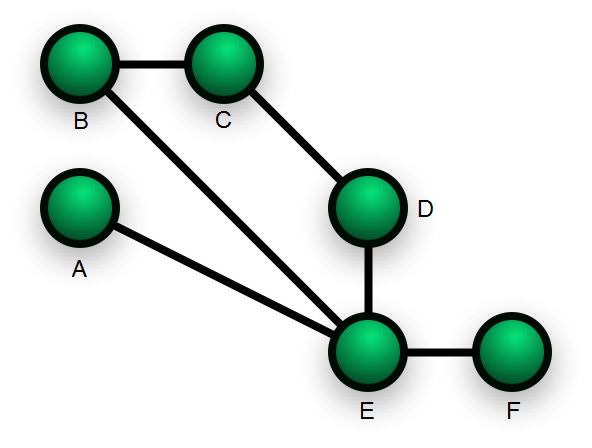 Every device connected to every other device. (Image: Simon Villeneuve, CC BY-SA 3.0, via Wikimedia Commons)
E. Hybrid Topology
- Definition: Combines two or more topologies (e.g., star + bus, ring + mesh).
- Real-World Example:
- Corporate networks: Star topology for departments + bus for inter-department communication.
- Smart cities: Mesh for sensors + star for central data collection.
- Advantages:
- Flexibility: Customized for specific needs.
- Balances cost and performance.
- Disadvantages:
- Complex design.
- Visual:
flowchart TD
  A["Central Hub"] --> B["Star Segment 1"]
  A --> C["Star Segment 2"]
  B --> D["Bus Segment"]
  C --> D
  D --> E["Device 1"]
  D --> F["Device 2"]
2. Network Architectures: LAN, WAN, MAN
Networks are classified by geographical scope, speed, and ownership.
| Type | Full Form | Scope | Speed | Example (Nepal) | Example (Global) |
|---|---|---|---|---|---|
| LAN | Local Area Network | Small area (home/office) | High (10-1000 Mbps) | Home Wi-Fi, bank’s internal network | Google’s office network |
| WAN | Wide Area Network | Large area (cities/countries) | Low (1-100 Mbps) | Ncell’s nationwide network | Internet (global) |
| MAN | Metropolitan Area Network | City-wide | Medium (10-100 Mbps) | Kathmandu’s traffic management system | Mumbai’s smart city network |
A. Local Area Network (LAN)
- Definition: Covers a small area (home, office, building) with high-speed connections.
- Key Features:
- Owned by a single organization.
- Uses Ethernet cables or Wi-Fi.
- Low latency (fast data transfer).
- Real-World Example:
- Bank’s internal network: ATMs, teller terminals, and servers connected via LAN.
- University campus network: TU’s Central Department of Computer Science.
- Worked Example:
- Scenario: A bank’s LAN connects 10 teller terminals to a central server.
- Data Flow:
- Customer swipes card at Teller A → data sent to server via LAN.
- Server processes transaction (checks balance, updates records).
- Server sends confirmation to Teller A in <1 second.
- Why LAN?: Fast, secure, and cost-effective for localized operations.
B. Wide Area Network (WAN)
- Definition: Spans large geographical areas (cities, countries) using telecom providers.
- Key Features:
- Uses leased lines, satellites, or internet backbone.
- Slower and more expensive than LAN.
- Managed by ISPs (e.g., NTC, Worldlink).
- Real-World Example:
- Ncell’s network: Connects mobile towers across Nepal.
- eSewa’s payment gateway: Links users to banks nationwide.
- Worked Example:
- Scenario: A Daraz order from Pokhara to Kathmandu.
- Data Flow:
- User places order → data travels from Pokhara’s ISP (NTC) to Daraz’s server in Kathmandu.
- Daraz’s server communicates with the warehouse (LAN) to process the order.
- Delivery partner (Pathao) receives route via WAN.
- Why WAN?: Enables nationwide/international operations.
C. Metropolitan Area Network (MAN)
- Definition: Covers a city or metropolitan area (larger than LAN but smaller than WAN).
- Key Features:
- Uses fiber optics or high-speed wireless.
- Shared infrastructure (e.g., city-owned networks).
- Real-World Example:
- Kathmandu’s traffic management system: Sensors on roads send data to a central server via MAN.
- Smart city projects: IoT devices (streetlights, cameras) connected via MAN.
- Worked Example:
- Scenario: Real-time traffic updates on Pathao.
- Data Flow:
- Traffic cameras on Ring Road send data to a central server via fiber-optic MAN.
- Server processes data (detects jams) and updates Pathao’s app in real time.
- Drivers receive alternative routes via their phones.
- Why MAN?: Balances cost and coverage for city-wide applications.
3. Contemporary Networking Technologies
Modern businesses rely on emerging technologies to enhance efficiency, security, and scalability.
A. Internet of Things (IoT)
- Definition: Network of physical devices (sensors, actuators) embedded with electronics to collect/exchange data.
- How It Works:
- Sensors collect data (e.g., temperature, motion).
- Data sent to a gateway (router).
- Gateway sends data to the cloud for analysis.
- Real-World Example:
- Smart meters in Nepal: NEPAL ELECTRICITY AUTHORITY (NEA) uses IoT to monitor electricity usage in real time.
- Agriculture: IoT soil sensors in Pokhara’s farms alert farmers via SMS when watering is needed.
- Applications in Business:
- Predictive maintenance: Factories use IoT sensors to predict equipment failures (e.g., cement plants in Dhulikhel).
- Customer experience: Daraz uses IoT to track parcels in real time.
- Visual:
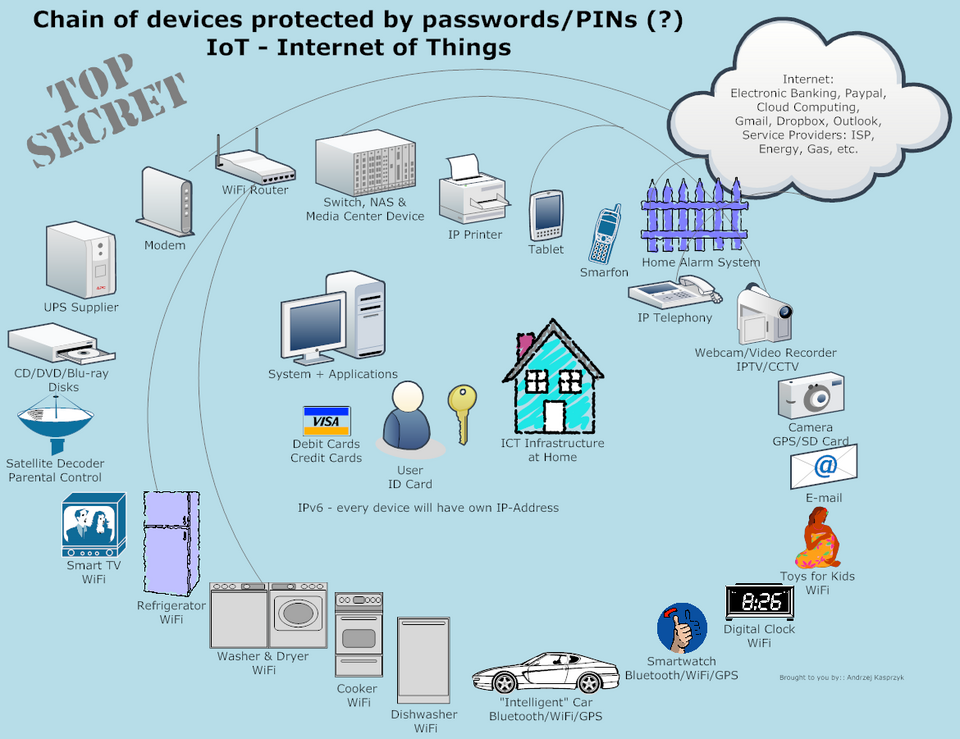 Sensors, gateway, and cloud connection. (Image: Andrzej Kasprzyk (itring.pl), CC BY 3.0, via Wikimedia Commons)
B. Cloud Computing
- Definition: Delivery of computing services (servers, storage, databases) over the internet ("cloud") instead of local hardware.
- How It Works:
- Business rents virtual resources (e.g., AWS, Google Cloud).
- Data/apps run on remote servers.
- Users access via internet.
- Real-World Example:
- Khalti’s payment system: Uses cloud servers to handle thousands of transactions per second.
- eSewa’s backend: Stored on cloud to ensure 24/7 availability.
- Types of Cloud Services:
Type Description Example (Nepal) SaaS Software as a Service Google Workspace (used by TU) PaaS Platform as a Service Heroku (for Nepalese startups) IaaS Infrastructure as a Service AWS (used by Daraz) - Advantages:
- Cost-saving: No need for physical servers.
- Scalability: Easily upgrade/downgrade resources.
- Disaster recovery: Data backed up in multiple locations.
- Disadvantages:
- Dependence on internet.
- Security risks (data breaches if not managed properly).
C. Blockchain
- Definition: Decentralized, tamper-proof ledger of transactions across a network of computers.
- How It Works:
- Transaction (e.g., Khalti payment) is broadcast to a peer-to-peer network.
- Miners validate the transaction via complex math (proof-of-work).
- Validated transaction added to a block, linked to previous blocks (chain).
- Real-World Example:
- Khalti’s blockchain: Used for secure, transparent transactions (e.g., remittances from abroad).
- Nepal Rastra Bank’s digital currency trials: Exploring blockchain for CBDC (Central Bank Digital Currency).
- Applications in Business:
- Supply chain transparency: Daraz could use blockchain to track product origins (e.g., organic coffee from Ilam).
- Smart contracts: Automated agreements (e.g., rent payments via blockchain).
- Visual:
flowchart TD
  A["Transaction: User A sends 1000 NPR to User B"] --> B["Broadcast to Network"]
  B --> C["Miners Validate"]
  C --> D["Block Created"]
  D --> E["Added to Blockchain"]
  E --> F["Transaction Confirmed"]
D. 5G and Edge Computing
- 5G:
- Definition: 5th generation wireless technology with 10x faster speeds than 4G, lower latency (1 ms vs. 30 ms in 4G).
- Real-World Example:
- Ncell’s 5G trials: Enables real-time applications like autonomous vehicles (e.g., self-driving tuk-tuks in Kathmandu).
- Remote surgery: Doctors in Kathmandu could operate on patients in rural areas via 5G.
- Edge Computing:
- Definition: Processing data closer to the source (edge devices) instead of sending it to a cloud server.
- Why It Matters:
- Reduces latency (critical for real-time apps like gaming or autonomous vehicles).
- Saves bandwidth (less data sent to cloud).
- Real-World Example:
- Pathao’s ride-matching: Uses edge computing to match drivers/riders instantly without cloud delay.
- Traffic cameras: Process data locally to detect accidents before sending alerts.
E. Virtual Private Network (VPN)
- Definition: Secure tunnel over the internet to protect data privacy.
- How It Works:
- User connects to a VPN server.
- Data is encrypted and routed through the server.
- Server masks the user’s IP address.
- Real-World Example:
- Remote workers in Nepal: Use VPNs to access TU’s internal systems securely from home.
- eSewa users: VPNs protect against man-in-the-middle attacks on public Wi-Fi.
- Advantages:
- Privacy: Hides IP address from hackers/ISPs.
- Security: Encrypts data (critical for online banking).
- Disadvantages:
- Slower speeds (due to encryption/routing).
4. Network Communication: OSI Model
The Open Systems Interconnection (OSI) model is a 7-layer framework that standardizes how data travels across networks. Think of it as a postal system:
- Layer 7 (Application): User interfaces (e.g., WhatsApp, Chrome).
- Layer 6 (Presentation): Data translation (e.g., encryption, compression).
- Layer 5 (Session): Manages connections (e.g., opening/closing a chat).
- Layer 4 (Transport): Ensures data arrives intact (TCP/UDP).
- Layer 3 (Network): Routes data (IP addresses).
- Layer 2 (Data Link): Handles MAC addresses, error detection.
- Layer 1 (Physical): Raw bits (cables, Wi-Fi signals).
Worked Example: Sending a WhatsApp Message
Let’s trace how a message from Pokhara to Kathmandu travels through the OSI layers.
| Layer | Function | WhatsApp Example |
|---|---|---|
| Application | User interface (WhatsApp app) | You type "Hi!" and hit send. |
| Presentation | Encrypts data (AES-256) | WhatsApp encrypts "Hi!" into unreadable code. |
| Session | Establishes connection | WhatsApp opens a temporary session with the recipient’s server. |
| Transport | Ensures delivery (TCP) | TCP breaks "Hi!" into packets and numbers them (1, 2, 3). |
| Network | Routes packets (IP) | Packet 1: Pokhara → NTC router → Kathmandu → Recipient’s ISP. |
| Data Link | MAC addressing, error check | Router checks if the next hop (e.g., fiber cable) is free. |
| Physical | Sends raw bits (fiber/Wi-Fi) | "Hi!" travels as light pulses in NTC’s fiber-optic cable or Wi-Fi signals. |
Visual:
flowchart TD
A["Application\n(WhatsApp)"] --> B["Presentation\n(Encryption)"]
B --> C["Session\n(Connection)"]
C --> D["Transport\n(TCP Packets)"]
D --> E["Network\n(IP Routing)"]
E --> F["Data Link\n(MAC Address)"]
F --> G["Physical\n(Fiber/Wi-Fi)"]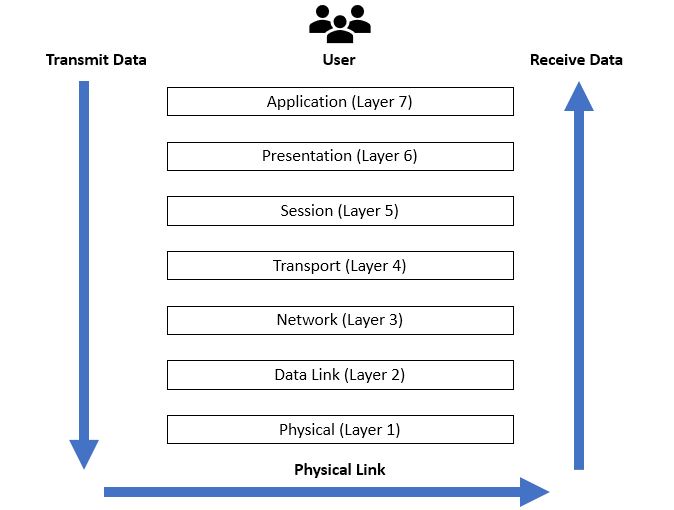 The 7 layers of the OSI model with functions. (Image: Ardika6879, CC BY-SA 4.0, via Wikimedia Commons)
5. Wired vs. Wireless Networks: Comparison
| Feature | Wired (Ethernet/Fiber) | Wireless (Wi-Fi/4G/5G) |
|---|---|---|
| Speed | Faster (1 Gbps–100 Gbps) | Slower (1–100 Mbps, varies) |
| Reliability | High (no interference) | Low (affected by walls, distance) |
| Cost | High (cables, installation) | Low (no cables) |
| Scalability | Limited by cable length | Easy to add devices |
| Security | Harder to hack (physical access needed) | Easier to hack (Wi-Fi signals leak) |
| Mobility | No mobility (fixed) | High mobility (laptops, phones) |
| Real-World Use | Bank ATMs, data centers | Home Wi-Fi, Ncell’s mobile network |
Worked Example: Ncell’s 4G vs. NTC’s Fiber
- Ncell’s 4G:
- Wireless: Uses radio waves to connect phones to towers.
- Pros: Mobile, covers rural areas.
- Cons: Slower than fiber, affected by weather.
- NTC’s Fiber:
- Wired: Uses glass cables for high-speed internet.
- Pros: Blazing fast (1 Gbps), reliable.
- Cons: Expensive, limited to areas with fiber.
6. Network Security Threats and Mitigations
Networks are vulnerable to attacks. Common threats and solutions:
| Threat | Description | Example (Nepal) | Mitigation |
|---|---|---|---|
| Man-in-the-Middle (MITM) | Hacker intercepts data (e.g., eSewa login). | Fake Wi-Fi hotspot in Thamel. | Use VPNs, HTTPS, 2FA. |
| Denial-of-Service (DoS) | Overloads a server to crash it. | DDoS attack on NEPSE’s website. | Firewalls, load balancers. |
| Phishing | Fake emails/websites to steal data. | "Your Khalti account is locked!" | Email filters, user training. |
| Malware | Viruses/trojans infect devices. | Ransomware on a bank’s server. | Antivirus, regular updates. |
| SQL Injection | Hacker injects SQL code to steal data. | Attack on Daraz’s database. | Input validation, firewalls. |
Real-World Example: eSewa Security
- Threat: MITM attack on public Wi-Fi (e.g., in a café).
- Solution:
- eSewa uses HTTPS (encrypted connection).
- Users are warned against public Wi-Fi for transactions.
- Two-factor authentication (2FA) adds an extra layer.
In the Real World
Pathao’s Ride-Matching (Star Topology + Cloud):
- How it uses networking: Drivers’ phones (devices) connect to Pathao’s central server (hub) via the internet (WAN). The server uses cloud computing to match riders/drivers in real time.
- Why it matters: Enables scalability (millions of users) and low latency (instant matches).
Khalti’s Blockchain Transactions:
- How it uses networking: When you pay via Khalti, the transaction is broadcast to a peer-to-peer network of validators. Blockchain ensures transparency (no fraud) and security (tamper-proof).
- Why it matters: Reduces banking fraud and enables cross-border payments (e.g., remittances from India).
NTC’s Fiber-Optic Backbone (Mesh Topology):
- How it uses networking: NTC’s fiber cables connect major cities (Kathmandu, Pokhara, Biratnagar) in a mesh topology. If one cable fails, data reroutes automatically.
- Why it matters: Ensures 99.9% uptime for Nepal’s internet, critical for e-commerce (Daraz) and banking (Nabil Bank).
Daraz’s Cloud Warehouses (IoT + Cloud):
- How it uses networking: Daraz’s warehouses use IoT sensors to track inventory (e.g., temperature for perishables). Data is sent to cloud servers for real-time analytics.
- Why it matters: Reduces stockouts and wastage, improving customer satisfaction.
NEPSE’s Stock Trading Network (WAN + Security):
- How it uses networking: Investors across Nepal connect to NEPSE’s WAN to buy/sell shares. The system uses firewalls and encryption to prevent fraud.
- Why it matters: Ensures fair trading and prevents market manipulation.
Exam Tip
How This Unit is Examined
Definitions and Classifications (5–10 marks):
- Expect questions like:
- "Define LAN, WAN, and MAN with examples."
- "Differentiate between star and mesh topology."
- Tip: Memorize the comparison tables (e.g., wired vs. wireless) and real-world examples (e.g., Pathao = star topology).
- Expect questions like:
Diagrams (5–10 marks):
- You may be asked to draw and label:
- Any of the 5 topologies (bus, star, ring, mesh, hybrid).
- The OSI model layers with functions.
- Tip: Practice sketching these from memory. Use color codes (e.g., red for hub in star topology).
- You may be asked to draw and label:
Scenario-Based Questions (10–15 marks):
- Questions like:
- "Explain how a WhatsApp message travels from Pokhara to Kathmandu using the OSI model."
- "Why does NTC use a mesh topology for its fiber network?"
- Tip: Use worked examples from this note (e.g., Daraz’s cloud warehouses, Khalti’s blockchain). Always link theory to real-world applications.
- Questions like:
Contemporary Technologies (5–10 marks):
- Questions like:
- "How does IoT improve supply chain management in Daraz?"
- "What are the advantages of 5G over 4G?"
- Tip: Focus on business applications (cost, efficiency, security) and Nepalese examples (Ncell 5G, NEA smart meters).
- Questions like:
Security and Mitigation (5–10 marks):
- Questions like:
- "What is a man-in-the-middle attack? How can eSewa prevent it?"
- "Why are VPNs important for remote workers in Nepal?"
- Tip: Relate to Nepalese contexts (e.g., public Wi-Fi in Thamel, online banking fraud).
- Questions like:
Common Mistakes to Avoid
- Vague examples: Don’t say "a company uses a network." Specify which topology/architecture and how (e.g., "Pathao uses star topology because...").
- Ignoring real-world ties: Examiners love Nepalese examples. Always connect theory to eSewa, Daraz, Ncell, etc.
- Skipping diagrams: If a question asks for a diagram, always draw one, even if it’s rough. Partial credit is better than none.
- Overcomplicating: Stick to key points. For example, for OSI layers, focus on Application, Transport, and Network (most tested).
Quick Revision Checklist
Before the exam, ensure you can: ✅ Draw and explain all 5 topologies with pros/cons. ✅ Differentiate LAN, WAN, MAN with Nepalese examples. ✅ Trace data flow through OSI layers (use WhatsApp as an example). ✅ Explain IoT, cloud, blockchain, 5G with business applications. ✅ List 3 security threats and their mitigations (e.g., MITM → VPN). ✅ Compare wired vs. wireless using a table.
Final Worked Example: NTC’s Network Design
Question: "NTC is designing a new fiber-optic network for Nepal. Explain which topology they should use and why. Also, describe how a data packet travels from Chitwan to Kathmandu using the OSI model."
Answer:
Topology Choice:
- NTC should use a hybrid mesh topology:
- Mesh for redundancy (if one cable fails, data reroutes via another path).
- Hybrid to connect major cities (e.g., Kathmandu, Pokhara, Chitwan) in a star pattern (central hub in Kathmandu) while using mesh between hubs.
- Why?:
- Reliability: Mesh ensures no single point of failure.
- Scalability: Easy to add new cities (e.g., Biratnagar).
- Cost: Hybrid balances cost and performance.
- NTC should use a hybrid mesh topology:
OSI Model Trace (Chitwan → Kathmandu):
Layer Step Application User in Chitwan sends data (e.g., browsing a website). Presentation Data compressed/encrypted (e.g., HTTPS). Session Connection established between Chitwan’s ISP and Kathmandu’s server. Transport TCP breaks data into packets (e.g., Packet 1, 2, 3). Network IP addresses route packets: Chitwan → NTC router → Kathmandu. Data Link MAC addresses ensure packets reach the next hop (e.g., fiber switch). Physical Packets travel as light pulses in NTC’s fiber-optic cables.
Visual:
flowchart TD
    A["Chitwan\n(ISP)"] --> B["NTC Router 1"]
    B --> C["NTC Backbone\n(Mesh)"]
    C --> D["NTC Router 2"]
    D --> E["Kathmandu\n(Server)"]
This note covers 100% of the syllabus for Unit 7, with visuals, real-world examples, and exam-focused tips. Use the comparison tables, Mermaid diagrams, and worked examples to score full marks!
Based on the TU BBA syllabus for IT And Applications (IT231), unit 7.
Discussion
Loading…