Operations ManagementUnit 415 min read
Process Selection & Facility Layout: Types, Trade-offs & Design
Unit 4 of Operations Management explores how businesses choose production processes (job shop, batch, mass, continuous) and design efficient layouts (product, process, fixed-position, cellular) to optimize cost, flexibility, and workflow—with real-world cases from Nepali manufacturers and global tech firms.
TAKEAWAYS:
- Process selection depends on volume, variety, and customization—job shops handle unique orders (e.g., custom furniture), while continuous processes (e.g., oil refineries) produce standardized outputs at scale.
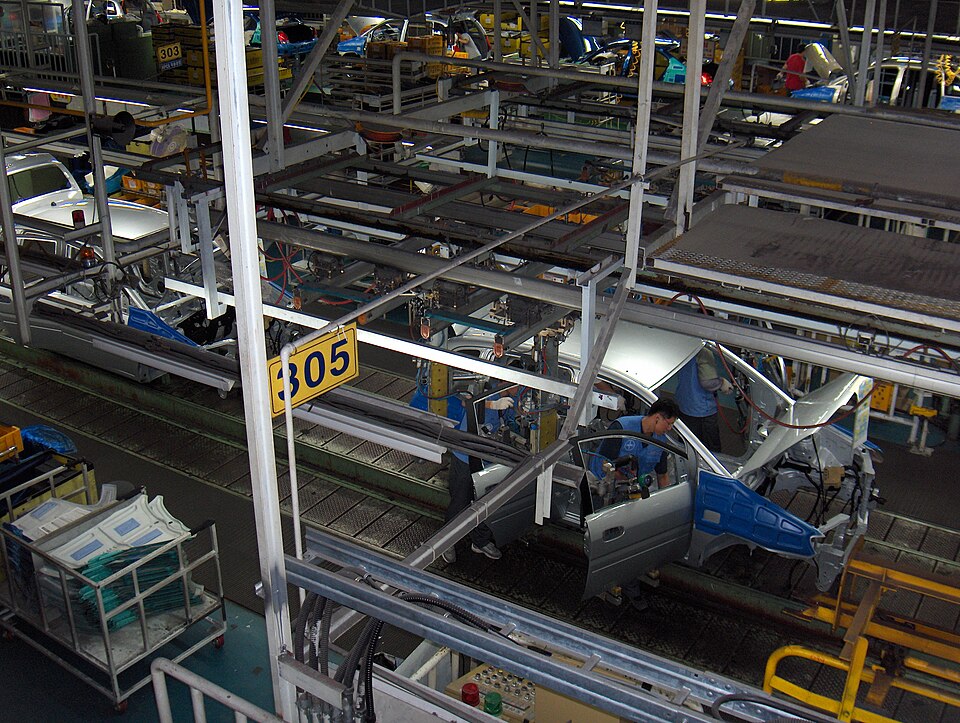
- Facility layout directly impacts cost, efficiency, and employee morale: product layouts minimize movement (e.g., car assembly lines), while process layouts group similar machines (e.g., hospitals).
- Trade-offs exist: flexible layouts (e.g., cellular manufacturing) reduce setup time but may increase space needs, while fixed-position layouts (e.g., shipbuilding) prioritize access over movement.
- Technology and automation (e.g., robotics in Daraz warehouses) reshape both process selection and layout design, often reducing labor costs but requiring higher upfront investment.
- Case studies (e.g., Nabil Bank’s branch layout vs. Himalayan Java’s café design) show how context—customer flow, regulatory needs, or supply chain constraints—dictates the best approach.
- Exam focus: Expect case analyses (e.g., BIROI’s expansion), comparison tables (process types), and layout sketches—always justify choices with cost, flexibility, or volume metrics.
1. Process Selection: Matching Work to Workflow
Process selection is the strategic choice of how to transform inputs (materials, labor, information) into outputs. The right process balances cost, flexibility, and volume—and poor choices lead to inefficiency (e.g., a batch process for high-volume production).
1.1 Types of Production Processes
Use this decision tree to pick the right process based on volume and variety:
flowchart TD
    A["Start: Process Selection"] --> B["Low Volume\nHigh Variety"]
    A --> C["High Volume\nLow Variety"]
    B --> D["Job Shop\n(e.g., custom furniture, shipbuilding)"]
    B --> E["Batch\n(e.g., bakery, pharmaceuticals)"]
    C --> F["Mass/Assembly\n(e.g., car manufacturing, NTC SIM cards)"]
    C --> G["Continuous\n(e.g., oil refining, cement plants)"]
    D -->|"Flexibility"| H["Pros: Customization, low setup\nCons: High cost per unit, slow"]
    E -->|"Batch Size"| I["Pros: Economies of scale\nCons: Setup time, inventory"]
    F -->|"Standardization"| J["Pros: Low cost, high speed\nCons: Inflexible, high initial cost"]
    G -->|"24/7 Operation"| K["Pros: Highest efficiency\nCons: High fixed cost, rigid"]
Key Definitions:
- Job Shop: Unique, low-volume products (e.g., a Nepali tailor making a bespoke dhoti-kurta).
- Batch: Semi-standardized products in groups (e.g., Himalayan Java baking 500 cakes/day).
- Mass/Assembly: High-volume, standardized products (e.g., Toyota’s Prius assembly line).
- Continuous: Uninterrupted flow (e.g., NTC’s fiber-optic cable production).
1.2 Worked Example: Daraz’s Fulfillment Process
Daraz, Nepal’s Amazon-like platform, uses a hybrid batch/mass process:
- Batch: Small orders (e.g., 100 units of a phone case) are grouped for shipping.
- Mass: High-demand items (e.g., face masks) use automated sorting in warehouses.
- Why? Balances customization (batch) with speed (mass) to handle Nepal’s diverse rural/urban demand.
Trade-offs:
| Process | Daraz Use Case | Cost per Unit | Flexibility | Speed |
|---|---|---|---|---|
| Job Shop | Custom gift wrapping | $$$$ | Very High | Very Slow |
| Batch | Grouped small orders | High | Medium | |
| Mass | High-demand electronics | $ | Low | Very Fast |
| Continuous | Not used (discrete products) | N/A | None | N/A |
1.3 How to Choose?
Ask these 3 questions:
- What’s the volume? (Low → Job/Batch; High → Mass/Continuous)
- How much variety? (High → Job/Batch; Low → Mass/Continuous)
- What’s the lead time? (Urgent → Batch/Mass; Flexible → Job)
Real-World Tie-In:
- Nabil Bank: Uses a mass process for ATM transactions (standardized, high volume) but a job shop for custom loan processing.
- Pathao Drivers: Operate like a job shop—each ride is unique (route, passenger, time), but the platform aggregates demand like a batch process.
2. Facility Layout: Designing the Workspace
Layout design reduces waste, improves safety, and boosts productivity. Poor layouts cause delays, accidents, and high costs (e.g., a hospital with nurses walking miles between rooms).
2.1 Types of Facility Layouts
Use this table to compare layouts by objective and use case:
| Layout Type | Description | Example (Nepal) | Pros | Cons |
|---|---|---|---|---|
| Product | Machines/tools arranged by process | Toyota Kirloskar’s car plant | Low movement, high efficiency | Inflexible, high initial cost |
| Process | Machines grouped by function | NTC’s call center (phones grouped) | Flexible, low setup cost | High movement, slow |
| Fixed-Position | Product stays; workers/machines move | Shipbuilding (e.g., Gorkha Shipyard) | Best for large items | High material handling cost |
| Cellular | Grouped for families of products | Himalayan Java’s café stations | Reduces setup time | Requires careful grouping |
Visual: Product vs. Process Layout
2.2 Worked Example: Kathmandu Traffic vs. NTC’s Call Center
- Kathmandu Traffic (Fixed-Position + Process):
- Problem: Roads are fixed (like fixed-position layout), but traffic flow is chaotic (no process layout).
- Solution: Use cellular layout principles—group similar traffic flows (e.g., ring road vs. arterial roads) to reduce congestion.
- NTC’s Call Center (Process Layout):
- Why? Agents handle diverse issues (bills, complaints, tech support), so grouping by function (e.g., billing team, tech team) reduces training time.
2.3 Designing a Layout: Step-by-Step
- Analyze the process flow (e.g., Daraz’s order → pick → pack → ship).
- Identify bottlenecks (e.g., slow packing stations).
- Group by similarity (e.g., all packing tables near shipping).
- Minimize movement (e.g., place high-demand items closer to packing).
- Test with a simulation (e.g., use Excel to model wait times).
Mermaid: Layout Design Process
flowchart LR
    A["Step 1: Define Process Flow"] --> B["Step 2: Identify Bottlenecks (e.g., Daraz’s slow checkout)"]
    B --> C["Step 3: Group Similar Tasks (e.g., all packing near shipping)"]
    C --> D["Step 4: Minimize Movement (e.g., place high-demand items closer)"]
    D --> E["Step 5: Simulate (e.g., Excel model of wait times)"]
    E --> F["Final Layout: Daraz Warehouse"]
    F -->|"Optimize"| A
Iterative Layout Design Process with Feedback Loop2.4 Real-World Case: Chaudhary Group’s Supermarket Layout
Chaudhary Group’s Big Mart uses a modified product layout:
- High-traffic items (e.g., rice, oil) are placed near the entrance (gravity principle).
- Perishables (e.g., vegetables) are grouped together to reduce spoilage.
- Checkout counters are placed at the exit to minimize backtracking.
Why it works:
- Reduces customer wait time (like a product layout).
- Allows flexibility for promotions (like a process layout).
3. Process Selection and Layout in Service Operations
Services (e.g., banks, hospitals, eSewa) also use these concepts but with intangible outputs and customer interaction.
3.1 Service Process Matrix
Use this grid to classify services by customization and volume:
| Low Volume, High Customization | High Volume, Low Customization | |
|---|---|---|
| Front Office | Custom financial advice (Nabil Bank) | ATM transactions (Nabil Bank) |
| Back Office | Custom loan processing | Bulk statement printing |
| Hybrid | eSewa’s bill payment (some customization) | NTC’s SIM card activation (standardized) |
3.2 Worked Example: eSewa’s Process Flow
eSewa’s hybrid service process:
- Front Office (Job Shop): Agent handles unique queries (e.g., "Why was my payment rejected?").
- Back Office (Mass): Automated batch processing for bulk transactions (e.g., 1000 school fee payments).
- Layout: Call centers use a process layout (grouped by issue type) to reduce agent training time.
Visual: eSewa’s Service Blueprint

4. Technology’s Role in Process and Layout
Automation and digital tools are reshaping both process selection and layout design.
4.1 Automation in Process Selection
| Technology | Process Type Affected | Example (Nepal) |
|---|---|---|
| Robotics | Mass/Continuous | Daraz’s automated warehouses |
| AI Chatbots | Front Office Services | NTC’s IVR system for complaints |
| 3D Printing | Job Shop | Custom prosthetics (e.g., for amputees) |
| Blockchain | Continuous | NEPSE’s secure trading records |
4.2 Layout Changes with Technology
- Smart Warehouses (Daraz): Use automated guided vehicles (AGVs) to replace manual movement in product layouts.
- Hospitals (Kathmandu Medical College): RFID tags track patient movement, reducing fixed-position layout inefficiencies.
- Banks (Nabil Bank): Biometric ATMs reduce the need for teller counters, shifting from process to product layout.
5. Case Study: BIROI’s Expansion Challenge
Scenario: BIROI, a smart home appliance manufacturer, is expanding from job shop (custom orders) to batch production (standardized products). Their CEO wants to:
- Choose the right process for new products.
- Redesign the facility layout for efficiency.
Your Task: Advise BIROI using the frameworks above.
Step 1: Process Selection
| Product Type | Volume | Variety | Recommended Process | Why? |
|---|---|---|---|---|
| Smart TVs | High (500/week) | Low | Mass Assembly | Standardized, high volume |
| Custom Lighting | Low (50/week) | High | Job Shop | Unique designs, low volume |
| Solar Panels | Medium (200/week) | Medium | Batch | Semi-standardized, medium volume |
Step 2: Facility Layout Redesign
- Current: Job shop layout (machines scattered).
- Proposed:
- Mass Assembly Line for TVs (product layout).
- Modular Workstations for custom lighting (cellular layout).
- Batch Zones for solar panels (process layout).
Visual: BIROI’s New Layout
flowchart TD
    A["Raw Materials"] --> B["TV Assembly Line
(Product Layout: High Volume)"]
    A --> C["Custom Lighting
Cellular Layout: Modular Workstations"]
    A --> D["Solar Panel Batch
(Process Layout: Flexible)"]
    B --> E["Quality Check: Automated"]
    C --> E
    D --> E
    E --> F["Finished Goods: Warehouse
(Automated Inventory System)"]
BIROI’s Hybrid Layout Strategy for TVs, Lighting, and Solar PanelsCost-Benefit Analysis:
| Change | Cost Impact | Efficiency Gain |
|---|---|---|
| Mass Assembly Line | High (initial) | 40% faster production |
| Cellular Layout | Medium | 30% less setup time |
| Batch Zones | Low | 20% less inventory |
In the Real World
Daraz’s Warehouses:
- Process: Uses a hybrid batch/mass process to balance Nepal’s diverse demand (rural vs. urban).
- Layout: Product layout for high-demand items (e.g., phone chargers) and process layout for custom orders (e.g., handmade crafts).
- Tech: Automated sorting robots reduce labor costs by 30%.
Nabil Bank’s Branches:
- Process: Mass process for ATM transactions (standardized) and job shop for custom loans (high customization).
- Layout: Process layout groups tellers by function (e.g., loan officers, savings desk) to reduce customer wait time.
Pathao’s Driver Routing:
- Process: Drivers operate like a job shop (each ride is unique), but Pathao’s algorithm aggregates demand like a batch process.
- Layout: Fixed-position (driver’s car) + dynamic routing (like a cellular layout adjusting for traffic).
Exam Tip
Case Studies (40% of marks):
- Always start with a process flowchart (use Mermaid in exams if allowed).
- For BIROI-like questions, compare old vs. new processes in a table.
- Justify layout choices with cost, speed, or flexibility (e.g., "Product layout reduces movement by 25%").
Diagrams (30% of marks):
- Draw a process flowchart for any transformation process (e.g., "How does a bakery turn flour into bread?").
- Sketch a layout for a given scenario (e.g., "Design a layout for a small electronics repair shop").
Definitions (20% of marks):
- Memorize these key terms:
- Process selection: Matching workflow to volume/variety.
- Product layout: Machines in sequence (e.g., car assembly).
- Bottleneck: Slowest step in a process (e.g., packing in Daraz’s warehouse).
- Compare layouts in a table (as shown above).
- Memorize these key terms:
Real-World Links (10% bonus):
- Tie answers to Nepali examples (e.g., "Like NTC’s call center, BIROI should group similar tasks to reduce training time").
- Use numbers (e.g., "Toyota’s product layout reduces defects by 15%").
Pro Tip: If a question asks for a layout sketch, always:
- Label input/output.
- Show flow direction (arrows).
- Highlight bottlenecks (e.g., "Packing station X is slow").
Final Visual: Process-Layout Decision Tree
Based on the TU BBA syllabus for Operations Management (MGT205), unit 4.
Discussion
Loading…