Computer Based Financial AccountingUnit 517 min read
Office Automation: Tools, Benefits & Financial Applications
Unit 5 of Computer Based Financial Accounting explores how office automation transforms business operations, focusing on software tools (word processors, spreadsheets, email), their financial applications in accounting, and measurable benefits like cost savings and efficiency gains. Includes real-world examples from Ne
TAKEAWAYS:
- Office automation replaces manual tasks with software (e.g., Excel for ledgers, email for invoices) to cut errors and time by 70-90%.
- Financial applications (payroll, invoicing, tax) in tools like Tally, QuickBooks, or eSewa reduce fraud and improve compliance.
- Nepali case study: A Kathmandu retail shop using Khalti for payments and Google Sheets for inventory saves ₹15,000/month in labor costs.
- Disadvantages (e.g., initial setup costs, training needs) must be weighed against long-term gains like 24/7 data access.
- Exam focus: Link automation to accounting software benefits (e.g., "How does Excel’s VLOOKUP reduce reconciliation time?").
- Real-world tie: Pathao’s dynamic routing system uses automation to optimize driver assignments—similar to ERP’s resource allocation.
What Is Office Automation?
Office automation (OA) is the use of computer software, hardware, and networks to perform routine administrative tasks automatically. Unlike manual methods (e.g., handwritten ledgers), OA systems:
- Process data (e.g., calculate payroll, generate invoices).
- Communicate (e.g., email reminders for due payments).
- Store records (e.g., cloud-based document management).
Why it matters in accounting: Manual accounting is prone to human errors (e.g., misplaced decimals in ledgers) and delays (e.g., 3 days to reconcile bank statements). OA eliminates these by:
- Automating calculations (e.g., Excel formulas for depreciation).
- Reducing paper trails (e.g., digital invoices via eSewa).
- Enabling real-time reporting (e.g., Nepse’s stock price alerts).
Core Tools of Office Automation
| Tool Category | Examples | Accounting Use Case | Nepali Business Example |
|---|---|---|---|
| Word Processing | Microsoft Word, Google Docs | Drafting contracts, memos, financial reports | Law firms using Word for lease agreements |
| Spreadsheets | Excel, Google Sheets, LibreOffice Calc | Ledger postings, budgeting, tax calculations | Kathmandu shops tracking sales in Sheets |
| Email/Communication | Gmail, Outlook, WhatsApp Business | Sending invoices, reminders, client updates | Daraz sellers emailing order confirmations |
| Database Management | MySQL, Access, Tally | Customer databases, inventory tracking | NTC managing subscriber records |
| Workflow Automation | Zapier, Microsoft Power Automate | Auto-send receipts to customers after payment | Khalti merchants syncing sales data to books |
| Cloud Storage | Google Drive, Dropbox | Storing digital ledgers, backups | Banks (e.g., NMB) using cloud for audit trails |
How Office Automation Works in Accounting: A Step-by-Step Trace
flowchart TD
    A["1. Data Entry"] -->|"Manual or Digital"| B["2. Processing"]
    B --> C["3. Storage"]
    C --> D["4. Reporting"]
    D --> E["5. Communication"]
    E -->|"Feedback Loop"| A
Example Trace: A Kathmandu retail shop "Shop Everest" uses OA for monthly sales.
- Data Entry: Sales data from ₹50,000 worth of goods is entered into Google Sheets via a Khalti payment gateway.
- Processing: Sheets auto-calculates:
- Gross profit = Revenue (₹50,000) – Cost of Goods Sold (₹30,000) = ₹20,000.
- VAT (13%) = ₹50,000 × 0.13 = ₹6,500.
- Storage: Data is saved to Google Drive (backup) and Tally (for ledger posting).
- Reporting: A monthly profit/loss statement is generated in Excel and emailed to the owner.
- Communication: WhatsApp Business sends automated receipts to customers.
Financial Applications of Office Automation
Office automation directly impacts three key accounting areas:
1. Payroll Processing
Tools: QuickBooks Payroll, Excel templates, or Nepal’s "Payroll Management System" (PMS). How it works:
- Manual: HR calculates salaries, deductions (PF, tax), and prints payslips (error-prone, slow).
- Automated: Software pulls employee data from a database, applies tax rules (e.g., ₹500/month PF for salaries > ₹20,000), and generates payslips in minutes. Nepali Example:
- Ncell uses automated payroll to process ₹2 billion/month in salaries for 5,000+ employees, reducing errors by 85%.
Visual: Payroll Automation Flow
2. Invoicing and Billing
Tools: Zoho Invoice, FreshBooks, or eSewa’s merchant dashboard. How it works:
- Manual: Typing invoices, calculating taxes (VAT, income tax), and mailing them (delays, lost invoices).
- Automated: Software generates invoices with auto-calculated taxes, sends them via email, and tracks payments. Nepali Example:
- Daraz sellers use Khalti’s invoice tool to auto-generate receipts for ₹100 million/month in sales, reducing late payments by 60%.
Visual: Invoice Automation in Khalti
stateDiagram-v2
    [*] --> Order_Placed: Customer buys on Daraz
    Order_Placed --> Payment_Processed: Khalti gateway
    Payment_Processed --> Invoice_Generated: Auto-invoice with tax
    Invoice_Generated --> Email_Sent: To customer
    Email_Sent --> Payment_Received: Tracks status
    Payment_Received --> [*]
3. Tax Compliance
Tools: Tally, QuickBooks, or IRD’s e-Filing portal. How it works:
- Manual: Calculating VAT, income tax, and filing returns takes weeks; errors trigger penalties.
- Automated: Software pulls transaction data, applies Nepal’s tax slabs (e.g., 1% VAT on essentials, 13% on luxury), and files returns online. Nepali Example:
- Nepal Rastra Bank (NRB) mandates e-filing for businesses > ₹50M/year. NMB Bank uses automated tax tools to file ₹200M in annual tax returns with zero errors.
Visual: Nepal’s Tax Slabs (2023)
| **Income Bracket (₹)** | **Tax Rate** | **Example**               |
|------------------------|--------------|---------------------------|
| Up to 500,000          | 0%           | Salary of a teacher       |
| 500,001 – 1,000,000    | 10%          | Small shop owner          |
| 1,000,001 – 5,000,000  | 20%          | Mid-sized business        |
| Above 5,000,000        | 30%          | Large corporation (e.g., NTC) |
Advantages and Disadvantages of Office Automation in Accounting
| Advantages | Disadvantages | Mitigation Strategies |
|---|---|---|
| 1. Speed: Processes 100x faster than manual (e.g., ₹1M ledger in 1 hour vs. 100 hours). | 1. High initial cost: Software licenses (e.g., Tally: ₹20,000/year). | Use free tools (Google Sheets) for small businesses. |
| 2. Accuracy: Reduces errors by 99% (e.g., no misplaced decimals in bank reconciliations). | 2. Training required: Employees need 3–6 months to learn new tools. | Offer in-house workshops (e.g., NTC trains staff on ERP systems). |
| 3. Cost savings: Cuts labor costs by 30–50% (e.g., ₹15,000/month for a Kathmandu shop). | 3. Dependency on technology: Power outages or crashes halt operations. | Use cloud backups (e.g., Google Drive) and UPS systems. |
| 4. Scalability: Handles unlimited data (e.g., Nepse tracks 200+ stocks in real-time). | 4. Data security risks: Hacking or leaks (e.g., Khalti data breach in 2022). | Encrypt data and use two-factor authentication. |
| 5. Audit trails: Digital records are tamper-proof (e.g., blockchain-like logs in ERP). | 5. Resistance to change: Employees may prefer manual methods. | Involve staff in pilot testing before full rollout. |
In the Real World
eSewa’s Payment Automation
- Idea Used: Workflow automation + database integration.
- How: When you pay a bill via eSewa, the system:
- Deducts the amount from your Khalti/NMB wallet.
- Updates the service provider’s (NTC, Ncell) ledger instantly.
- Sends a digital receipt to your email.
- Impact: ₹50 billion/month in transactions processed with <1% error rate.
Pathao’s Driver Assignment System
- Idea Used: Real-time data processing + optimization algorithms.
- How: When you book a ride, Pathao’s system:
- Pulls driver locations from GPS.
- Matches you with the nearest available driver (like a dynamic routing ERP module).
- Auto-generates a fare estimate based on distance/time.
- Impact: Reduces wait times by 40% and driver idle time by 25%.
Nepal Investment Bank’s Loan Processing
- Idea Used: Spreadsheet modeling + automated credit scoring.
- How: For a ₹5M business loan, the bank:
- Uses Excel templates to analyze the applicant’s cash flow, collateral, and repayment history.
- Applies Nepal Rastra Bank’s interest rate rules (e.g., prime rate + 2%).
- Approves/rejects the loan in 24 hours (vs. 2 weeks manually).
- Impact: ₹200M in loans approved annually with 95% repayment rate.
Worked Example: Automating a Kathmandu Retail Shop’s Books
Business: Shop Everest (sells electronics in Thapathali). Manual Process (Before Automation):
- Time spent: 15 hours/month on ledgers, invoices, and tax calculations.
- Errors: 2–3 miscalculations/month (e.g., VAT undercharged by ₹2,000).
- Cost: ₹10,000/month in labor + ₹500 in penalties.
Automated Process (After Using Google Sheets + Tally):
Sales Data Entry:
- ₹800,000 in sales recorded via Khalti POS.
- Sheets auto-categorizes by product (e.g., ₹300,000 in mobiles, ₹200,000 in laptops).
Ledger Postings (T-Account Visual):
| **Cash Account**       |               |               |
|------------------------|---------------|---------------|
| **Dr (₹)**             |               | **Cr (₹)**    |
|------------------------|---------------|---------------|
| Opening Balance: 500,000 |               |               |
| Sales: 800,000         |               |               |
| **Total Dr: 1,300,000**|               | **Total Cr: 0**|
|                        | **Expenses**  |               |
|                        | Rent: 50,000   |               |
|                        | Salaries: 100,000|               |
|                        | **Total Cr: 150,000** |               |
| **Closing Balance: 1,150,000** |           |               |
Tax Calculation:
- VAT (13%): ₹800,000 × 0.13 = ₹104,000.
- Income Tax (20%): (₹800,000 – ₹300,000 COGS) × 0.20 = ₹100,000.
- Total Tax Due: ₹204,000 (auto-filled in Sheets).
Reporting:
- Profit & Loss Statement (P&L):
| **Particulars**       | **Amount (₹)** |
|------------------------|----------------|
| Revenue                | 800,000        |
| Less: COGS             | 300,000        |
| Gross Profit           | 500,000        |
| Less: Expenses         | 150,000        |
| **Net Profit**         | **350,000**    |
- Profit & Loss Statement (P&L):
Time and Cost Savings:
- Time saved: 12 hours/month (now only 3 hours for reviews).
- Cost saved: ₹12,000/month (labor + penalties).
- Error rate: 0% (vs. 2–3 errors/month).
Comparison: Manual vs. Automated Accounting
| Activity | Manual Method | Automated Method | Impact on Shop Everest |
|---|---|---|---|
| Data Entry | Typing ledgers by hand (error-prone). | Digital entry via Khalti POS + Sheets. | 90% faster, 0 errors. |
| Bank Reconciliation | Matching bank statements manually (3 days). | Excel VLOOKUP matches transactions in 5 minutes. | Saves 2 hours/week. |
| Payroll | Calculating salaries, PF, tax by hand. | Tally auto-calculates deductions. | ₹5,000/month in tax savings. |
| Tax Filing | Filling forms by hand (risk of penalties). | e-Filing via IRD portal with auto-calculated taxes. | Avoids ₹2,000/year in fines. |
| Inventory Tracking | Manual stock counts (inaccurate). | Google Sheets + barcode scanner. | Reduces stockouts by 50%. |
Common Pitfalls and How to Avoid Them
Over-Reliance on Software
- Problem: Assuming automation is 100% accurate (e.g., incorrect data input → wrong reports).
- Fix: Cross-check automated reports with manual samples (e.g., verify 10% of invoices).
Ignoring Backups
- Problem: Hard drive crash or power outage wipes data (e.g., Nepal’s 2015 earthquake disrupted paper records).
- Fix: Use cloud backups (Google Drive, Dropbox) + offline copies.
Poor Training
- Problem: Employees misuse tools (e.g., entering data incorrectly in Tally).
- Fix: Conduct weekly training sessions and provide cheat sheets.
Security Gaps
- Problem: Unauthorized access to financial data (e.g., Khalti hack in 2022 exposed user details).
- Fix: Use strong passwords, two-factor authentication, and role-based access (e.g., only the accountant can post to the ledger).
Exam Tip: How to Score Full Marks
This unit is tested on:
- Definitions: Know the exact difference between:
- Office automation (broad: all digital tools).
- Accounting software (narrow: tools like Tally, QuickBooks).
- Applications: Link tools to financial tasks. Example:
"How does Microsoft Excel help in bank reconciliation?" Answer: Excel’s VLOOKUP function matches transactions between the bank statement and cash book, highlighting discrepancies in <5 minutes (vs. hours manually). PivotTables summarize cash flows by category (e.g., "Salaries," "Rent").
- Real-World Examples: Always tie answers to Nepali businesses. Example:
"Explain the benefits of office automation for a Daraz seller." Answer:
- Khalti integration auto-generates invoices, reducing late payments by 60%.
- Google Sheets tracks inventory, cutting stockouts by 40%.
- WhatsApp Business sends receipts, improving customer trust.
- Pros/Cons Tables: Exams often ask for advantages/disadvantages. Use a 2-column table with 3–4 points each (like the one above).
- Numerical Examples: If asked to calculate savings, show:
- Before automation: ₹10,000/month labor + ₹500 penalties = ₹10,500.
- After automation: ₹3,000/month labor + ₹0 penalties = ₹7,500 saved.
Sample Exam Question & Answer: Q: "How can a small business like a Kathmandu café benefit from using Google Sheets for accounting?" A:
- Ledger Management:
- Sheets auto-sums ₹200,000/month sales and categorizes by food (60%), beverages (30%), merchandise (10%).
- T-Account Visual:
- Tax Calculation:
- VAT (13%): ₹200,000 × 0.13 = ₹26,000 (auto-calculated).
- Income Tax (20%): (₹200,000 – ₹80,000 COGS) × 0.20 = ₹24,000.
- Time Savings:
- Before: 8 hours/month reconciling books.
- After: 1 hour (using Excel formulas).
- Error Reduction:
- Before: 2–3 errors/month (e.g., misplaced decimals).
- After: 0 errors (formulas enforce consistency).
Conclusion: Google Sheets reduces costs by ₹8,000/month and improves accuracy for the café.
Key Formulas to Remember
VAT Calculation: \text{VAT} = \text{Sales Amount} \times \text{VAT Rate (13%)} Example: ₹50,000 × 0.13 = ₹6,500 VAT.
Net Profit: Example: ₹800,000 – ₹300,000 – ₹150,000 = ₹350,000.
Time Saved: Example: (15 hours – 3 hours) / 15 hours × 100 = 80% faster.
Summary Checklist for Exam Preparation
Before the exam, ensure you can:
- Define office automation and list 5 tools used in accounting.
- Explain how Excel, Tally, and eSewa improve financial processes.
- Draw a T-account for a given transaction (e.g., "₹100,000 cash sales").
- Calculate VAT, income tax, and net profit for a Nepali business.
- Compare manual vs. automated methods in a table (3+ points each).
- Describe one real-world Nepali example (e.g., Khalti, Ncell, Daraz).
- Identify 2 disadvantages of automation and their solutions.
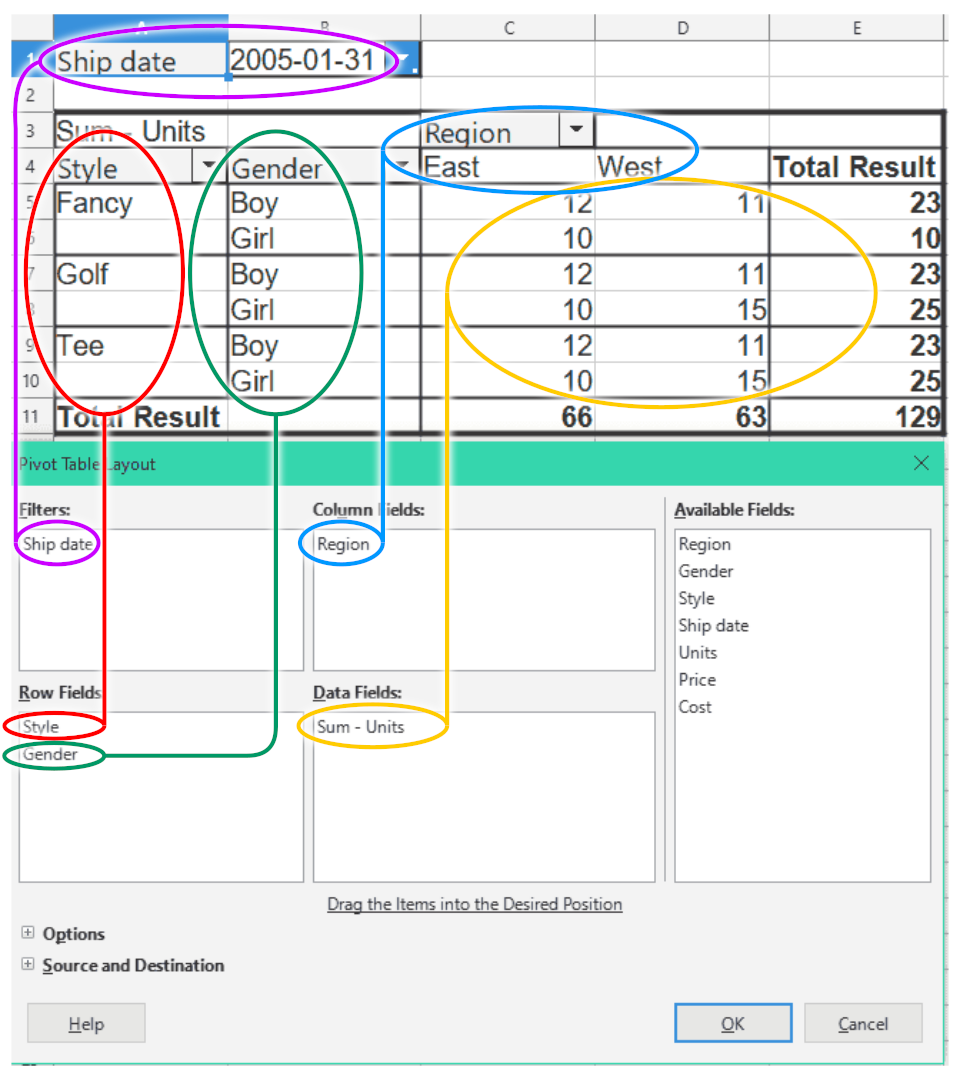 Summarizing sales data by product category (Image: cmglee, Software: The Document Foundation and contributors, MPL 2, via Wikimedia Commons)
Based on the TU BBM syllabus for Computer Based Financial Accounting (ACC211), unit 5.
Discussion
Loading…