Computer Fundamentals and ApplicationsUnit 316 min read
Computer Networks & Internet: OSI Model, Topologies, Protocols & Real-World Apps
Unit 3 of Computer Fundamentals and Applications covers the foundational principles of computer networks, including the OSI 7-layer model, network topologies, protocols (TCP/IP), and real-world applications like eSewa, WhatsApp, and Ncell. Learn how data travels, how devices connect, and how the internet works—with vis
TAKEAWAYS:
- Understand the OSI 7-layer model and how each layer (Physical to Application) processes data for transmission.
- Differentiate between network topologies (star, bus, mesh) and their pros/cons using real-world examples like NTC’s fiber network or Pathao’s ride-sharing system.
- Master TCP/IP protocol suite, including how HTTP, FTP, and DNS work in apps like YouTube or Daraz.
- Trace data packets through a network path (e.g., a WhatsApp message from Pokhara to Kathmandu) using packet formats and routing tables.
- Compare peer-to-peer vs. client-server architectures with examples from eSewa (client-server) and BitTorrent (peer-to-peer).
- Learn how IP addressing (IPv4/IPv6), subnetting, and NAT enable global connectivity, with a worked example of assigning IPs to a TU campus network.
1. What is a Computer Network?
A computer network is a system where two or more devices (computers, servers, smartphones) are connected via communication media (cables, Wi-Fi) to share resources (data, printers, internet) and communicate. Networks enable:
- Resource sharing (e.g., printers, files).
- Data communication (e.g., emails, video calls).
- Cost efficiency (e.g., NTC’s shared internet infrastructure).
- Scalability (e.g., Daraz’s distributed servers).
Why Do Organizations Need Networks?
| Need | Example in Nepal | Benefit |
|---|---|---|
| Shared Access | NTC providing internet to multiple users | Reduces individual costs. |
| Centralized Data | Banks (NMB, Global IME) storing customer data | Prevents duplication, ensures security. |
| Collaboration | TU’s internal email system for faculty | Enables teamwork across campuses. |
| Redundancy | Ncell’s backup towers for call continuity | Ensures service during outages. |
2. Network Classification
Networks are classified based on size, scope, and architecture:
A. By Size/Geographical Scope
mindmap
  root((Network Types))
    Local Area Network (LAN)
      "Small area (home, office)"
      "High speed, low latency"
      Example: TU’s internal network
    Metropolitan Area Network (MAN)
      "City-wide (e.g., Kathmandu traffic cameras)"
      "Connects multiple LANs"
    Wide Area Network (WAN)
      "Global (e.g., Internet)"
      "Uses ISPs like NTC, Worldlink"
    Personal Area Network (PAN)
      "Short-range (Bluetooth, Wi-Fi Direct)"
      Example: Pairing your phone with a speaker
B. By Architecture
| Type | Description | Example in Nepal | Pros | Cons |
|---|---|---|---|---|
| Peer-to-Peer (P2P) | Devices share resources directly. | BitTorrent (file sharing) | No central server needed. | Less secure, slower for many users. |
| Client-Server | Central server manages resources. | eSewa, WhatsApp servers | Scalable, secure, reliable. | Single point of failure. |
| Hybrid | Combines P2P and client-server. | Skype (P2P for calls, servers for login) | Balances load and security. | Complex to manage. |
3. OSI 7-Layer Model: How Data Travels
The Open Systems Interconnection (OSI) model standardizes network communication into 7 layers. Each layer has a protocol and function:
How Data Moves Through Layers (Example: Sending an Email)
- Application Layer: Your email client (e.g., Gmail) formats the message.
- Presentation Layer: Encrypts data (e.g., TLS for security).
- Session Layer: Establishes a connection with the server.
- Transport Layer: Breaks data into segments (TCP) or datagrams (UDP).
- Network Layer: Adds IP addresses (e.g.,
192.168.1.2to203.120.100.50). - Data Link Layer: Adds MAC addresses (e.g.,
00:1A:2B:3C:4D:5E) and creates a frame. - Physical Layer: Sends bits (0s and 1s) via cable/Wi-Fi.
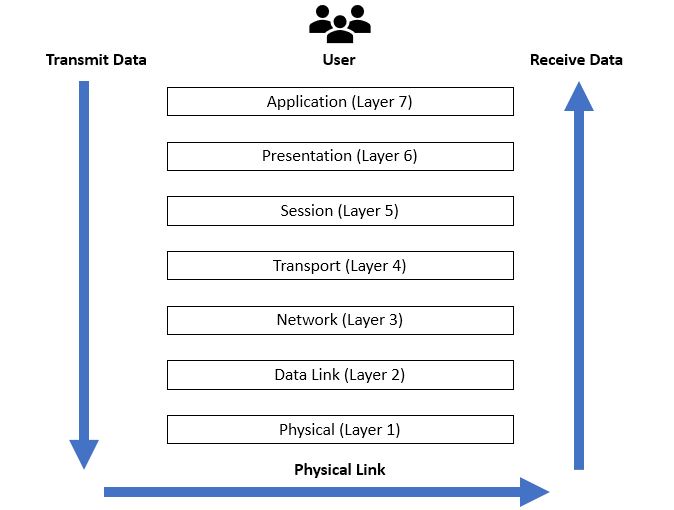 Labeled OSI 7-layer model with arrows showing data encapsulation. (Image: Ardika6879, CC BY-SA 4.0, via Wikimedia Commons)
4. TCP/IP Protocol Suite: The Internet’s Backbone
While OSI is a theoretical model, the TCP/IP suite is the practical standard for the internet. It combines 4 layers (not 7):
| Layer | Protocols | Function | Example in Nepal |
|---|---|---|---|
| Application | HTTP, FTP, SMTP, DNS | User-facing services. | eSewa (HTTPS), Daraz (HTTP) |
| Transport | TCP, UDP | Reliable (TCP) vs. fast (UDP) delivery. | WhatsApp (UDP for media), emails (TCP) |
| Internet | IP, ICMP, ARP | Addressing and routing. | NTC routing your request to Google. |
| Network Access | Ethernet, Wi-Fi, PPP | Physical transmission. | Your home Wi-Fi (802.11) or LAN cable. |
Packet Format: How Data is Structured
Worked Example: Tracing a WhatsApp Message
- Your phone (192.168.1.100) sends a message to WhatsApp’s server (
142.250.190.46). - Router (192.168.1.1) forwards it to NTC’s ISP.
- NTC’s router routes it to Google’s server (WhatsApp’s host) via BGP (Border Gateway Protocol).
- WhatsApp server processes the message and sends it to the recipient’s phone via the same path.
5. Network Topologies: How Devices Connect
The physical or logical arrangement of devices in a network affects performance and cost.
A. Physical Topologies
B. Logical Topologies
- Star: Most common (e.g., home Wi-Fi).
- Mesh: Used in IoT (e.g., smart traffic lights in Kathmandu).
- Hybrid: Combines topologies (e.g., NTC’s backbone uses mesh for reliability).
Comparison Table
| Topology | Pros | Cons | Real-World Use |
|---|---|---|---|
| Star | Easy to manage, fault isolation. | Single point of failure (hub). | Home networks, offices. |
| Bus | Cheap to install. | Entire network fails if cable breaks. | Old Ethernet (10BASE5). |
| Ring | Equal priority for all devices. | Slow if one device fails. | Token Ring (obsolete). |
| Mesh | Highly reliable, scalable. | Expensive, complex setup. | Ncell’s backup towers, IoT sensors. |
6. IP Addressing: The Internet’s Address Book
Every device on a network has a unique IP address (like a home address).
A. IPv4 vs. IPv6
| Feature | IPv4 | IPv6 |
|---|---|---|
| Address Size | 32-bit (e.g., 192.168.1.1) |
128-bit (e.g., 2001:0db8::1) |
| Address Range | ~4.3 billion addresses | ~340 undecillion addresses |
| Notation | Dotted decimal (e.g., 8.8.8.8) |
Hexadecimal (e.g., 2001:4860) |
| Header Size | 20 bytes | 40 bytes |
| Use Case | Still dominant (e.g., NTC) | Future-proof (e.g., IoT) |
B. Subnetting: Dividing a Network
Example: TU has a network 203.120.100.0/24. To divide it into 4 subnets:
- Borrow 2 bits (since ).
- New subnet mask:
255.255.255.192(/26). - Subnets:
203.120.100.0/26(Faculty)203.120.100.64/26(Students)203.120.100.128/26(Admin)203.120.100.192/26(Library)
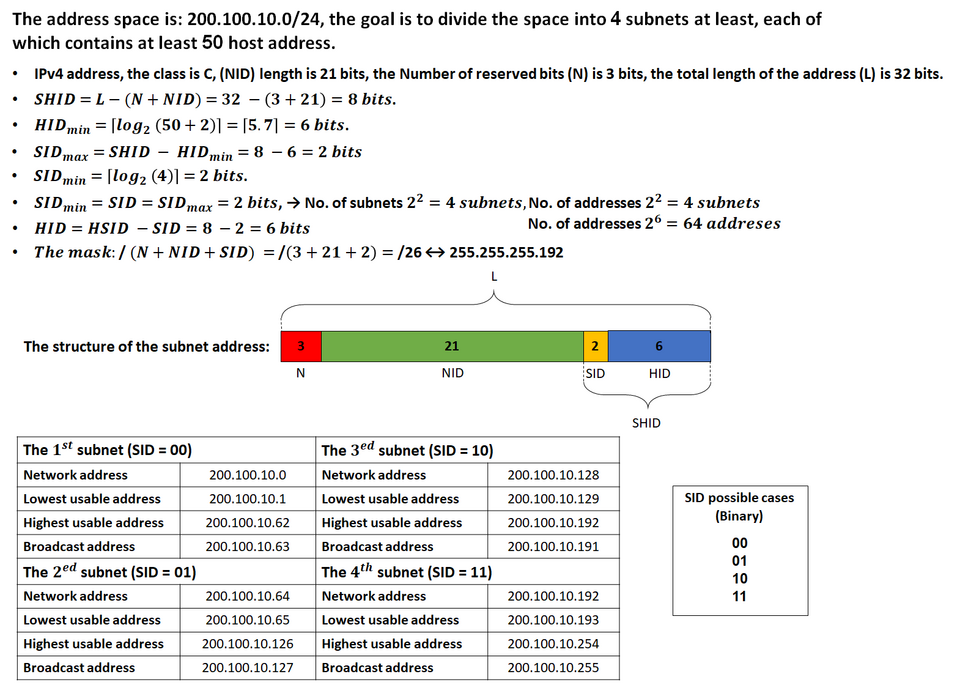 TU’s network divided into 4 subnets. (Image: Michel Bakni, CC BY-SA 4.0, via Wikimedia Commons)
C. NAT (Network Address Translation)
- Problem: IPv4 addresses are limited. How does NTC connect millions of users?
- Solution: NAT translates private IPs (e.g.,
192.168.1.100) to a public IP (e.g.,203.120.100.1). - Example: Your home router uses NAT to share one NTC IP among 10 devices.
7. Network Devices: The Hardware That Connects Everything
| Device | Layer (OSI) | Function | Example in Nepal |
|---|---|---|---|
| Hub | Physical | Broadcasts data to all ports. | Obsolete (replaced by switches). |
| Switch | Data Link | Forwards data only to the destination port. | Used in TU’s computer labs. |
| Router | Network | Connects networks (LAN to WAN). | NTC’s routers, home Wi-Fi routers. |
| Gateway | All layers | Connects dissimilar networks (e.g., LAN to Internet). | Your ISP’s modem. |
| Repeater | Physical | Boosts signal over long distances. | Fiber optic repeaters in NTC cables. |
| Bridge | Data Link | Connects two LANs (rarely used today). | Old Ethernet networks. |
8. Real-World Applications: Where Networks Power Nepal
A. eSewa: Client-Server Architecture
- How it works:
- Your phone (client) sends a payment request via HTTPS (Application Layer).
- eSewa’s server (client-server) processes the transaction using TCP (Transport Layer).
- The bank’s server (another client-server) verifies funds via IP routing (Network Layer).
- Why client-server?
- Centralized security (prevents fraud).
- Scalable (handles millions of transactions).
B. Pathao: Peer-to-Peer Ride Matching
- How it works:
- Your phone (P2P node) broadcasts a ride request via UDP (fast, no handshake).
- Nearby drivers (P2P nodes) respond directly (no central server for matching).
- Why P2P?
- Faster matching (no server delay).
- Works offline (drivers can accept rides without constant internet).
C. NTC’s Internet Backbone: Mesh Topology
- How it works:
- NTC uses a mesh of fiber-optic cables between Kathmandu, Pokhara, and Biratnagar.
- If one cable fails (e.g., landslide), data reroutes automatically.
- Why mesh?
- Redundancy: No single point of failure.
- Load balancing: Traffic distributes across paths.
9. Exam Tip: How to Score Full Marks
OSI Model Questions:
- Always draw the 7 layers and label one protocol per layer (e.g., HTTP for Application, TCP for Transport).
- For "data encapsulation," show how a message → segment → packet → frame → bits at each layer.
Topologies:
- Compare star vs. mesh with pros/cons and one real-world example each.
- For "bus topology," mention it’s obsolete but was used in old Ethernet (10BASE2).
IP Addressing:
- For subnetting, show borrowed bits → new subnet mask → subnets.
- For NAT, explain how private IPs (192.168.x.x) → public IP (e.g., 203.120.100.1).
Protocol Questions:
- TCP vs. UDP: TCP is reliable (ACK, SYN), UDP is fast (no handshake).
- Example: WhatsApp calls (UDP) vs. email (TCP).
- HTTP vs. HTTPS: HTTPS adds TLS encryption (Presentation Layer).
- TCP vs. UDP: TCP is reliable (ACK, SYN), UDP is fast (no handshake).
Worked Examples:
- Always trace a real scenario (e.g., "How does a Daraz order reach you?").
- Steps:
- Application Layer: You click "Buy" (HTTP request).
- Transport Layer: TCP handshake with Daraz’s server.
- Network Layer: Your IP → Daraz’s IP via NTC routers.
- Data Link Layer: MAC addresses on your LAN.
- Physical Layer: Bits travel via fiber/Wi-Fi.
10. Common Mistakes to Avoid
- ❌ Confusing OSI and TCP/IP: OSI is 7 layers, TCP/IP is 4 layers. Memorize both!
- ❌ Forgetting real-world examples: Always tie theory to eSewa, NTC, or Daraz.
- ❌ Subnetting errors: Practice calculating subnets using the formula:
- ❌ Ignoring layers in questions: If asked about "how data travels," always mention all 7 layers (even if some are trivial).
11. Practice Questions (Exam-Style)
Short Answer:
- "Explain the difference between a switch and a router with examples from Nepal."
- "Draw the OSI model and label the layer where DNS operates."
Long Answer:
- "Trace the path of a WhatsApp video call from Pokhara to Kathmandu, mentioning the OSI layers and protocols used at each step."
- "Given the network
192.168.1.0/28, divide it into 4 subnets and assign IPs to TU’s departments (Library, Admin, Faculty, Students)."
Comparison:
- "Compare peer-to-peer and client-server architectures with reference to eSewa and BitTorrent."
12. Key Formulas to Remember
| Concept | Formula | Example |
|---|---|---|
| Subnet Mask | /26 → 255.255.255.192 |
|
| Number of Hosts | /26 → hosts |
|
| Default Gateway | Router’s IP in your subnet. | If your IP is 192.168.1.100/24, gateway is 192.168.1.1. |
13. Summary Infographic
mindmap
  root((Computer Networks))
    OSI Model
      "7 Layers: Application → Physical"
      "Example: Email (HTTP → TCP → IP → Ethernet)"
    Topologies
      "Star (TU lab), Mesh (Ncell), Bus (obsolete)"
    Protocols
      "TCP (reliable), UDP (fast), IP (addressing)"
    IP Addressing
      "IPv4 (32-bit), IPv6 (128-bit), Subnetting"
    Real-World
      "eSewa (client-server), Pathao (P2P), NTC (mesh)"
Based on the TU BCA syllabus for Computer Fundamentals and Applications (BCA101), unit 3.
Discussion
Loading…