Computer Fundamentals and ApplicationsUnit 19 min read
Computer Systems: Anatomy, Architecture, Memory & Hardware
Unit 1 of Computer Fundamentals and Applications covers the foundational building blocks of computer systems: hardware components (CPU, memory, I/O), memory hierarchy, computer classifications, system software, and how these elements interact to process data. This note includes real-world applications, visual breakdown
1. Anatomy of a Computer System
A computer system consists of hardware (physical components) and software (instructions/programs). The block diagram of a computer shows how these components interact:
Key Components:
- CPU (Central Processing Unit): The "brain" of the computer, consisting of:
- ALU (Arithmetic Logic Unit): Performs calculations and logical operations.
- CU (Control Unit): Manages instruction execution.
- Registers: Temporary high-speed storage (e.g., PC, IR, ACC).
- Memory: Stores data and instructions (RAM = volatile, ROM = non-volatile).
- Input/Output Devices: Enable interaction with the user (e.g., keyboard, monitor).
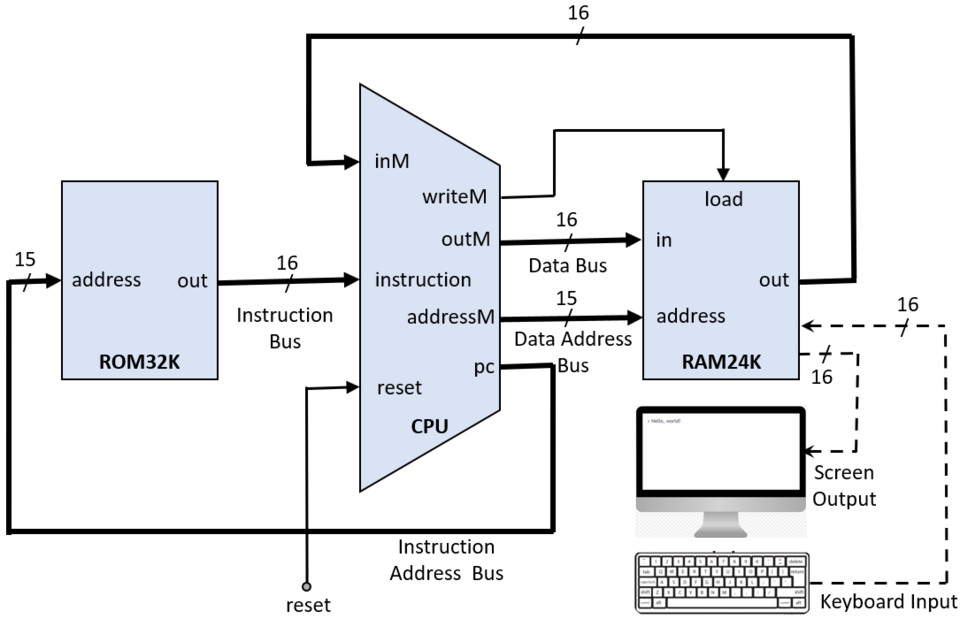 A labelled diagram of a computer system showing CPU, memory, input/output devices, and their connections. (Image: Rleininger, CC BY-SA 4.0, via Wikimedia Commons)
2. Computer Architecture
Computer architecture defines how hardware components are organized and communicate. It includes:
- Von Neumann Architecture: Uses a single memory for both data and instructions (most modern computers follow this).
- Harvard Architecture: Separates data and instruction memory (used in microcontrollers like Arduino).
Example: In a bank ATM system, the CPU processes transactions (e.g., withdrawing cash), the RAM stores temporary data (e.g., PIN verification), and the ROM holds the ATM’s operating system.
3. Memory Hierarchy
Memory is organized in layers based on speed, cost, and capacity:
| Level | Type | Speed | Capacity | Volatility | Example |
|---|---|---|---|---|---|
| L1 (Fastest) | Cache (SRAM) | ns | KB-MB | Volatile | CPU Cache |
| L2 | RAM (DRAM) | µs | GB | Volatile | System RAM |
| L3 | Secondary Storage | ms | TB | Non-volatile | HDD/SSD |
| L4 (Slowest) | Offline Storage | s | PB | Non-volatile | Cloud/Backup Drives |
Worked Example: When you open WhatsApp on your phone:
- The app’s instructions are loaded from SSD (L3) to RAM (L2).
- Frequently used data (e.g., chat history) moves to CPU Cache (L1) for faster access.
4. Types of Computers
Computers are classified based on size, speed, and purpose:
| Type | Size | Speed | Example | Use Case |
|---|---|---|---|---|
| Supercomputer | Large | Extremely Fast | Cray, Fugaku | Weather forecasting, nuclear research |
| Mainframe | Room-sized | Very Fast | IBM Z16 | Banking, government databases |
| Minicomputer | Desk-sized | Fast | DEC PDP-11 | Small business networks |
| Microcomputer | Portable | Moderate | Laptop, Raspberry Pi | Personal use, IoT devices |
| Embedded System | Tiny | Slow | Arduino, Smartwatch | Home automation, medical devices |
Real-World Tie-In:
- Nepal Electricity Authority (NEA) uses mainframe computers to manage grid operations and billing.
- Pathao drivers rely on microcomputers (smartphones) for real-time navigation and ride requests.
5. System Software vs. Application Software
| System Software | Application Software |
|---|---|
| Manages hardware/software resources | Performs specific tasks for users |
| Examples: OS (Windows, Linux), Drivers, Compilers | Examples: MS Word, Photoshop, Chrome |
| Role: Acts as an intermediary between hardware and applications | Role: Solves user problems (e.g., editing documents, gaming) |
Worked Example: When you use eSewa to pay bills:
- The operating system (Linux/Windows) manages the app’s resources.
- The eSewa app (application software) processes your payment request and communicates with the bank’s server.
6. Language Translators
Programming languages are translated into machine code using:
| Translator | Input | Output | Example |
|---|---|---|---|
| Compiler | High-level code | Machine code | GCC (C/C++), Java Compiler |
| Interpreter | High-level code | Executes line-by-line | Python, JavaScript (Node.js) |
| Assembler | Assembly code | Machine code | NASM (x86 Assembly) |
Example:
- WhatsApp’s backend is written in C++ (compiled) for performance.
- Python scripts (e.g., for data analysis) are interpreted for flexibility.
7. Input/Output Devices
Softcopy vs. Hardcopy Devices
| Softcopy (Digital Output) | Hardcopy (Physical Output) |
|---|---|
| Monitor, Projector | Printer, Plotter |
| Advantage: Editable, eco-friendly | Advantage: Tangible records |
Specialized Input Devices
- OMR (Optical Mark Recognition): Used in NEB exams to read answer sheets.
How it works:
- Students mark answers with a pencil.
- OMR scanner detects bubbles and converts them to digital data.
- Results are processed by a computer.
8. Computer Memory (Detailed)
Primary vs. Secondary Memory
| Primary Memory (RAM/ROM) | Secondary Memory (HDD/SSD) |
|---|---|
| Fast, volatile | Slow, non-volatile |
| RAM: Temporary storage for running programs | HDD/SSD: Permanent storage (OS, apps, files) |
| ROM: Stores BIOS/firmware | Example: Your laptop’s SSD holds Windows and documents. |
CMOS (Complementary Metal-Oxide-Semiconductor)
- Definition: A small amount of RAM powered by a battery to store BIOS settings (e.g., date/time, boot order).
- Why it matters: Ensures your computer remembers settings even when powered off.
In the Real World
eSewa/Khalti (Digital Payments):
- Uses computer architecture (CPU processes transactions) and memory hierarchy (RAM stores temporary payment data, SSD logs transactions).
- Language translators: Backend servers use compiled languages (Java/C++) for security and speed.
NTC (Nepal Telecom) Network:
- Relies on computer networks (covered in Unit 3) but starts with hardware (routers, switches) and memory (caching frequent requests in RAM).
- Example: When you call a friend, the CPU in your phone and NTC’s servers handle the real-time data exchange.
Daraz Order Fulfillment:
- Memory hierarchy: Product catalogs are stored in databases (SSD/HDD), but frequently accessed items (e.g., bestsellers) are cached in RAM for faster loading.
- Input device: Barcode scanners (OMR-like) track inventory in warehouses.
Exam Tip
Diagrams are worth marks!
- Draw the block diagram of a computer or memory hierarchy in exams. Label every component.
- For computer architecture, compare Von Neumann vs. Harvard in a table.
Define and differentiate:
- Softcopy vs. hardcopy devices (NEB often asks for examples).
- System software vs. application software (give 2 examples each).
Real-world applications score high:
- Link memory hierarchy to WhatsApp loading chats or eSewa processing payments.
- Explain OMR in the context of NEB exams.
Common pitfalls:
- Don’t confuse RAM (volatile) with ROM (non-volatile).
- CMOS is not the same as RAM—it’s a tiny battery-backed memory for BIOS.
Short-answer formulas:
- Computer anatomy = CPU + Memory + I/O Devices.
- Memory hierarchy = Speed ↑ → Cost ↑ → Capacity ↓.
Visual Summary:
Based on the TU BCA syllabus for Computer Fundamentals and Applications (BCA101), unit 1.
Discussion
Loading…