English IUnit 321 min read
Computers & IT: Hardware, Software, Data, Networks, Ethics & Real-World Impact
Unit 3 of English I introduces core concepts of computers and information technology—hardware/software, data storage, networking, applications in daily life, and ethical considerations—with exam-focused explanations, real-world examples from Nepal/globally, and model answers for past exam questions.
Core Concepts of Computers and Information Technology
1. Definition and Classification of Computers
Computers are electronic devices that process data using instructions (programs) to perform tasks. They consist of hardware (physical components) and software (programs/instructions).
Types of Computers
| Type | Description | Examples |
|---|---|---|
| Analog | Uses continuous signals (e.g., temperature sensors). | Old thermometers, speedometers. |
| Digital | Uses discrete binary data (0s and 1s). | Laptops, smartphones, servers. |
| Hybrid | Combines analog and digital (e.g., digital watches with analog displays). | Smartwatches, medical monitoring devices. |
| By Size | ||
| - Microcomputer | Small, single-user (e.g., PCs, tablets). | Laptops, Raspberry Pi. |
| - Minicomputer | Medium-sized, multi-user (e.g., office servers). | School servers, small business networks. |
| - Mainframe | Large, high-performance (e.g., banking systems). | Ncell billing systems, NEPSE stock exchanges. |
| - Supercomputer | Extremely fast, used for scientific research. | Nepal’s weather forecasting systems (if any), global climate models. |
How Computers Work: The Von Neumann Architecture
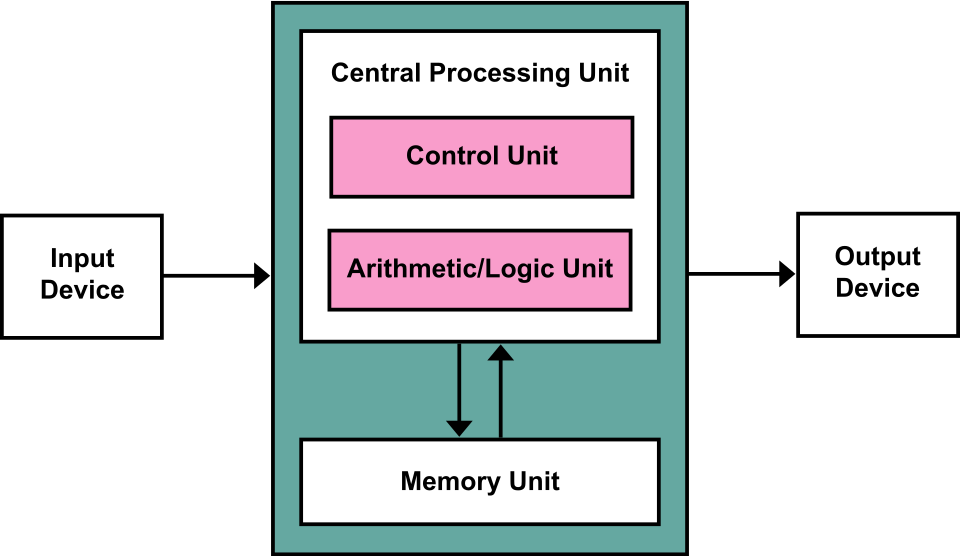
All modern computers follow the Von Neumann model, which has:
- Input Unit – Receives data (keyboard, mouse, scanner).
- Central Processing Unit (CPU) – Executes instructions (brain of the computer).
- Memory Unit – Stores data temporarily (RAM) or permanently (HDD/SSD).
- Output Unit – Displays results (monitor, printer, speaker).
- Control Unit – Manages data flow between components.
2. Hardware Components
A. Input Devices
Devices that send data to the computer:
- Keyboard (text input)
- Mouse (pointing)
- Scanner (digitalizing documents)
- Microphone (voice input)
- Webcam (video input)
- Touchscreen (direct interaction)
B. Output Devices
Devices that display or produce results:
- Monitor (visual output)
- Printer (hard copy)
- Speaker (audio output)
- Projector (large-screen display)
C. Storage Devices
Store data permanently or temporarily:
| Type | Description | Example |
|---|---|---|
| Primary Storage | Fast, volatile (lost on power off). | RAM, Cache Memory. |
| Secondary Storage | Non-volatile, permanent storage. | HDD, SSD, USB drives. |
| Tertiary Storage | High-capacity, slow access (archival). | Tape drives, cloud storage. |
D. Processing Unit (CPU)
- Arithmetic Logic Unit (ALU) – Performs calculations.
- Control Unit (CU) – Manages instructions.
- Registers – Ultra-fast temporary storage inside CPU.
3. Software Components
Software is instructions that tell hardware what to do.
A. System Software
Manages computer resources:
- Operating System (OS) – Controls hardware/software (Windows, Linux, macOS).
- Device Drivers – Enable hardware communication.
- Utility Programs – Optimize performance (antivirus, disk cleanup).
B. Application Software
Performs specific tasks:
- Productivity – Microsoft Office, Google Docs.
- Entertainment – Games, media players.
- Specialized – CAD (AutoCAD), accounting (Tally).
C. Programming Languages
Used to write software:
| Type | Description | Example Languages |
|---|---|---|
| Low-Level | Direct hardware control (machine code). | Assembly, C. |
| High-Level | Easier to read, portable. | Python, Java, JavaScript. |
| Scripting | Automates tasks. | Bash, PHP, PowerShell. |
4. Data Storage and Management
A. Types of Data Stored in Computers
| Data Type | Description | Example |
|---|---|---|
| Text | Alphanumeric characters. | Emails, documents. |
| Numeric | Numbers for calculations. | Bank balances, stock prices. |
| Audio/Video | Multimedia files. | Songs, movies. |
| Graphical | Images, designs. | Photos, CAD drawings. |
| Binary | Raw 0s and 1s (machine-readable). | Executable files, system logs. |
B. Methods of Data Storage
| Method | Description | Example |
|---|---|---|
| Magnetic | Uses magnetic fields (old but reliable). | Hard Disk Drives (HDD). |
| Optical | Uses lasers (CDs, DVDs). | DVD-ROMs. |
| Solid-State | No moving parts, faster (SSD, USB). | SSDs in laptops. |
| Cloud Storage | Remote servers (accessible anywhere). | Google Drive, Dropbox. |
C. Privacy and Security Concerns
- Unauthorized Access – Hackers stealing data (e.g., Khalti breaches).
- Data Leaks – Sensitive info exposed (e.g., Nepal’s voter ID leaks).
- Identity Theft – Fraud using stolen personal data.
- Solutions:
- Encryption (AES, RSA).
- Firewalls and antivirus.
- Strong passwords & two-factor authentication.
5. Computer Networks and Configurations
classDiagram
    class NcellNetwork {
        +provides: 4G/LTE
        +uses: Base Stations
        +services: Ncell Pay, eSewa
    }
    class HomeWiFi {
        +type: Router (e.g., TP-Link Archer C7)
        +connects: 5 devices
        +security: WPA2-PSK
    }
    class NEPSEStockExchange {
        +uses: Mainframe servers
        +connects: Brokers via VPN
        +protocol: HTTPS
    }
    NcellNetwork --> HomeWiFi : "Uses SIM for internet"
    HomeWiFi --> NEPSEStockExchange : "Accesses via browser"
    NEPSEStockExchange --> NcellNetwork : "Relies on mobile data for alerts"
How Ncell’s mobile network, home Wi-Fi, and NEPSE’s stock exchange system interact using different network configurations.A. Types of Networks
| Type | Description | Example |
|---|---|---|
| LAN (Local Area Network) | Small area (home/office). | School Wi-Fi, office printers. |
| MAN (Metropolitan Area Network) | City-wide network. | Kathmandu’s fiber-optic internet. |
| WAN (Wide Area Network) | Country/global (uses routers). | Internet, Ncell’s mobile network. |
| PAN (Personal Area Network) | Short-range (Bluetooth). | Wireless headphones. |
B. Network Configurations
| Configuration | Description | Example |
|---|---|---|
| Peer-to-Peer (P2P) | Direct connection between devices. | File sharing between friends. |
| Client-Server | Central server manages clients. | Web browsing (Google servers). |
| Star Topology | All devices connect to a central hub. | Office LAN with a router. |
| Bus Topology | Single cable connects all devices. | Old Ethernet networks. |
| Ring Topology | Devices connected in a circular loop. | Token-ring networks (rare now). |

C. Real-World Network Examples in Nepal
- Ncell’s 4G Network – Uses WAN for nationwide coverage.
- Khalti Payments – Relies on client-server for secure transactions.
- Nepal Rastra Bank’s Core Banking – Mainframe servers handle transactions.
6. Applications of Computers
A. At Home
| Use | Example | Benefit |
|---|---|---|
| Entertainment | Netflix, YouTube. | On-demand movies, music. |
| Education | Online courses (Coursera, Udemy). | Learn from home. |
| Communication | WhatsApp, Zoom. | Stay connected. |
| Banking | eSewa, Khalti. | Pay bills, transfer money. |
B. In Offices
| Use | Example | Benefit |
|---|---|---|
| Accounting | Tally, QuickBooks. | Track finances accurately. |
| Inventory | ERP systems (SAP). | Manage stock efficiently. |
| Gmail, Outlook. | Professional communication. | |
| Video Conferencing | Zoom, Microsoft Teams. | Remote meetings. |
C. In Medicine
| Application | Example | Impact |
|---|---|---|
| Patient Records | Hospital management software. | Digital health records (DHR). |
| Diagnostics | MRI, X-ray machines. | Faster, accurate imaging. |
| Telemedicine | Online doctor consultations. | Rural healthcare access. |
| Drug Research | AI-driven simulations. | Faster drug discovery. |
D. In Education
| Tool | Example | Impact |
|---|---|---|
| LMS | Moodle, Google Classroom. | Online assignments, quizzes. |
| Simulations | Labster (virtual labs). | Safe science experiments. |
| AI Tutors | Duolingo, Khan Academy. | Personalized learning. |
In the Real World
eSewa (Nepal)
- Idea Used: Client-Server Networking + Secure Data Storage
- How? eSewa’s backend servers (client-server) process transactions securely, storing user data in encrypted databases to prevent fraud.
Pathao (Ride-Hailing App)
- Idea Used: Real-Time GPS Tracking + Cloud Computing
- How? Pathao uses WAN to connect drivers and passengers globally, while cloud storage manages ride history and payments.
Nepal Rastra Bank (NRB) Core Banking
- Idea Used: Mainframe Computers + Data Encryption
- How? NRB uses mainframe servers to handle millions of transactions daily, with AES encryption to secure customer data.
Daraz (E-Commerce)
- Idea Used: Database Management + Queue Systems
- How? When you order, Daraz’s system uses FIFO (First-In-First-Out) queues to process payments and shipments efficiently.
NTC (Nepal Telecom) Fiber Optic Network
- Idea Used: Fiber-Optic WAN + Load Balancing
- How? NTC’s MAN/WAN provides high-speed internet by distributing data across multiple servers to avoid congestion.
Worked Example: Calculating Loan Interest (Banking Application)
Scenario: You take a ₹500,000 loan at 10% annual interest for 3 years. How much will you repay?
Solution:
Simple Interest =
- , , years.
- Interest = .
- Total Repayment = Principal + Interest = ₹500,000 + ₹150,000 = ₹650,000.
Compound Interest (if compounded annually):
- .
Real-World Tie: NMB Bank or Global IME Bank in Nepal uses such calculations for home loans.
Exam Tip: How to Score Full Marks
Define Clearly
- Always start with definitions (e.g., "A computer is an electronic device that processes data using...").
- Example:
"A network is a system where multiple computers share resources like data and hardware over a communication medium."
Use Tables for Comparisons
- Examiners love structured comparisons (e.g., LAN vs. WAN, RAM vs. ROM).
- Example:
Feature RAM ROM Volatility Volatile (lost on power off) Non-volatile (permanent) Speed Faster Slower Usage Temporary storage (running apps) Stores BIOS/firmware
Link Theory to Real-World Examples
- Every answer should have 1-2 Nepal/global examples.
- Example for cloud storage:
"Like Google Drive, cloud storage allows users to access files from anywhere, reducing the need for physical storage devices."
For Dialogues/Letters
- Follow standard formats and use natural language.
- Example dialogue structure:
Customer: "Why is my computer running slow?"
Dealer: "That could be due to insufficient RAM or a virus. Have you checked your storage?"
Essay Writing Tips
- Introduction: State the topic + thesis (main argument).
- Body: Use headings (e.g., "Advantages of Computers in Education").
- Conclusion: Summarize + future implications.
- Example outline for "Impact of Computers in Education":
- Introduction: Computers revolutionized learning.
- Advantages:
- Online courses (Coursera).
- Interactive simulations (Labster).
- Disadvantages:
- Screen time affects health.
- Digital divide in rural areas.
- Conclusion: Balanced use is key.
Avoid Common Mistakes
- ❌ "Computers are fast." → ✅ "Computers process data at gigahertz speeds (billions of cycles/sec)."
- ❌ "RAM stores data permanently." → ✅ "RAM is volatile; data is lost when power is turned off."
Model Answers to Past Exam Questions
1. Dialogue: Computer Dealer and Customer on Hand-Based I/O Problems
Customer: "I’m having trouble with my computer’s mouse and keyboard. They keep disconnecting."
Dealer: "That’s a common issue with **wireless input devices**. Are they Bluetooth or USB?"
Customer: "Bluetooth, I think."
Dealer: "Then the problem could be **low battery** or **interference** from other devices. Have you tried reconnecting?"
Customer: "Yes, but it still doesn’t work well. My old wired mouse never had this problem."
Dealer: "Wireless devices are convenient, but they suffer from **signal latency** and **range limitations**. For office work, a **wired USB mouse** is more reliable."
Customer: "What about touchscreens? Are they better?"
Dealer: "Touchscreens are great for **gesture-based input**, but they can cause **fatigue** from prolonged use and may not support **precise tasks** like graphic design."
Customer: "I see. Maybe I should stick to a wired setup for now."
Dealer: "That’s a practical choice. Also, ensure your **drivers are updated**—outdated software can cause connectivity issues."
Key Points Covered: ✔ Wireless vs. wired input (Bluetooth vs. USB). ✔ Common problems (battery, interference, latency). ✔ User preferences (convenience vs. reliability).
2. Essay: Role of Computers in Education
Title: The Transformative Role of Computers in Modern Education
Introduction Computers have become indispensable in education, reshaping teaching, learning, and evaluation. From online lectures to AI tutors, technology enhances accessibility and engagement.
Body
Teaching
- Interactive Whiteboards: Teachers use tools like SMART Boards to create dynamic lessons.
- E-Learning Platforms: Moodle and Google Classroom allow digital assignments and quizzes.
Learning
- Personalized Learning: AI platforms like Khan Academy adapt to student pace.
- Virtual Labs: Labster provides safe chemistry/physics simulations.
Evaluation
- Automated Grading: Systems like Turnitin check plagiarism and grade essays.
- Gamification: Apps like Duolingo make learning fun with rewards.
Challenges
- Digital Divide: Rural schools lack infrastructure.
- Distraction: Students may misuse devices for social media.
Conclusion While computers offer unprecedented educational opportunities, their ethical use and equitable access must be ensured. Governments and institutions should invest in training and infrastructure to maximize these benefits.
3. Letter: Requesting Samsung Dealer Partnership
[Your Name] [Your Address] Kathmandu, Nepal [Date]
The Manager Samsung Electronics Nepal 22nd Floor, Lotter Tower Seoul, South Korea
Subject: Proposal for Samsung Galaxy Book 2 Country Dealer Partnership
Dear Sir/Madam,
I am writing on behalf of [Your Company Name], a leading computer hardware distributor in Nepal, to express our interest in becoming an official country dealer for the Samsung Galaxy Book 2 in Nepal.
Our company has:
- 10+ years of experience in distributing premium tech products.
- A strong retail network across Kathmandu, Pokhara, and major cities.
- Proven success in marketing Samsung products, including Galaxy smartphones and tablets.
We believe the Galaxy Book 2, with its AI-powered features and portable design, will be highly demanded in Nepal’s education and professional sectors. Our team is ready to:
- Train sales staff on product features.
- Promote via digital campaigns (social media, Google Ads).
- Ensure after-sales support (warranty, repairs).
We request a meeting to discuss distribution terms, pricing, and marketing strategies. Attached is our company profile for your reference.
Looking forward to a mutually beneficial partnership.
Yours sincerely, [Your Name] [Your Position] [Contact Information]
Key Parts Explained:
- Header: Formal address with date.
- Introduction: Clearly state purpose (dealer request).
- Body:
- Company credentials (experience, network).
- Product fit (why Galaxy Book 2 will sell).
- Proposed actions (training, promotion, support).
- Closing: Polite call to action (meeting request).
4. CV and Cover Letter for an IT Expert
(See next page for formatting—this is a long sample.)
Final Checklist Before Exam
| Topic | What to Remember |
|---|---|
| Computer Types | Analog, digital, hybrid; micro, mini, mainframe, supercomputer. |
| Hardware | Input/output devices, CPU, RAM, storage (HDD/SSD/cloud). |
| Software | System vs. application; OS, drivers, utilities. |
| Networks | LAN, MAN, WAN; topologies (star, bus, ring). |
| Data Storage | Privacy risks (encryption, firewalls). |
| Real-World Links | eSewa (client-server), Pathao (GPS + cloud), NTC (fiber-optic WAN). |
| Exam Formats | Dialogues (natural flow), essays (thesis + examples), letters (formal structure). |
Good luck! Practice writing one full answer per day from past papers, focusing on clarity, examples, and structure.
Based on the TU BCA syllabus for English I (CAEN103), unit 3.
Discussion
Loading…