Database Management SystemUnit 613 min read
Database Design & Schema Architecture: ER to Relational, 3-Schema, Normalization
Unit 6 of Database Management System covers translating ER diagrams into relational schemas, the three-schema architecture (external, conceptual, internal), schema evolution techniques, and designing schemas that balance normalization with performance. Learn how to map weak entities, composite attributes, and relations
Key Concepts and Definitions
Database Schema
A database schema defines the structure of a database, including:
- Logical schema: Describes what data is stored and how it relates (e.g., tables, fields, constraints).
- Physical schema: Specifies how data is physically stored (e.g., file organization, indexing).
- External schema: User-specific views of the database (e.g., a cashier’s view vs. a manager’s view).
Why it matters: Schemas act as a blueprint for the database, ensuring consistency and integrity.
ER Diagram to Relational Schema Mapping
Step-by-Step Conversion Rules
Use these rules to convert an Entity-Relationship (ER) diagram into a relational schema (tables):
1. Entities → Tables
- Each entity becomes a table.
- Attributes of the entity become columns in the table.
- The primary key (PK) of the entity becomes the PK of the table.
2. Relationships → Tables or Foreign Keys
| Relationship Type | Mapping Rule | Example |
|---|---|---|
| One-to-Many (1:N) | Add the PK of the "one" side as a foreign key (FK) to the "many" side. | Order (PK: order_id) → Order_Items (FK: order_id, PK: item_id) |
| Many-to-Many (M:N) | Create a junction table with PKs from both sides. | Student (PK: student_id) ↔ Course (PK: course_id) → Enrollment (PK: student_id, course_id) |
| One-to-One (1:1) | Option 1: Merge into one table. Option 2: Use FK in either table. | Passport (PK: passport_id) → Person (FK: passport_id) |
| Weak Entity | Include the identifying relationship’s PK + its discriminator. | Dependent (PK: SSN, Dependent_ID) → FK: SSN (from Employee) |
3. Attributes in Relationships
- If a relationship has attributes, create a table for it (even for 1:N).
- Example:
WorksAt(attributes:Workinghrs,Shift) becomes a table withCname(FK) andRname(FK).
4. Composite and Multivalued Attributes
- Composite attributes (e.g.,
Address:Street,City,Zip) → Split into columns. - Multivalued attributes (e.g.,
PhoneNumbers) → Create a separate table with a FK to the entity.
Worked Example: Hospital Database
ER Diagram Assumptions:
- Entities:
Patient,Doctor,Appointment,Test(weak entity ofPatient). - Relationships:
PatienthasAppointment(1:N).DoctorprescribesTest(M:N viaPrescription).Testis a weak entity ofPatient(requiresPatient_IDto identify).
Relational Schema:
CREATE TABLE Patient (
    Patient_ID INT PRIMARY KEY,
    Name VARCHAR(100),
    Age INT,
    Gender CHAR(1)
);

CREATE TABLE Doctor (
    Doctor_ID INT PRIMARY KEY,
    Name VARCHAR(100),
    Speciality VARCHAR(50)
);

CREATE TABLE Appointment (
    Appointment_ID INT PRIMARY KEY,
    Patient_ID INT,
    Doctor_ID INT,
    Date DATE,
    Time TIME,
    FOREIGN KEY (Patient_ID) REFERENCES Patient(Patient_ID),
    FOREIGN KEY (Doctor_ID) REFERENCES Doctor(Doctor_ID)
);

CREATE TABLE Test (
    Test_ID INT PRIMARY KEY,
    Patient_ID INT,  -- Partial key (identifying relationship)
    Test_Name VARCHAR(100),
    Result VARCHAR(100),
    FOREIGN KEY (Patient_ID) REFERENCES Patient(Patient_ID)
);

CREATE TABLE Prescription (
    Prescription_ID INT PRIMARY KEY,
    Doctor_ID INT,
    Test_ID INT,
    Date DATE,
    FOREIGN KEY (Doctor_ID) REFERENCES Doctor(Doctor_ID),
    FOREIGN KEY (Test_ID) REFERENCES Test(Test_ID)
);
Three-Schema Architecture
The ANSI/SPARC three-level architecture separates concerns for flexibility and security:
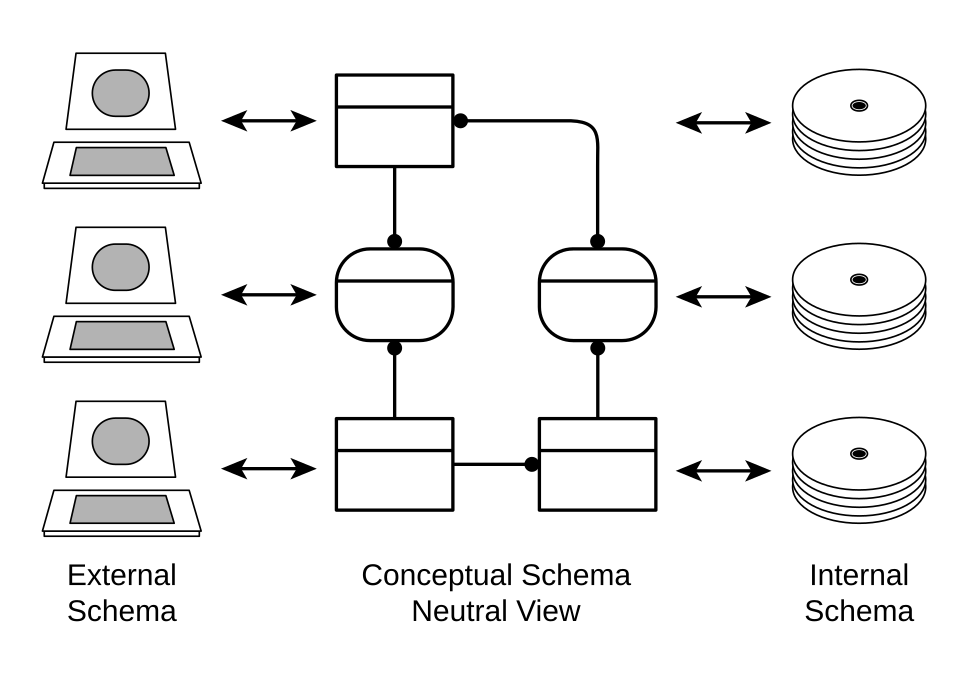
1. External Schema (User Views)
- Defines how users interact with the database (e.g., a
Cashierview vs. anAdminview). - Uses views in SQL to hide complexity.
- Example:
CREATE VIEW Cashier_View AS
SELECT Order_ID, Customer_Name, Total_Amount
FROM Orders;
2. Conceptual Schema (Logical Design)
- Describes the entire database structure (tables, relationships, constraints).
- Independent of physical storage or user views.
- Example: The
Patient,Doctor,Appointmenttables above.
3. Internal Schema (Physical Storage)
- Details how data is stored (e.g., file organization, indexing, hashing).
- Example:
Patienttable stored in a B-tree index onPatient_ID.
Advantages of Three-Schema Architecture
| Benefit | Explanation |
|---|---|
| Data Independence | Changes in one layer (e.g., physical storage) don’t affect others. |
| Security | External schemas restrict access (e.g., cashiers can’t see patient records). |
| Flexibility | Users can have customized views without altering the core database. |
Schema Evolution Techniques
Databases change over time. Use these techniques to modify schemas without breaking applications:
1. Adding Columns
- Add a new column to a table.
- Example:
ALTER TABLE Patient ADD Email VARCHAR(100);
2. Renaming Tables/Columns
- Use
RENAMEorALTER:ALTER TABLE Appointment RENAME TO Medical_Appointment;
3. Dropping Columns/Tables
- Drop unused columns or tables:
ALTER TABLE Patient DROP COLUMN Old_Address;
4. Handling Data Migration
- For critical changes (e.g., renaming
Patient_IDtoUser_ID):- Add the new column.
- Update data:
UPDATE Patient SET User_ID = Patient_ID; - Drop the old column after validation.
Normalization vs. Denormalization Trade-offs
When to Normalize (3NF/Boyce-Codd NF)
| Scenario | Why Normalize? |
|---|---|
| OLTP Systems (e.g., eSewa) | Ensures data integrity and minimizes redundancy. |
| Frequent Updates | Reduces anomalies (e.g., update, insert, delete). |
| Small to Medium Databases | Simplifies queries and maintenance. |
When to Denormalize
| Scenario | Why Denormalize? |
|---|---|
| OLAP Systems (e.g., NEPSE reports) | Improves read performance for complex queries. |
| Large Tables with Joins | Reduces join overhead (e.g., Orders + Customers → merge into Order_Details). |
| Data Warehousing | Pre-computes aggregations (e.g., Total_Sales column in Product). |
In the Real World
1. eSewa (Nepal)
- Idea Used: Three-Schema Architecture
- How: eSewa’s database has:
- External Schema: User-specific views (e.g.,
Customer_Viewfor payments,Admin_Viewfor transactions). - Conceptual Schema: Core tables like
User,Transaction,Service. - Internal Schema: Optimized storage (e.g., indexing on
Transaction_IDfor fast lookups).
- External Schema: User-specific views (e.g.,
- Real Example: When you pay a bill, eSewa’s
Customer_Viewhides theBank_Integrationtable from you.
2. Daraz (Nepal)
- Idea Used: Schema Evolution + Denormalization
- How:
- Schema Evolution: Daraz’s
Ordertable started withOrder_ID,Customer_ID,Product_ID. Later, they addedShipping_StatusandPayment_Methodcolumns. - Denormalization: The
Order_Detailstable includes a pre-computedTotal_Priceto avoid recalculatingSUM(Quantity * Price)for every order view.
- Schema Evolution: Daraz’s
- Real Example: During the Dashain sale, Daraz denormalizes
Inventorytables to speed up "low stock" alerts.
3. Khalti (Nepal)
- Idea Used: Weak Entities + Relationships
- How:
- Weak Entity:
Transactionis a weak entity ofUser(requiresUser_IDto identify). - Relationship Table:
Transaction_DetailslinksTransaction(PK:Transaction_ID) toMerchant(PK:Merchant_ID) with attributes likeAmount,Fee,Status.
- Weak Entity:
- Real Example: When you transfer money to a merchant, Khalti’s
Transaction_Detailstable records the M:N relationship betweenUserandMerchant.
Exam Tip
What Examiners Look For
ER to Relational Mapping:
- Show all tables, including junction tables for M:N relationships.
- Label PKs and FKs clearly.
- Example: For a
Student↔Course(M:N), createEnrollmentwith bothStudent_IDandCourse_IDas PK.
Three-Schema Questions:
- Draw the three layers (External → Conceptual → Internal).
- Explain one advantage of each layer (e.g., "External schemas provide security").
Schema Evolution:
- For
ALTER TABLEquestions, show step-by-step SQL (e.g., add column → update data → drop old column). - Mention data integrity risks (e.g., "Dropping a column without backing up data can lose history").
- For
Normalization vs. Denormalization:
- Compare in a table (as above) with real-world examples (e.g., "eSewa uses 3NF for transactions").
- Justify your choice (e.g., "Denormalizing
Ordersimproves report generation speed").
Common Pitfalls to Avoid
- Forgetting FKs: Always include
FOREIGN KEYconstraints in your schema. - Ignoring Weak Entities: Weak entities need both the identifying relationship’s PK and their own discriminator.
- Over-Denormalizing: Denormalize only where performance gains outweigh integrity risks.
- Vague ER Diagrams: Label cardinalities (1:N, M:N) and participation (total/partial). Example:
erDiagram
  Patient ||--o{ Appointment : "has"
  Appointment ||--|| Doctor : "with"
  Doctor }|--|| Prescription : "prescribes"
  Prescription ||--|| Test : "for"
  Test }|--|| Patient : "belongs to"
Practice Question Walkthrough
Question: Design an ER diagram for a Library System with:
- Entities:
Book,Member,Loan(weak entity ofMember),Fine. - Relationships:
MemberborrowsBook(M:N viaLoan).Loanhas attributes:Due_Date,Return_Date.MemberowesFine(1:N).
Step 1: ER Diagram
erDiagram
    Member ||--o{ Loan : "borrows"
    Loan }|--|| Book : "borrowed"
    Member ||--o{ Fine : "owes"
    Loan ||--|| Fine : "incurs"
Step 2: Relational Schema
CREATE TABLE Member (
    Member_ID INT PRIMARY KEY,
    Name VARCHAR(100),
    Email VARCHAR(100)
);

CREATE TABLE Book (
    ISBN INT PRIMARY KEY,
    Title VARCHAR(200),
    Author VARCHAR(100)
);

CREATE TABLE Loan (
    Loan_ID INT PRIMARY KEY,
    Member_ID INT,  -- Partial key (identifying relationship)
    ISBN INT,
    Due_Date DATE,
    Return_Date DATE,
    FOREIGN KEY (Member_ID) REFERENCES Member(Member_ID),
    FOREIGN KEY (ISBN) REFERENCES Book(ISBN)
);

CREATE TABLE Fine (
    Fine_ID INT PRIMARY KEY,
    Member_ID INT,
    Amount DECIMAL(10,2),
    Issue_Date DATE,
    FOREIGN KEY (Member_ID) REFERENCES Member(Member_ID)
);
Step 3: Three-Schema Explanation
- External Schema:
Librarian_View:Book_Title,Member_Name,Loan_Status.Member_View: OnlyMy_LoansandMy_Fines.
- Conceptual Schema: The 4 tables above.
- Internal Schema:
Booktable indexed onISBNfor fast searches.
Real-World Trace: Kathmandu Traffic Routes Database
Scenario: Design a database for Kathmandu’s traffic management system to track routes, congestion, and accidents.
ER Diagram:
erDiagram
    Road ||--o{ Traffic_Camera : "has"
    Road ||--o{ Accident : "site of"
    Vehicle ||--o{ Violation : "commits"
    Traffic_Camera ||--|| Violation : "captures"
Relational Schema:
CREATE TABLE Road (
    Road_ID INT PRIMARY KEY,
    Name VARCHAR(100),
    Length_KM DECIMAL(5,2)
);

CREATE TABLE Traffic_Camera (
    Camera_ID INT PRIMARY KEY,
    Road_ID INT,
    Location VARCHAR(100),
    FOREIGN KEY (Road_ID) REFERENCES Road(Road_ID)
);

CREATE TABLE Vehicle (
    License_Plate VARCHAR(20) PRIMARY KEY,
    Type VARCHAR(20)
);

CREATE TABLE Violation (
    Violation_ID INT PRIMARY KEY,
    Camera_ID INT,
    License_Plate VARCHAR(20),
    Violation_Type VARCHAR(50),
    Fine_Amount DECIMAL(10,2),
    FOREIGN KEY (Camera_ID) REFERENCES Traffic_Camera(Camera_ID),
    FOREIGN KEY (License_Plate) REFERENCES Vehicle(License_Plate)
);
Denormalization Example:
- Add
Congestion_Level(e.g., "Low", "High") to theRoadtable to avoid joiningTraffic_Cameradata every time.
Why?:
- Kathmandu’s traffic police use this to fine violators (via
Violationtable) and predict congestion (viaCongestion_Level). TheTraffic_Camera→Violationrelationship ensures real-time updates for enforcement.
Based on the TU BCA syllabus for Database Management System (CACS255), unit 6.
Discussion
Loading…