Database Management SystemUnit 412 min read
Relational Algebra & SQL: Queries, Operators & Optimization
Unit 4 of Database Management System covers Relational Algebra (set-based operations) and SQL (declarative query language), including operators, query construction, and optimization techniques for efficient database retrieval. Learn how to translate real-world problems into RA expressions and SQL queries, with hands-on
TAKEAWAYS:
- Relational Algebra uses set operations (union, difference) and relational operators (select, project, join) to manipulate tables mathematically.
- SQL translates RA into declarative statements (SELECT, WHERE, GROUP BY, HAVING) for database engines to execute.
- Query optimization relies on cost-based planning (I/O, CPU) and expression trees to choose the fastest execution path.
- Constraints (PRIMARY KEY, FOREIGN KEY, CHECK) enforce data integrity, while indexes speed up searches.
- Real-world systems (e.g., eSewa transactions, Khalti payments) use SQL for secure, efficient data retrieval.
- Always compare RA vs. SQL for the same query to understand their equivalence and trade-offs.
Core Concepts: Relational Algebra
Relational Algebra (RA) is a procedural, set-based language for querying databases. It defines operations on relations (tables) to produce new relations. Unlike SQL (declarative), RA specifies how to compute results step-by-step.
erDiagram
    Employee ||--o{ Order : places
    Employee {
        int Eid PK
        string Ename
        string Dept
        int age
    }
    Department {
        int Did PK
        string Dname
        int Budget
    }
    Order {
        int Oid PK
        int Eid FK
        string Product
        date OrderDate
    }
Example ER diagram for Employee, Department, and Order tablesKey Operators in Relational Algebra
RA operators are divided into 4 categories:
mindmap
  root((Relational Algebra Operators))
    Set Operations
      Union
      Difference
      Intersection
      Cartesian Product
    Relational Operators
      Select (σ)
      Project (π)
      Join (⋈)
      Division (÷)
    Aggregation
      Grouping (γ)
    Miscellaneous
      Rename (ρ)
1. Set Operations (Work like set theory)
- Union (∪): Combines two relations with the same schema, removing duplicates.
Example:
R ∪ S→ All rows in R or S. - Difference (−): Rows in the first relation but not the second.
Example:
R − S→ Rows in R that are not in S. - Intersection (∩): Rows common to both relations.
Example:
R ∩ S→ Rows in both R and S. - Cartesian Product (×): All possible pairs of rows from two relations.
Example:
R × S→ Every row in R paired with every row in S (expensive!).
2. Relational Operators (Core of RA)
- Select (σ): Filters rows based on a condition.
Syntax:
σ_condition(R)Example:σ_age>25(Employee)→ Employees older than 25. - Project (π): Selects columns (attributes) from a relation.
Syntax:
π_attributes(R)Example:π_name, salary(Employee)→ Only names and salaries. - Join (⋈): Combines rows from two relations based on a condition.
Types:
- Natural Join (⋈): Joins on common attributes (no duplicates).
- Theta Join (⋈θ): Joins with a custom condition (e.g.,
⋈_salary>50000(Employee × Department)). - Equijoin: Join on equality (most common).
- Division (÷): "For all X in R, find Y in S such that every X in R pairs with some Y in S." Example: Find suppliers who supply all parts in a given list.
WORKED EXAMPLE: Select-Project-Join Given:
Employee(Eid, Ename, Dept)Department(Did, Dname, Budget)
RA Query: Find names of employees in the "IT" department.
π_Ename(σ_Dept="IT"(Employee))
SQL Equivalent:
SELECT Ename FROM Employee WHERE Dept = "IT";
SQL: The Declarative Query Language
SQL (Structured Query Language) is the industry standard for database querying. It is declarative (you specify what you want, not how to get it).
SQL vs. Relational Algebra
| Feature | Relational Algebra (RA) | SQL |
|---|---|---|
| Type | Procedural (step-by-step) | Declarative (what to do) |
| Syntax | Symbolic (σ, π, ⋈) | English-like keywords |
| Execution | Manual (you define steps) | Automatic (optimizer picks plan) |
| Example | π_name(σ_age>30(Employee)) |
SELECT name FROM Employee WHERE age > 30; |
Core SQL Clauses
1. SELECT-FROM-WHERE (Basic Query)
SELECT column1, column2
FROM table1, table2
WHERE condition;
Example: Find all books published after 2020.
SELECT Title, Publisher
FROM Book
WHERE Published_Date > '2020-01-01';
2. GROUP BY & HAVING
GROUP BY: Groups rows by a column (like aggregation).HAVING: Filters groups (unlikeWHERE, which filters rows).
Example: Find departments with an average salary > 50,000.
SELECT Dept, AVG(Salary)
FROM Employee
GROUP BY Dept
HAVING AVG(Salary) > 50000;
3. JOINs in SQL
SQL supports all RA join types with explicit syntax:
-- Inner Join (default)
SELECT *
FROM Employee INNER JOIN Department ON Employee.Dept = Department.Did;

```figure
{"type":"network","nodes":["Employee","Department","Order"],"edges":[{"from":"Employee","to":"Department","label":"Dept = Did","type":"join"},{"from":"Employee","to":"Order","label":"Eid = Eid","type":"join"}],"caption":"Graph representation of JOIN operations between Employee, Department, and Order tables"}
-- Left Join (all rows from left table) SELECT * FROM Employee LEFT JOIN Department ON Employee.Dept = Department.Did;
-- Natural Join (joins on common columns) SELECT * FROM Employee NATURAL JOIN Department;
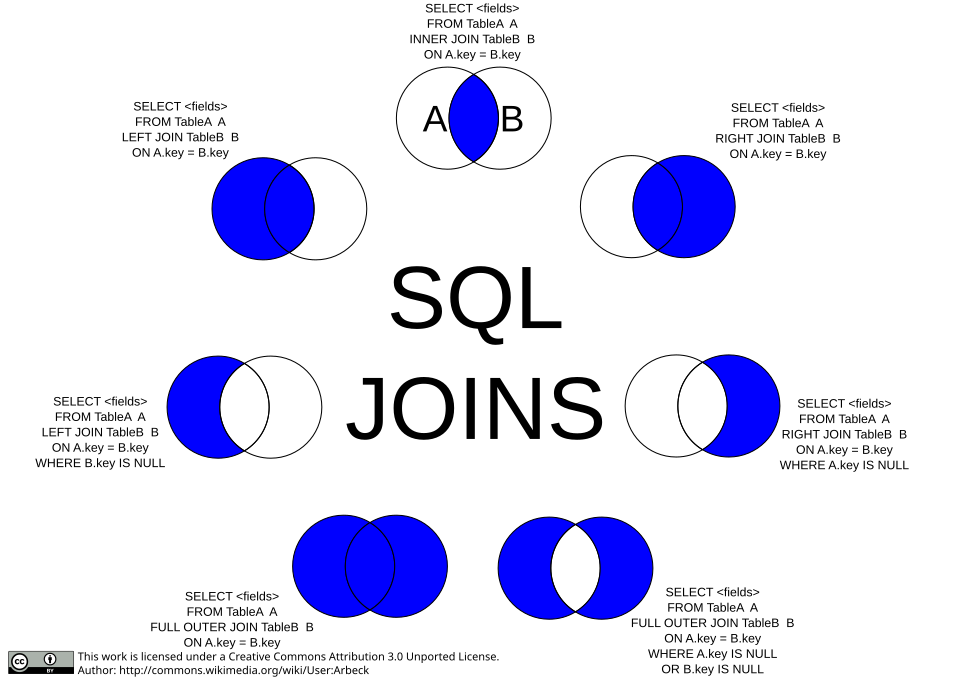 Inner, left, right, and full joins visualized (Image: Arbeck, CC BY 3.0, via Wikimedia Commons)
Query Optimization: How Databases Execute SQL
Databases don’t run SQL as written—they optimize it first. The optimizer uses:
- Cost-Based Optimization: Estimates the cost (I/O, CPU) of different execution plans.
- Query Expression Trees: Breaks down RA/SQL into a tree of operations.
stateDiagram-v2
    [*] --> Optimizer
    Optimizer --> CostEstimation: Analyzes
    CostEstimation --> PlanGeneration: Generates
    PlanGeneration --> ExecutionPlan: Chooses
    ExecutionPlan --> [*]: Executes
    state CostEstimation {
        [I/O Cost] --> [CPU Cost]
        [Memory Usage]
    }
Database query optimization state machineExample: Optimizing a Query
RA Query:
π_name(σ_age>30(Employee ⋈ Department))
SQL Equivalent:
SELECT Ename
FROM Employee, Department
WHERE Employee.Dept = Department.Did AND age > 30;
Optimizer Choices:
- Join Order: Decides whether to join
EmployeeandDepartmentfirst or filterage > 30first. - Index Usage: Uses indexes on
Deptorageto speed up filtering. - Materialization: May create temporary tables for intermediate results.
Constraints and Indexes
1. SQL Constraints (Enforce Data Integrity)
| Constraint | Purpose | Example |
|---|---|---|
| PRIMARY KEY | Unique identifier for a row | PRIMARY KEY (Eid) |
| FOREIGN KEY | Links to another table’s PK | FOREIGN KEY (Dept) REFERENCES Department(Did) |
| UNIQUE | Ensures no duplicate values | UNIQUE (Email) |
| CHECK | Validates data against a rule | CHECK (Salary > 0) |
| NOT NULL | Column cannot be null | Name VARCHAR(50) NOT NULL |
Example: Enforce that every Book has a Publisher.
CREATE TABLE Book (
    BookId INT PRIMARY KEY,
    Title VARCHAR(100),
    Publisher INT NOT NULL,
    FOREIGN KEY (Publisher) REFERENCES Publisher(PublisherId)
);
2. Indexes (Speed Up Queries)
Indexes are data structures (B-trees, hash tables) that speed up searches.
Types of Indexes:
| Index Type | Use Case | SQL Command |
|---|---|---|
| B-tree | Default for most queries | CREATE INDEX idx_name ON Employee(Name); |
| Hash | Exact-match lookups (e.g., PK) | CREATE INDEX idx_email ON User(Email); |
| Composite | Multi-column searches | CREATE INDEX idx_name_dept ON Employee(Name, Dept); |
Example: Index the age column for faster filtering.
CREATE INDEX idx_age ON Employee(age);
In the Real World
Database queries power every digital service in Nepal and globally. Here’s how Relational Algebra and SQL are used:
1. eSewa & Khalti (Digital Payments)
- Problem: When you pay a bill via eSewa, the system must:
- Check if your account has enough balance (
SELECT balance FROM User WHERE uid = 123). - Deduct the amount and update the transaction log (
UPDATE User SET balance = balance - 1000 WHERE uid = 123). - Record the transaction (
INSERT INTO Transactions VALUES (123, 456, 1000, '2023-10-15')).
- Check if your account has enough balance (
- RA/SQL Used:
- Select (
σ) to fetch user data. - Join (
⋈) to link transactions with users. - Update and Insert operations for modifications.
- Select (
2. Daraz (E-Commerce Orders)
- Problem: When you place an order, Daraz must:
- Check inventory (
SELECT stock FROM Products WHERE pid = 789). - Reserve items (update stock temporarily).
- Log the order (
INSERT INTO Orders VALUES (order_id, user_id, product_id, quantity)).
- Check inventory (
- RA/SQL Used:
- Natural Join to combine
OrdersandProductstables. - Transaction Management (ACID properties) to ensure no overselling.
- Natural Join to combine
WORKED EXAMPLE: Daraz Order Processing
RA Query: Find all orders placed by user U123 with a total > Rs. 5,000.
γ_sum(amount) > 5000(σ_user="U123"(Orders ⋈ Products))
SQL Equivalent:
SELECT SUM(quantity * price) AS total
FROM Orders JOIN Products ON Orders.pid = Products.pid
WHERE Orders.user_id = "U123"
GROUP BY Orders.order_id
HAVING SUM(quantity * price) > 5000;
3. Ncell & NTC (Customer Billing)
- Problem: Ncell must generate monthly bills by:
- Summing all calls/SMS/data usage per customer.
- Applying taxes and discounts.
- Storing the bill in the database.
- RA/SQL Used:
- Group By to aggregate usage per customer.
- Having to filter high-value customers.
- Subqueries to calculate taxes.
Example: Find Ncell customers with usage > 5GB.
SELECT customer_id, SUM(data_used) AS total_data
FROM Usage
GROUP BY customer_id
HAVING SUM(data_used) > 5000; -- 5GB in MB
Common Pitfalls & Best Practices
- Avoid
SELECT *: Always specify columns to reduce data transfer. - Use Indexes Wisely: Indexes speed up reads but slow down writes.
- Normalize Early: Design tables properly to avoid redundancy.
- Test Queries: Use
EXPLAINin SQL to see the execution plan.EXPLAIN SELECT * FROM LargeTable WHERE column = 'value'; - Transactions: Use
BEGIN TRANSACTIONandCOMMITfor critical operations (e.g., banking).
Exam Tip
This unit is heavily tested in TU exams with:
RA to SQL Conversion: You’ll be given an RA expression and asked to write SQL (or vice versa).
- Example Question:
Given:
π_name(σ_salary>50000(Employee ⋈ Department))Write the SQL equivalent. - Answer:
SELECT Employee.name
FROM Employee, Department
WHERE Employee.Dept = Department.Did AND salary > 50000;
- Example Question:
Given:
Query Writing: Design SQL queries for given schemas (e.g., "Find all books published after 2020").
- Tip: Always draw the tables first to visualize joins.
Optimization Questions: Explain how a query would be optimized (e.g., "Why is an index on
agehelpful?").- Answer: Indexes reduce the I/O cost of
WHERE age > 30by allowing binary search instead of full table scan.
- Answer: Indexes reduce the I/O cost of
Constraints & Indexes: Write
CREATE TABLEwith constraints orCREATE INDEXstatements.- Example:
CREATE TABLE Student (
    RollNo INT PRIMARY KEY,
    Name VARCHAR(50) NOT NULL,
    Dept VARCHAR(30) CHECK (Dept IN ('CSE', 'ECE', 'IT'))
);
- Example:
Pro Tip: Memorize the RA symbols (σ, π, ⋈) and their SQL equivalents. Examiners love testing this mapping!
Based on the TU BCA syllabus for Database Management System (CACS255), unit 4.
Discussion
Loading…