Operating SystemUnit 78 min read
Input/Output Systems: Devices, Buffers, Scheduling & Performance
Unit 7 of Operating System covers I/O hardware, device drivers, buffering strategies, I/O scheduling algorithms (FCFS, SSTF, SCAN, C-SCAN, LOOK), and performance metrics like throughput and response time—with real-world ties to eSewa, Daraz, and NTC.
TAKEAWAYS:
- I/O devices are classified by speed (block vs. character), access method (sequential vs. random), and sharing (dedicated vs. shared).
- Device drivers act as translators between OS and hardware, handling interrupts and DMA for efficiency.
- Buffering (single, double, circular) reduces CPU idle time by staging data transfers.
- Scheduling algorithms (FCFS, SSTF, SCAN, LOOK) optimize disk arm movement—SCAN is best for high throughput, LOOK for fairness.
- Performance metrics: Throughput (I/O ops/second) and response time (latency) are critical for apps like Daraz’s order processing.
- Real-world tie: NTC’s fiber-optic backbone uses SCAN-like scheduling to route calls efficiently across exchanges.
1. I/O Hardware and Classification
I/O devices bridge the CPU and external systems. The OS manages them via device controllers and drivers.
Classification of I/O Devices
classDiagram
    class Device {
        <<abstract>>
        +speed: String
        +access: String
        +sharing: String
    }
    class BlockDevice {
        +speed: "High (e.g., SSD)"
        +access: "Random (e.g., disk)"
        +sharing: "Shared (e.g., HDD)"
    }
    class CharDevice {
        +speed: "Low (e.g., keyboard)"
        +access: "Sequential (e.g., printer)"
        +sharing: "Dedicated (e.g., serial port)"
    }
    Device <|-- BlockDevice
    Device <|-- CharDevice
Key Terms:
- Block devices: Transfer data in fixed-size blocks (e.g., disks, SSDs). Used by file systems.
- Character devices: Stream data (e.g., keyboards, printers). Used for real-time I/O.
- Shared vs. Dedicated: Printers are shared; GPUs may be dedicated.
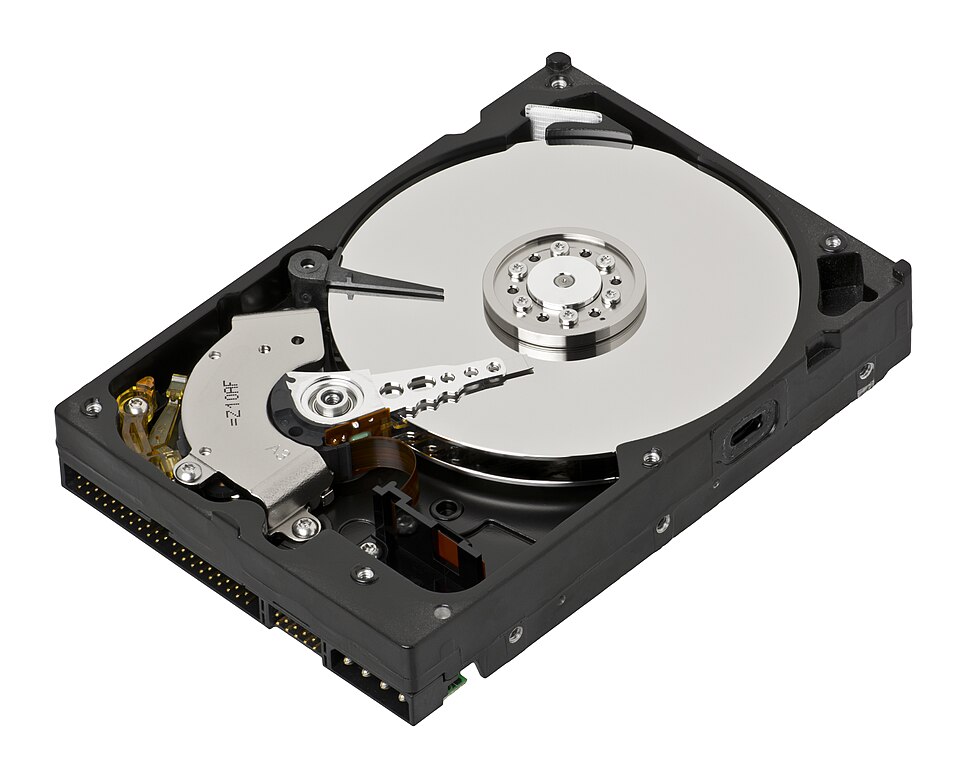 Labelled diagram of a HDD showing platters, actuator arm, and read/write heads. (Image: Evan-Amos, CC BY-SA 3.0, via Wikimedia Commons)
2. Device Drivers and Interrupts
Device drivers are OS modules that control hardware. They handle:
- Initialization: Configuring hardware on boot.
- Command Execution: Sending I/O requests (e.g.,
read(2)). - Interrupt Handling: Responding to hardware signals (e.g., disk completion).
Interrupt-Driven I/O
When a device finishes an operation, it sends an interrupt to the CPU. The OS:
- Saves the current process state.
- Executes the Interrupt Service Routine (ISR) for the device.
- Restores the process.
Example: eSewa’s payment gateway uses interrupts to log transactions in real-time.
sequenceDiagram
    participant CPU
    participant DeviceDriver
    participant Disk
    CPU->>DeviceDriver: Issue read(100)
    DeviceDriver->>Disk: Send I/O request
    Disk-->>DeviceDriver: Interrupt (I/O done)
    DeviceDriver->>CPU: Return data
3. Direct Memory Access (DMA)
DMA controllers transfer data without CPU intervention, reducing overhead.
- How it works:
- CPU sets up DMA controller with source/destination addresses.
- DMA transfers data directly to/from memory.
- Interrupts CPU only when done.
Real-World Use: Pathao’s ride-matching app uses DMA to stream GPS data from phones to servers without CPU bottlenecks.
4. Buffering Strategies
Buffering stages data to balance CPU and device speeds.
Types of Buffers
| Type | Description | Use Case |
|---|---|---|
| Single Buffer | One buffer; CPU waits for I/O completion. | Simple systems (e.g., old printers). |
| Double Buffer | Two buffers; CPU alternates between them. | Video playback (e.g., YouTube). |
| Circular Buffer | Fixed-size ring buffer for continuous data. | Network packet handling (e.g., Ncell’s base stations). |
Example: Daraz’s order queue uses a circular buffer to handle spikes during sales.
stateDiagram-v2
    [*] --> BufferFull
    BufferFull --> BufferEmpty : Data read
    BufferEmpty --> BufferFull : Data written
5. I/O Scheduling Algorithms
Optimizes disk arm movement to minimize latency. Key metrics:
- Seek Time: Time to move the arm to a track.
- Rotational Latency: Time for the sector to rotate under the head.
- Transfer Time: Time to read/write the data.
Comparison Table
| Algorithm | Description | Pros | Cons | Best For |
|---|---|---|---|---|
| FCFS | First-Come, First-Served. | Simple, fair. | High seek time (convoy effect). | Low-load systems. |
| SSTF | Shortest Seek Time First. | Minimizes seek time. | Starves far requests. | Short bursts of I/O. |
| SCAN | Arm moves in one direction, servicing all requests. | Balanced seek time. | Variable latency. | High-throughput systems (e.g., NTC exchanges). |
| C-SCAN | Circular SCAN; returns to start after end. | Predictable latency. | Slightly higher seek time. | Real-time systems. |
| LOOK | Like SCAN but stops at last request in direction. | Fewer arm reversals. | Complex to implement. | Fairness-critical apps (e.g., banks). |
Worked Example: NTC’s call routing uses SCAN to minimize delays across exchanges.
- Scenario: Requests at tracks 10, 22, 20, 2, 40.
- SCAN Order: 10 → 20 → 22 → 40 → 2 (arm reverses at end).
6. Performance Metrics
| Metric | Definition | Formula | Example |
|---|---|---|---|
| Throughput | I/O operations per second. | ops/sec |
Daraz: 10,000 orders/min → 166 ops/sec. |
| Response Time | Time from request to first data byte. | t_completion - t_request |
eSewa: 200ms for payment confirmation. |
| Utilization | % of time device is busy. | (busy_time / total_time) * 100 |
NTC: 95% during peak hours. |
7. Spooling
Simultaneous Peripheral Operations Online (SPOOLing):
- Uses a spool manager to queue print/job requests.
- Steps:
- Jobs written to disk (spool).
- CPU processes next job while device handles current one.
- Output written to disk until device is free.
Real-World Use: Banks use spooling to batch process loan applications overnight.
8. Error Handling in I/O
Common errors:
- Device Failure: Retry or notify user (e.g., printer out of paper).
- Data Corruption: Use checksums/CRC (e.g., WhatsApp’s message integrity).
- Timeouts: Requeue requests (e.g., Daraz’s failed payment retries).
Example: Ncell’s 4G network uses CRC to detect corrupted packets.
In the Real World
eSewa’s Payment Gateway:
- Uses double buffering to stage transaction data before processing.
- SCAN-like scheduling for database queries to minimize latency.
Daraz’s Order Fulfillment:
- Circular buffers manage order queues during sales.
- SSTF prioritizes nearby warehouses to reduce delivery time.
NTC’s Fiber-Optic Backbone:
- SCAN algorithm routes calls across exchanges to balance load.
- DMA streams voice data without CPU bottlenecks.
Khalti’s Transaction Logging:
- Spooling batches transactions for audit trails.
- Checksums verify payment data integrity.
Exam Tip
- Diagrams are key: Draw disk arm movement (SCAN/C-SCAN) and buffer states in exams.
- Compare algorithms: Memorize the pros/cons table for scheduling algorithms.
- Real-world ties: Relate buffering to apps (e.g., YouTube’s double buffer) and scheduling to systems (e.g., NTC’s SCAN).
- Formulas: Know throughput and response time calculations.
- Deadlock hint: I/O deadlocks occur when processes wait for devices held by others (e.g., two printers sharing a spool).
Based on the TU BCA syllabus for Operating System (CACS251), unit 7.
Discussion
Loading…