Scripting LanguageUnit 127 min read
CMS, Widgets, and Dynamic Web Interfaces
Unit 12 of Scripting Language explores Content Management Systems (CMS) and Widgets, covering their architecture, features, implementation in PHP, and real-world applications like WordPress and Joomla. Learn how CMS platforms streamline content creation, widget customization, and dynamic web interfaces.
TAKEAWAYS:
- CMS enables non-technical users to manage websites via intuitive interfaces, reducing reliance on developers.
- Widgets are reusable UI components that enhance modularity and customization in web applications.
- WordPress and Joomla are popular CMS platforms with distinct features for plugins, themes, and user roles.
- PHP interfaces enforce consistent method signatures across classes, ensuring compatibility in CMS plugins.
- Security in CMS involves sanitization, access control, and database protection against SQL injection.
- AJAX and jQuery UI integrate dynamic content loading and interactive widgets without page reloads.
What is a CMS?
A Content Management System (CMS) is a software application that allows users to create, edit, publish, and manage digital content (text, images, videos) without requiring deep technical knowledge of HTML, CSS, or backend scripting. CMS platforms provide a graphical user interface (GUI) for content creation, workflow management, and collaboration.
Key Features of CMS
mindmap
root((CMS Features))
Architecture
Frontend: Themes/Templates
Backend: Admin Panel
Database: Stores Content
User Roles
Admin, Editor, Author, Subscriber
Plugins/Extensions
Adds Functionality (e.g., SEO, eCommerce)
Multi-User Collaboration
Role-Based Access Control
SEO Optimization
Meta Tags, URL Structure
Scalability
Supports Large-Scale Websites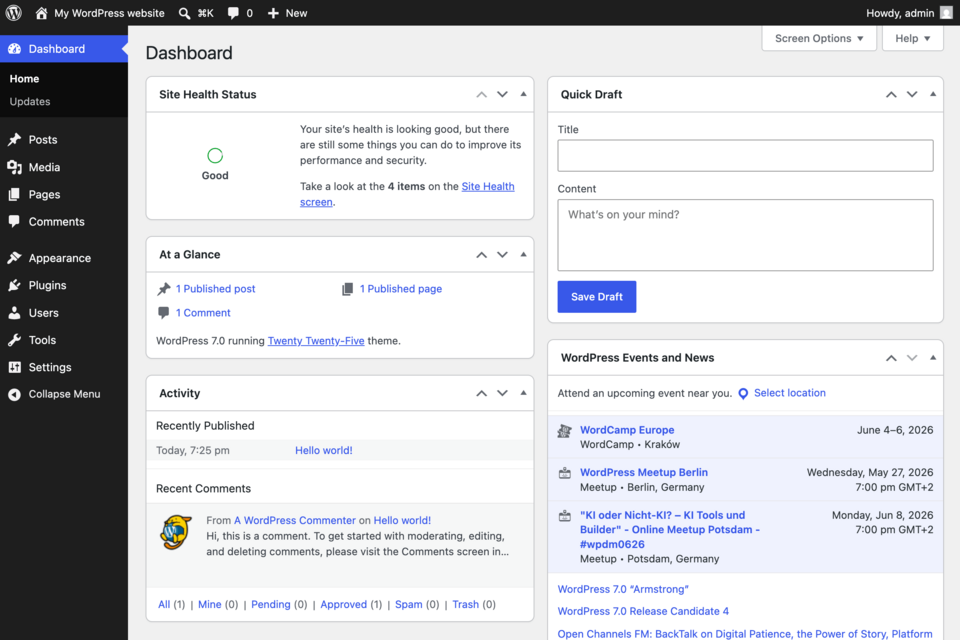 A typical CMS admin panel showing posts, pages, and plugins. (Image: WordPress Foundation, GPL, via Wikimedia Commons)
How CMS Works: Architecture
A CMS follows a three-tier architecture:
- Presentation Layer: Themes/templates (HTML/CSS) render content dynamically.
- Application Layer: PHP/Python scripts handle logic (e.g., user authentication, content retrieval).
- Data Layer: MySQL/PostgreSQL stores content in structured tables (e.g.,
wp_postsin WordPress).
flowchart TD
    A["User"] --> B["Frontend: Themes"]
    B --> C["PHP Scripts: Logic"]
    C --> D["Database: MySQL"]
    D --> C
C --> BExample: When you publish a blog post in WordPress:
- You write content in the admin panel (backend).
- WordPress stores it in the
wp_poststable. - A theme displays it dynamically when a user visits the page.
Popular CMS Platforms: WordPress vs. Joomla
| Feature | WordPress | Joomla |
|---|---|---|
| Ease of Use | Beginner-friendly | Moderate learning curve |
| Flexibility | High (plugins/themes) | High (extensions/components) |
| Performance | Optimized for blogs | Better for complex sites |
| Plugins | 60,000+ (Gutenberg, WooCommerce) | 8,000+ (e.g., VirtueMart) |
| Security | Frequent updates | Strong access control |
| Use Case | Blogs, portfolios | Corporate websites, eCommerce |
Widgets in CMS
Widgets are reusable UI components that add functionality to a website without modifying core code. Examples:
- Sidebars: Recent posts, social media feeds.
- Footers: Newsletter signup forms.
- Headers: Search bars, language selectors.
How Widgets Work in WordPress
- Registration: Widgets are registered in
functions.php:register_widget('My_Widget'); - Display: Added to widget areas (e.g., sidebar) via the admin panel.
- Dynamic Content: Fetches data via PHP/MySQL (e.g., latest blog posts).
Example: A "Popular Products" widget in an eCommerce site:
class PopularProductsWidget extends WP_Widget {
    public function widget($args, $instance) {
        $products = get_posts(array('posts_per_page' => 5));
        echo '<ul>';
        foreach ($products as $product) {
            echo "<li>{$product->post_title}</li>";
        }
        echo '</ul>';
    }
}
Trace:
| Step | Action | Output |
|---|---|---|
| 1 | get_posts() called |
Fetches 5 latest products |
| 2 | Loop through products | Renders <li> for each product |
| 3 | Widget displayed in sidebar | Shows dynamic product list |
Implementing a CMS Interface in PHP
To ensure multiple classes (e.g., Circle, Square) share a common interface:
interface Shape {
    public function area();
}

class Circle implements Shape {
    private $radius;
    public function __construct($radius) { $this->radius = $radius; }
    public function area() { return pi() * $this->radius ** 2; }
}

class Square implements Shape {
    private $side;
    public function __construct($side) { $this->side = $side; }
    public function area() { return $this->side ** 2; }
}
Use Case: A CMS plugin for calculating area of shapes in a geometry tool.
In the Real World
eSewa (Nepal):
- Uses a custom CMS to manage government service portals (e.g., bill payments, license renewals).
- Widget: Dynamic dropdown menus for service selection (implemented via PHP/AJAX).
Daraz (Alibaba Group):
- WordPress/WooCommerce powers its blog and affiliate programs.
- Widget: "Trending Products" sidebar fetches real-time data via MySQL.
Ncell App:
- Joomla-based backend manages user accounts, recharge history, and promotions.
- Widget: "Top-Up Balance" widget updates dynamically via AJAX calls.
Worked Example: NTC Website Traffic Routes
- Problem: NTC’s website uses a CMS to display real-time bus schedules.
- Solution:
- Database: Stores bus routes in
ntc_routestable. - Widget: PHP script fetches routes and displays them in a dropdown:
$routes = $db->query("SELECT * FROM ntc_routes"); echo '<select name="route">'; foreach ($routes as $route) { echo "<option value='{$route['id']}'>{$route['name']}</option>"; } echo '</select>'; - Output: Users select a route, and the widget updates the map via JavaScript.
- Database: Stores bus routes in
Security in CMS
Common threats and mitigations:
| Threat | Mitigation |
|---|---|
| SQL Injection | Use prepared statements ($db->prepare()) |
| XSS Attacks | Sanitize inputs (htmlspecialchars()) |
| Brute Force Login | Limit attempts, use CAPTCHA |
| Outdated Plugins | Regular updates |
Example: Sanitizing user input in a WordPress form:
$name = sanitize_text_field($_POST['name']);
$comment = wp_kses_post($_POST['comment']); // Allows safe HTML
Exam Tip
- Define CMS: Start with its core purpose (content management without coding).
- Features: List 5 key features (e.g., themes, plugins, user roles) with brief explanations.
- WordPress/Joomla: Compare 2 platforms in a table (focus on plugins, ease of use).
- PHP Interfaces: Show how
implementsenforces method consistency (e.g.,Shapeinterface). - Widgets: Explain how they fetch dynamic data (e.g.,
get_posts()in WordPress). - Security: Mention SQL injection prevention (prepared statements) and XSS (sanitization).
Common Pitfalls:
- Forgetting to mention database integration in CMS architecture.
- Describing widgets as static HTML (they’re dynamic!).
- Ignoring user roles (admin vs. editor vs. subscriber).
Visual Summary:
graph LR
    A["CMS"] --> B["Themes"]
    A --> C["Plugins"]
    A --> D["Database"]
    C --> E["WooCommerce"]
    C --> F["SEO Tools"]
    D --> G["MySQL"]
Based on the TU BCA syllabus for Scripting Language (CACS254), unit 12.
Discussion
Loading…