Software EngineeringUnit 19 min read
Software Engineering Basics: Definitions, Challenges, Models & Tools
Unit 1 of Software Engineering introduces the core concepts of software engineering, including its definition, evolution, challenges, software life cycle models, and the role of CASE tools. It covers foundational topics like software vs. programming, the importance of process models, and how real-world systems (e.g., e
Core Concepts: What Is Software Engineering?
Definition and Evolution
Software engineering is the systematic application of engineering principles to the design, development, maintenance, testing, and evaluation of software. It bridges the gap between raw programming and large-scale, reliable software systems.
Why is it called "engineering"?
- Disciplined approach: Like civil or mechanical engineering, it follows structured methodologies.
- Scalability: Manages complexity in large projects (e.g., eSewa’s payment system).
- Reliability: Ensures software meets requirements (e.g., Ncell’s billing system).
Caption: The shift from ad-hoc coding to structured software engineering.
Software vs. Programming: Key Differences
| Aspect | Programming | Software Engineering |
|---|---|---|
| Scope | Writing code for small tasks. | End-to-end development of large systems. |
| Process | Linear (write → test → fix). | Iterative (requirements → design → build → test → maintain). |
| Tools | Editors, compilers. | CASE tools, version control, project management software. |
| Example | Writing a Python script to sort data. | Developing the Khalti payment gateway. |
Worked Example:
- Programming: A student writes a script to calculate exam grades.
- Software Engineering: A team builds eSewa’s online payment system, requiring:
- Secure transaction handling.
- Integration with banks (Nabil, Global IME).
- User authentication and audit logs.
The Software Life Cycle (SLC) Models
Software engineering follows process models to guide development. The three primary models are:
1. Waterfall Model
Pros:
- Simple, easy to manage.
- Works well for small, well-defined projects (e.g., a static website for a local shop).
Cons:
- No going back to previous phases.
- Inflexible for changing requirements (e.g., NTC’s digital ticketing system evolving over time).
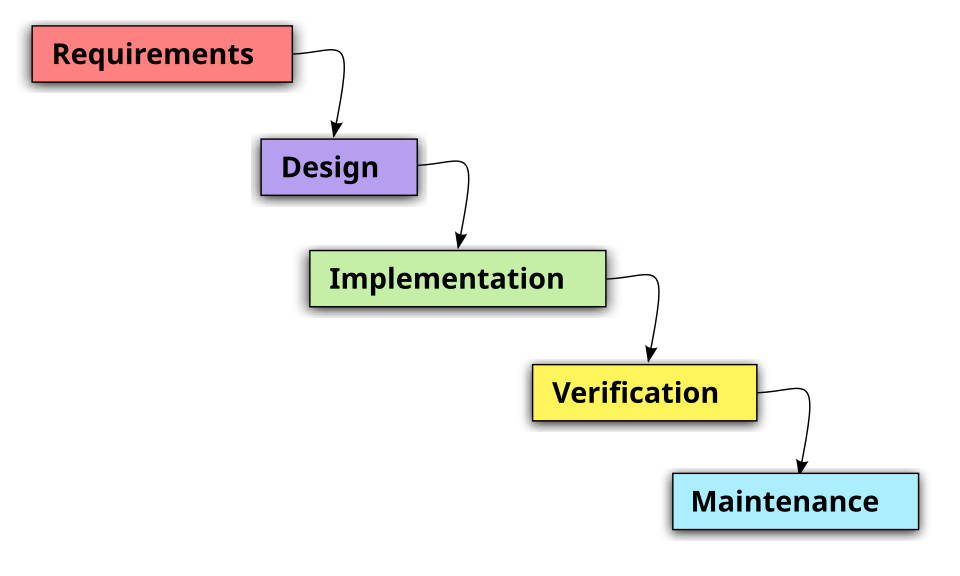 waterfall model diagram (Image: Beao First version: Paul Smith, CC BY 3.0, via Wikimedia Commons)
Caption: Linear progression in the Waterfall Model.
waterfall model diagram (Image: Beao First version: Paul Smith, CC BY 3.0, via Wikimedia Commons)
Caption: Linear progression in the Waterfall Model.
2. Incremental Model
Example:
- Pathao’s ride-hailing app started with basic ride booking, then added features like food delivery and payments incrementally.
Pros:
- Early delivery of partial functionality.
- Flexibility to adapt to changes.
Cons:
- Requires careful planning of increments.
- Integration challenges between phases.
3. Spiral Model
Best for: High-risk projects (e.g., Nepal Stock Exchange (NEPSE) trading platform). Pros:
- Risk-driven approach.
- Allows for prototyping and feedback.
Cons:
- Complex and costly.
- Requires expert risk assessment.
Challenges in Software Engineering
Despite structured models, software engineering faces real-world hurdles:
Changing Requirements
- Example: Daraz initially focused on e-commerce but later added logistics and fintech services.
- Solution: Agile methodologies (discussed in Unit 4).
Complexity Management
- Example: Ncell’s network management software must handle millions of users simultaneously.
- Solution: Modular design (Unit 3) and layered architecture.
Maintenance and Evolution
- Example: WhatsApp constantly updates its encryption and UI.
- Solution: Version control (Git) and automated testing.
Cost and Schedule Overruns
- Example: Delayed launch of eSewa’s new features due to integration issues.
- Solution: COCOMO model (Unit 2) for realistic cost estimation.
Computer-Aided Software Engineering (CASE) Tools
CASE tools automate parts of the software development process, improving efficiency and reducing errors.
Types of CASE Tools
| Type | Purpose | Example Tools | Use Case |
|---|---|---|---|
| Upper CASE | Requirements and design. | Rational RequisitePro, Lucidchart. | NTC’s digital service design. |
| Lower CASE | Coding and testing. | Eclipse, Visual Studio. | Developing Khalti’s backend. |
| Integrated CASE | End-to-end support. | IBM Rational, Microsoft Azure DevOps. | Pathao’s full-stack development. |
How CASE Tools Help:
- Automated documentation: Generates SRS (Software Requirements Specification) from models.
- Code generation: Reduces manual coding errors.
- Version control integration: Tracks changes in collaborative projects.
Caption: An example of an Integrated CASE tool used for end-to-end development.
In the Real World
eSewa’s Payment System
- Concept: Layered Architecture (Unit 3) separates user interface, business logic, and database layers.
- How it works:
- Presentation Layer: Mobile/web app for users.
- Business Layer: Handles transactions (e.g., deducting from bank accounts).
- Data Layer: Stores transaction records securely.
- Why it matters: Ensures security and scalability for millions of transactions daily.
Ncell’s Network Management
- Concept: Modular Decomposition (Unit 3) splits the system into modules like billing, customer service, and network monitoring.
- Example: The billing module can be updated independently without affecting network operations.
Daraz’s Order Processing
- Concept: Incremental Model for adding features like cash-on-delivery, COD tracking, and seller dashboards.
- Real-world trace:
- Phase 1: Basic product listing and checkout.
- Phase 2: Added COD and seller registration.
- Phase 3: Integrated logistics and reviews.
Exam Tip: How to Score Full Marks
Define Clearly
- Always start with precise definitions (e.g., "Software engineering is the application of systematic, disciplined, quantifiable approaches to develop software...").
- Example Answer Start:
"The Waterfall Model is a linear, sequential approach to software development where each phase (requirements → design → implementation → testing → maintenance) must be completed before the next begins."
Use Diagrams
- Draw process models (Waterfall, Spiral) or layered architectures in exams. Label all components.
- Example: For the Spiral Model, show the 4 quadrants (Plan, Risk Analysis, Engineer, Evaluate).
Relate to Real-World Examples
- Examiners love Nepali context. Tie concepts to:
- eSewa: Security, layered architecture.
- Ncell: Modularity, scalability.
- Daraz: Incremental development, agility.
- Examiners love Nepali context. Tie concepts to:
Compare and Contrast
- Questions often ask to differentiate models (e.g., Waterfall vs. Spiral). Use tables or flowcharts to highlight differences.
COCOMO and Risk Management
- For COCOMO, explain the 3 modes (Organic, Semi-detached, Embedded) and how they estimate effort.
- For risk management, describe the process as a cycle: Identify → Assess → Mitigate → Monitor.
CASE Tools
- Name at least one tool (e.g., Rational RequisitePro for requirements) and describe its role.
- Mention automation benefits (e.g., "reduces human error in code generation").
Final Note: This unit is foundational. Master the definitions, models, and real-world applications to excel in exams and future projects. Always visualize processes—diagrams are worth marks!
Based on the TU BCA syllabus for Software Engineering (CACS253), unit 1.
Discussion
Loading…