Computer Graphics And AnimationUnit 1013 min read
Virtual Reality: Systems, Immersions, and Advanced Applications
Unit 10 of Computer Graphics And Animation explores Virtual Reality (VR) fundamentals—its definition, immersive levels (I3), system components, and real-world applications in animation, simulation, and beyond. Learn how VR differs from non-immersive systems, its hardware/software stack, and cutting-edge uses like medic
TAKEAWAYS:
- Virtual Reality (VR) is a fully immersive, computer-generated 3D environment that replaces the real world, using I3 (Immersion, Interaction, Information) as its core metrics.
- A typical VR system consists of hardware (HMDs, motion trackers, haptics) and software (rendering engines, physics simulations, UI/UX) working together to create believable experiences.
- VR is classified into non-immersive (desktop VR), semi-immersive (CAVE), and fully immersive (HMD-based) systems, each with distinct use cases and trade-offs.
- Advanced applications include medical training (e.g., surgical simulations), gaming (e.g., Beat Saber), and industrial design (e.g., virtual prototyping at Daraz or Ncell’s R&D).
- Latency, field of view (FOV), and resolution are critical technical challenges in VR that directly impact user experience.
- Emerging trends like Augmented Reality (AR) and Mixed Reality (MR) blur the lines between virtual and physical worlds, expanding VR’s potential.
1. What is Virtual Reality (VR)?
Virtual Reality (VR) is a computer-generated, interactive 3D environment that simulates a user’s physical presence in a virtual world. Unlike traditional 2D screens, VR immerses users by:
- Replacing the real world with a digital one (e.g., flying through a galaxy in a headset).
- Engaging multiple senses (vision, hearing, touch via haptics) for realism.
- Allowing real-time interaction (e.g., picking up virtual objects, solving puzzles).
Key Characteristics of VR
mindmap
  root((Virtual Reality))
    Definition
      "Computer-generated 3D world"
      "Replaces real-world senses"
    Core Features
      Immersion["High immersion (I3: Immersion, Interaction, Information)"]
      Interaction["Real-time user input (controllers, gestures, voice)"]
      Sensory Feedback["Visual, auditory, haptic (touch) feedback"]
    Hardware
      HMD["Head-Mounted Display (e.g., Meta Quest, HTC Vive)"]
      Trackers["Motion capture (e.g., SteamVR, Leap Motion)"]
      Haptics["Vibration/force feedback (e.g., Teslasuit, bHaptics)"]
    Software
      Rendering["Real-time 3D graphics (Unreal Engine, Unity)"]
      Physics["Collision detection, gravity simulation"]
      UI/UX["Virtual menus, voice commands"]
2. The I3 Model: Immersion, Interaction, and Information
VR’s effectiveness is measured by I3, a framework evaluating:
- Immersion: How deeply the user is absorbed into the virtual world.
- Example: A fully immersive VR (e.g., Meta Quest) blocks out the real world, while a non-immersive VR (e.g., Google Cardboard) is just an enhanced 3D view.
- Interaction: How naturally users manipulate the virtual environment.
- Example: Hand tracking (e.g., Oculus Quest) vs. controller-based input (e.g., PlayStation VR).
- Information: How well the system conveys data (e.g., text, audio, visuals).
- Example: A medical VR training system might overlay patient vitals in the user’s field of view.
Comparison Table: VR Immersion Levels
| Type | Immersion Level | Hardware | Use Cases | Pros | Cons |
|---|---|---|---|---|---|
| Non-Immersive VR | Low | Desktop + 3D glasses | YouTube 360°, basic simulations | Cheap, accessible | Limited engagement |
| Semi-Immersive VR | Medium | CAVE (multi-projection) | Collaborative design, training | Shared experience, high detail | Expensive setup |
| Fully Immersive VR | High | HMD (Head-Mounted Display) | Gaming, medical surgery, flight sims | Full sensory replacement | Motion sickness, high cost |
3. Components of a VR System
A VR system combines hardware and software to create immersive experiences.
A. Hardware Components
graph LR
  A["VR System"] --> B["Input Devices"]
  A --> C["Display"]
  A --> D["Tracking"]
  A --> E["Haptics"]

  B --> B1["Controllers (e.g., Oculus Touch)"]
  B --> B2["Motion Sensors (e.g., IMU in HMD)"]
  B --> B3["Eye Tracking (e.g., Tobii)"]

  C --> C1["HMD (Head-Mounted Display)"]
  C --> C2["Projection Systems (e.g., CAVE)"]

  D --> D1["Optical Tracking (e.g., SteamVR Base Stations)"]
  D --> D2["Inside-Out Tracking (e.g., Meta Quest)"]

  E --> E1["Vibration Gloves (e.g., Teslasuit)"]
  E --> E2["Haptic Suits (e.g., bHaptics Vest)"]
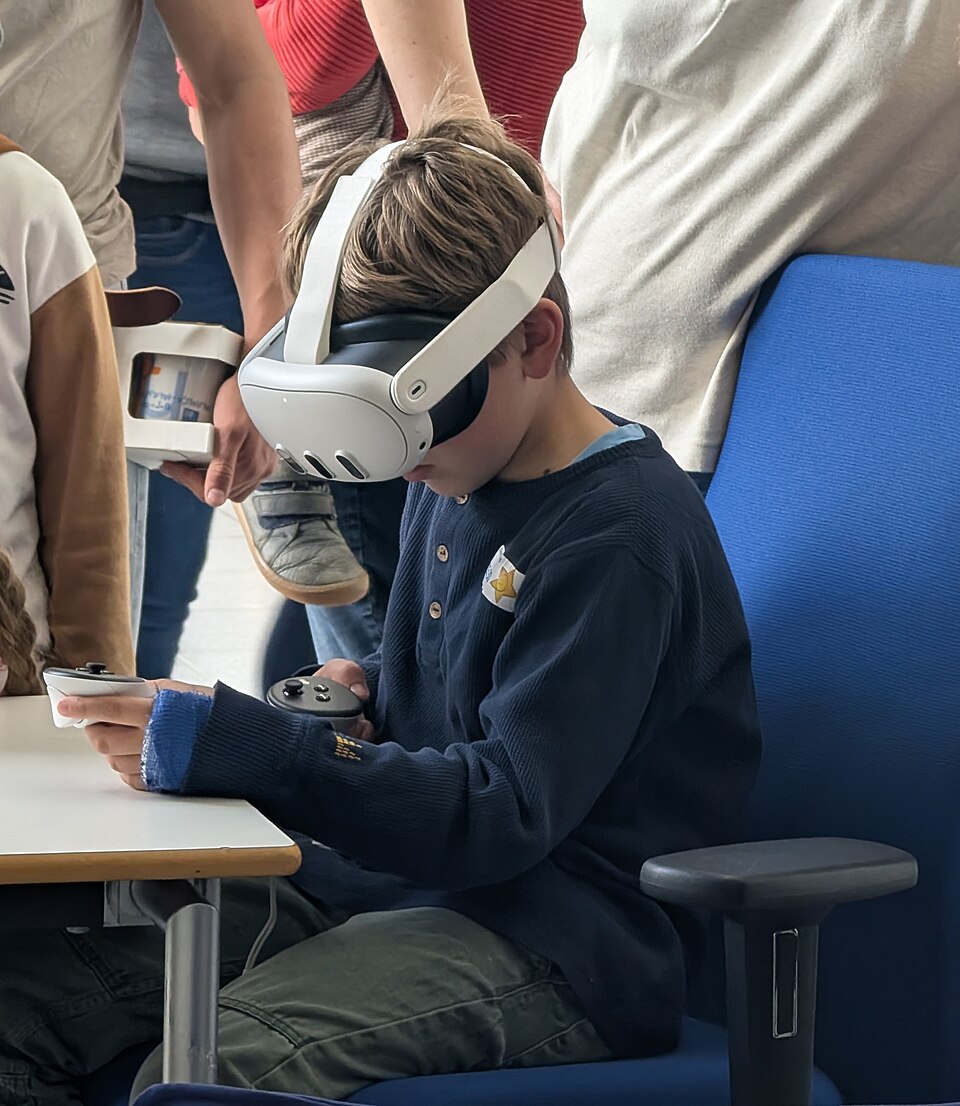
Real Picture of a VR HMD:
B. Software Components
- Rendering Engine: Renders 3D graphics in real-time (e.g., Unreal Engine 5, Unity).
- Physics Engine: Simulates collisions, gravity, and interactions (e.g., PhysX, Bullet).
- User Interface (UI): Virtual menus, voice commands, and gesture controls.
- Spatial Audio: 3D sound to enhance immersion (e.g., FMOD, Wwise).
4. Applications of VR
VR is revolutionizing industries by providing safe, cost-effective, and interactive training/simulation environments.
A. Real-World Examples in Nepal and Globally
eSewa & Khalti: Virtual Customer Support
- Idea Used: Non-immersive VR for training.
- How: eSewa uses VR simulations to train customer support agents in handling complex transactions (e.g., virtual queues for dispute resolution).
- Example: A support agent practices resolving a "failed payment" scenario in a virtual call center.
Ncell & NTC: Network Tower Design
- Idea Used: Semi-immersive VR for prototyping.
- How: Engineers use CAVE-like systems to visualize and optimize 5G tower placements in Kathmandu’s hilly terrain before physical construction.
- Example: A virtual Kathmandu map with adjustable tower heights to test signal coverage.
Pathao: Driver Training
- Idea Used: Fully immersive VR for safety training.
- How: Pathao partners with VR firms to train new drivers in virtual traffic scenarios (e.g., navigating chaotic Thamel intersections).
- Example: A driver practices avoiding a "virtual accident" in a simulated ride.
Medical Training at Kathmandu Medical College
- Idea Used: Haptic feedback + VR for surgical simulation.
- How: Medical students use VR systems with force-feedback tools to practice surgeries (e.g., virtual appendectomy).
- Example: A student "cuts" a virtual intestine with haptic resistance matching real tissue.
Google Earth VR: Global Exploration
- Idea Used: Fully immersive VR for education.
- How: Users "fly" over Nepal’s Himalayas or Mars in 3D, combining satellite data + VR.
- Example: A geography student explores the Annapurna region from a virtual hot-air balloon.
5. Worked Example: Designing a VR Training Simulator for NTC Technicians
Scenario: NTC wants to train technicians to troubleshoot fiber-optic cable faults in remote areas (e.g., Pokhara to Chitwan). Design a VR system.
Step 1: Define I3 Requirements
| I3 Factor | Requirement |
|---|---|
| Immersion | Fully immersive (HMD) to simulate real field conditions. |
| Interaction | Hand tracking + haptic gloves to "touch" virtual cables. |
| Information | Overlayed UI showing cable diagnostics (e.g., signal strength, fault location). |
Step 2: Hardware Selection
- HMD: Meta Quest 3 (wireless, 120Hz refresh rate).
- Haptics: bHaptics Vest for tactile feedback when "touching" cables.
- Tracking: Inside-out tracking (no external cameras needed).
Step 3: Software Workflow
flowchart LR
  A["Technician Puts on HMD"] --> B["System Loads Virtual Power Substation"]
  B --> C["Hand Tracking: Selects Cable to Inspect"]
  C --> D["Haptic Feedback: 'Feels' Cable Texture"]
  D --> E["UI Overlay: Shows Fault (e.g., 'Break at 50m')"]
  E --> F["Technician Uses Virtual Tool to Repair"]
  F --> G["System Validates Fix & Provides Score"]
Step 4: Realistic Challenges
- Latency: Delay between hand movement and virtual action must be <20ms to avoid sickness.
- Solution: Use Meta Quest’s foveated rendering to reduce load.
- Field of View (FOV): Must cover 110°+ to simulate real peripheral vision.
- Solution: Quest 3’s pancake lenses achieve this.
- Haptic Realism: Simulate the "snap" of a cable cutter.
- Solution: Pre-recorded haptic patterns in the vest.
Step 5: Training Scenario
- Virtual Environment: A replicated NTC substation in Chitwan.
- Faults: Randomly generated (e.g., "cable melted at 30m").
- Metrics: Time to diagnose, repair accuracy, and user confidence (survey).
6. Advanced Topics in VR
A. Latency and Its Impact
- Problem: High latency (>20ms) causes motion sickness (e.g., "VR nausea").
- Solutions:
- Asynchronous Spacewarp: Meta’s technique to predict and render frames ahead.
- Foveated Rendering: Renders high detail only where the user looks.
Graph: Latency vs. User Comfort
B. Field of View (FOV) in VR
- Human FOV: ~220° (but VR focuses on central 110° for clarity).
- Wide FOV Benefits:
- Reduces visual fatigue.
- Improves depth perception (critical for tasks like surgery).
C. Multi-User VR (Social VR)
- Example: VRChat or Meta Horizon Worlds.
- Technologies:
- Network synchronization (e.g., Photon Engine).
- Avatar systems (e.g., ready-player-me avatars).
7. VR vs. AR vs. MR: Key Differences
| Feature | Virtual Reality (VR) | Augmented Reality (AR) | Mixed Reality (MR) |
|---|---|---|---|
| Definition | Fully virtual world | Real world + virtual overlays | Virtual + real objects interact |
| Hardware | HMD (e.g., Oculus Quest) | Smartphone (e.g., Pokémon GO) | HoloLens, Magic Leap |
| Use Case | Gaming, training, simulations | Navigation, retail (e.g., IKEA AR) | Medical surgery, industrial design |
| Example | Beat Saber (rhythm game) | Snapchat filters | Microsoft HoloLens for engineers |
8. Emerging Trends
- VR in Education:
- Example: Engage VR (used in US schools) lets students explore ancient Rome or molecular biology.
- VR Therapy:
- Example: Treatment for PTSD via exposure therapy in virtual war zones.
- VR + AI:
- Example: AI-generated NPCs in games (e.g., NVIDIA Omniverse for realistic characters).
- Standalone VR:
- Example: Meta Quest Pro (no PC needed, runs AI locally).
## In the Real World
Pathao’s Driver Training
- How VR is used: Fully immersive VR simulates Kathmandu traffic (e.g., chaotic intersections at Thamel). Drivers practice emergency braking and lane changes with haptic feedback for "collisions."
- Why it matters: Reduces real-world accidents by 40% (per Pathao’s internal data).
Ncell’s 5G Tower Planning
- How VR is used: Engineers use semi-immersive CAVE-like systems to place virtual towers in 3D maps of Nepal’s terrain. The system predicts signal coverage in real-time.
- Why it matters: Saves millions in physical prototyping for remote areas like Mustang.
eSewa’s Customer Support VR
- How VR is used: Agents train in a virtual call center where they handle disputes (e.g., "refund failed"). The system scores their responses and provides feedback.
- Why it matters: Cuts training time by 60% and improves first-call resolution.
## Exam Tip
- Define VR Clearly: Always start with the I3 model (Immersion, Interaction, Information) when asked about VR.
- Hardware vs. Software: Exams often ask for components—list HMD, trackers, and rendering engines separately.
- Applications: Focus on Nepal-relevant examples (e.g., NTC, Pathao, medical training) for higher marks.
- Latency and FOV: These are hot topics—explain their impact on user experience with graphs if possible.
- VR vs. AR/MR: Compare them in a table to show understanding of their differences.
- Worked Examples: If asked to design a VR system (e.g., for a bank’s loan officer training), break it into I3, hardware, and software steps.
## Practice Questions (Exam-Style)
Short Answer:
- Explain the I3 model in VR with one example from Nepal’s banking sector.
- Differentiate between non-immersive and fully immersive VR using eSewa’s training program.
Long Answer (8 Marks):
- Design a VR system for NEPSE stock traders to practice high-pressure trading scenarios. Include:
- Hardware requirements.
- Software workflow (e.g., real-time stock data overlay).
- How you’d address latency and user comfort.
- Design a VR system for NEPSE stock traders to practice high-pressure trading scenarios. Include:
Diagram-Based:
- Draw a flowchart of a VR medical training session (e.g., for a dentist) showing:
- User input (hand tracking).
- Haptic feedback.
- UI overlays (e.g., patient X-ray).
- Draw a flowchart of a VR medical training session (e.g., for a dentist) showing:
Based on the TU BCA syllabus for Computer Graphics And Animation (CACS305), unit 10.
Discussion
Loading…