Computer NetworkingUnit 1016 min read
Application Layer Protocols: DNS, HTTP, FTP, DHCP – How the Web and Services Work
Unit 10 of Computer Networking covers the application layer protocols that power the internet: DNS (domain name resolution), HTTP (web browsing), FTP (file transfers), and DHCP (automatic IP assignment). Learn how these protocols interact with lower layers, their message formats, real-world use cases (e.g., eSewa payme
TAKEAWAYS:
- DNS translates human-readable domain names (e.g.,
www.esewa.com.np) into IP addresses using a hierarchical, distributed database of name servers. - HTTP is a stateless, request-response protocol for fetching web pages (e.g., loading Daraz product pages), with versions HTTP/1.1 and HTTP/2 optimizing performance.
- FTP enables secure file transfers (e.g., uploading documents to a cloud server) using control and data connections, while SFTP/FTPS add encryption.
- DHCP automates IP address assignment in networks (e.g., Ncell’s Wi-Fi hotspots), reducing manual configuration via a four-step lease process (DORA).
- Each protocol operates at the application layer but relies on lower layers (e.g., TCP for reliability, UDP for speed) to deliver data.
- Security risks (e.g., DNS spoofing, HTTP man-in-the-middle attacks) require encryption (HTTPS, DNSSEC) and best practices like strong credentials.
1. Application Layer: The User-Facing Interface
The application layer (Layer 7 of the OSI model) is where users and applications interact with the network. Unlike lower layers (which handle data transmission), this layer defines protocols for specific services:
- DNS: Translates domain names to IPs.
- HTTP/HTTPS: Rules for web browsing.
- FTP/SFTP: File transfer protocols.
- DHCP: Automates IP address assignment.
These protocols are independent of hardware but depend on lower layers (e.g., TCP for reliability, UDP for speed). They use port numbers to identify services (e.g., port 80 for HTTP, 22 for SSH).
Why Protocols?
A protocol is a set of rules governing how data is formatted, transmitted, and interpreted between applications. For example:
- HTTP defines how a browser requests a webpage from a server.
- FTP specifies how files are uploaded/download in chunks.
- DNS dicts how name servers query each other.
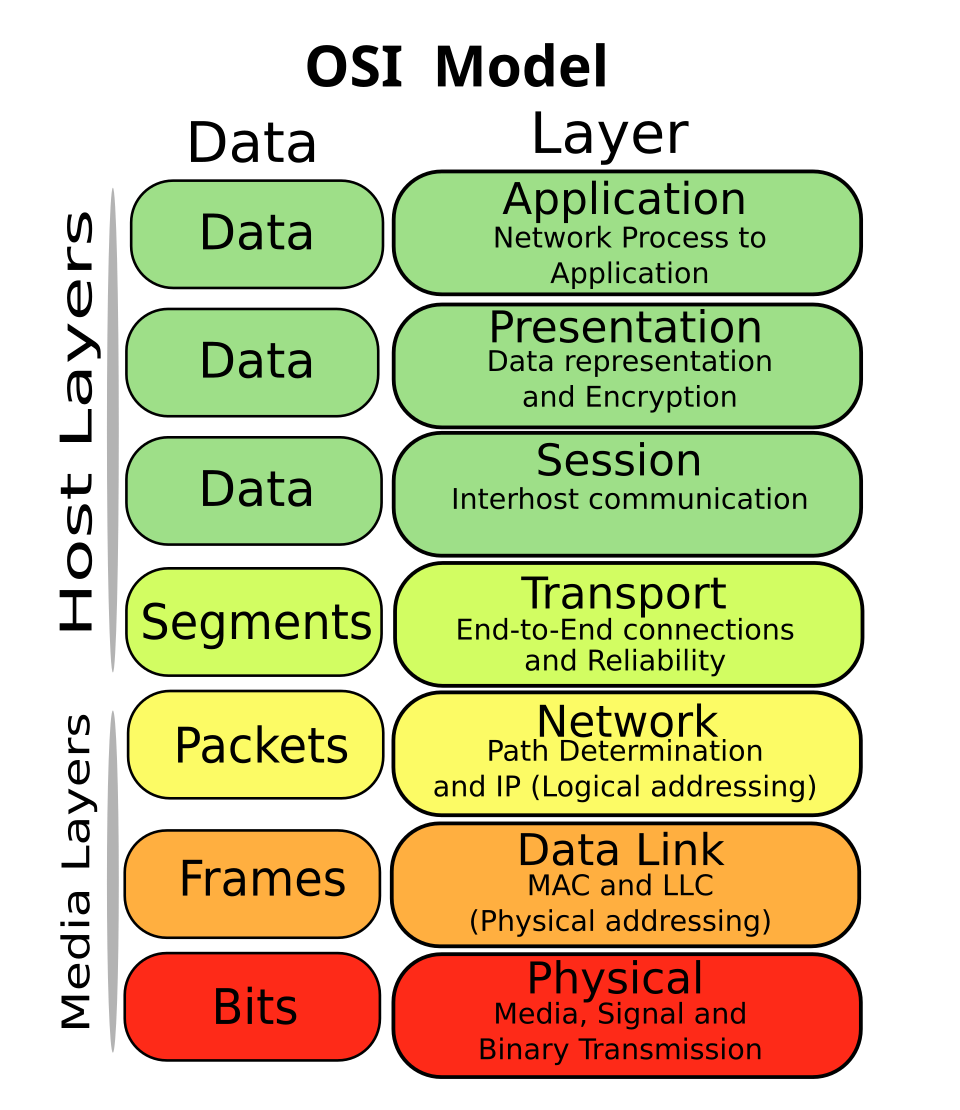 The application layer sits atop the transport layer (TCP/UDP), which relies on the network layer (IP). (Image: SVG edition: Gorivero, CC BY-SA 3.0, via Wikimedia Commons)
2. Domain Name System (DNS): The Internet’s Phonebook
2.1 What is DNS?
DNS (Domain Name System) maps human-readable domain names (e.g., www.tribhuvan-university.edu.np) to IP addresses (e.g., 192.0.34.166). Without DNS, users would memorize IPs like 8.8.8.8 for Google’s DNS servers.
2.2 How DNS Works: A Step-by-Step Trace
When you type www.esewa.com.np in a browser, this happens:
- Local Cache Check: Your device checks its local DNS cache (or browser cache).
- Recursive Resolver Query: If not found, your ISP’s DNS resolver (e.g., NTC’s
203.120.144.10) queries the root name server (.). - Root → TLD → Authoritative Server:
- Root refers to
.np(top-level domain, TLD). .npserver refers toesewa.com.np’s authoritative server.- Authoritative server returns the IP (e.g.,
103.12.160.10).
- Root refers to
- Response: The IP is cached locally and sent to your browser.
sequenceDiagram
    participant User
    participant LocalCache
    participant ISP_DNS
    participant Root
    participant NP_TLD
    participant ESEWA_AUTH
    User->>LocalCache: www.esewa.com.np?
    LocalCache-->>User: Not found
    User->>ISP_DNS: Query
    ISP_DNS->>Root: .np?
    Root-->>ISP_DNS: NP_TLD IP
    ISP_DNS->>NP_TLD: esewa.com.np?
    NP_TLD-->>ISP_DNS: ESEWA_AUTH IP
    ISP_DNS->>ESEWA_AUTH: IP?
    ESEWA_AUTH-->>ISP_DNS: 103.12.160.10
    ISP_DNS-->>User: IP + Cache
2.3 DNS Record Types
| Record Type | Purpose | Example |
|---|---|---|
| A | Maps domain to IPv4 address | esewa.com.np → 103.12.160.10 |
| AAAA | Maps domain to IPv6 address | esewa.com.np → 2606:2800:10:: |
| MX | Mail exchange server | esewa.com.np → mail.esewa.com |
| CNAME | Alias for another domain | blog.esewa.com → esewa.com |
| NS | Name server for the domain | esewa.com.np → ns1.esewa.com |
2.4 Why DNS? Real-World Example: eSewa Payments
When you pay a bill via eSewa’s website:
- You type
esewa.com.np. - DNS resolves this to
103.12.160.10. - Your browser connects to eSewa’s server via HTTP/HTTPS (port 443).
- The server processes your payment request and returns a confirmation page.
Without DNS, you’d have to manually enter 103.12.160.10 every time—impossible for humans!
2.5 DNS Security Risks & Solutions
| Risk | Description | Solution |
|---|---|---|
| DNS Spoofing | Fake IP returned (phishing) | Use DNSSEC (digital signatures) |
| Cache Poisoning | Corrupting DNS caches | Regular cache updates |
| DDoS Attacks | Overloading DNS servers | Anycast routing (e.g., Cloudflare) |
3. Hypertext Transfer Protocol (HTTP/HTTPS)
3.1 What is HTTP?
HTTP (Hypertext Transfer Protocol) is a stateless, text-based protocol for fetching web resources (HTML, images, videos). It runs on port 80 (HTTP) or 443 (HTTPS).
3.2 HTTP Request-Response Cycle
- Client (Browser) sends a request (e.g.,
GET /index.html HTTP/1.1). - Server processes the request and sends a response (e.g.,
200 OKwith HTML). - Connection closes (unless
Connection: keep-aliveis used).
sequenceDiagram
    participant Browser
    participant Server
    Browser->>Server: GET /index.html HTTP/1.1 (Host: esewa.com.np)
    Server-->>Browser: HTTP/1.1 200 OK\nContent-Type: text/html
    Browser->>Server: GET /logo.png
    Server-->>Browser: HTTP/1.1 200 OK\nContent-Type: image/png
3.3 HTTP Methods
| Method | Purpose | Example |
|---|---|---|
| GET | Retrieve data | GET /products |
| POST | Submit data (e.g., form) | POST /login (with credentials) |
| PUT | Update a resource | PUT /profile (new data) |
| DELETE | Remove a resource | DELETE /account |
| HEAD | Get headers only (faster) | HEAD /status |
3.4 HTTP Status Codes
| Code | Meaning | Example |
|---|---|---|
| 200 | OK | Page loaded successfully |
| 301 | Moved Permanently | Redirect to new URL |
| 404 | Not Found | Page doesn’t exist |
| 500 | Server Error | Internal server crash |
3.5 HTTP vs. HTTPS
| Feature | HTTP | HTTPS |
|---|---|---|
| Security | No encryption (plaintext) | Encrypted (TLS/SSL) |
| Port | 80 | 443 |
| Use Case | Internal networks | E-commerce (eSewa, Daraz) |
| Performance | Faster (no encryption) | Slightly slower (but secure) |
Real-World Example: Daraz Shopping When you browse Daraz, HTTPS ensures:
- Your credit card details are encrypted.
- No third party can intercept your cart data.
- The website’s authenticity is verified via SSL certificates.
 The green padlock in your browser confirms HTTPS. (Image: Sean MacEntee, CC BY 2.0, via Wikimedia Commons)
4. File Transfer Protocol (FTP)
4.1 What is FTP?
FTP (File Transfer Protocol) transfers files between a client and server using two connections:
- Control Connection (port 21): Sends commands (e.g.,
USER,PASS,RETR). - Data Connection (port 20): Transfers files (port 20 for active mode, dynamic port for passive mode).
4.2 FTP Commands
| Command | Purpose | Example |
|---|---|---|
| USER | Login username | USER admin |
| PASS | Login password | PASS secret123 |
| RETR | Retrieve a file | RETR report.pdf |
| STOR | Store (upload) a file | STOR backup.zip |
| LIST | List directory contents | LIST |
4.3 FTP vs. SFTP/FTPS
| Protocol | Security | Port | Use Case |
|---|---|---|---|
| FTP | None (plaintext) | 21 | Internal file transfers |
| FTPS | SSL/TLS | 990 | Secure file transfers |
| SFTP | SSH | 22 | Encrypted (recommended) |
Real-World Example: Bank File Transfers Banks use SFTP to securely transfer transaction logs between branches and the central server. Plain FTP would expose sensitive data.
5. Dynamic Host Configuration Protocol (DHCP)
5.1 What is DHCP?
DHCP (Dynamic Host Configuration Protocol) automatically assigns IP addresses, subnet masks, and DNS servers to devices on a network. It eliminates manual configuration (e.g., ipconfig /release and ipconfig /renew in Windows).
5.2 DHCP Process (DORA)
- Discover: Client broadcasts
DHCP Discover(port 67/68). - Offer: Server responds with
DHCP Offer(proposed IP). - Request: Client accepts with
DHCP Request. - Acknowledge: Server confirms with
DHCP ACK+ lease time (e.g., 24 hours).
sequenceDiagram
    participant Client
    participant DHCP_Server
    Client->>DHCP_Server: DHCP Discover (Broadcast)
    DHCP_Server-->>Client: DHCP Offer (192.168.1.100)
    Client->>DHCP_Server: DHCP Request (Accept)
    DHCP_Server-->>Client: DHCP ACK + Lease Time
5.3 DHCP Message Format
0                   1                   2                   3
0 1 2 3 4 5 6 7 8 9 0 1 2 3 4 5 6 7 8 9 0 1 2 3 4 5 6 7 8 9 0 1
+-+-+-+-+-+-+-+-+-+-+-+-+-+-+-+-+-+-+-+-+-+-+-+-+-+-+-+-+-+-+-+-+
|     op (1=BOOTREQUEST, 2=BOOTREPLY)    |   htype (1=Ethernet) |
+-+-+-+-+-+-+-+-+-+-+-+-+-+-+-+-+-+-+-+-+-+-+-+-+-+-+-+-+-+-+-+-+
|   hlen (6 for Ethernet)              |   hops (0)          |
+-+-+-+-+-+-+-+-+-+-+-+-+-+-+-+-+-+-+-+-+-+-+-+-+-+-+-+-+-+-+-+-+
|       xid (Transaction ID)           |
+-+-+-+-+-+-+-+-+-+-+-+-+-+-+-+-+-+-+-+-+-+-+-+-+-+-+-+-+-+-+-+-+
|   secs |   flags (Broadcast)          |
+-+-+-+-+-+-+-+-+-+-+-+-+-+-+-+-+-+-+-+-+-+-+-+-+-+-+-+-+-+-+-+-+
|                     ciaddr (Client IP)|
+-+-+-+-+-+-+-+-+-+-+-+-+-+-+-+-+-+-+-+-+-+-+-+-+-+-+-+-+-+-+-+-+
|                    yiaddr (Your IP) |
+-+-+-+-+-+-+-+-+-+-+-+-+-+-+-+-+-+-+-+-+-+-+-+-+-+-+-+-+-+-+-+-+
|                    siaddr (Server IP)|
+-+-+-+-+-+-+-+-+-+-+-+-+-+-+-+-+-+-+-+-+-+-+-+-+-+-+-+-+-+-+-+-+
|                    giaddr (Gateway IP)|
+-+-+-+-+-+-+-+-+-+-+-+-+-+-+-+-+-+-+-+-+-+-+-+-+-+-+-+-+-+-+-+-+
5.4 Real-World Example: Ncell Wi-Fi Hotspots
When you connect to Ncell’s Wi-Fi:
- Your phone broadcasts a
DHCP Discover. - Ncell’s router assigns an IP (e.g.,
192.168.1.100) and DNS servers (e.g.,8.8.8.8). - You can now browse the internet without manual IP settings.
6. Protocol Layering in Action
All these protocols rely on lower layers. For example, when you load www.youtube.com:
- Application Layer: DNS resolves
youtube.com→142.250.190.46. - Transport Layer: TCP establishes a connection (SYN, SYN-ACK, ACK).
- Network Layer: IP packets route through routers (e.g., NTC’s backbone).
- Data Link Layer: Ethernet frames transmit data to your NIC.
- Physical Layer: Signals travel via fiber/copper to your device.
7. Common Exam Questions & Answers
Q1: Why do we need DNS when we can use IP addresses directly?
Answer:
- Human Usability: IPs (e.g.,
142.250.190.46) are hard to remember vs.youtube.com. - Scalability: DNS handles millions of domains without manual IP updates.
- Flexibility: One domain can point to multiple IPs (load balancing).
- Mobility: Devices can move (e.g., laptop switching networks) while keeping the same domain.
Q2: Differentiate between HTTP and HTTPS.
| Feature | HTTP | HTTPS |
|---|---|---|
| Security | No encryption | Encrypted (TLS/SSL) |
| Port | 80 | 443 |
| Use Case | Internal testing | E-commerce, banking |
| Performance | Faster (no handshake) | Slight overhead (but secure) |
Q3: Explain the DHCP process with a diagram.
Answer: See the DORA sequence diagram above. Key steps:
- Client broadcasts
Discover. - Server offers an IP (
Offer). - Client requests the IP (
Request). - Server confirms (
ACK) with lease time.
Q4: How does FTP transfer files securely?
Answer:
- Plain FTP: Unencrypted (avoid for sensitive data).
- SFTP: Uses SSH (port 22) for encryption.
- FTPS: Uses SSL/TLS (port 990) for encryption. Example: Banks use SFTP to transfer transaction files between branches.
## In the Real World
eSewa Payments
- DNS: Resolves
esewa.com.npto its server IP. - HTTPS: Encrypts your payment details (credit card numbers).
- TCP: Ensures reliable delivery of transaction data.
- DNS: Resolves
YouTube Streaming
- DNS: Maps
youtube.comto Google’s IP. - HTTP/3 (QUIC): Uses UDP for faster video chunks (reduces buffering).
- CDN: Distributes content via edge servers worldwide.
- DNS: Maps
Ncell Wi-Fi Hotspot
- DHCP: Assigns your phone an IP (e.g.,
192.168.1.100) automatically. - DNS: Provides Google’s DNS (
8.8.8.8) for internet access.
- DHCP: Assigns your phone an IP (e.g.,
Daraz Order Processing
- FTP/SFTP: Securely transfers order data from Daraz’s website to its warehouse system.
- HTTP: Displays product pages to customers.
NEPSE Stock Trading
- HTTPS: Encrypts buy/sell orders to prevent fraud.
- DNS: Resolves
nepse.com.npto the stock exchange server.
## Exam Tip
What Examiners Look For
- Definitions: Know exact terms (e.g., "DNS is a hierarchical, distributed database").
- Diagrams: Draw sequence diagrams for DNS/HTTP/DHCP and packet formats for HTTP headers.
- Real-World Links: Relate protocols to Nepali examples (eSewa, Ncell, Daraz).
- Comparisons: Tables for HTTP/HTTPS, FTP/SFTP, TCP/UDP.
- Troubleshooting: Explain why a site loads slowly (e.g., "DNS cache miss" or "HTTP 500 error").
Common Mistakes to Avoid
- Mixing layers: Don’t say "DNS works at the transport layer" (it’s application layer).
- Ignoring ports: Always mention ports (e.g., HTTP=80, HTTPS=443).
- Overlooking security: HTTPS is not just HTTP + S; it’s TLS encryption.
- Skipping steps: For DNS, list all 4 steps (root → TLD → authoritative).
Sample Short-Answer Questions
| Question Type | Key Points to Include |
|---|---|
| "Explain DNS resolution" | Root → TLD → Authoritative → Client cache |
| "HTTP vs. HTTPS" | Encryption, ports, use cases |
| "DHCP process" | Discover, Offer, Request, Acknowledge (DORA) |
| "FTP security" | Plain FTP vs. SFTP/FTPS (SSH/SSL) |
Final Note: Master the flowcharts, packet formats, and real-world ties (eSewa, YouTube, Ncell). Examiners love practical examples!
Based on the TU BCA syllabus for Computer Networking (CACS303), unit 10.
Discussion
Loading…