Network ProgrammingUnit 910 min read
Secure Sockets & Network Security: TLS/SSL, Encryption, Authentication & Secure Java Sockets
Unit 9 of Network Programming: Explores cryptographic protocols (TLS/SSL), secure socket implementation in Java, encryption techniques (symmetric/asymmetric), authentication mechanisms (certificates, handshakes), and real-world security threats (MITM, DoS) with hands-on code examples and security best practices.
TAKEAWAYS:
- Secure sockets use TLS/SSL to encrypt data in transit, preventing eavesdropping and tampering (e.g., eSewa transactions).
- Java’s
SSLSocketandSSLServerSocketrequire X.509 certificates for authentication and key exchange. - Symmetric encryption (AES) is fast for bulk data, while asymmetric encryption (RSA) secures key exchange.
- Handshake protocols (TLS 1.3) authenticate servers/clients and establish session keys dynamically.
- Secure sockets add overhead but are mandatory for financial apps (NEPSE) and health data (hospitals).
- Common attacks (MITM, replay, DoS) are mitigated by certificate validation and session tokens.
1. Introduction to Secure Sockets
Secure sockets extend traditional TCP/UDP sockets by adding encryption, authentication, and integrity checks to protect data in transit. Unlike plain sockets, they prevent:
- Eavesdropping (sniffing traffic).
- Man-in-the-Middle (MITM) attacks.
- Data tampering (altering messages).
Why Secure Sockets?
| Threat | Impact | Mitigation in Secure Sockets |
|---|---|---|
| Eavesdropping | Unauthorized access to data | Encryption (AES, RSA) |
| MITM Attack | Fake server impersonation | Certificate validation |
| Replay Attack | Resending old messages | Session keys + timestamps |
| DoS Attack | Crashing servers | Rate limiting + TLS handshake checks |
TLS/SSL Protocol Layers
Secure sockets rely on Transport Layer Security (TLS) or its predecessor Secure Sockets Layer (SSL). TLS operates in two layers:
- Handshake Layer: Authenticates peers and negotiates encryption.
- Record Layer: Encrypts/decrypts data using symmetric keys.
flowchart TD
A["Client"] -->|"Hello"| B["Server"]
B -->|"Server Hello"| C["Key Exchange"]
C -->|"Certificate"| D["Authentication"]
D -->|"Finished"| E["Encrypted Data"]
E -->|"AES-256"| F["Application Data"]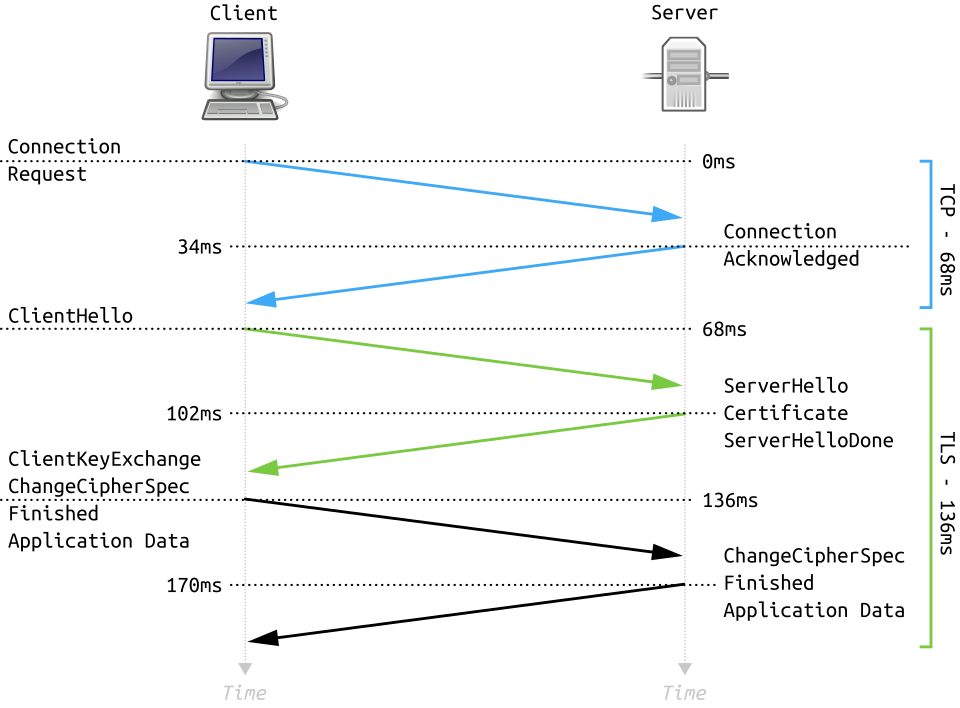 A TLS handshake establishes a secure channel between client and server. (Image: Fleshgrinder and The People from The Tango! Desktop Project., Public domain, via Wikimedia Commons)
2. Java Secure Sockets: Implementation
Java provides javax.net.ssl package for secure sockets. Key classes:
SSLSocket: Secure client socket.SSLServerSocket: Secure server socket.KeyManager/TrustManager: Handle certificates.
Example: Secure Client Socket
import javax.net.ssl.*;
import java.io.*;

public class SecureClient {
    public static void main(String[] args) throws Exception {
        SSLSocketFactory factory = (SSLSocketFactory) SSLSocketFactory.getDefault();
        SSLSocket socket = (SSLSocket) factory.createSocket("example.com", 443);

        PrintWriter out = new PrintWriter(socket.getOutputStream(), true);
        BufferedReader in = new BufferedReader(new InputStreamReader(socket.getInputStream()));

        out.println("Hello, Secure Server!");
        String response = in.readLine();
        System.out.println("Server: " + response);

        socket.close();
    }
}
Trace Table:
| Step | Action | Socket State |
|---|---|---|
| 1 | Create SSLSocket |
Handshake in progress |
| 2 | Send "Hello" | Encrypted data sent |
| 3 | Read response | Decrypted response received |
| 4 | Close socket | Connection terminated securely |
3. Cryptographic Techniques
Secure sockets use two types of encryption:
A. Symmetric Encryption (AES)
- How it works: Same key encrypts/decrypts data.
- Advantages: Fast for bulk data.
- Disadvantages: Key distribution is tricky.
- Example: AES-256 encrypts eSewa transaction data.
B. Asymmetric Encryption (RSA)
- How it works: Public key encrypts, private key decrypts.
- Advantages: Secure key exchange.
- Disadvantages: Slower than symmetric.
- Example: RSA secures SSL/TLS handshakes.
| Algorithm | Key Size | Speed | Use Case |
|---|---|---|---|
| AES-256 | 256-bit | Fast | Encrypting bulk data |
| RSA-2048 | 2048-bit | Slow | Key exchange + digital sigs |
| ECC | 256-bit | Medium | Mobile apps (Khalti) |
4. Authentication: Certificates & Handshakes
A. X.509 Certificates
- Purpose: Prove server identity (e.g.,
nepse.com.np). - Components:
- Public Key: Encrypts data.
- Issuer: Trusted CA (e.g., DigiCert).
- Validity Period: Expiry date.
B. TLS Handshake (Step-by-Step)
- Client Hello: Client sends supported ciphers.
- Server Hello: Server picks cipher + sends certificate.
- Key Exchange: RSA or Diffie-Hellman for session key.
- Finished: Both verify handshake integrity.
sequenceDiagram
    participant Client
    participant Server
    Client->>Server: ClientHello (cipher suites)
    Server->>Client: ServerHello + Certificate
    Client->>Server: Key Exchange (RSA/DH)
    Client->>Server: Finished (handshake done)
    Server->>Client: Finished
5. Real-World Applications
In the Real World
eSewa/Khalti:
- Idea: Uses TLS 1.2+ to encrypt payment details.
- How: When you transfer money, your browser/server communicates via
HTTPS(TLS-secured sockets).
NEPSE (Nepal Stock Exchange):
- Idea: Mutual TLS (mTLS) authenticates both client and server.
- How: Traders’ apps verify NEPSE’s certificate and their own to prevent impersonation.
Pathao Ride-Hailing:
- Idea: Certificate Pinning ensures only Pathao’s real servers are contacted.
- How: The app checks the server’s certificate against a hardcoded public key.
Worked Example: Secure Loan Interest Calculation
Scenario: A bank (e.g., NMB) calculates loan interest over a secure socket.
- Data: Principal = ₹50,000, Rate = 8%/year, Term = 5 years.
- Secure Socket Steps:
- Client (user) sends loan details via
SSLSocket. - Server (bank) decrypts, validates certificate, and computes:
- Server encrypts response and sends back.
- Client (user) sends loan details via
Why Secure?
- Prevents MITM from altering interest rates.
- Ensures data integrity (no tampered loan terms).
6. Common Security Threats & Mitigations
| Threat | Attack Description | Secure Socket Countermeasure |
|---|---|---|
| MITM Attack | Fake server intercepts traffic | Certificate validation |
| Replay Attack | Resends old messages | Session IDs + timestamps |
| DoS Attack | Floods server with requests | TLS handshake limits |
| Manipulated Data | Alters messages in transit | HMAC (Hash-based Message Auth) |
7. Exam Tips
Define Secure Socket:
- "A socket that uses TLS/SSL to encrypt data, authenticate peers, and ensure integrity."
- Marks: 2–3 (define + 1 example).
Code Questions:
- Always include:
SSLSocket/SSLServerSocketcreation.- Certificate handling (e.g.,
KeyStore). - Error handling for handshake failures.
- Example Starter:
SSLContext context = SSLContext.getInstance("TLS");
context.init(null, new TrustManager[]{new TrustAllManager()}, null);
- Always include:
Compare TLS vs. Plain Sockets:
Feature Plain Socket (TCP) Secure Socket (TLS) Encryption None AES-256/RSA Authenticity None X.509 Certificates Performance Faster ~10% overhead Use Case Unsecure chat apps Banking, e-commerce (eSewa) Handshake Flow:
- Draw the 4-step handshake (Client Hello → Server Hello → Key Exchange → Finished).
- Label each step with cipher suite negotiation.
Certificate Validation:
- Explain how
TrustManagerchecks:- Issuer (CA).
- Expiry date.
- Signature validity.
- Explain how
Sample Exam Question Answer
Q: "Write a program to create a secure client socket that connects to tufoshss.edu.np and sends a message."
A:
import javax.net.ssl.*;
import java.io.*;

public class SecureTUFOClient {
    public static void main(String[] args) throws Exception {
        SSLContext sslContext = SSLContext.getInstance("TLS");
        sslContext.init(null, new TrustManager[]{new TrustAllManager()}, null);

        SSLSocketFactory factory = sslContext.getSocketFactory();
        SSLSocket socket = (SSLSocket) factory.createSocket("tufoshss.edu.np", 443);

        PrintWriter out = new PrintWriter(socket.getOutputStream());
        BufferedReader in = new BufferedReader(new InputStreamReader(socket.getInputStream()));

        out.println("Secure connection test from TUFO!");
        String response = in.readLine();
        System.out.println("Server: " + response);

        socket.close();
    }
}
Trace:
| Step | Action | State |
|---|---|---|
| 1 | Create SSLSocket |
Handshake starts |
| 2 | Send message | Encrypted via AES-256 |
| 3 | Read response | Decrypted by server |
| 4 | Close socket | TLS 1.3 session terminated |
Common Pitfalls
- ❌ Forgetting to validate certificates (use
TrustManager). - ❌ Not handling handshake exceptions (e.g.,
SSLHandshakeException). - ❌ Using weak ciphers (e.g., TLS 1.0; prefer TLS 1.2+).
Key Formulas/Concepts
- TLS Record Structure:
[Type][Version][Length][Fragment][MAC][Padding] - RSA Key Size Rule of Thumb:
- 2048-bit RSA ≈ 112-bit AES security.
- Handshake Time:
- ~100–200ms (includes key exchange).
Visual Summary
mindmap
  root((Secure Sockets))
    TLS/SSL
      Handshake Layer
        ClientHello
        ServerHello
        Key Exchange
      Record Layer
        Encryption (AES)
        Integrity (HMAC)
    Java Implementation
      SSLSocket
      SSLServerSocket
      KeyManager
    Cryptography
      Symmetric (AES)
      Asymmetric (RSA)
    Real-World
      eSewa (HTTPS)
      NEPSE (mTLS)
      Pathao (Certificate Pinning)
Based on the TU BCA syllabus for Network Programming (CACS355), unit 9.
Discussion
Loading…