Database ProgrammingUnit 49 min read
PL/SQL Architecture, SQL vs. PL/SQL, and Exception Handling
Unit 4 of Database Programming explores PL/SQL’s layered architecture, contrasts SQL and PL/SQL, and teaches exception handling—key for writing robust database programs. Learn how PL/SQL processes blocks, handles errors, and integrates with Oracle’s database layers, with real-world examples from Nepalese apps like eSew
TAKEAWAYS:
- PL/SQL runs in Oracle’s three-layer architecture (SQL engine → PL/SQL engine → database), enabling procedural logic on top of SQL.
- SQL is declarative (what to do), while PL/SQL is procedural (how to do it), with features like loops, conditions, and exception handling.
- Exception handling in PL/SQL uses
EXCEPTIONblocks to catch errors (predefined likeZERO_DIVIDEor user-defined) and execute recovery code. - Anonymous blocks execute once, while named blocks (procedures/functions) can be reused and parameterized.
- Predefined exceptions (e.g.,
NO_DATA_FOUND,TOO_MANY_ROWS) handle common SQL errors; user-defined exceptions requireRAISE_APPLICATION_ERROR. - Oracle’s PL/SQL engine parses, optimizes, and executes PL/SQL code, while the SQL engine processes SQL statements.
PL/SQL Architecture: How It Works Under the Hood
PL/SQL is Oracle’s procedural extension to SQL, designed to run inside the database. Its architecture consists of three key layers:
- SQL Engine: Executes SQL statements (DML, DDL, DCL).
- PL/SQL Engine: Handles procedural logic (blocks, loops, exceptions).
- Database: Stores data and metadata.
flowchart LR
A["User/Application"] -->|"SQL/PLSQL"| B["PL/SQL Engine"]
B -->|"Parsing/Validation"| C["SQL Engine"]
C -->|"Execution"| D["Database"]
D -->|"Results"| B
B -->|"Output"| A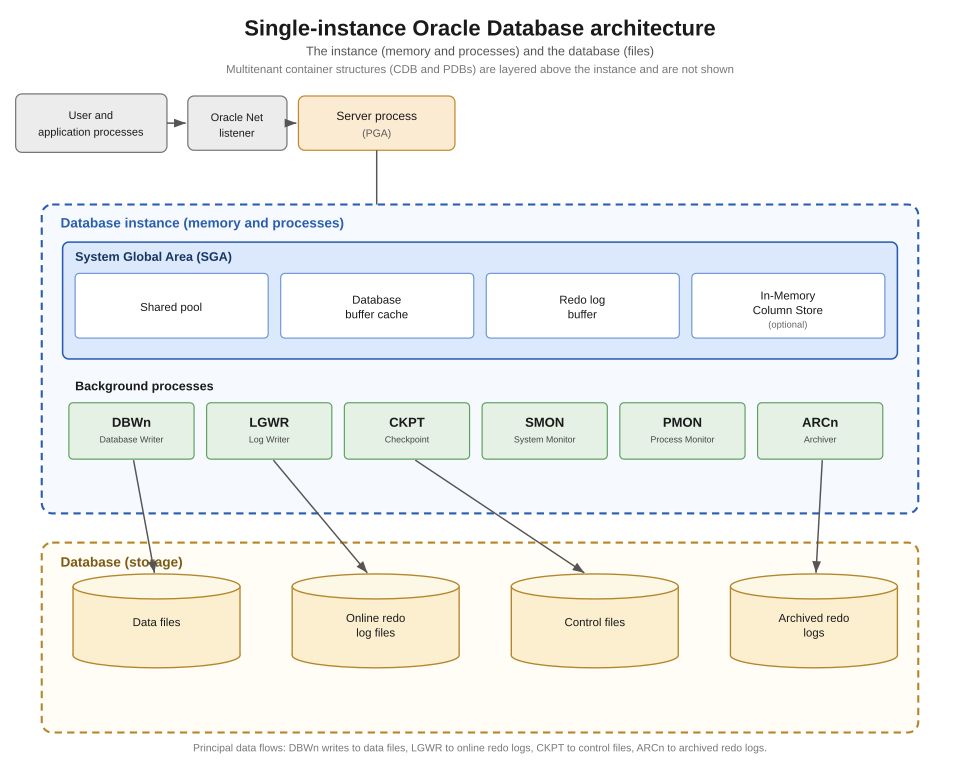 Oracle’s multi-layered architecture: PL/SQL sits between SQL and the database. (Image: Brickcompass, CC BY 4.0, via Wikimedia Commons)
How PL/SQL Blocks Execute
PL/SQL processes code in blocks, which can be:
- Anonymous blocks: Run once, no name.
DECLARE v_salary NUMBER := 50000; BEGIN IF v_salary > 40000 THEN DBMS_OUTPUT.PUT_LINE('Eligible for bonus!'); END IF; END; - Named blocks: Stored in the database (procedures, functions, packages).
Key Steps in Execution:
- Parsing: Checks syntax and semantics.
- Optimization: Generates execution plan.
- Execution: Runs the code in the database.
SQL vs. PL/SQL: What’s the Difference?
| Feature | SQL | PL/SQL |
|---|---|---|
| Purpose | Declarative (what to do) | Procedural (how to do it) |
| Syntax | Statements (SELECT, INSERT) | Blocks, loops, conditions |
| Error Handling | Limited (returns errors) | Full (EXCEPTION blocks) |
| Reusability | One-time use | Stored procedures/functions |
| Performance | Faster for simple queries | Slower due to procedural logic |
Example: SQL vs. PL/SQL for Salary Calculation
- SQL (Declarative):
SELECT employee_name, salary * 1.1 AS new_salary FROM employees WHERE department_id = 10; - PL/SQL (Procedural):
DECLARE
    v_raise NUMBER := 1.1;
BEGIN
    UPDATE employees
    SET salary = salary * v_raise
    WHERE department_id = 10;
    COMMIT;
END;
Why Use PL/SQL?
- Business logic: Implement rules (e.g., "If salary > 50k, auto-approve loan").
- Error handling: Catch and recover from errors gracefully.
- Reusability: Store procedures for repeated tasks (e.g.,
CALCULATE_BONUS).
In the Real World
eSewa (Nepal):
- Uses PL/SQL to validate transactions before processing payments.
- Example: A
BEFORE INSERTtrigger checks if the user’s account balance is sufficient before deducting fees.CREATE OR REPLACE TRIGGER check_balance BEFORE INSERT ON transactions FOR EACH ROW BEGIN IF :NEW.amount > (SELECT balance FROM users WHERE user_id = :NEW.user_id) THEN RAISE_APPLICATION_ERROR(-20001, 'Insufficient balance!'); END IF; END;
Ncell (Telecom):
- PL/SQL calculates bill amounts dynamically (e.g., discounts for bulk SMS).
- Example: A stored procedure
CALCULATE_BILLusesCASEstatements to apply promotions.
NEPSE (Stock Exchange):
- Uses PL/SQL triggers to log trades and update share prices in real time.
- Example: A
BEFORE UPDATEtrigger on thesharestable validates price changes against market rules.
Exception Handling: Making Your Code Robust
Exceptions are errors or unexpected events. PL/SQL handles them with:
- Predefined exceptions (e.g.,
ZERO_DIVIDE,NO_DATA_FOUND). - User-defined exceptions (custom error messages).
Syntax for Exception Handling
DECLARE
    v_employee_id employees.employee_id%TYPE;
    e_no_record EXCEPTION;
BEGIN
    SELECT employee_id INTO v_employee_id
    FROM employees
    WHERE employee_name = 'John Doe';

EXCEPTION
    WHEN NO_DATA_FOUND THEN
        RAISE e_no_record;
    WHEN OTHERS THEN
        DBMS_OUTPUT.PUT_LINE('Error: ' || SQLERRM);
END;
Common Predefined Exceptions
| Exception | Triggered When |
|---|---|
ZERO_DIVIDE |
Division by zero |
NO_DATA_FOUND |
No rows returned in a SELECT INTO |
TOO_MANY_ROWS |
Multiple rows in a SELECT INTO |
VALUE_ERROR |
Invalid data type conversion |
User-Defined Exceptions
DECLARE
    e_invalid_salary EXCEPTION;
    v_salary NUMBER := -5000;
BEGIN
    IF v_salary < 0 THEN
        RAISE e_invalid_salary;
    END IF;
EXCEPTION
    WHEN e_invalid_salary THEN
        DBMS_OUTPUT.PUT_LINE('Error: Salary cannot be negative!');
END;
Real-World Example: Bank Loan Approval A bank uses PL/SQL to validate loan applications:
CREATE OR REPLACE PROCEDURE APPROVE_LOAN(
    p_customer_id IN NUMBER,
    p_amount IN NUMBER
) AS
    e_invalid_amount EXCEPTION;
BEGIN
    IF p_amount <= 0 THEN
        RAISE e_invalid_amount;
    END IF
    -- Process loan...
EXCEPTION
    WHEN e_invalid_amount THEN
        INSERT INTO audit_log (error_message)
        VALUES ('Invalid loan amount for customer ' || p_customer_id);
        DBMS_OUTPUT.PUT_LINE('Loan rejected: Invalid amount.');
END;
Anonymous vs. Named Blocks
| Feature | Anonymous Block | Named Block (Procedure/Function) |
|---|---|---|
| Definition | Runs once, no name | Stored in database, reusable |
| Syntax | DECLARE...BEGIN...END; |
CREATE PROCEDURE/FUNCTION... |
| Use Case | One-time tasks (e.g., ad-hoc reports) | Repeated tasks (e.g., CALCULATE_TAX) |
Example: Anonymous Block (One-Time Calculation)
DECLARE
    v_total NUMBER := 0;
BEGIN
    SELECT SUM(salary) INTO v_total
    FROM employees;
    DBMS_OUTPUT.PUT_LINE('Total salary: ' || v_total);
END;
Example: Named Block (Reusable Procedure)
CREATE OR REPLACE PROCEDURE CALCULATE_TAX(
    p_salary IN NUMBER,
    p_tax OUT NUMBER
) AS
BEGIN
    IF p_salary <= 50000 THEN
        p_tax := p_salary * 0.1;
    ELSE
        p_tax := p_salary * 0.2;
    END IF;
END;
Oracle Database Architecture: Where PL/SQL Fits In
Oracle’s architecture has three main layers:
- Client Layer: Applications (SQL*Plus, TOAD).
- Oracle Server: PL/SQL engine + SQL engine.
- Database Layer: Data storage (tables, indexes).
flowchart TD
    A["Client Application"] -->|"SQL/PLSQL"| B["Oracle Server"]
    B --> C["PL/SQL Engine"]
    B --> D["SQL Engine"]
    C -->|"Procedural Logic"| E["Database"]
    D -->|"SQL Queries"| E
    E -->|"Results"| B
Exam Tip
- Architecture: Draw the three-layer PL/SQL architecture (SQL engine → PL/SQL engine → database) and label each layer’s role.
- SQL vs. PL/SQL: Compare them in a table (purpose, syntax, error handling) and give one example each.
- Exception Handling:
- Know 5 predefined exceptions and when they occur.
- Write a user-defined exception with
RAISE_APPLICATION_ERROR. - Explain
WHEN OTHERSandSQLERRM.
- Blocks: Differentiate anonymous vs. named blocks with syntax examples.
- Real-World Tie: For any question, relate to eSewa/Khalti/Ncell (e.g., "How would you use PL/SQL to validate a Khalti payment?").
Common Pitfalls:
- Forgetting
COMMITin procedures (useAUTONOMOUS_TRANSACTIONif needed). - Not handling
NO_DATA_FOUNDinSELECT INTOqueries. - Confusing
IN,OUT, andIN OUTparameters in procedures.
Worked Example: Loan Interest Calculation with Exception Handling Scenario: A bank uses PL/SQL to calculate loan interest. If the interest rate is negative, raise an error.
CREATE OR REPLACE PROCEDURE CALCULATE_INTEREST(
    p_principal IN NUMBER,
    p_rate IN NUMBER,
    p_years IN NUMBER,
    p_interest OUT NUMBER
) AS
    e_invalid_rate EXCEPTION;
BEGIN
    IF p_rate < 0 THEN
        RAISE e_invalid_rate;
    END IF
    p_interest := p_principal * p_rate * p_years / 100;
EXCEPTION
    WHEN e_invalid_rate THEN
        DBMS_OUTPUT.PUT_LINE('Error: Interest rate cannot be negative.');
        p_interest := NULL;
END;
Test Case:
DECLARE
    v_interest NUMBER;
BEGIN
    CALCULATE_INTEREST(100000, -5, 2, v_interest);
    -- Output: "Error: Interest rate cannot be negative."
END;
Based on the TU BCA syllabus for Database Programming (CACS484), unit 4.
Discussion
Loading…