Information SecurityUnit 1212 min read
Honeypots & Trust Frameworks: Deception & Trust in Cybersecurity
Unit 12 of Information Security explores honeypots (deceptive systems to trap attackers) and trust frameworks (how organizations verify identities and permissions). Learn their types, real-world deployments (e.g., banks, eSewa), Kerberos authentication, token-based systems, and core trust components like PKI and OAuth.
TAKEAWAYS:
- Honeypots are decoy systems designed to lure attackers, classify threats, and study malware—low-interaction (simulated) vs. high-interaction (fully functional) types exist.
- Trust frameworks rely on authentication (Kerberos, tokens), authorization (access rights), and PKI (digital certificates) to secure transactions (e.g., eSewa payments).
- Token-based auth (JWT/OAuth) replaces passwords with short-lived tokens, reducing credential theft risks (used by Khalti, Daraz).
- Kerberos uses symmetric encryption and tickets for secure authentication in enterprise networks (e.g., NTC’s internal systems).
- Honeypots help detect APT attacks (e.g., a fake NEPSE trading server trapping hackers) while trust frameworks enable cross-organization trust (e.g., banks sharing fraud data).
- Exam focus: Define access rights, trust frameworks, and honeypot types; explain Kerberos/OAuth workflows with diagrams.
1. Honeypots: The Cybersecurity Decoy
Honeypots are intentional traps designed to attract cybercriminals, study their tactics, and gather threat intelligence. Unlike firewalls or IDS, they do not block attacks but observe and analyze them in a controlled environment.
Why Use Honeypots?
- Threat intelligence: Collect malware samples, attack patterns (e.g., how hackers exploit Ncell’s old servers).
- Early warning: Detect zero-day exploits before they hit production systems.
- Resource diversion: Waste attacker time/money on fake systems (e.g., a decoy Daraz database).
- Compliance: Meet security audits by proving proactive monitoring.
Types of Honeypots
| Type | Description | Example Use Case | Pros | Cons |
|---|---|---|---|---|
| Low-Interaction | Simulates limited services (e.g., fake SSH, HTTP) without full OS. | Trapping brute-force attacks on eSewa. | Low resource use, easy to deploy. | Limited attacker engagement. |
| High-Interaction | Fully functional OS/apps (e.g., fake bank server with real services). | Studying APT groups targeting NEPSE. | Realistic attack data. | High risk if compromised. |
| Research Honeypot | Used by security firms (e.g., Honeynet Project) to analyze malware. | Decoding ransomware samples. | High-value intelligence. | Requires expert analysis. |
| Production Honeypot | Deployed in live networks (e.g., Google’s Project Honey Pot). | Detecting botnet C&C servers. | Real-world attack data. | Higher operational risk. |
How Honeypots Work: A Worked Example
Scenario: A Khalti payment gateway deploys a high-interaction honeypot mimicking its transaction server.
- Attacker scans for port 443 (HTTPS) and finds the honeypot.
- They attempt SQL injection on a fake login page.
- The honeypot logs the IP, payload (
' OR 1=1 --), and timing. - Security team blocks the IP and analyzes the exploit for Khalti’s real servers.
sequenceDiagram
    participant Attacker
    participant Honeypot
    participant SecurityTeam
    Attacker->>Honeypot: Scans port 443 (fake Khalti server)
    Honeypot-->>Attacker: Returns fake login page
    Attacker->>Honeypot: Sends SQLi: ' OR 1=1 --
    Honeypot->>SecurityTeam: Logs attack (IP: 192.168.1.100, Payload: SQLi)
    SecurityTeam->>Firewall: Blocks 192.168.1.100
Real-World Honeypot Deployments
- Google’s Project Honey Pot: Tracks spam botnets by deploying fake email servers.
- NTC’s Darknet Honeypot: Monitors DDoS tools targeting Nepal’s telecom infrastructure.
- Banking Sector: Fake ATM networks to study skimming malware (e.g., GlobalPayments breach).
2. Trust Frameworks: Building Secure Digital Trust
Trust frameworks enable secure interactions between entities (users, organizations, systems) by verifying identities and permissions. They are critical for:
- E-commerce (e.g., Daraz’s buyer-seller trust system).
- Government services (e.g., eSewa’s digital signatures).
- Cross-organization data sharing (e.g., banks verifying KYC via Nepal Rastra Bank).
Core Components of Trust Frameworks
- Authentication: Proving identity (e.g., Kerberos, OAuth, biometrics).
- Authorization: Defining access rights (e.g., RBAC: Role-Based Access Control).
- Audit Logs: Recording actions for accountability (e.g., NEPSE’s trade logs).
- Public Key Infrastructure (PKI): Uses digital certificates (e.g., SSL/TLS for HTTPS).
- Federated Identity: Single sign-on (SSO) across systems (e.g., Google/Facebook login).
Key Trust Models
| Model | Description | Example | Pros | Cons |
|---|---|---|---|---|
| Centralized Trust | Single authority verifies all identities (e.g., Nepal Government’s eKYC). | eSewa’s bank verification. | Simple to implement. | Single point of failure. |
| Decentralized Trust | No single authority; uses blockchain or P2P verification (e.g., Bitcoin). | Cryptocurrency wallets. | Resistant to censorship. | Scalability issues. |
| Federated Trust | Multiple organizations share trust (e.g., SAML/OAuth). | Daraz + Khalti payment integration. | Flexible, scalable. | Complex setup. |
| Hierarchical Trust | Trust flows from top-level CA (e.g., Let’s Encrypt) to sub-entities. | Bank’s internal PKI. | Strong security. | Slow certificate revocation. |
How Trust Frameworks Work: Kerberos Example
Scenario: A NTC employee accesses an internal database using Kerberos.
sequenceDiagram
    participant User
    participant AuthServer
    participant TicketGrantingServer (TGS)
    participant DatabaseServer
    User->>AuthServer: Requests TGT (with password)
    AuthServer-->>User: Returns TGT (encrypted)
    User->>TGS: Sends TGT + service request
    TGS-->>User: Returns Service Ticket (for DB)
    User->>DatabaseServer: Sends Service Ticket + request
DatabaseServer-->>User: Grants accessSteps:
- User sends credentials to Authentication Server (AS).
- AS issues a Ticket Granting Ticket (TGT) (encrypted with KDC’s key).
- User requests access to Database Server; TGS issues a Service Ticket.
- Database verifies the ticket and grants access.
Why Kerberos?
- No password transmission over the network.
- Time-stamped tickets prevent replay attacks.
- Used by Microsoft Active Directory, Linux MIT Kerberos.
3. Token-Based Authentication: The Future of Logins
Traditional passwords are weak (easily stolen via phishing). Token-based auth (e.g., JWT, OAuth) replaces them with short-lived tokens.
How Tokens Work
- User logs in → Server issues a token (e.g., JWT).
- Token contains:
- Payload (user ID, expiry time).
- Signature (verified with server’s secret key).
- Client sends token with each request (no password needed).
stateDiagram-v2
    [*] --> Login
    Login --> AuthServer: {Send credentials}
    AuthServer --> Token: {Issue JWT}
    Token --> Client: {Store token (localStorage)}
    Client --> API: {Send token in Authorization: Bearer <token>}
    API --> AuthServer: {Verify token}
    AuthServer --> API: {Grant access}
    API --> Client: {Return data}
    Client --> [*]
Real-World Token Use Cases
- Khalti/Daraz: Uses OAuth 2.0 for third-party app logins (e.g., "Login with Google").
- eSewa: JWT tokens for secure API access between banks and eSewa.
- Ncell’s MyNcell App: Refresh tokens to extend session validity.
Advantages:
- Stateless: No server-side session storage.
- Scalable: Tokens can be validated by any server.
- Secure: Short expiry times limit damage from leaks.
Disadvantages:
- Token theft risk: If stolen, attacker gains access until expiry.
- Storage issues: Tokens in localStorage are vulnerable to XSS.
4. Access Rights and Trust Frameworks in Action
Access rights define what a user can do (e.g., read, write, delete). Trust frameworks enforce these rights across systems.
Types of Access Rights
| Right | Description | Example |
|---|---|---|
| Read | View data (e.g., NEPSE stock prices). | Public access. |
| Write | Modify data (e.g., update a Daraz order). | Seller only. |
| Execute | Run a program (e.g., admin commands). | Root user. |
| Delete | Remove data (e.g., delete a Khalti transaction). | Account owner. |
| Admin | Full control (e.g., NTC network admin). | Limited to IT staff. |
Trust Framework Workflow: eSewa Payment
- User logs into eSewa (via OAuth token).
- eSewa verifies user’s digital signature (PKI).
- Bank checks KYC records (centralized trust).
- Transaction is logged in blockchain (decentralized trust).
- Receipt is signed with eSewa’s private key.
erDiagram
    USER ||--o{ TRANSACTION : "makes"
    USER ||--o{ DIGITAL_SIGNATURE : "has"
    BANK ||--o{ TRANSACTION : "processes"
    TRANSACTION }|--|| BLOCKCHAIN : "records"
    eSewa ||--o{ TRANSACTION : "facilitates"
    eSewa ||--|{ DIGITAL_SIGNATURE : "issues"
In the Real World
eSewa’s Trust Framework:
- Uses PKI for digital signatures on transactions.
- OAuth 2.0 for third-party app integrations (e.g., Daraz payments).
- Honeypots in test environments to simulate phishing attacks.
Ncell’s Security:
- Kerberos secures internal network access for employees.
- High-interaction honeypots detect SIM-swapping attacks (where hackers take over phone numbers).
Daraz’s Token-Based Auth:
- JWT tokens replace passwords for API calls (e.g., order tracking).
- Honeypot servers mimic Daraz’s database to trap credential-stuffing bots.
Nepal Rastra Bank (NRB) Compliance:
- Federated trust between banks for KYC verification.
- Audit logs stored in tamper-proof ledgers (blockchain).
Exam Tip
This unit is conceptual but heavily diagram-based. Expect:
Definitions (e.g., "Define access right"):
- Access right: A permission granted to a user/process to perform an action (e.g., read/write/execute) on a resource.
- Trust framework: A system of policies, protocols, and technologies to establish and maintain trust between entities (e.g., PKI + OAuth).
Explain with diagrams:
- Draw a honeypot deployment (low vs. high interaction).
- Kerberos sequence diagram (must show TGT and service ticket).
- Trust model (centralized vs. federated).
Compare and contrast:
- Honeypot types (table with pros/cons).
- Token vs. session-based auth (JWT vs. cookies).
Real-world applications:
- Link eSewa/Khalti to OAuth/PKI.
- Link NTC/Ncell to Kerberos/honeypots.
Common Pitfalls:
- Forgetting to label diagrams (e.g., "TGT" in Kerberos).
- Confusing symmetric (Kerberos) vs. asymmetric (PKI) crypto.
- Overlooking high-interaction honeypot risks (e.g., "What if the attacker exploits a bug?").
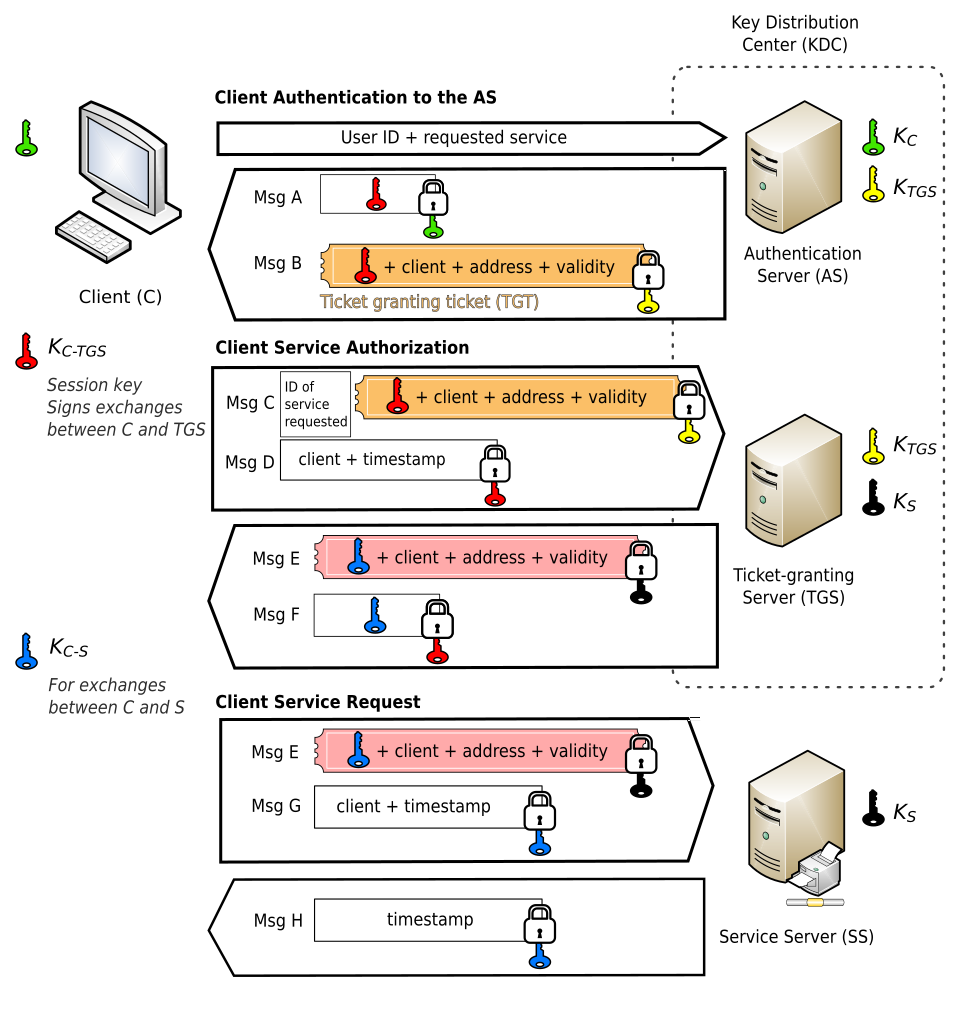 Kerberos ticket flow: TGT → Service Ticket → Access Grant (Image: Jeran Renz, CC BY-SA 4.0, via Wikimedia Commons)
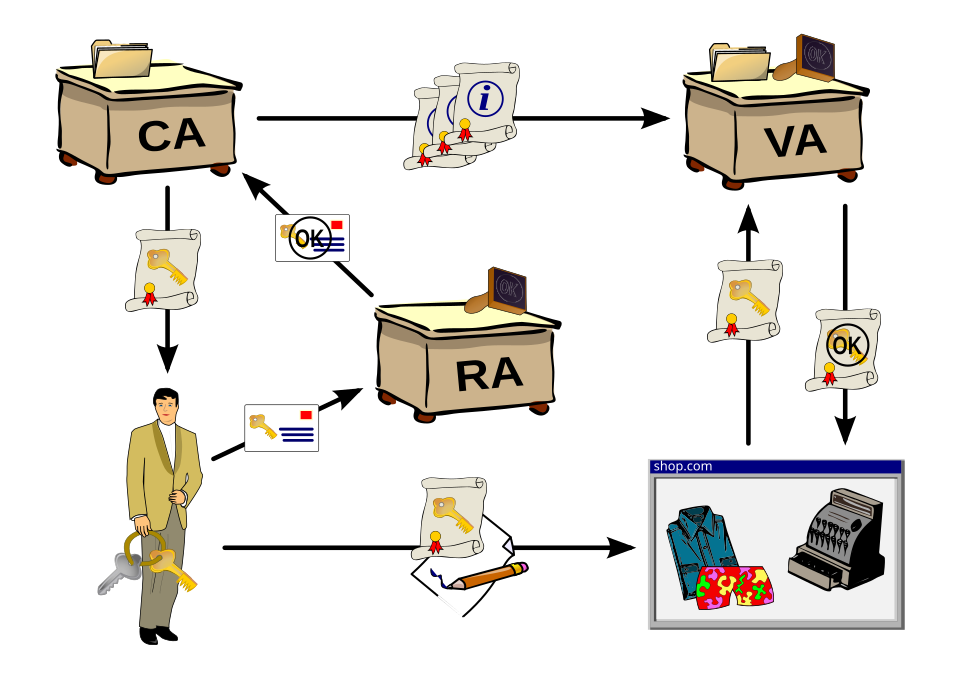 CA → Certificate Issuance → Digital Signature Workflow (Image: Chris 論, CC BY-SA 3.0, via Wikimedia Commons)
Based on the TU BCA syllabus for Information Security (CACS459), unit 12.
Discussion
Loading…