Foundation of Information TechnologyUnit 29 min read
Data Representation & Number Systems – binary, octal, decimal, hexadecimal, codes, conversion methods
Unit 2 of Foundation of Information Technology introduces how data is encoded, explains binary, octal, decimal and hexadecimal systems, character codes, and step‑by‑step conversion techniques with real‑world examples.
Key points
- Binary (base‑2) is the fundamental language of computers; every higher‑level datum is ultimately stored as bits.
- Octal and hexadecimal provide compact, human‑readable notations for binary groups.
- Character encoding schemes (ASCII, Unicode) map numbers to symbols, enabling text processing.
- Systematic conversion algorithms (division‑remainder, double‑dabble, table‑lookup) are essential for programming and hardware design.
- Understanding number‑system limits (range, overflow) prevents common bugs in software and digital circuits.
1. Why Number Systems Matter in IT
Computers operate with electronic switches that have two stable states: ON (1) and OFF (0). All information—numbers, text, images, sound—is ultimately represented as sequences of these binary digits (bits). Different number systems are used to express binary data in a form that humans can read, write, and debug efficiently.
2. Binary (Base‑2)
- Definition: A positional numeral system with only two symbols, 0 and 1. Each position represents a power of 2.
- Bit & Byte: 1 bit = one binary digit; 8 bits = 1 byte, the smallest addressable unit in most computers.
2.1 Binary Counting
| Decimal | Binary |
|---|---|
| 0 | 0 |
| 1 | 1 |
| 2 | 10 |
| 3 | 11 |
| 4 | 100 |
| 5 | 101 |
| 6 | 110 |
| 7 | 111 |
| 8 | 1000 |
Worked Example – Adding 13₂ + 7₂
  1101   (13)
+ 0111   (7)
-------
 10100   (20)
Carry occurs when two 1’s are added, exactly like decimal addition but with base 2.
2.2 Binary Arithmetic Basics
- AND, OR, NOT, XOR gates manipulate bits directly; they are the building blocks of CPUs.
- Two’s complement represents signed integers, allowing a single circuit for addition and subtraction.
3. Octal (Base‑8)
- Definition: Uses digits 0‑7; each octal digit corresponds to three binary bits.
- Historical Use: Early mainframes (e.g., PDP‑11) displayed memory addresses in octal because it aligns neatly with 12‑bit and 24‑bit word sizes.
3.1 Conversion Octal ↔ Binary
| Octal | Binary |
|---|---|
| 0 | 000 |
| 1 | 001 |
| 2 | 010 |
| 3 | 011 |
| 4 | 100 |
| 5 | 101 |
| 6 | 110 |
| 7 | 111 |
Example: Octal 27 → Binary 010 111 → Decimal 23.
4. Decimal (Base‑10)
- Definition: The everyday numeral system using digits 0‑9; each position is a power of 10.
- Why It Persists: Human cognition is tuned to ten fingers, making decimal intuitive for input and reporting.
4.1 Decimal ↔ Binary Conversion (Division‑Remainder Method)
Algorithm (Decimal → Binary):
- Divide the decimal number by 2.
- Record the remainder (0 or 1).
- Replace the number with the integer quotient.
- Repeat steps 1‑3 until the quotient is 0.
- The binary result is the remainders read upward (last remainder first).
flowchart TD
    A["Start with decimal N"] --> B["Divide N by 2"]
    B --> C["Record remainder r"]
    C --> D["Set N = floor(N/2)"]
    D --> E{"N > 0?"}
    E -- Yes --> B
    E -- No --> F["Read remainders in reverse order"]
    F --> G["Binary representation"]
Worked Example: Convert 156₁₀ to binary.
| Step | N (quotient) | Remainder |
|---|---|---|
| 1 | 156 ÷ 2 = 78 | 0 |
| 2 | 78 ÷ 2 = 39 | 0 |
| 3 | 39 ÷ 2 = 19 | 1 |
| 4 | 19 ÷ 2 = 9 | 1 |
| 5 | 9 ÷ 2 = 4 | 1 |
| 6 | 4 ÷ 2 = 2 | 0 |
| 7 | 2 ÷ 2 = 1 | 0 |
| 8 | 1 ÷ 2 = 0 | 1 |
Reading remainders upward: 10011100₂.
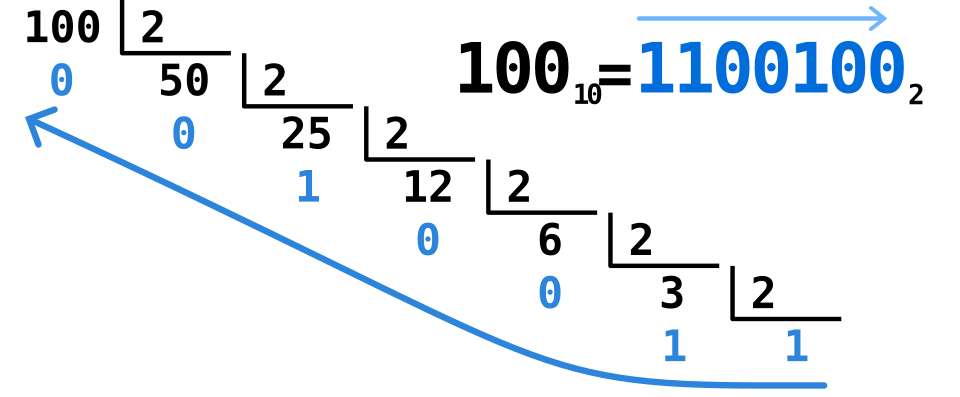 Stepwise division‑remainder process (Image: User:Retraza, Public domain, via Wikimedia Commons)
5. Hexadecimal (Base‑16)
- Definition: Uses digits 0‑9 and letters A‑F (10‑15). Each hexadecimal digit maps to four binary bits (a nibble).
- Why It’s Popular: Memory addresses, color codes in web design, and machine code are often expressed in hex for brevity.
5.1 Hex ↔ Binary Mapping
| Hex | Binary |
|---|---|
| 0 | 0000 |
| 1 | 0001 |
| 2 | 0010 |
| 3 | 0011 |
| 4 | 0100 |
| 5 | 0101 |
| 6 | 0110 |
| 7 | 0111 |
| 8 | 1000 |
| 9 | 1001 |
| A | 1010 |
| B | 1011 |
| C | 1100 |
| D | 1101 |
| E | 1110 |
| F | 1111 |
5.2 Conversion Hex ↔ Decimal
Algorithm (Hex → Decimal): Multiply each digit by 16ⁿ, where n is the position index from right (starting at 0).
Example: Convert 2F₁₆ to decimal.
.
6. Character Encoding
6.1 ASCII (American Standard Code for Information Interchange)
- 7‑bit code (128 characters) covering English letters, digits, punctuation, and control codes.
- Example: ‘A’ = 65₁₀ = 01000001₂ = 41₁₆.
6.2 Unicode (UTF‑8, UTF‑16)
- Supports > 1 million code points, covering virtually all world scripts.
- UTF‑8 encodes characters in 1‑4 bytes, preserving ASCII compatibility.
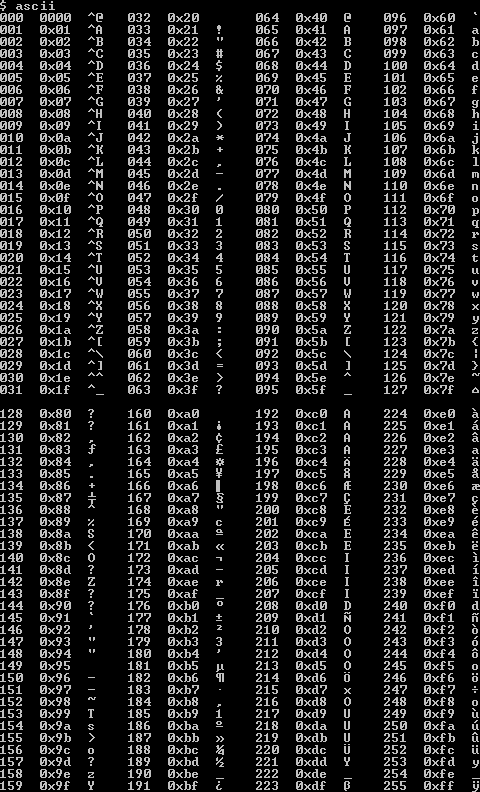 Standard ASCII mapping of characters to decimal/hex values (Image: I, the copyright holder of this work, hereby publish it unde, Public domain, via Wikimedia Commons)
7. Fixed‑Point vs. Floating‑Point Representation
- Fixed‑Point: A predetermined number of bits for integer and fractional parts; simple but limited range.
- Floating‑Point (IEEE 754): Sign bit, exponent, and mantissa; provides a wide dynamic range for scientific calculations.
| Feature | Fixed‑Point | Floating‑Point |
|---|---|---|
| Range | Limited, depends on scaling factor | Very large (≈ 10³⁸ for single precision) |
| Precision | Uniform across range | Varies; more precision near zero |
| Hardware cost | Simple adders/subtractors | Complex normalisation, rounding units |
8. Data Representation in Memory
- Big‑Endian vs. Little‑Endian: Order of byte storage for multi‑byte numbers.
- Big‑Endian: Most significant byte first (network order).
- Little‑Endian: Least significant byte first (Intel x86).
9. Applications & Advantages
| Application | Number System Used | Reason |
|---|---|---|
| Machine code | Binary | Direct control of CPU logic gates |
| Memory addresses | Hexadecimal | Compact representation of long binary strings |
| Color codes in web design | Hexadecimal | Each color channel (R,G,B) uses two hex digits (00‑FF) |
| File permissions (UNIX) | Octal | Three permission bits per user/group/others map neatly to octal |
| Text storage | ASCII / Unicode | Maps characters to numeric codes for processing |
Advantages
- Binary aligns with hardware; hex/octal reduce human error.
- Standardized codes (ASCII, Unicode) enable interoperability across platforms.
Disadvantages
- Binary strings are long and error‑prone for manual handling.
- Fixed‑width encodings (ASCII) cannot represent non‑English scripts, requiring Unicode’s larger footprint.
10. In the real world
eSewa & Khalti transaction IDs – Every payment request is assigned a 128‑bit UUID displayed as a 32‑character hexadecimal string (e.g.,
4F3A9C2E7B1D...). The hex form lets developers and support staff copy, read, and verify IDs without handling 128 binary digits.Daraz order queue – Orders are placed into a FIFO (first‑in‑first‑out) queue where each order number is a decimal integer incremented by 1. Internally the server stores the counter as a 32‑bit binary integer; overflow checks (when the counter reaches 2³²‑1) are built into the order‑management microservice to avoid duplicate IDs.
YouTube video bitrate selection – Adaptive streaming uses binary‑based bitrate values (e.g., 1 Mbps = 1 000 000 bits / second). The client’s player converts these to hexadecimal for logging (
0xF4240), which compresses log size and aligns with the server’s binary protocol.
Worked Real‑World Example:
A Nepali bank offers a personal loan at 12 % annual interest, compounded monthly. The interest rate is stored as a fixed‑point number: 12.00 % → 0x0C00 (hex) where the lower byte represents two decimal places. When the loan management system calculates monthly interest, it multiplies the principal (binary) by the fixed‑point rate, shifts right by 8 bits to restore the decimal position, and records the result in the customer’s ledger. This illustrates how binary arithmetic, fixed‑point representation, and hexadecimal encoding cooperate in everyday banking software.
11. Common Mistakes & How to Avoid Them
| Mistake | Why it Happens | Fix |
|---|---|---|
| Forgetting to pad binary groups when converting to octal/hex | Leads to mis‑aligned values | Always write binary in groups of 3 (octal) or 4 (hex) starting from the right, adding leading zeros if needed |
| Mixing up endianness when reading multi‑byte data | Causes wrong numeric values | Remember: network protocols use big‑endian; most PC CPUs use little‑endian. Use language‑provided functions (ntohl, htonl) |
| Assuming ASCII can represent Nepali characters | Unicode required for Devanagari | Use UTF‑8 encoding; each Nepali character occupies 2‑3 bytes |
| Ignoring overflow in fixed‑width counters | Leads to duplicate IDs or crashes | Implement wrap‑around checks or use larger data types (e.g., 64‑bit) |
Exam tip
- Memorise the conversion tables for binary↔octal and binary↔hex; the exam often asks for a single‑step conversion without a calculator.
- Practice the division‑remainder algorithm for decimal→binary and the reverse multiplication method for binary→decimal; write out at least five examples of each.
- Know the ASCII codes for ‘0’–‘9’, ‘A’–‘Z’, ‘a’–‘z’; a typical question asks to convert a character to its decimal/hex value.
- Be able to explain big‑ vs. little‑endian with a 4‑byte example; draw the byte order diagram (use the provided memory picture).
- When a question mentions “fixed‑point” or “floating‑point”, identify the three fields (sign, exponent, mantissa) and state one advantage of each representation.
Focus on process diagrams (the mermaid flowchart) and tables; examiners award marks for clear, step‑by‑step reasoning. Good luck!
Based on the TU BIM syllabus for Foundation of Information Technology (IT231), unit 2.
Discussion
Loading…