Foundation of Information TechnologyUnit 711 min read
Internet, Web, Protocols, HTTP/HTTPS, URLs, Web Browsers, Search Engines, E-Commerce
Unit 7 of Foundation of Information Technology covers the architecture of the Internet and World Wide Web, including TCP/IP protocols, HTTP/HTTPS, web browsers, search engines, e-commerce models, and security mechanisms like SSL/TLS, with real-world examples from Nepalese and global platforms.
1. Introduction to the Internet and Web
1.1 Definition and Evolution
- Internet: A global network of interconnected computers and devices using standardized protocols (TCP/IP) to exchange data.
- World Wide Web (WWW): A system of interlinked hypertext documents accessed via the Internet, introduced by Tim Berners-Lee in 1989.
- Key Milestones:
- 1960s: ARPANET (precursor to the Internet).
- 1980s: TCP/IP protocol suite adopted.
- 1990s: WWW popularized with browsers like Netscape and Internet Explorer.
1.2 Internet vs. World Wide Web
| Feature | Internet | World Wide Web (WWW) |
|---|---|---|
| Definition | Physical network of interconnected devices | Information system on the Internet |
| Protocol | TCP/IP (transmission control) | HTTP/HTTPS (hypertext transfer) |
| Purpose | Data exchange (emails, files, etc.) | Accessing web pages and multimedia |
| Example | Email (SMTP), File Transfer (FTP) | Google, YouTube, Daraz |
1.3 How the Internet Works
The Internet relies on packets, routers, and protocols:
- Data Packets: Information broken into small chunks for transmission.
- Routers: Devices that direct packets to their destination using IP addresses.
- TCP/IP Protocol Suite: Ensures reliable data delivery.
graph TD
    A["User Device"] -->|"HTTP Request"| B["Router 1"]
    B -->|"TCP/IP"| C["ISP Network"]
    C -->|"TCP/IP"| D["Router 2"]
    D -->|"TCP/IP"| E["Web Server"]
    E -->|"HTTP Response"| D
    D -->|"TCP/IP"| C
    C -->|"TCP/IP"| B
B -->|"HTTP Response"| ACaption: Packet routing from a user to a web server via ISPs.
2. TCP/IP Protocol Suite
2.1 Layers of TCP/IP
The TCP/IP model has 4 layers (simplified from the OSI 7-layer model):
| Layer | Protocol | Function |
|---|---|---|
| Application | HTTP, FTP, SMTP, DNS | User-facing services (web, email, file transfer) |
| Transport | TCP, UDP | End-to-end communication (reliable/unreliable) |
| Internet | IP, ICMP | Addressing and routing (IP addresses) |
| Network Access | Ethernet, Wi-Fi | Physical data transmission (cables, radio) |
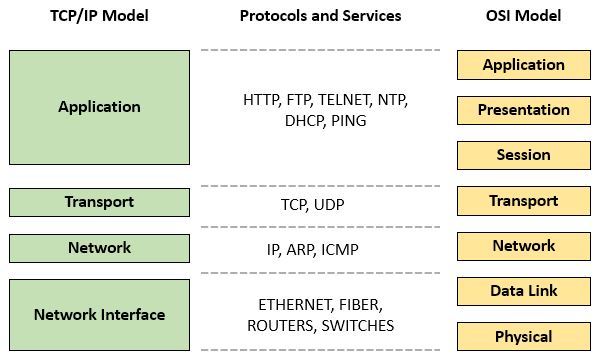 TCP/IP vs. OSI model comparison (Image: Ardika6879, CC BY-SA 4.0, via Wikimedia Commons)
2.2 Key Protocols
- TCP (Transmission Control Protocol): Ensures reliable, ordered data delivery (used by HTTP).
- UDP (User Datagram Protocol): Faster but unreliable (used for video streaming, VoIP).
- IP (Internet Protocol): Assigns IP addresses (e.g.,
192.168.1.1) and routes packets. - DNS (Domain Name System): Converts domain names (e.g.,
daraz.com.np) to IP addresses.
Worked Example: DNS Lookup
When you type esewa.com.np in a browser:
- Your device checks the local DNS cache.
- If not found, it queries the root DNS server.
- The request follows the DNS hierarchy (
.np→esewa.com.npservers). - The IP address (e.g.,
103.12.219.10) is returned, and the browser connects.
3. HTTP and HTTPS
3.1 HTTP (Hypertext Transfer Protocol)
- Stateless protocol: Each request is independent (no memory of past requests).
- Methods:
GET: Retrieve data (e.g., loading a webpage).POST: Send data (e.g., submitting a form).PUT,DELETE,PATCH: Modify server data.
- HTTP Response Codes:
200 OK: Request succeeded.404 Not Found: Page does not exist.500 Internal Server Error: Server failure.
3.2 HTTPS (HTTP Secure)
- Encryption: Uses SSL/TLS to encrypt data (prevents eavesdropping).
- How it works:
- Client and server exchange public/private keys.
- A secure session is established.
- All data is encrypted using symmetric encryption (faster).
- Why HTTPS?
- Protects login credentials (e.g., eSewa, Khalti).
- Prevents man-in-the-middle attacks.
- Boosts SEO rankings (Google prioritizes HTTPS sites).
Real-World Example: Khalti Payments When you transfer money via Khalti:
- Your browser connects to
khalti.comvia HTTPS. - The SSL certificate (issued by a trusted CA like Let’s Encrypt) verifies the site’s identity.
- Your card details are encrypted and sent securely to Khalti’s servers.
4. Web Browsers and Search Engines
4.1 Web Browsers
- Function: Interpret HTML/CSS/JS and render web pages.
- Popular Browsers:
- Chrome (Google), Firefox (Mozilla), Edge (Microsoft), Safari (Apple).
- Browser Components:
- Rendering Engine (Blink in Chrome, Gecko in Firefox).
- JavaScript Engine (V8 in Chrome).
- DOM Tree (Document Object Model for dynamic content).
4.2 Search Engines
- How They Work:
- Crawling: Bots (e.g., Googlebot) scan the web for new content.
- Indexing: Store data in a searchable database.
- Ranking: Algorithms (e.g., PageRank) determine relevance.
- Key Search Engines:
- Google (90% market share), Bing (Microsoft), DuckDuckGo (privacy-focused).
Worked Example: Google Search When you search for "best laptops in Nepal":
- Google’s crawler indexes pages like
daraz.com.npornepalilaptop.com. - The algorithm ranks results based on keywords, backlinks, and user location.
- You see sponsored ads (paid) and organic results (free).
5. E-Commerce and Web Applications
5.1 E-Commerce Models
| Model | Description | Nepalese Example |
|---|---|---|
| B2C | Business to Consumer (retail) | Daraz, Sastodeal |
| B2B | Business to Business (wholesale) | TradeKey, Alibaba |
| C2C | Consumer to Consumer (marketplace) | OLX, Facebook Marketplace |
| C2B | Consumer to Business (freelancing) | Fiverr, Upwork |
5.2 How Daraz Works (B2C Example)
- User Request: You browse
daraz.com.np(HTTPS). - Server Processing:
- The request goes to Daraz’s load balancer.
- A web server (e.g., Apache/Nginx) handles the request.
- A database (MySQL) fetches product details.
- Payment Gateway: Khalti/eSewa integrates via API calls.
- Order Fulfillment: Inventory system updates stock; logistics (e.g., Ncell Parcel) ships the product.
sequenceDiagram
    User->>Daraz: Requests product page (HTTP)
    Daraz->>Database: Fetches product data
    Database-->>Daraz: Returns data
    Daraz-->>User: Displays page (HTML/CSS)
    User->>Daraz: Clicks "Buy Now" (POST)
    Daraz->>Payment Gateway: Redirects to Khalti
    Khalti-->>Daraz: Confirms payment (HTTPS)
    Daraz->>Logistics: Updates order status
6. Web Security
6.1 Common Threats
| Threat | Description | Prevention |
|---|---|---|
| Phishing | Fake websites stealing credentials | Check HTTPS, avoid suspicious links |
| SQL Injection | Malicious SQL queries | Use parameterized queries |
| Cross-Site Scripting (XSS) | Injecting malicious JS | Sanitize user input |
| DDoS Attacks | Overloading servers with traffic | Use CDNs (Cloudflare) |
6.2 Security Measures
- SSL/TLS Certificates: Encrypts data (e.g.,
https://esewa.com.np). - Firewalls: Block unauthorized access.
- Two-Factor Authentication (2FA): Adds an extra verification step (e.g., SMS/OTP).
Real-World Example: Ncell’s Security
When you log in to ncell.com.np:
- The site uses HTTPS to encrypt your credentials.
- If you enable 2FA, a one-time password (OTP) is sent to your phone.
- Even if a hacker steals your password, they can’t log in without the OTP.
7. Emerging Web Technologies
7.1 Progressive Web Apps (PWAs)
- Definition: Web apps that work offline and feel like native apps.
- Example: Twitter Lite, PWA version of eSewa.
- Advantages:
- No app store installation needed.
- Works on slow networks.
7.2 Web 3.0 (Semantic Web)
- Goal: Machines can understand web content (not just display it).
- Technologies:
- Blockchain (decentralized apps like Uniswap).
- AI-driven search (e.g., Google’s BERT).
In the Real World
eSewa (Nepal)
- Uses HTTPS for secure transactions.
- Relies on APIs to integrate with banks (NMB, Global IME) and telecom (Ncell).
- Worked Example: When you pay a bill via eSewa, the app sends an encrypted
POSTrequest to the bank’s server, which verifies your credentials and deducts the amount.
Daraz (Nepal)
- Uses load balancers to distribute traffic across servers during sales (e.g., Daraz Great Republic Day Sale).
- Database: MySQL/PostgreSQL stores product inventory, user orders, and reviews.
- Logistics: Integrates with Ncell Parcel via APIs for real-time tracking.
Google (Global)
- Search Algorithm: Uses PageRank (backlinks) and RankBrain (AI) to rank results.
- HTTPS: All Google services (Gmail, YouTube) use encryption.
- CDN: Uses Cloudflare to deliver content faster worldwide.
Exam Tip
What to Expect in TU/PU Exams
Short Questions (2-5 marks):
- Define HTTP vs. HTTPS, TCP vs. UDP, DNS.
- Explain the 4 layers of TCP/IP.
- Differentiate B2C vs. B2B e-commerce.
Long Questions (10-15 marks):
- Trace the flow of a web request (user → ISP → server → response).
- Compare OSI and TCP/IP models in a table.
- Explain how SSL/TLS works with a diagram.
- Case Study: "How does Khalti ensure secure payments?" (Cover encryption, APIs, and fraud detection.)
Practical Questions:
- Debugging: "Why does a website show
ERR_CONNECTION_REFUSED?"- Answer: Firewall blocking port 80/443, server down, or incorrect URL.
- Configuration: "How would you secure a web server?"
- Answer: Enable HTTPS, use firewalls, update software, implement 2FA.
- Debugging: "Why does a website show
Common Mistakes to Avoid
- Mixing OSI and TCP/IP layers: Remember TCP/IP has 4 layers, not 7.
- Ignoring HTTPS: Always mention encryption for security questions.
- Vague answers: Use real examples (e.g., Daraz, eSewa) instead of generic terms.
- Forgetting diagrams: Draw HTTP request-response cycles or TCP/IP layer tables for full marks.
Marks Boosters
- Use bullet points for protocols (TCP, UDP, HTTP methods).
- Relate to Nepal: Mention Ncell, eSewa, Daraz in case studies.
- Include real numbers: E.g., "Google processes 40,000 search queries per second."
Final Note: The Internet and Web are interconnected systems—master the protocols (TCP/IP, HTTP), security (HTTPS, SSL), and real-world applications (e-commerce, search engines). Practice tracing requests and comparing models to excel in exams.
Based on the TU BIM syllabus for Foundation of Information Technology (IT231), unit 7.
Discussion
Loading…