Object Oriented Programming with JavaUnit 110 min read
Java Basics: Syntax, Structure & First Program
Unit 1 of Object Oriented Programming with Java covers Java’s history, setup, basic syntax, data types, variables, operators, control structures, and writing your first program—essential foundations for all OOP concepts.
TAKEAWAYS:
- Java is a platform-independent, object-oriented language with strict syntax rules and a "write once, run anywhere" philosophy via the JVM.
- A Java program must start with a
classcontaining amain()method, which is the entry point for execution. - Data types (primitive and reference) and operators define how variables store and manipulate data.
- Control structures (
if-else, loops) dictate program flow based on conditions or repetition. - Comments (
//,/* */) improve code readability and documentation. - Compilation (
javac) and execution (java) are two distinct steps in Java programming.
1. Introduction to Java Programming
Java is a high-level, object-oriented, platform-independent programming language developed by Sun Microsystems (now Oracle) in 1995. It follows the "Write Once, Run Anywhere" (WORA) principle, meaning Java code can run on any device with a Java Virtual Machine (JVM).
Key Features of Java:
| Feature | Description |
|---|---|
| Platform Independence | Java bytecode runs on any OS with a JVM (Windows, Linux, macOS, etc.). |
| Object-Oriented | Everything in Java is an object (e.g., String, Scanner). |
| Strong Memory Management | Automatic garbage collection removes unused objects. |
| Multithreading | Supports concurrent execution (useful in apps like Pathao for ride requests). |
| Robust & Secure | Strong type-checking and no explicit pointers reduce errors. |
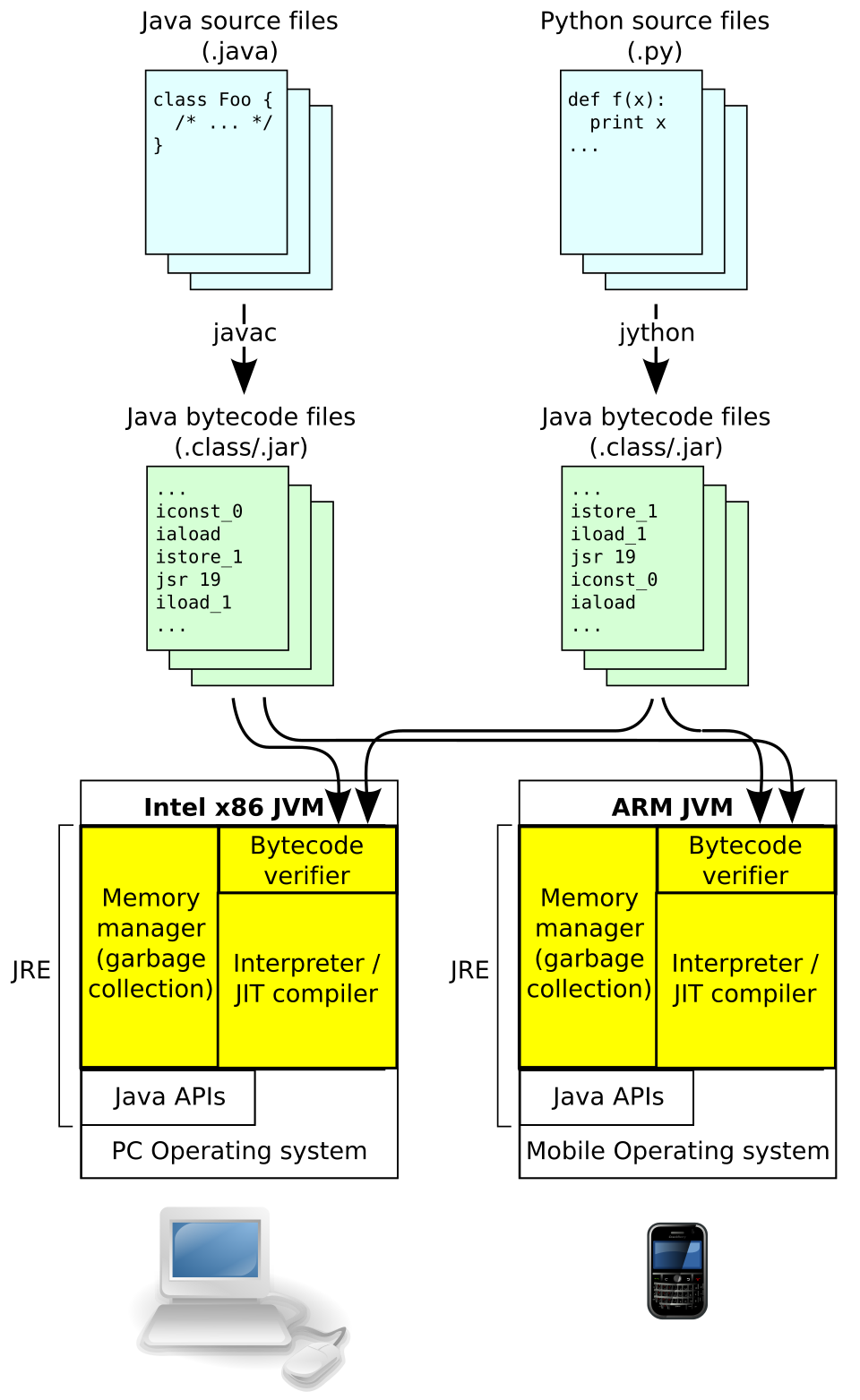 How Java bytecode runs on different OS via JVM (Image: Dcoetzee (File:Computer-blue.svg by OpenClipart, File:Phone-, CC0, via Wikimedia Commons)
2. Setting Up Java Environment
To write and run Java programs, you need:
- Java Development Kit (JDK) – Download from Oracle or OpenJDK.
- Text Editor/IDE – Notepad++, VS Code, Eclipse, or IntelliJ IDEA.
- Command Prompt/Terminal – For compiling (
javac) and running (java) programs.
Steps to Run a Java Program:
- Write code in a file (e.g.,
Hello.java). - Compile:
→ Generatesjavac Hello.javaHello.class(bytecode). - Run:
→ Executes the program.java Hello
Why Compilation?
- Java is not interpreted like Python; it compiles to bytecode first.
- The JVM executes bytecode, ensuring platform independence.
3. Basic Java Syntax & Structure
Every Java program must follow this structure:
// Single-line comment
/*
   Multi-line comment
*/
public class Main {          // Class name must match filename (Main.java)
    public static void main(String[] args) {  // Entry point
        System.out.println("Hello, World!");  // Statement ends with ;
    }
}
Key Components:
class– Blueprints for objects (e.g.,Car,BankAccount).main()method – Execution starts here (must bepublic static void).System.out.println()– Prints output to the console.;(semicolon) – Ends every statement.
4. Variables & Data Types
Java supports two types of data:
Primitive Data Types (fixed size, stored directly in memory):
Type Size (bits) Example Values Default Value byte8 -128 to 127 0 short16 -32,768 to 32,767 0 int32 -2B to 2B 0 long64 -9E18 to 9E18 0L float32 3.4e-038 to 3.4e+038 0.0f double64 1.7e-308 to 1.7e+308 0.0d char16 Unicode (e.g., 'A', '₹') '\u0000' boolean1 true/falsefalseReference Data Types (objects, stored in heap memory):
String,Array,Classobjects (e.g.,String name = "Ram";).
Variable Declaration & Initialization:
int age = 25;          // Primitive
String name = "Hari";  // Reference (String is a class)
Why int over long?
- Use
intfor general counting (faster, less memory). - Use
longfor large numbers (e.g., NEPSE stock prices in billions).
5. Operators in Java
Operators perform operations on variables and values.
| Category | Operators | Example |
|---|---|---|
| Arithmetic | +, -, *, /, % |
int sum = 10 + 5; |
| Relational | ==, !=, >, <, >=, <= |
if (age >= 18) { ... } |
| Logical | && (AND), ` |
|
| Assignment | =, +=, -=, *=, /= |
x += 5; (same as x = x + 5) |
| Bitwise | &, ` |
, ^, ~`, <<, >> |
Example: Compound Assignment
int x = 10;
x += 5;  // x = x + 5 → x = 15
6. Control Structures
A. Decision Making (if-else)
int marks = 85;
if (marks >= 90) {
    System.out.println("Grade: A");
} else if (marks >= 80) {
    System.out.println("Grade: B");
} else {
    System.out.println("Grade: C");
}
Mermaid Diagram:
flowchart TD
    A["Start"] --> B{"marks >= 90?"}
    B -->|"Yes"| C["Print 'A'"]
    B -->|"No"| D{"marks >= 80?"}
    D -->|"Yes"| E["Print 'B'"]
    D -->|"No"| F["Print 'C'"]
B. Loops
forloop (known iterations):for (int i = 1; i <= 5; i++) { System.out.println("Iteration: " + i); }whileloop (unknown iterations):int i = 1; while (i <= 5) { System.out.println("While loop: " + i); i++; }do-whileloop (executes at least once):int j = 1; do { System.out.println("Do-while: " + j); j++; } while (j <= 5);
Real-World Example: Daraz Order Processing
- A
forloop checks each order in a queue and updates stock. - A
whileloop waits for payment confirmation before dispatch.
7. Writing Your First Java Program
Example: Simple Calculator
import java.util.Scanner;  // For user input

public class Calculator {
    public static void main(String[] args) {
        Scanner scanner = new Scanner(System.in);  // Create Scanner object
        System.out.print("Enter first number: ");
        int num1 = scanner.nextInt();
        System.out.print("Enter second number: ");
        int num2 = scanner.nextInt();

        System.out.println("Sum: " + (num1 + num2));
        System.out.println("Product: " + (num1 * num2));
    }
}
Trace Table:
| Step | Action | num1 |
num2 |
Output |
|---|---|---|---|---|
| 1 | scanner.nextInt() |
10 | - | Waits for user input |
| 2 | User enters 10 |
10 | - | - |
| 3 | scanner.nextInt() |
10 | 5 | Waits for second input |
| 4 | User enters 5 |
10 | 5 | - |
| 5 | System.out.println(num1 + num2) |
10 | 5 | Prints Sum: 15 |
Real-World Tie-In: Khalti Payment App
- Uses
Scanner-like input handling for PIN entry. if-elsechecks validate transactions (e.g., sufficient balance).
8. Comments in Java
Comments improve readability and are ignored by the compiler.
// Single-line comment
/*
   Multi-line comment
   Used for explanations or disabling code blocks.
*/
public class Example {
    public static void main(String[] args) {
        // This prints "Hello"
        System.out.println("Hello, Java!");  // Ends with semicolon
    }
}
In the Real World
eSewa (Nepal)
- Uses Java’s multithreading to handle multiple payment requests simultaneously (e.g., electricity bill payments).
- Control structures validate user inputs (e.g., checking if the phone number matches the account).
Pathao (Ride-Hailing App)
- Arrays/Loops manage ride requests in a queue (FIFO order).
if-elsechecks driver availability before assigning a ride.
Ncell Recharge System
switch-case(covered later) routes calls to different recharge menus (e.g., 1 for talk-time, 2 for data).- Exception handling (Unit 6) manages invalid PIN entries.
Exam Tip
Syntax is Strict – Miss a semicolon (
;) or brace (})? Compilation error.- Always check for:
public classdeclaration.main()method signature (public static void main(String[] args)).- Proper indentation (not required but helps grading).
- Always check for:
Trace Tables Are Key – For loops and conditionals, show step-by-step variable changes (like the
Calculatortrace above). Examiners love this!Common Pitfalls:
- Forgetting
import java.util.Scanner;→ Error:Scannernot recognized. - Using
==forStringcomparison → Wrong: Use.equals()instead.String a = "Hello"; String b = "Hello"; System.out.println(a == b); // true (same reference in memory) System.out.println(a.equals(b)); // true (correct way)
- Forgetting
Practical Questions – Expect:
- Write a program to check if a number is prime (use loops).
- Calculate simple interest (formula:
P * R * T / 100). - Print a pattern (e.g., pyramid using nested loops).
Diagrams Help – For control flow, draw flowcharts (like the
if-elseexample above). Even if not asked, it clarifies logic.
Final Note: Master the basic syntax, variables, and control structures—they form the backbone of all Java programs. Practice writing small programs (e.g., calculator, grade checker) to build confidence. Good luck!
Based on the TU BIM syllabus for Object Oriented Programming with Java (IT234), unit 1.
Discussion
Loading…