Business Data Communication and NetworkingUnit 410 min read
Data Link Layer: Framing, MAC, LANs & Ethernet
Unit 4 of Business Data Communication and Networking explores the Data Link Layer (DLL), its sublayers (LLC and MAC), LAN technologies (Ethernet, Wi-Fi, Token Ring), framing, error detection, MAC addressing, and switching. It covers how devices communicate on the same network, how collisions are handled, and how LANs a
The Data Link Layer: Connecting Devices on the Same Network
The Data Link Layer (DLL) is the second layer of the OSI model, sitting between the Physical Layer (which transmits raw bits) and the Network Layer (which routes packets). Its primary job is to:
- Transfer data between adjacent network nodes (e.g., two computers on the same LAN).
- Handle access to shared media (like Ethernet cables or Wi-Fi channels).
- Detect and correct errors that occur during transmission.
- Manage device addressing (MAC addresses) and flow control.
Unlike the Physical Layer (which deals with signals and cables), the DLL ensures that data is correctly framed, delivered to the right device, and retransmitted if errors occur.
1. Structure of the Data Link Layer: LLC and MAC Sublayers
The DLL is divided into two sublayers:
- Logical Link Control (LLC) – Manages communication between devices and handles flow control and error checking.
- Media Access Control (MAC) – Controls how devices access the network medium (e.g., Ethernet cable or Wi-Fi channel).
mindmap
  root((Data Link Layer))
    LLC["Logical Link Control (Flow Control, Error Detection)"]
    MAC["Media Access Control (MAC Addressing, Access Methods)"]
Why split into two?
- LLC is protocol-independent (works with any MAC method).
- MAC depends on the physical medium (Ethernet, Wi-Fi, Token Ring).
2. Framing: Packaging Data for Transmission
Before data is sent over a network, it must be wrapped in a frame—a structured format that includes:
- Header (contains source/destination MAC addresses, protocol type).
- Payload (the actual data from the Network Layer).
- Trailer (contains error-checking bits, like CRC).
Ethernet Frame Structure (Most Common in LANs)
| Preamble (7 bytes) | SFD (1 byte) | Destination MAC (6 bytes) | Source MAC (6 bytes) | Type/Length (2 bytes) | Data (46-1500 bytes) | CRC (4 bytes) |
- Preamble + SFD (Start Frame Delimiter): Synchronizes sender/receiver clocks.
- MAC Addresses: Identify the sender and receiver (48-bit addresses, e.g.,
00:1A:2B:3C:4D:5E). - Type/Length: Indicates the upper-layer protocol (e.g., IPv4 =
0x0800). - CRC (Cyclic Redundancy Check): Detects errors in transmission.
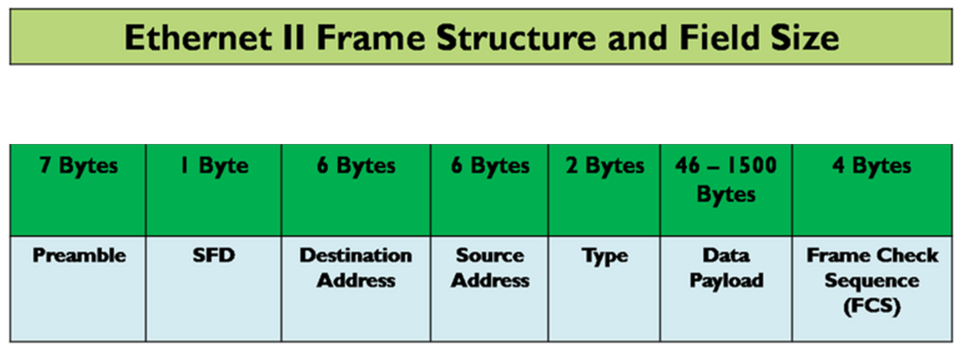 Ethernet II frame format with labeled fields (Image: Shahabalikhattak, CC BY-SA 4.0, via Wikimedia Commons)
Worked Example: Framing in a Bank’s ATM Network
When you swipe your card at an Nabil Bank ATM, the ATM sends a login request frame to the bank’s server:
- Destination MAC: Bank’s server MAC (
AA:BB:CC:DD:EE:FF). - Source MAC: ATM’s MAC (
11:22:33:44:55:66). - Type:
0x0800(IPv4). - Payload: Your card details (encrypted).
- CRC: Ensures no bit errors during transmission.
If the CRC fails, the ATM retransmits the frame.
3. MAC Addressing: Unique Identifiers for Devices
Every network interface card (NIC) has a 48-bit MAC address (e.g., 00:1A:2B:3C:4D:5E).
- First 24 bits (OUI): Manufacturer ID (e.g.,
00:1A:2B= Cisco). - Last 24 bits: Unique device ID.
How MAC Addresses Work in a LAN
- Broadcast: A device sends a frame with FF:FF:FF:FF:FF:FF (destination MAC) to all devices.
- Unicast: A frame sent to a specific MAC address.
- Multicast: A frame sent to a group of devices (e.g., IPTV streams).
Worked Example: MAC Addresses in a University Wi-Fi Network
When you connect to TU’s Wi-Fi, your laptop gets a dynamic MAC address from the DHCP server:
- Your laptop’s MAC:
A1:B2:C3:D4:E5:F6. - The router’s MAC:
00:11:22:33:44:55. - The switch uses MAC addresses to forward frames only to the correct port.
4. Media Access Control Methods: How Devices Share the Network
Since multiple devices share the same physical medium (e.g., Ethernet cable), we need access control methods:
| Method | Description | Pros | Cons | Used In |
|---|---|---|---|---|
| CSMA/CD | Devices listen before transmitting; if collision occurs, they back off and retry. | Simple, no central control. | Collisions waste bandwidth. | Ethernet (Old 10/100 Mbps) |
| CSMA/CA | Devices wait for a random time before transmitting (used in Wi-Fi). | Reduces collisions in wireless. | Still has collisions. | Wi-Fi (802.11) |
| Token Passing | Devices take turns using a token; only the token holder can transmit. | No collisions, fair access. | Slow, complex. | Token Ring (Old LANs) |
| Polling | A central controller asks each device if it has data. | No collisions. | Bottleneck at controller. | Old mainframe networks |
CSMA/CD (Carrier Sense Multiple Access with Collision Detection)
- Listen: Device checks if the medium is idle.
- Transmit: If idle, it sends data.
- Collision: If two devices transmit at once, a collision occurs.
- Backoff: Devices wait a random time before retrying.
Worked Example: CSMA/CD in a Busy Office LAN
- Scenario: Two employees (A and B) try to send files to the printer at the same time.
- Collision: Their frames collide.
- Backoff: Both wait randomly (e.g., A waits 1ms, B waits 2ms).
- Retry: A sends first, then B.
(Note: Modern switched Ethernet eliminates collisions by using dedicated paths.)
5. LAN Technologies: Ethernet, Wi-Fi, and Token Ring
A. Ethernet (Most Common LAN Technology)
- Uses CSMA/CD (old) or switch-based full-duplex (modern).
- Speed: 10 Mbps (old) → 10 Gbps (modern).
- Cabling: Twisted Pair (UTP), Fiber Optic, Coaxial.
B. Wi-Fi (Wireless LAN – 802.11)
- Uses CSMA/CA (avoids collisions via ACK frames).
- Channels: 2.4 GHz (11 channels) or 5 GHz (more channels, less interference).
- Security: WPA2/WPA3 (encryption).
Worked Example: Wi-Fi in a Café (Like a Starbucks in Nepal)
- Multiple laptops connect to the same access point (AP).
- If two devices transmit at once, CSMA/CA ensures they wait and retry.
- WPA3 encrypts your Khalti payment data.
C. Token Ring (Old Technology)
- Devices pass a token in a ring.
- Only the token holder can transmit.
- Disadvantage: If the token is lost, the network fails.
6. LAN Switches vs. Hubs vs. Routers
| Device | Function | Layer | Example |
|---|---|---|---|
| Hub | Broadcasts all frames to all ports (no intelligence). | Physical | Old 10 Mbps Ethernet hubs. |
| Switch | Learns MAC addresses and forwards frames only to the correct port. | Data Link | Cisco Catalyst switches. |
| Router | Connects different networks (LAN to WAN) using IP addresses. | Network | Home Wi-Fi router (connects LAN to ISP). |
Worked Example: Switch in a Corporate Network (Like Ncell HQ)
- Employee A (MAC: AA:BB:CC) sends a file to Employee B (MAC: DD:EE:FF).
- The switch checks its MAC table and forwards the frame only to Employee B’s port.
- No collisions, faster than a hub.
7. Error Detection: CRC and Hamming Codes
The Data Link Layer uses error detection to ensure data integrity.
| Method | How It Works | Used In |
|---|---|---|
| CRC (Cyclic Redundancy Check) | Sender appends a checksum; receiver recalculates and compares. | Ethernet, Wi-Fi, Storage. |
| Parity Bit | Adds an extra bit to detect single-bit errors. | Simple networks. |
| Hamming Code | Uses multiple parity bits to detect and correct errors. | Memory, old modems. |
Worked Example: CRC in a Daraz Order Processing System
- When you place an order on Daraz, the server sends a confirmation frame to your phone.
- Your phone’s Wi-Fi chip checks the CRC.
- If CRC fails, Daraz retransmits the frame.
In the Real World
eSewa Payments (Nepal)
- When you pay a NTC bill via eSewa, your phone sends a framed request to eSewa’s server.
- The MAC address of your phone and eSewa’s server ensure the data goes to the right place.
- CRC checks for errors in the payment confirmation.
Khalti Mobile Banking
- When you transfer money to a friend, Wi-Fi/Ethernet frames carry the transaction.
- Switches in Khalti’s data center forward frames based on MAC addresses.
- CSMA/CD (if using old Ethernet) or full-duplex switching ensures no collisions.
Pathao Ride Booking
- When you book a ride, your phone sends a frame to Pathao’s server.
- The MAC address of your phone and Pathao’s cloud server ensure correct delivery.
- Error detection (CRC) ensures the ride details (driver location, fare) are not corrupted.
Nepal Stock Exchange (NEPSE) Trading
- When a broker sends a buy/sell order, it is framed and sent over financial networks.
- Switches in NEPSE’s data center route frames to the correct stock server.
- CRC ensures no errors in share price updates.
Exam Tip
What Examiners Look For
✅ Framing: Know the Ethernet frame structure (Preamble, MAC addresses, CRC). ✅ MAC Addressing: Understand unicast, broadcast, multicast and how switches learn MAC tables. ✅ CSMA/CD vs. CSMA/CA: Know when collisions happen and how backoff works. ✅ LAN Technologies: Compare Ethernet, Wi-Fi, Token Ring (speeds, access methods). ✅ Error Detection: Explain CRC and how it detects errors. ✅ Switches vs. Hubs: Know why switches are better (no collisions, dedicated paths).
Common Mistakes to Avoid
❌ Confusing MAC and IP addresses (MAC = Data Link, IP = Network Layer). ❌ Forgetting the Preamble/SFD in Ethernet frames. ❌ Saying Wi-Fi uses CSMA/CD (it uses CSMA/CA). ❌ Assuming hubs and switches work the same (hubs broadcast, switches filter).
How to Score Full Marks
- Draw diagrams (Ethernet frame, MAC table, CSMA/CD flowchart).
- Relate to real-world examples (eSewa, Khalti, Daraz, NTC).
- Explain step-by-step processes (e.g., how a switch forwards a frame).
- Compare technologies (Ethernet vs. Wi-Fi vs. Token Ring in a table).
Final Thought: The Data Link Layer is like the traffic police of a network—it ensures data reaches the right device without errors, just like how Khalti ensures your money goes to the correct account. Master this unit, and you’ll understand how every device on a LAN communicates efficiently!
Based on the TU BIM syllabus for Business Data Communication and Networking (IT240), unit 4.
Discussion
Loading…