Operating SystemUnit 18 min read
OS Basics: Functions, Services, Types & Evolution
Unit 1 of Operating System covers the core concepts of operating systems, including their definitions, functions, services, types, and historical evolution, with real-world applications and exam-focused insights.
TAKEAWAYS:
- An operating system (OS) is system software that manages hardware, provides services to applications, and acts as an intermediary between users and the computer.
- OS provides five key services: process management, memory management, file management, I/O management, and security.
- There are three main types of OS: batch, time-sharing, and real-time, each suited for different computing needs.
- The evolution of OS from early systems to modern ones reflects advancements in hardware and user demands.
- Linux is a widely used open-source OS with a modular design, making it ideal for servers, embedded systems, and desktops.
- Understanding OS layers helps visualize how hardware and software interact, from the kernel to user applications.
What is an Operating System?
An operating system (OS) is a system software that acts as an intermediary between hardware and software applications. It manages system resources, provides common services, and ensures efficient execution of programs.
Key Functions of an OS
An OS performs the following core functions:
- Process Management: Creates, schedules, and terminates processes.
- Memory Management: Allocates and deallocates memory to processes.
- File Management: Organizes and manages files and directories.
- I/O Management: Controls input/output devices (keyboard, printer, disk, etc.).
- Security & Protection: Ensures secure access to system resources.
Why Do We Need an OS?
Without an OS, a computer would be useless because:
- Users would have to manually manage hardware.
- Programs would compete for resources without control.
- Data would be unorganized and inaccessible.
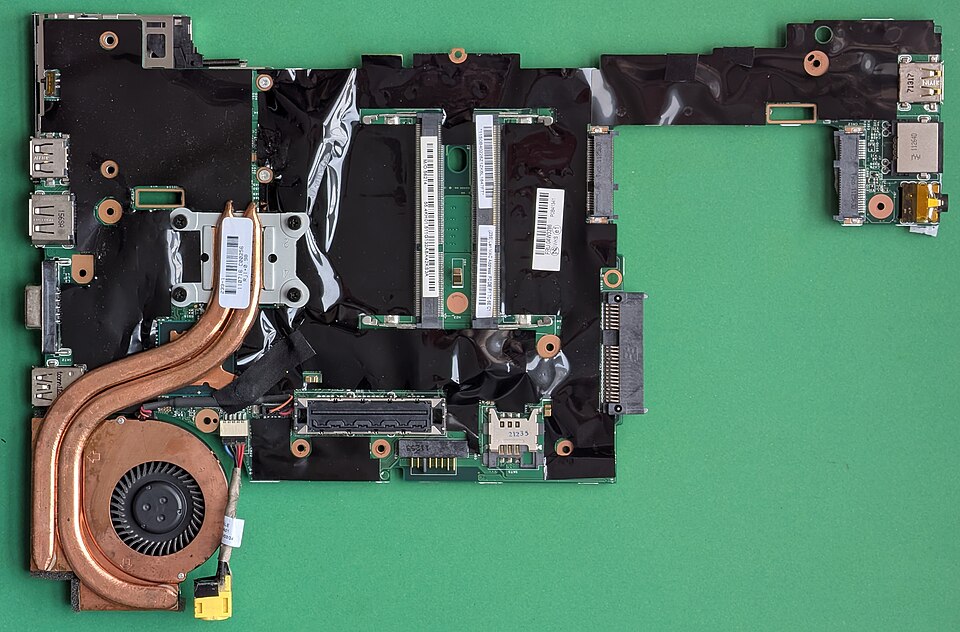 Hardware components managed by the OS (Image: Siarhei Besarab, CC BY-SA 4.0, via Wikimedia Commons)
Services Provided by an OS
An OS provides five major services to users and applications:
| Service | Description | Example |
|---|---|---|
| Process Management | Creates, schedules, and terminates processes. | Windows Task Manager, Linux ps command. |
| Memory Management | Allocates and deallocates memory to processes. | Virtual memory in Windows/Linux. |
| File Management | Organizes files and directories in a hierarchical structure. | Windows Explorer, Linux ls command. |
| I/O Management | Controls input/output devices (keyboard, printer, disk, etc.). | USB driver management in macOS. |
| Security | Protects system resources from unauthorized access. | User authentication in Android/iOS. |
Types of Operating Systems
OS can be classified into three main types based on their usage:
1. Batch Operating System
- Definition: Executes jobs in batches without user interaction.
- How it works:
- Jobs are grouped into batches.
- A monitor program controls job execution.
- Output is collected and given to users later.
- Advantages:
- Efficient for large-scale processing.
- Minimal user intervention.
- Disadvantages:
- No user interaction during execution.
- Slow response time.
- Example: Early mainframe systems (e.g., IBM’s OS/360).
2. Time-Sharing (Multitasking) OS
- Definition: Allows multiple users to share a single system simultaneously.
- How it works:
- CPU time is divided among users.
- Each user gets a time slice (e.g., 100ms).
- Users interact via terminals.
- Advantages:
- Fast response time.
- Multiple users can work at once.
- Disadvantages:
- Requires more memory and CPU power.
- Security risks if not properly managed.
- Example: Unix, Linux, Windows Server.
3. Real-Time Operating System (RTOS)
- Definition: Designed for time-critical applications where deadlines must be met.
- Types:
- Hard RTOS: Must meet deadlines (e.g., medical devices, aviation).
- Soft RTOS: Best-effort deadline meeting (e.g., multimedia systems).
- How it works:
- Uses priority-based scheduling.
- Guarantees deterministic response times.
- Advantages:
- High reliability and predictability.
- Used in critical systems.
- Disadvantages:
- Complex to design.
- Requires specialized hardware.
- Example: VxWorks (used in drones, industrial control).
Evolution of Operating Systems
The OS has evolved from simple batch systems to modern multitasking and distributed systems:
| Era | OS Example | Key Features |
|---|---|---|
| 1940s-1950s | Batch Systems | No user interaction, jobs executed in batches. |
| 1960s | Time-Sharing (Unix) | Multiple users, interactive computing. |
| 1970s-1980s | Personal OS (DOS) | Single-user, command-line interface. |
| 1990s-Present | GUI OS (Windows, macOS, Linux) | Graphical user interface, multitasking, networking. |
In the Real World
eSewa (Nepal)
- Uses a time-sharing OS (Linux-based servers) to handle thousands of transactions simultaneously.
- Process management ensures smooth execution of payment requests.
Pathao (Ride-Hailing App)
- Relies on a real-time OS for driver location tracking and ride matching.
- I/O management handles GPS data and user requests efficiently.
Nepal Rastra Bank (NRB) Systems
- Uses Linux-based servers for financial transactions.
- Memory management ensures secure handling of large databases.
Linux: A Case Study
Linux is a popular open-source OS used in servers, embedded systems, and desktops.
Key Features of Linux
- Open-source: Free and customizable.
- Modular design: Kernel + user-space utilities.
- Multi-user & multitasking: Supports multiple users and processes.
- Security: Strong permission and access control.
Linux Architecture
Exam Tip
- Define OS clearly (system software, manages hardware/software).
- Compare Batch vs. Time-Sharing vs. Real-Time OS in a table.
- Explain Linux architecture with a layered diagram.
- Relate real-world examples (eSewa, Pathao, NRB) to OS concepts.
- Memorize key terms:
- Process Management → CPU scheduling.
- Memory Management → Virtual memory.
- File Management → Directory structure.
Final Note: Always visualize OS concepts (layers, types, evolution) to score full marks in exams!
Based on the TU BIM syllabus for Operating System (IT241), unit 1.
Discussion
Loading…