Operating SystemUnit 614 min read
Memory Management: Allocation, Swapping, Paging, Segmentation & Virtual Memory
Unit 6 of Operating System: Covers how OS manages primary and secondary memory, including allocation strategies (contiguous, paging, segmentation), swapping, memory protection, and virtual memory techniques (demand paging, page replacement algorithms) with real-world examples from Nepalese apps and hardware.
TAKEAWAYS:
- Memory management ensures efficient use of limited RAM by allocating, deallocating, and protecting memory for processes.
- Contiguous allocation (single/multiple partitions) is simple but suffers from fragmentation; paging and segmentation solve this.
- Virtual memory extends physical memory using disk storage, with page replacement algorithms (FIFO, LRU, Optimal) determining which pages to swap out.
- Memory protection prevents processes from accessing unauthorized memory via base/bound registers, page tables, or segmentation tables.
- Swapping moves entire processes between RAM and disk to free up memory, but causes high I/O overhead.
- Thrashing occurs when a system spends more time swapping than executing, degrading performance.
1. Introduction to Memory Management
Memory management is the core function of an OS that controls and coordinates the use of primary (RAM) and secondary (disk) memory. Its goals are:
- Efficient utilization of available memory.
- Protection of memory from unauthorized access.
- Fast access to data by processes.
Why is Memory Management Needed?
- Limited RAM: Physical memory (RAM) is finite, but processes require more memory than available.
- Process isolation: Prevent one process from interfering with another.
- Dynamic allocation: Assign memory to processes as they arrive and release it when they terminate.
Key Terms
| Term | Definition |
|---|---|
| Physical Memory | RAM (volatile, fast access). |
| Logical Memory | Memory as seen by a process (virtual address space). |
| Memory Allocation | Assigning memory to processes (static/dynamic). |
| Fragmentation | Wasted memory due to unused gaps (external/internal). |
| Swapping | Moving entire processes between RAM and disk. |
| Virtual Memory | Using disk as an extension of RAM (via paging/segmentation). |
2. Memory Allocation Techniques
Memory allocation determines how memory is divided among processes. The three main techniques are:
A. Contiguous Memory Allocation
Processes are allocated contiguous blocks of memory. Two types:
Single Partition Allocation
- Entire memory is allocated to one process at a time (e.g., early OS like MS-DOS).
- Disadvantages:
- Only one process can run at a time (no multitasking).
- Inefficient for modern systems.
Multiple Partition Allocation
- Memory is divided into fixed or variable partitions.
- Fixed Partition:
- Memory is divided into fixed-size blocks (e.g., 100KB, 200KB).
- Problem: Wastage due to external fragmentation (unused gaps between allocated blocks).
- Example:
[Process A (150KB)] [Free (50KB)] [Process B (200KB)] [Free (100KB)]
- Variable Partition:
- Partitions are dynamically allocated based on process size.
- Problems:
- External fragmentation: Free memory is scattered in small chunks.
- Compaction: OS periodically shifts processes to combine free blocks (costly).
B. Paging
- **Divides physical memory into fixed-size blocks called pages (e.g., 4KB).
- **Logical memory is divided into page frames (same size as pages).
- Page Table: Maps logical pages to physical frames.
- Advantages:
- No external fragmentation (since all pages are fixed-size).
- Efficient memory utilization.
- Disadvantages:
- Internal fragmentation: If a process needs 5KB but a page is 4KB, 1KB is wasted.
- Overhead of page tables (extra memory usage).
How Paging Works:
- Process arrives → OS divides its memory into pages.
- Page Table is created to map logical pages to physical frames.
- Page Fault: If a page is not in RAM, it is loaded from disk (via virtual memory).
Example: Suppose a process needs 12KB, and page size = 4KB.
- Number of pages = ceil(12KB / 4KB) = 3 pages.
- If physical memory has free frames: 1, 5, 6 → OS maps:
- Page 0 → Frame 1
- Page 1 → Frame 5
- Page 2 → Frame 6
C. Segmentation
- Divides memory into variable-sized segments (e.g., code, data, stack).
- Each segment has a base and limit register to protect memory.
- Advantages:
- Logical grouping: Related data (e.g., code, stack) is kept together.
- No internal fragmentation (since segments fit exactly).
- Disadvantages:
- External fragmentation (like variable partitioning).
- Complexity in allocation (segment table management).
Example: A process has:
- Code segment: 5KB
- Data segment: 3KB
- Stack segment: 2KB → OS allocates non-contiguous memory blocks for each segment.
D. Paging vs. Segmentation
| Feature | Paging | Segmentation |
|---|---|---|
| Memory Division | Fixed-size pages | Variable-size segments |
| Fragmentation | Internal fragmentation | External fragmentation |
| Logical Grouping | No (arbitrary division) | Yes (code, data, stack) |
| Protection | Page table + protection bits | Base/limit registers |
| Overhead | Page table entries | Segment table entries |
Combined Approach: Paged Segmentation
- Segments are divided into pages (best of both worlds).
- Used in modern OS like Linux, Windows.
3. Memory Protection and Sharing
A. Memory Protection
Prevents processes from accessing unauthorized memory. Methods:
Base and Limit Registers (Segmentation)
- Base: Starting address of the segment.
- Limit: Size of the segment.
- Check: If a process accesses address
A, verify:Base ≤ A ≤ Base + Limit - 1.
Page Table Protection Bits
- Each page table entry has read/write/execute bits.
- Example: If a process tries to write to a read-only page → segmentation fault.
Relocation Registers (Paging)
- Stores the base address of the process in physical memory.
- Logical address =
Page Number × Page Size + Offset. - Physical address =
(Relocation Register) + (Page Frame × Page Size) + Offset.
B. Memory Sharing
Allows multiple processes to access the same memory region.
- Shared Code: Multiple processes can run the same program (e.g., multiple users running
lsin Linux). - Shared Data: Databases, file systems.
- Implemented via:
- Shared pages (paging).
- Shared segments (segmentation).
Example: Ncell’s Billing System
- Multiple users access the same billing database.
- Shared memory ensures all users see the latest data without duplication.
4. Swapping
- Moves entire processes between RAM and disk to free up memory.
- Two types:
- Swap-in: Load a process from disk to RAM.
- Swap-out: Move a process from RAM to disk.
- Disadvantages:
- High I/O overhead (disk access is slow).
- Thrashing: Excessive swapping degrades performance.
When is Swapping Used?
- When RAM is full and a new process arrives.
- When a low-priority process is running.
Example: Pathao Driver App
- If Pathao’s app is in the background and RAM is low, the OS may swap it out to disk.
- When the user opens the app again, it is swapped back in.
5. Virtual Memory
Extends physical memory using disk storage (swap space). Key concepts:
- Logical vs. Physical Address:
- Logical address: Generated by CPU (process view).
- Physical address: Actual RAM location.
- Page Table: Maps logical pages to physical frames.
- Page Fault: When a page is not in RAM, it is loaded from disk.
A. Demand Paging
- Pages are loaded only when needed (lazy loading).
- Advantages:
- Reduces I/O overhead (only necessary pages are loaded).
- More efficient than swapping entire processes.
- Disadvantages:
- Page fault overhead (if too many faults, performance drops).
Example: YouTube Buffering
- When you play a video, YouTube preloads pages (chunks of the video) into RAM.
- If you skip ahead, new pages are loaded on-demand.
B. Page Replacement Algorithms
When RAM is full and a new page needs to be loaded, the OS must replace an existing page. Common algorithms:
| Algorithm | Description | Example Scenario |
|---|---|---|
| FIFO | Replace the oldest page in memory. | First-in, first-out (like a queue). |
| LRU | Replace the Least Recently Used page. | Tracks page access time. |
| Optimal | Replace the page not used for the longest time in the future (theoretical). | Impossible to implement in practice. |
| Clock (NRU) | Approximates LRU using a circular list with reference bits. | Used in Unix. |
Worked Example: LRU Page Replacement
- Page Reference String:
1, 2, 3, 4, 1, 2, 5, 1, 2, 3, 4, 5 - Frames: 3
- Steps:
- Load
1, 2, 3→ Frames:[1, 2, 3] - Load
4→ Replace1(oldest) →[4, 2, 3] - Load
1→ Replace4→[1, 2, 3] - Load
5→ Replace2→[1, 5, 3] - Continue until all references are processed.
- Load
sequenceDiagram
    participant CPU
    participant PageTable
    participant RAM
    participant Disk

    CPU->>PageTable: Request Page 1
    PageTable->>RAM: Page 1 not found (Page Fault)
    PageTable->>Disk: Load Page 1
    Disk-->>RAM: Page 1 loaded
    RAM-->>PageTable: Page 1 mapped
    PageTable-->>CPU: Page 1 served
C. Thrashing
- Excessive page faults occur when a process is constantly swapping pages.
- Cause: Insufficient RAM for active processes.
- Solution:
- Increase RAM.
- Use better page replacement algorithms.
- Reduce the number of active processes.
Example: NTC Website During Peak Hours
- If too many users access NTC’s website simultaneously, the server may thrash, causing slow responses.
- Solution: Use more RAM or optimize page replacement.
6. Memory-Mapped Files
- Maps a file directly to a region of virtual memory.
- Advantages:
- Efficient I/O: No need to read/write files explicitly (OS handles it).
- Simplified programming: Treat files like memory.
- Used in:
- Databases (e.g., SQLite).
- File systems (e.g., Linux
mmap()).
Example: eSewa Transaction Logs
- eSewa stores transaction logs in a file.
- Instead of reading the file line-by-line, it maps the file to memory for faster access.
## In the Real World
Khalti’s Payment Processing
- Idea Used: Memory protection and sharing.
- How: Multiple users access Khalti’s servers simultaneously. The OS uses shared memory to ensure all transactions are processed efficiently without duplication. Page tables protect each user’s data from unauthorized access.
Daraz’s Order Fulfillment Queue
- Idea Used: Paging and virtual memory.
- How: Daraz’s servers handle thousands of orders. The OS uses demand paging to load only the necessary order pages into RAM, reducing I/O overhead. If RAM is full, LRU page replacement ensures frequently accessed orders stay in memory.
Ncell’s Customer Support Chatbot
- Idea Used: Swapping and segmentation.
- How: The chatbot runs in the background. If RAM is low, the OS may swap out less critical processes (like the chatbot) to disk. When a customer messages, the chatbot is swapped back in and runs in its own segmented memory space (code, data, stack) for protection.
## Exam Tip
- Understand the difference between contiguous, paging, and segmentation allocation – examiners often ask comparison-based questions.
- Page replacement algorithms are high-weight topics – be ready to calculate page faults for FIFO, LRU, and Optimal.
- Virtual memory is key – explain demand paging, page faults, and thrashing with examples.
- Memory protection mechanisms (base/limit registers, page table bits) are often asked in short-answer questions.
- Real-world applications – relate concepts to Nepali apps (eSewa, Khalti, Daraz) or global tech (YouTube, WhatsApp).
- Diagrams are mandatory – always draw:
- Paging vs. segmentation (memory division).
- Page table entry format.
- Page replacement algorithm steps (e.g., LRU trace).
- Common mistakes to avoid:
- Confusing internal vs. external fragmentation.
- Forgetting that Optimal is theoretical (cannot be implemented).
- Ignoring memory protection in questions about allocation.
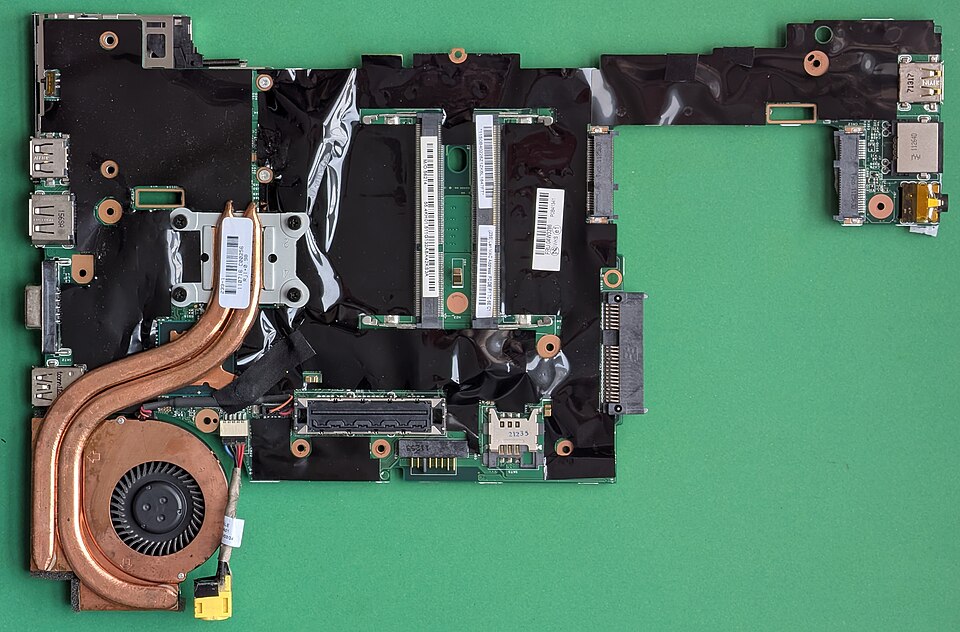 A real motherboard showing RAM slots and modules, illustrating physical memory allocation. (Image: Siarhei Besarab, CC BY-SA 4.0, via Wikimedia Commons)
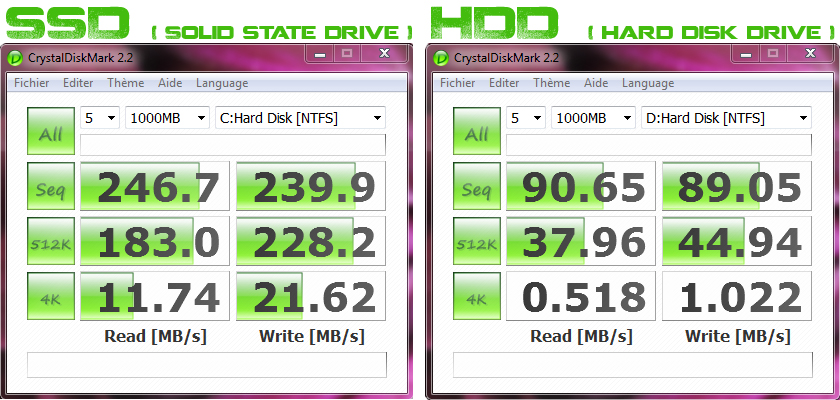 Comparison of disk storage (swap space) vs. RAM, highlighting why disk is slower but necessary for virtual memory. (Image: BlooodMotion, CC BY-SA 3.0, via Wikimedia Commons)
Based on the TU BIM syllabus for Operating System (IT241), unit 6.
Discussion
Loading…