Multimedia System ApplicationUnit 610 min read
Animation: Types, Techniques, Tools & Applications
Unit 6 of Multimedia System Application covers the principles of animation—from traditional frame-by-frame techniques to modern digital tools—exploring key concepts like motion principles, animation software, and real-world applications in gaming, advertising, and multimedia projects.
What is Animation?
Animation is the art of creating the illusion of movement by displaying a sequence of static images (frames) in rapid succession. The human eye perceives these frames as continuous motion due to persistence of vision (the brain retains an image for a fraction of a second after it disappears).
Key Principles of Animation
Animation relies on 12 fundamental principles (developed by Disney animators), but the most critical ones are:
- Squash and Stretch: Objects deform to show weight and movement (e.g., a bouncing ball flattens on impact).
- Anticipation: Preparing the audience for an action (e.g., a character winding up before throwing a punch).
- Timing and Spacing: Controls the speed and fluidity of motion (e.g., a slow zoom vs. a quick punch).
- Arcs: Natural movement follows curved paths (e.g., a thrown object doesn’t travel in a straight line).
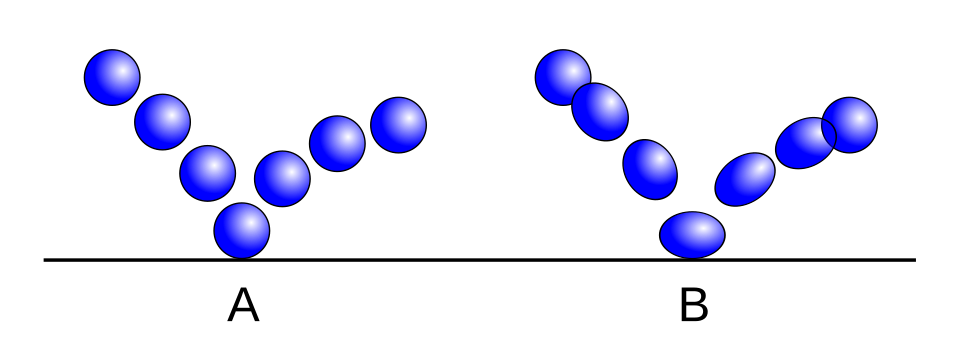 Illustrates how a bouncing ball deforms on impact (Squash and Stretch principle) (Image: Lampman, CC BY-SA 3.0, via Wikimedia Commons)
Types of Animation
Animation can be classified based on technique and medium. Below is a comparison table of major types:
| Type | Description | Examples | Tools/Software |
|---|---|---|---|
| Traditional (2D) | Hand-drawn frames on paper or digital tablets. | Disney’s Snow White, Spider-Man (2018) | Adobe Animate, Toon Boom |
| Stop Motion | Physical objects moved incrementally and photographed frame-by-frame. | Wallace and Gromit, Laika films | Dragonframe, Stop Motion Studio |
| 3D Animation | Computer-generated models with lighting, textures, and physics. | Toy Story, Avatar | Blender, Maya, Cinema 4D |
| Motion Graphics | Animated text, logos, or abstract designs (often for UI/ads). | YouTube intros, Google Doodles | After Effects, Premiere Pro |
| Cutout Animation | Pre-drawn characters moved on a digital stage (like puppets). | South Park, Over the Garden Wall | Adobe Character Animator |
| Rotoscoping | Animators trace over live-action footage frame-by-frame. | A Scanner Darkly, Waking Life | Rotoscoping tools in After Effects |
How Animation Works: Frame-by-Frame vs. Motion Capture
1. Frame-by-Frame Animation
- Each frame is manually created or altered.
- Pros: Full creative control, high detail.
- Cons: Time-consuming (e.g., 24 frames/sec = 1.44k frames per minute).
2. Motion Capture (MoCap)
- Real actors’ movements are recorded (via sensors or cameras) and applied to 3D models.
- Pros: Natural human motion, faster than manual keyframing.
- Cons: Requires expensive equipment, less control over final output.
Worked Example: Animating a Bouncing Ball (2D)
Let’s trace how a simple bouncing ball is animated using squash and stretch and timing:
Keyframes:
- Frame 1: Ball at rest (circle).
- Frame 12: Ball stretches downward as it falls.
- Frame 24: Ball squashes on impact (flattened).
- Frame 36: Ball stretches upward as it bounces back.
- Frame 48: Ball returns to original shape.
In-Betweening:
- Animators add intermediate frames (e.g., 6–11, 18–23) to smooth the motion.
- Timing: The ball spends more frames squashed (showing weight) than stretched.
Real-World Tie-In:
- Pathao’s Delivery Animation: The app uses motion graphics to show real-time rider movement. The squash-and-stretch principle is subtly applied to the rider’s avatar to imply acceleration/deceleration, making the UI feel dynamic.
Animation Software and Workflow
Popular Tools for Different Needs
| Software | Best For | Learning Curve | Cost |
|---|---|---|---|
| Blender | 3D modeling, rigging, rendering | Steep | Free |
| Adobe Animate | 2D vector animation, web ads | Moderate | Paid (~$20/month) |
| After Effects | Motion graphics, VFX | Moderate | Paid (~$20/month) |
| Toon Boom | Traditional 2D animation | High | Paid (~$300/year) |
| Stop Motion Studio | Stop motion, puppetry | Easy | Free/Paid |
Basic Animation Workflow in Blender (3D)
- Modeling: Create or import a 3D object (e.g., a cube).
- Rigging: Add bones to the model for deformable parts (e.g., a character’s arm).
- Keyframing:
- Select the cube → Move it to position A → Insert keyframe (I → Location).
- Move to position B → Insert another keyframe.
- Interpolation: Blender automatically calculates in-between frames.
- Rendering: Export as a video or GIF.
In the Real World
eSewa’s Loading Animations:
- Uses motion graphics (spinning circles, progress bars) to reduce user frustration during payment processing. The principle of anticipation is applied—users expect feedback, so a loading spinner prepares them for delays.
Daraz’s Product Demo Videos:
- Leverages 3D animation to showcase products (e.g., a rotating shoe or a zoom-in on fabric textures). This reduces the need for physical photoshoots and allows dynamic angles.
NTC’s Traffic Simulation Ads:
- Stop-motion or 2D cutout animation is used to explain traffic rules (e.g., a car “stopping” frame-by-frame at a red light). This makes complex rules easier to digest.
Khalti’s Transaction Confirmation:
- After a payment, Khalti shows a short looped animation (e.g., a checkmark growing or a confetti burst). This uses exaggeration and timing to reinforce success visually.
Challenges and Limitations
- Performance: High-resolution animations (e.g., 4K 60fps) require powerful hardware.
- File Size: Uncompressed animation files can be gigabytes (e.g., a 1-minute 3D render).
- Learning Curve: Mastering tools like Blender or Maya takes hundreds of hours.
- Copyright: Using assets (music, models) without licenses can lead to legal issues.
Exam Tip
- Define Clearly: Start answers with precise definitions (e.g., “Animation is the rapid display of sequential images to create the illusion of motion…”).
- Compare Types: Questions often ask to contrast 2D vs. 3D vs. stop motion. Use the table above as a template.
- Diagrams: Always sketch a timeline or frame sequence for motion questions. Even a rough 4-frame example scores marks.
- Real-World Links: Connect concepts to Nepali apps (e.g., “Like Pathao’s rider avatars, squash and stretch can imply speed…”).
- Software Names: Know the primary use of tools (e.g., “Blender is open-source and used for 3D rendering…”).
- Common Pitfalls:
- Don’t confuse rotoscoping (tracing live-action) with motion capture (recording movement).
- Avoid vague terms like “computer animation”—specify 2D/3D/motion graphics.
Practice Question: “Explain how stop-motion animation differs from 3D animation, and give one Nepali example of each.” Model Answer: Stop-motion animation involves physically moving real objects and photographing them frame-by-frame (e.g., Wallace and Gromit), while 3D animation uses digital models and keyframing (e.g., Toy Story).
- Nepali Example 1: A local ad for Fanta might use stop-motion with Lego-like characters to show product fun.
- Nepali Example 2: Ncell’s promotional videos often use 3D animation for character designs (e.g., the Ncell mascot).
Based on the TU BIM syllabus for Multimedia System Application (IT273), unit 6.
Discussion
Loading…