Introduction to Information TechnologyUnit 1011 min read
Communication & Data Transmission: Signals, Media, Protocols, Modems, and Networks
Unit 10 of Introduction to Information Technology explores how data travels through computers and networks—from analog/digital signals to transmission media, modulation, protocols, and real-world applications like e-commerce, IoT, and mobile telephony. You’ll learn how data is encoded, transmitted, and received, along
TAKEAWAYS:
- Data transmission converts signals into binary (0s and 1s) for computers to process, using analog (voice, radio waves) or digital (pulses) formats.
- Transmission media (cables, wireless) determine speed, cost, and reliability—e.g., fiber optics for high-speed data vs. twisted pair for local networks.
- Modems bridge analog (phone lines) and digital (computer) signals, while modulation (e.g., AM/FM) encodes data onto carrier waves for wireless transmission.
- Network protocols (e.g., TCP/IP, HTTP) define rules for data exchange, ensuring error-free delivery in apps like WhatsApp or eSewa transactions.
- Multiplexing (FDM, TDM) shares bandwidth efficiently, used in NTC’s 4G networks to serve multiple users simultaneously.
- Data rates (bps, kbps, Mbps) and latency (delay) impact real-time services like Pathao ride-hailing or live YouTube streams.
1. Data Transmission Basics
Data transmission is the process of sending digital information from one device to another via electrical, optical, or wireless signals. Computers use binary (0s and 1s) to represent data, but transmission media often require analog signals (e.g., voice over phone lines). The key challenge is converting between analog and digital formats.
Analog vs. Digital Signals
flowchart TD
    A["Analog Signal"] -->|"Continuous wave"| B["Sine wave: amplitude/variation over time"]
    C["Digital Signal"] -->|"Discrete pulses"| D["Binary: 0s and 1s"]
    B -->|"Example: Voice, radio"| E["Human speech"]
    D -->|"Example: Computer data"| F["Files, emails, videos"]
Worked Example: eSewa Transaction When you pay via eSewa, your request (digital data) is converted to an analog signal for transmission over a phone line or wireless network. The bank’s server decodes it back to digital to process your payment.
2. Transmission Media
Media are the physical or wireless paths through which data travels. They vary in speed, cost, and susceptibility to interference.
Guided Media (Wired)
| Type | Description | Advantages | Disadvantages | Real-World Use |
|---|---|---|---|---|
| Twisted Pair | Copper wires twisted to reduce interference. | Cheap, easy to install. | Limited bandwidth (~100 Mbps), prone to EMI. | NTC’s DSL internet, office LANs. |
| Coaxial Cable | Thick copper core with insulating foil (e.g., RG-59). | High bandwidth (~500 Mbps), resistant to EMI. | Bulky, expensive. | Cable TV (e.g., Ncell’s broadband). |
| Fiber Optic | Thin glass fibers transmitting light pulses (lasers). | Extremely high speed (~10 Gbps), immune to EMI. | Expensive, requires special equipment. | NEPSE’s stock market data, NTC’s backbone. |
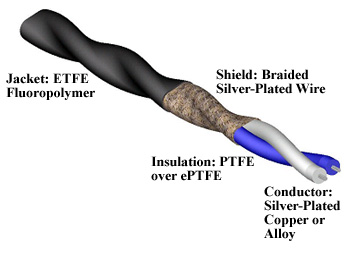 Shows twisted copper pairs with insulation and connectors (RJ-45). (Image: Oyuhain, CC BY-SA 4.0, via Wikimedia Commons)
Unguided Media (Wireless)
- Radio Waves: Used in Wi-Fi, Bluetooth, and mobile networks (e.g., Ncell’s 5G).
- Microwaves: High-frequency signals for satellite communication (e.g., YouTube streaming via satellites).
- Infrared: Short-range (e.g., TV remotes, some smart home devices).
Worked Example: NTC’s 4G Network NTC uses microwave signals (unguided media) to transmit 4G data between cell towers. Each tower covers a cell, and frequency reuse (sharing frequencies across cells) maximizes capacity.
3. Modulation and Demodulation
Since computers use digital signals but many media (e.g., phone lines) require analog signals, modems (modulator-demodulator) convert between the two.
Modulation Techniques
- Amplitude Modulation (AM): Varies the amplitude of a carrier wave (e.g., radio stations).
- Frequency Modulation (FM): Varies the frequency (e.g., FM radio).
- Phase Modulation (PM): Varies the phase (used in digital modems).
Mermaid Diagram: Modem Workflow
sequenceDiagram
    participant Computer as Digital Data
    participant Modem as Modem
    participant PhoneLine as Analog Signal
    participant Receiver as Modem (Other End)

    Computer->>Modem: Sends binary (0s/1s)
    Modem->>PhoneLine: Converts to analog (AM/FM)
    PhoneLine->>Receiver: Transmits analog signal
    Receiver->>Modem: Demodulates back to digital
    Modem->>Computer: Delivers data
Real-World Tie: WhatsApp Calls WhatsApp uses VoIP (Voice over IP), where your voice is digitized, compressed, and transmitted over the internet. The modem in your router converts this digital data into analog signals for your ISP (e.g., NTC) to transmit via fiber optic cables.
4. Data Transmission Modes
How data flows between devices:
- Simplex: One-way communication (e.g., TV broadcast).
- Half-Duplex: Two-way but not simultaneously (e.g., walkie-talkie).
- Full-Duplex: Two-way simultaneous (e.g., phone call, WhatsApp chat).
Mermaid Diagram: Transmission Modes
5. Network Protocols
Protocols are rules that govern data exchange. Without them, devices couldn’t communicate. Key protocols:
- TCP/IP: Foundation of the internet (e.g., HTTP for websites, FTP for file transfers).
- HTTP/HTTPS: Rules for web communication (e.g., Daraz’s order processing).
- Wi-Fi (IEEE 802.11): Standards for wireless LANs.
Worked Example: Daraz Order Processing When you order on Daraz:
- Your request (HTTP) travels via TCP/IP to Daraz’s server.
- The server checks inventory (database query) and sends a confirmation packet back.
- Your phone’s modem converts the digital response to an analog signal for your ISP to deliver.
6. Multiplexing
Multiplexing allows multiple signals to share a single transmission medium efficiently.
| Type | Description | Example Use |
|---|---|---|
| FDM (Frequency Division) | Divides bandwidth by frequency (e.g., TV channels). | Cable TV (multiple channels on one coaxial cable). |
| TDM (Time Division) | Shares time slots (e.g., phone calls). | NTC’s 4G network (multiple users per tower). |
| WDM (Wavelength Division) | Uses different light wavelengths in fiber optics. | NEPSE’s high-speed stock market data. |
Mermaid Diagram: TDM in NTC’s 4G
sequenceDiagram
  participant User1 as User 1
  participant User2 as User 2
  participant Tower as Cell Tower

  Tower->>User1: Time Slot 1 (Data for User1)
  Tower->>User2: Time Slot 2 (Data for User2)
  loop
    Tower->>User1: Alternates slots (e.g., Slot 1, Slot 3, Slot 5...)
    Tower->>User2: Alternates slots (e.g., Slot 2, Slot 4, Slot 6...)
  end
  note right of Tower: **TDM Efficiency**
  note right of User1: Multiple users share bandwidth
  note right of User2: No interference between slots
7. Data Rates and Latency
- Data Rate: Speed of transmission (e.g., 1 Mbps = 1 million bits/sec).
- Worked Example: Ncell’s 5G offers 1 Gbps, while NTC’s DSL maxes at ~50 Mbps.
- Latency: Delay in data transmission (measured in milliseconds).
- Worked Example: Pathao’s ride-hailing app needs <100 ms latency to show real-time driver locations.
Comparison Table: Common Data Rates
| Service | Data Rate | Latency | Real-World Use |
|---|---|---|---|
| Dial-up | 56 kbps | 500–1000 ms | Legacy phone connections. |
| DSL | 1–100 Mbps | 20–50 ms | NTC’s broadband. |
| 4G | 10–100 Mbps | 30–50 ms | Mobile data (Ncell). |
| 5G | 1–10 Gbps | 1–10 ms | Ultra-fast apps (Pathao, YouTube). |
8. Error Detection and Correction
Transmission errors occur due to noise or interference. Techniques include:
- Parity Bit: Simple error detection (odd/even bits).
- Checksum: Sum of data bytes to detect errors.
- CRC (Cyclic Redundancy Check): More robust error detection (used in Wi-Fi).
Mermaid Diagram: CRC Error Detection
flowchart TD
    A["Data"] -->|"Add CRC bits"| B["Transmitted Data"]
    B -->|"Noise"| C["Received Data"]
    C -->|"Check CRC"| D{"Error?"}
    D -->|"Yes"| E["Request Retransmission"]
    D -->|"No"| F["Proceed"]
In the Real World
eSewa/Khalti Payments
- Idea: Modulation and Protocols
- How: When you pay via eSewa, your transaction is encrypted (HTTPS protocol) and transmitted via TCP/IP. The bank’s server uses modems to convert digital data to analog signals for phone-line transmission (if using legacy systems) or directly over fiber optics (for modern banks).
Ncell’s 5G Network
- Idea: Multiplexing (TDM) and Fiber Optics
- How: Ncell’s 5G towers use Time Division Multiplexing (TDM) to share bandwidth among thousands of users. Data travels via fiber optic cables (low latency, high speed) to central switches, which then route calls/data to the correct device.
Daraz’s Order Fulfillment
- Idea: Network Protocols and Latency
- How: When you order on Daraz, the app uses HTTP/HTTPS to send requests to Daraz’s servers. The system checks inventory (database query) and updates your order status in <200 ms (low latency). If a seller is nearby, the app may use local Wi-Fi (reducing latency) to show real-time tracking.
Exam Tip
- Focus on definitions: Always define terms like modem, multiplexing, latency, and protocols clearly.
- Compare media: Know the pros/cons of twisted pair vs. fiber optic (e.g., cost vs. speed).
- Real-world links: Connect concepts to apps you use daily (e.g., WhatsApp = TCP/IP, Pathao = low-latency networks).
- Diagrams: Draw TCP/IP stack, modem workflow, or TDM/FDM to score extra marks.
- Worked examples: Practice tracing a Daraz order or eSewa payment step-by-step to show understanding.
Common Pitfalls:
- Confusing simplex/half-duplex/full-duplex (remember: simplex = one-way like TV).
- Mixing up FDM/TDM/WDM (FDM = frequency slots, TDM = time slots).
- Forgetting to mention error detection (always include CRC or checksum in answers).
Based on the TU BIT syllabus for Introduction to Information Technology (BIT101), unit 10.
Discussion
Loading…