Introduction to Information TechnologyUnit 612 min read
Computer Networks & Internet: Protocols, Topologies, and Real-World Systems
Unit 6 of Introduction to Information Technology explores how computers communicate via networks, the role of the Internet, key protocols (TCP/IP), network topologies (bus, star, ring), and real-world applications like eSewa, Daraz, and NTC’s infrastructure—with practical examples and exam-focused definitions.
1. Introduction to Computer Networks
A computer network is a system connecting multiple devices (computers, servers, phones) to share resources (data, printers, internet) via communication channels. Networks enable collaboration, remote access, and distributed computing.
Why Networks Exist
- Resource sharing: Printers, databases, and storage (e.g., NTC’s shared internet backbone).
- Communication: Email, messaging (WhatsApp), and VoIP (Pathao’s ride-hailing app).
- Cost efficiency: Centralized servers reduce hardware costs (e.g., Daraz’s cloud-based inventory).
- Reliability: Redundancy prevents single-point failures (e.g., Ncell’s 4G/5G network).
Types of Networks
Classified by scope and geometry:
| Scope | Example | Devices Connected |
|---|---|---|
| Local Area Network (LAN) | Home Wi-Fi, university lab | 20–500 devices in one building |
| Metropolitan Area Network (MAN) | City-wide internet (Kathmandu) | Hospitals, banks, government offices |
| Wide Area Network (WAN) | Internet, NTC/Ncell network | Countries, continents (global scale) |
Network Topologies
The physical or logical arrangement of devices affects performance, cost, and scalability.
1. Bus Topology
- Structure: All devices share a single communication line (backbone).
- Advantages:
- Simple and cheap to install.
- Easy to add new devices.
- Disadvantages:
- Single point of failure: If the backbone fails, the entire network crashes.
- Traffic congestion: All devices compete for the same channel (collisions).
- Example: Old Ethernet networks in schools.
flowchart TD
    A["Device 1"] -->|"Shared Bus"| B["Backbone"]
    C["Device 2"] -->|"Shared Bus"| B
    D["Device 3"] -->|"Shared Bus"| B
    E["Device 4"] -->|"Shared Bus"| B
    B -->|"Terminator"| F["End"]
2. Star Topology
- Structure: All devices connect to a central hub/switch.
- Advantages:
- Fault isolation: Failure of one device doesn’t affect others.
- Easy troubleshooting: Isolate issues by checking the hub.
- Scalable: Add devices without redesigning the network.
- Disadvantages:
- Centralized dependency: Hub failure = network failure.
- Higher cost: Requires a central device (switch/router).
- Example: Modern home Wi-Fi routers, NTC’s fiber-optic network.
flowchart TD
    A["Central Switch"] --> B["Device 1"]
    A --> C["Device 2"]
    A --> D["Device 3"]
    A --> E["Device 4"]
3. Ring Topology
- Structure: Devices form a closed loop; data travels in one direction.
- Advantages:
- Predictable traffic: No collisions (unlike bus).
- High performance: Suitable for real-time systems (e.g., industrial control).
- Disadvantages:
- Single point of failure: Break in the ring = network down.
- Complex management: Requires token-passing protocols.
- Example: Token Ring networks (legacy IBM systems), some railway signaling systems.
flowchart TD
    A["Device 1"] --> B["Device 2"]
    B --> C["Device 3"]
    C --> D["Device 4"]
    D --> A
Hybrid Topologies
Combine two or more topologies for optimized performance. Example:
- Star-Bus: Multiple star networks connected via a bus (used in large offices).
- Mesh Topology: Every device connects to multiple others (redundant paths; used in IoT sensors).
2. The Internet: A Global Network
The Internet is a WAN of networks connecting billions of devices worldwide using standardized protocols.
How the Internet Works
- Packets: Data is split into small chunks (packets) with source/destination addresses.
- Routers: Devices that forward packets toward their destination using routing tables.
- Protocols: Rules governing data transmission (e.g., TCP/IP).
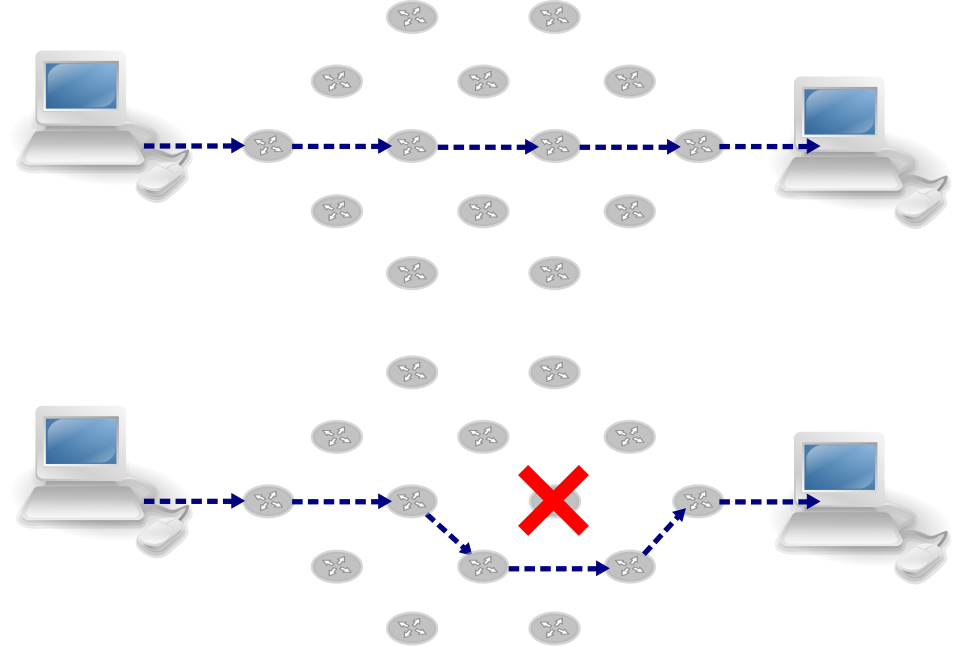 A simplified path of a packet from your phone to a server in the US, showing routers, ISPs (NTC/Ncell), and the global backbone. (Image: Pluke, CC0, via Wikimedia Commons)
Key Protocols: TCP/IP
The Transmission Control Protocol/Internet Protocol (TCP/IP) is the foundation of the Internet. It consists of four layers:
| Layer | Protocol | Function | Example |
|---|---|---|---|
| Application | HTTP, FTP, SMTP | Defines how applications (browsers, email) request data. | Loading a Daraz page via HTTP |
| Transport | TCP, UDP | Ensures reliable data delivery (TCP) or fast delivery (UDP). | Video streaming (UDP) vs. file download (TCP) |
| Internet | IP | Handles addressing and routing of packets across networks. | Your IP: 192.168.1.1 |
| Network Access | Ethernet, Wi-Fi | Defines how data is physically transmitted (cables, radio waves). | NTC’s fiber-optic cables |
Function of TCP/IP:
- TCP (Transmission Control Protocol): Ensures reliable, ordered delivery of data (used for emails, file transfers).
- Uses acknowledgments and retries if packets are lost.
- IP (Internet Protocol): Handles addressing (e.g.,
192.168.1.1) and routing (finding the shortest path to a destination).- IPv4: 32-bit addresses (limited to ~4.3 billion devices).
- IPv6: 128-bit addresses (supports trillions of devices; being deployed globally).
Real-World Example: eSewa’s Payment Network
When you pay via eSewa:
- Your phone sends a TCP packet to eSewa’s server with transaction details.
- The server routes the request via NTC’s internet backbone (IP).
- The bank verifies funds and sends back a TCP-acknowledged response.
- Your phone displays "Payment successful" (HTTP response).
3. World Wide Web (WWW)
The WWW is a service built on top of the Internet, enabling hypertext documents (webpages) via URLs and HTTP/HTTPS.
Key Components
- URL (Uniform Resource Locator): Address of a webpage (e.g.,
https://www.daraz.com).https://= secure (HTTPS),http://= unsecure.
- HTTP/HTTPS: Protocols for transferring webpages.
- HTTP: Unencrypted (vulnerable to eavesdropping).
- HTTPS: Encrypted (secure; used by eSewa, banks).
- HTML/CSS/JavaScript: Languages that define webpage structure, styling, and interactivity.
4. Network Security Basics
Security threats include hacking, malware, and data breaches. Mitigation tools:
- Firewalls: Filter traffic between networks (e.g., NTC’s firewall blocking malicious IP addresses).
- VPNs: Encrypt data for secure remote access (used by banks for employee logins).
- Encryption: Scrambles data (e.g., HTTPS uses TLS to protect eSewa transactions).
Functions of a Firewall:
- Packet filtering: Blocks/unblocks packets based on rules (e.g., block port 21 for FTP attacks).
- Stateful inspection: Tracks active connections (e.g., allows return traffic for a legitimate request).
- Proxy services: Acts as an intermediary (e.g., school firewalls cache websites to reduce bandwidth).
5. Case Study: Daraz’s Order Processing Network
Scenario: A customer orders a laptop from Daraz.
- Client-Server Model:
- User’s phone (client) sends an HTTP POST request to Daraz’s server with order details.
- Database Query:
- Server checks inventory (SQL query) and updates stock in real-time.
- Payment Gateway:
- Redirects to eSewa/Khalti (UDP for fast payment processing).
- Order Fulfillment:
- Daraz’s warehouse system (IoT sensors + WAN) tracks the laptop’s location via GPS.
- Delivery Confirmation:
- Pathao’s app sends an SMS/email (SMTP protocol) to the customer.
Why TCP/IP?
- Reliability: TCP ensures the order details aren’t lost in transit.
- Scalability: Daraz’s servers use load balancers (distribute traffic across multiple servers).
## In the Real World
eSewa/Khalti: Cryptography and Protocols
- Idea: Uses HTTPS (TLS encryption) and TCP for secure transactions.
- How: When you pay ₹1,000, your phone encrypts the data and sends it via TCP to eSewa’s server. The server decrypts it, verifies funds, and sends back a signed receipt (digital signature).
NTC/Ncell: Packet Switching and Routers
- Idea: Uses IP routing and packet switching to deliver your WhatsApp message.
- How: Your message is split into packets, routed through NTC’s backbone, and reassembled at the recipient’s phone. Routers use OSPF (Open Shortest Path First) to find the fastest path.
Pathao: IoT and Real-Time Data
- Idea: Uses MAN (Metropolitan Area Network) to connect driver apps, GPS, and payment gateways.
- How: When you book a ride, Pathao’s backend (running on a cloud server) checks driver availability via a real-time database query, updates the driver’s app, and processes payment via Khalti (UDP for speed).
## Exam Tips
Definitions:
- Always define terms briefly but clearly. For example:
- Internet: A global WAN connecting billions of devices via TCP/IP.
- Protocol: A set of rules for data exchange (e.g., TCP for reliability, UDP for speed).
- WWW: A service on the Internet using HTTP/HTTPS to deliver webpages.
- Common mistake: Don’t confuse "Internet" with "WWW." The Internet is the infrastructure; the WWW is an application.
- Always define terms briefly but clearly. For example:
TCP/IP Layer Comparison:
- Memorize the four layers and their protocols. Draw a table like above in exams.
- Example question: "Explain the role of TCP in data transmission." → Answer: TCP ensures reliable, ordered delivery with acknowledgments and retries.
Topology Questions:
- For bus/star/ring, always include:
- Structure (diagram or description).
- Advantages/disadvantages.
- Real-world example (e.g., star topology in NTC’s network).
- Example question: "Why is star topology preferred in modern networks?" → Answer: Fault isolation, scalability, and easy troubleshooting.
- For bus/star/ring, always include:
Security Focus:
- Firewalls are highly examinable. Mention:
- Packet filtering, stateful inspection, and proxy services.
- Example: "How does a firewall protect NTC’s network from DDoS attacks?" → Answer: Blocks excessive traffic from a single source.
- Firewalls are highly examinable. Mention:
Case Study Practice:
- Expect application-based questions (e.g., "How does Daraz use TCP/IP for order processing?").
- Break it down:
- Client-server model (HTTP request).
- Database interaction (SQL queries).
- Payment gateway (UDP for speed).
- IoT integration (real-time tracking).
Worked Example: Binary Addition (Bonus)
- Even though this is from Unit 1, TCP/IP uses binary/hexadecimal for addressing (e.g., IP
192.168.1.1is binary11000000.10101000.00000001.00000001). - Question: "Add 23 (binary
10111) and 12 (binary1100) and verify in decimal."- Step 1: Binary addition:
10111 (23) + 1100 (12) -------- 11011 (35) - Step 2: Verify in decimal:
23 + 12 = 35✓.
- Step 1: Binary addition:
- Even though this is from Unit 1, TCP/IP uses binary/hexadecimal for addressing (e.g., IP
## Summary Table for Quick Revision
| Topic | Key Points | Exam Focus |
|---|---|---|
| Network Types | LAN, MAN, WAN; scope and examples. | Define + example (e.g., NTC = WAN). |
| Topologies | Bus (shared), Star (centralized), Ring (loop). | Draw diagram + pros/cons. |
| TCP/IP Layers | Application (HTTP), Transport (TCP/UDP), Internet (IP), Network Access. | Match protocols to layers. |
| WWW | HTTP/HTTPS, URLs, HTML/CSS. | Differentiate Internet vs. WWW. |
| Firewalls | Packet filtering, stateful inspection, proxy. | Functions in 1–2 sentences. |
| Real-World Apps | eSewa (HTTPS), Daraz (TCP/IP), NTC (routers). | Trace a process (e.g., payment flow). |
Final Tip: For short-answer questions, use bullet points and diagrams (even if hand-drawn). For long answers, structure like this note—define, explain, compare, and apply to real-world examples. Good luck!
Based on the TU BIT syllabus for Introduction to Information Technology (BIT101), unit 6.
Discussion
Loading…