Operating SystemUnit 79 min read
Disk Management & I/O Systems: Storage, Scheduling & Hardware
Unit 7 of Operating System: Explores how OS manages disk storage (allocation, fragmentation, file systems), optimizes I/O operations (scheduling algorithms, DMA), and interfaces with hardware like disks and controllers—critical for databases, cloud storage, and real-time systems.
TAKEAWAYS:
- Disk storage is managed via bitmap, FAT, or linked lists, each with trade-offs in speed and overhead.
- Disk scheduling algorithms (SSTF, SCAN, LOOK) reduce seek time by prioritizing requests intelligently.
- DMA (Direct Memory Access) offloads I/O from the CPU, improving system performance.
- File systems (FAT, NTFS, ext4) organize data on disks using inodes, directories, and metadata.
- Fragmentation (internal/external) degrades performance; defragmentation tools mitigate it.
- I/O controllers and interrupts enable efficient communication between hardware and OS.
1. Disk Structure and Storage Management
Disks store data in sectors (typically 512 bytes) grouped into tracks (cylinders). The OS must manage free space efficiently.
1.1 Disk Addressing
A disk’s address is defined by:
- Cylinder number (track)
- Head number (platter side)
- Sector number
stateDiagram-v2
    [*] --> DiskAddress: Cylinder (0-199)
    DiskAddress --> Head: 0 (Top) or 1 (Bottom)
    Head --> Sector: 0-511 (512-byte sectors)
1.2 Free Space Management
Three methods to track free blocks:
Bitmap: A bit array where
1= free,0= allocated.- Example: For a 2 GB disk with 2 KB blocks → 1,048,576 blocks → 131,072 bytes (128 KB) bitmap.
- Trade-off: Fast lookup but wastes space.
Linked List: Free blocks linked via pointers.
- Trade-off: Slow traversal; no contiguous allocation.
File Allocation Table (FAT): Each entry points to the next block.
- Example: 2 GB disk, 4 KB blocks → 512,000 entries → 2 MB FAT (if 4-byte entries).
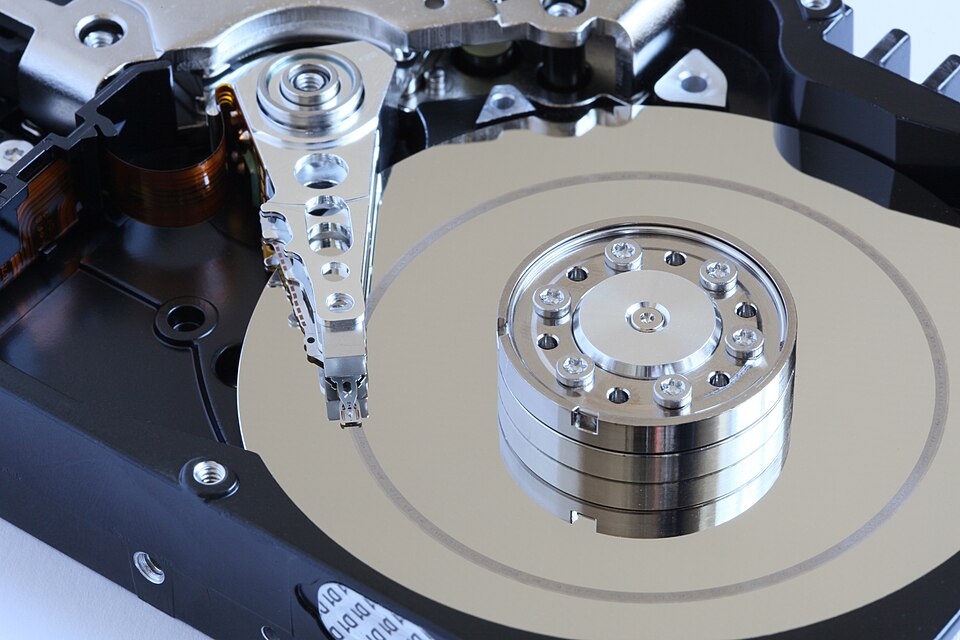 hard disk platter and read write head (Image: Alchemist-hp (talk) www.pse-mendelejew.de, CC BY-SA 3.0, via Wikimedia Commons)
| Component | Function |
|---|---|
| Platter | Stores data magnetically in concentric tracks. |
| Actuator Arm | Moves read/write heads to target cylinder. |
| Read/Write Head | Reads/writes data from/to sectors. |
| Spindle Motor | Rotates platters at 5,400–15,000 RPM. |
2. Disk Scheduling Algorithms
The OS must decide the order of serving disk requests to minimize seek time.
2.1 Comparison Table
| Algorithm | Description | Example Trace |
|---|---|---|
| FCFS | First Come, First Served (no optimization). | Requests: 98 → 183 → 37 → 122 → 14 → 124 → 65 → 67 → Total seek: 350 |
| SSTF | Shortest Seek Time First (greedy; can starve). | Requests: 53 → 79 → 18 → 37 → 122 → 91 → 16 → 63 → Total seek: 230 |
| SCAN | Elevator algorithm (moves in one direction). | Requests: 53 → 98 → 122 → 183 → 14 → 37 → 65 → 67 → Total seek: 200 |
| C-SCAN | Circular SCAN (avoids bias toward one end). | Same requests as SCAN but wraps around. |
| LOOK | SCAN variant that stops at last request in direction. | More efficient than SCAN for clustered requests. |
Worked Example (SCAN Algorithm) Disk at cylinder 53. Request queue: 98, 183, 14, 122, 37, 16, 65, 67.
- Move right: 53 → 98 → 122 → 183 (seek = 98 + 61 + 61 = 220).
- Reverse direction: 183 → 14 → 37 → 16 → 65 → 67 (seek = 169 + 33 + 21 + 51 + 2 = 276).
- Total seek time = 220 + 276 = 496 (vs. FCFS’s 350—SCAN is better here!).
Graph showing seek time for FCFS, SSTF, SCAN, and LOOK with the same request queue.
3. Direct Memory Access (DMA)
The CPU cannot handle all I/O; DMA controllers transfer data directly to/from memory without CPU intervention.
3.1 How DMA Works
- CPU initiates I/O request.
- DMA takes control of the bus and memory.
- Data transfers in blocks (e.g., 1 KB at a time).
- DMA triggers an interrupt when done.
sequenceDiagram
    participant CPU
    participant DMA
    participant Memory
    participant Disk

    CPU->>DMA: "Start I/O"
    CPU-->>DMA: "Release bus"
    DMA->>Disk: "Read block 1"
    Disk-->>DMA: "Data"
    DMA->>Memory: "Store data"
    loop Until transfer complete
        DMA->>Disk: "Read block X"
        Disk-->>DMA: "Data"
        DMA->>Memory: "Store data"
    end
    DMA->>CPU: "Interrupt: Done"
3.2 Advantages of DMA
- Reduces CPU overhead (no polling).
- Faster transfers (e.g., 10 MB/s vs. 1 MB/s with CPU).
- Supports burst transfers (e.g., video streaming).
In the Real World
Pathao (Ride-hailing App)
- Uses disk scheduling to optimize order processing. Requests from nearby riders are prioritized (like SSTF), reducing wait times.
- Example: If 10 riders request rides in Kathmandu, the OS schedules them based on proximity to reduce driver travel time.
NEPSE (Stock Exchange)
- DMA is used for high-speed trading data transfers. Stock prices and orders are moved to memory quickly, minimizing latency.
- Example: A DMA controller handles 10,000 trades/sec without CPU bottlenecks.
Daraz (E-commerce)
- File allocation tables (FAT/ext4) manage product catalogs. When you search for a product, the OS quickly locates the file using metadata.
- Worked Example: A 1 TB SSD storing 10 million product images uses ext4 with inodes to map files to disk blocks in milliseconds.
4. File Systems
File systems organize data on disks using metadata (inodes, directories) and allocation methods.
4.1 Key Components
- Inode: Stores file metadata (size, permissions, block pointers).
- Directory: Maps filenames to inodes.
- Block Allocation: FAT, linked lists, or bitmap.
erDiagram
    File {
        int file_id PK
        string name
    }
    Block {
        int block_id PK
        int inode_id FK
    }
    Inode {
        int inode_id PK
        int size
        string permissions
        int block_ptr1
        int block_ptr2
    }
    Directory {
        int dir_id PK
        string filename
        int inode_id FK
    }
    File ||--o{ Block : "contains"
    Block ||--o{ Inode : "pointed by"
    Inode ||--o{ Directory : "linked to"
    File ||--|| Directory : "contains"
Simplified ER diagram showing file-inode-block relationships in Unix-like file systems.4.2 Fragmentation
- Internal Fragmentation: Wasted space in fixed-size partitions (e.g., paging).
- External Fragmentation: Free blocks scattered (e.g., FAT systems).
- Solution: Defragmentation (e.g., Windows’
defrag).
- Solution: Defragmentation (e.g., Windows’
Diagram showing how a file’s data blocks are linked via inodes.
5. I/O Hardware and Interrupts
I/O devices (disks, keyboards) communicate via controllers and interrupts.
5.1 I/O Controllers
- Disk Controller: Manages read/write operations.
- Network Controller: Handles Ethernet/Wi-Fi traffic.
- Keyboard/Mouse Controller: Manages input devices.
5.2 Interrupts
- Devices signal the CPU via interrupt lines.
- CPU responds by executing an interrupt service routine (ISR).
Flowchart showing CPU, I/O device, and interrupt service routine interaction.
Exam Tip
- Calculations: Always show steps for bitmap/FAT size (e.g.,
DiskSize / BlockSize = NumberOfBlocks). - Algorithms: Compare SCAN vs. LOOK—LOOK stops at last request, reducing seek time.
- DMA vs. Polling: Know that DMA reduces CPU load but adds hardware complexity.
- File Systems: Differentiate FAT (simple, slow) vs. ext4 (fast, journaling).
- Fragmentation: Know internal (paging) vs. external (FAT) and how defragmentation helps.
Past Exam Question Adaptation Q: A 2 GB disk has 4 KB blocks. Calculate FAT size if each entry is 4 bytes. A:
- Total blocks = 2 GB / 4 KB = 512,000 blocks.
- FAT size = 512,000 × 4 bytes = 2,048,000 bytes (2 MB).
Final Visual Summary
mindmap
  root((Disk Management & I/O))
    FreeSpace
      Bitmap
      FAT
      LinkedList
    Scheduling
      FCFS
      SSTF
      SCAN
      LOOK
    DMA
      ReducesCPULoad
      BurstTransfers
    FileSystems
      Inodes
      Directories
      Fragmentation
    I/OHardware
      Controllers
      Interrupts
Based on the TU BIT syllabus for Operating System (BIT204), unit 7.
Discussion
Loading…