Operating SystemUnit 211 min read
Process Management: Creation, States, PCB, IPC, and Deadlocks
Unit 2 of Operating System: Explores processes as the basic unit of CPU execution, their lifecycle (creation, termination, states), Process Control Blocks (PCBs), Inter-Process Communication (IPC), synchronization (mutexes, semaphores), deadlocks (conditions, detection, prevention), and real-world examples like eSewa’s
TAKEAWAYS:
- A process is an executing program instance with its own memory space, state, and resources, while a program is a static file on disk.
- Processes cycle through 5 states (New → Ready → Running → Waiting → Terminated) managed by the OS scheduler.
- The Process Control Block (PCB) is a kernel data structure storing process metadata (PID, registers, state, memory pointers) for context switching.
- Inter-Process Communication (IPC) enables processes to share data via pipes, message queues, shared memory, or semaphores (e.g., Pathao’s ride allocation uses semaphores to avoid double-booking).
- Deadlocks occur when processes hold resources waiting for others in a circular chain; the Banker’s Algorithm prevents them by checking system safety.
- Synchronization tools like mutexes and semaphores prevent race conditions (e.g., eSewa’s transaction locks ensure no duplicate payments).
1. Process vs. Program
A program is a passive collection of instructions stored on disk (e.g., notepad.exe). A process is an active execution of that program with:
- Its own memory space (code, data, stack, heap).
- Process ID (PID) assigned by the OS.
- State (running, waiting, etc.).
- Resources (open files, sockets, CPU time).
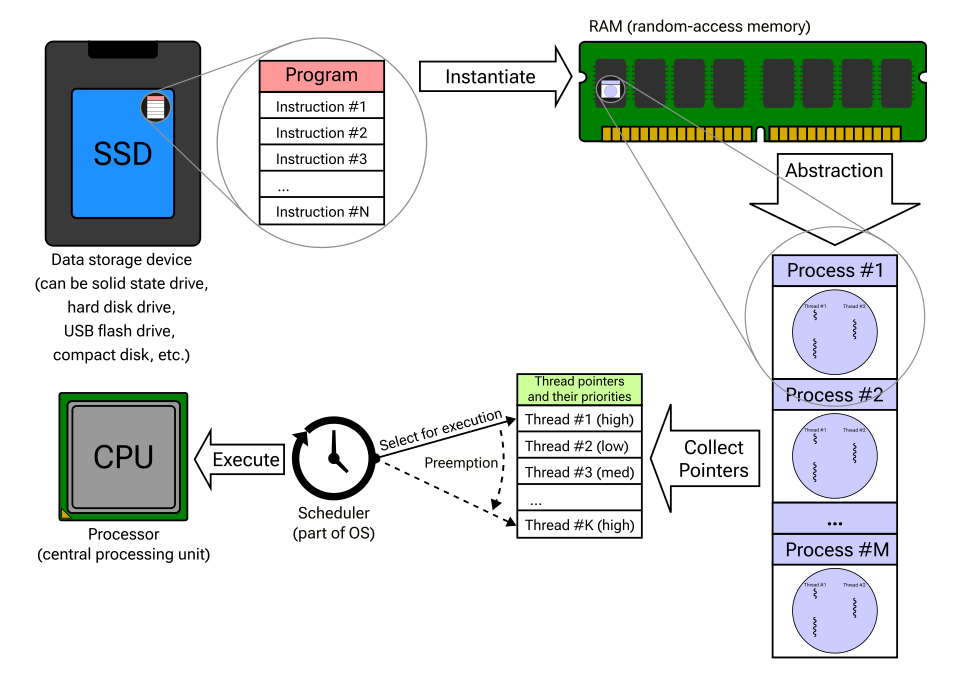 A program is a file; a process is a running instance with memory and state. (Image: Trara123 Hooman Mallahzadeh Cburnett, CC BY-SA 4.0, via Wikimedia Commons)
2. Process States and Lifecycle
A process transitions through 5 states (extended from the 3-state model):
stateDiagram-v2
    [*] --> New: Creation
    New --> Ready: Loaded into memory
    Ready --> Running: CPU allocated
    Running --> Waiting: Blocked (e.g., I/O)
    Waiting --> Ready: I/O completes
    Running --> Terminated: Execution ends
    Terminated --> [*]: Exit
Key Transitions:
- New → Ready: Process loaded into memory (e.g., when you launch Chrome).
- Ready → Running: Scheduler picks the process (e.g., Pathao’s ride-matching algorithm switches between drivers and riders).
- Running → Waiting: Process blocked (e.g., waiting for user input or disk I/O).
- Terminated: Process exits (e.g., a closed browser tab).
Worked Example: Consider a Ncell call center system where:
- New: A new call arrives (process created).
- Ready: Call waits in a queue (ready state).
- Running: Agent picks up the call (running state).
- Waiting: Agent checks customer details (blocked on database query).
- Terminated: Call ends (process exits).
3. Process Control Block (PCB)
The PCB is the OS’s record of a process, containing:
Why it matters:
- Enables context switching (saving/restoring CPU state when processes run).
- Used by the scheduler to decide which process runs next.
Example: When you switch between Daraz and WhatsApp, the OS saves WhatsApp’s PCB (registers, memory) and loads Daraz’s PCB.
4. Process Creation and Termination
Creation:
- Fork() (Unix/Linux): Creates a child process (e.g.,
bash -c "ls | grep .txt"). - Exec(): Replaces a process’s memory with a new program (e.g., launching
notepad). - Spawn() (Windows): Combines fork + exec.
Termination:
- Normal exit: Process calls
exit()(e.g., closing a browser tab). - Abnormal exit: Crash or
abort()(e.g., a frozen app). - Parent termination: Child processes are orphaned (adopted by
initin Linux). - Parent waits:
wait()system call ensures parent cleans up child resources.
5. Inter-Process Communication (IPC)
Processes communicate via:
| Method | Description | Example Use Case |
|---|---|---|
| Pipes | Unidirectional byte stream (FIFO). | Parent-child communication (e.g., `ls |
| Message Queues | Processes send/receive messages. | Pathao’s driver-rider matching system. |
| Shared Memory | Processes share a memory segment. | eSewa’s transaction database. |
| Semaphores | Synchronization tool (mutexes, counters). | NTC’s router queue management. |
| Signals | OS delivers events (e.g., SIGINT). |
Keyboard interrupt (Ctrl+C). |
Semaphore Example (Mutex):
sequenceDiagram
    participant P1
    participant P2
    participant Semaphore
    P1->>Semaphore: request(lock)
    Semaphore-->>P1: grant
    P2->>Semaphore: request(lock)
    Semaphore-->>P2: wait (blocked)
    P1->>Semaphore: release(lock)
    Semaphore-->>P2: grant
Real-world tie:
- eSewa’s payment system uses semaphores to ensure only one process updates the transaction ledger at a time (prevents race conditions).
6. Process Synchronization
Race Condition:
When two processes access shared data simultaneously, leading to inconsistent results (e.g., two drivers claiming the same Pathao ride).
Solutions:
- Mutex (Mutual Exclusion):
- Only one process can access critical section at a time.
- Example: Locking a bank account for a transfer.
- Semaphores:
- Generalized mutex (can allow multiple processes, e.g.,
semaphore = 3allows 3 processes). - Used in NTC’s router queues to limit concurrent connections.
- Generalized mutex (can allow multiple processes, e.g.,
- Monitors:
- High-level construct with condition variables (e.g., Java’s
synchronizedblocks).
- High-level construct with condition variables (e.g., Java’s
Worked Example (Dining Philosophers):
stateDiagram-v2
    [*] --> Hungry: Waits for fork
    Hungry --> Thinking: Eats (releases forks)
    Thinking --> Hungry: Drops fork
Deadlock Scenario: If all 5 philosophers take left forks first, they starve (circular wait).
7. Deadlocks
Necessary Conditions for Deadlock:
- Mutual Exclusion: At least one resource held in non-sharable mode.
- Hold and Wait: Process holds a resource and waits for another.
- No Preemption: Resources cannot be forcibly taken.
- Circular Wait: Circular chain of processes (P1 → P2 → P3 → P1).
Deadlock Detection (Resource Allocation Graph - RAG):
Cycle in RAG → Deadlock possible.
Prevention Strategies:
| Method | How It Works | Example |
|---|---|---|
| Resource Ordering | Processes request resources in a fixed order. | NTC routers assign IP addresses sequentially. |
| Hold-and-Wait Violation | Require processes to request all resources upfront. | Banker’s Algorithm (see below). |
| Preemption | Forcefully take resources from processes. | Swapping memory pages in virtual memory. |
| Deadlock Avoidance | Use algorithms like Banker’s to ensure safety. | eSewa’s transaction rollback on failure. |
Banker’s Algorithm (Avoidance):
Worked Example: Suppose:
- Resources: 3 printers (total).
- Processes:
- P1: Needs 2 (holds 0).
- P2: Needs 1 (holds 1).
- P3: Needs 2 (holds 1).
Allocation Matrix:
| Process | Max | Allocated | Need |
|---|---|---|---|
| P1 | 2 | 0 | 2 |
| P2 | 1 | 1 | 0 |
| P3 | 2 | 1 | 1 |
Available Resources: 1 Safe Sequence Check:
- P2 can run (needs 0) → releases 1 → Available = 2.
- P1 can run (needs 2) → releases 2 → Available = 4.
- P3 can run (needs 1) → releases 1 → Available = 5. → System is safe.
Unsafe Scenario: If P1 requests 2 more (Available = 0), the system is unsafe (no process can run).
8. Starvation vs. Deadlock
| Feature | Deadlock | Starvation |
|---|---|---|
| Definition | Processes are blocked indefinitely. | Process never gets CPU/time. |
| Cause | Circular wait + hold-and-wait. | Low priority + greedy high-priority processes. |
| Solution | Break conditions (e.g., timeouts). | Aging (increase priority over time). |
| Example | All NTC routers stuck in a loop. | A Pathao driver’s request ignored due to high demand. |
In the Real World
eSewa’s Transaction Queue (IPC + Synchronization):
- Uses message queues to handle payment requests.
- Semaphores ensure only one process updates the ledger (prevents double-spending).
- Worked Example: If 100 users pay simultaneously, semaphores serialize access to the database.
NTC’s Router Process Scheduling:
- Routers manage multiple processes (forwarding, routing tables, error handling).
- CPU scheduling (e.g., Round Robin) ensures fair packet forwarding.
- Deadlock Prevention: Routers use timeouts for TCP connections to avoid indefinite blocking.
Daraz’s Order Fulfillment (Process States):
- New: Order placed.
- Ready: Awaiting warehouse pickup.
- Running: Shipped to courier.
- Waiting: Delivered but not signed.
- Terminated: Order completed or canceled.
- Synchronization: Mutexes lock inventory counts to prevent overselling.
Exam Tip
Diagrams are Mandatory:
- Always draw the 5-state process model or RAG for deadlock questions.
- Label transitions clearly (e.g., "Blocked → Ready on I/O completion").
Banker’s Algorithm:
- For safety checks, simulate each process running and update available resources.
- If a sequence exists where all processes complete → safe.
Deadlock Conditions:
- Memorize the 4 conditions and how to break them (e.g., "Preemption" = forcibly take resources).
- Starvation is often tested with priority scheduling (e.g., "Why does a low-priority process never run?").
IPC Examples:
- Link real apps (eSewa, Pathao) to IPC methods (semaphores, pipes) in answers.
- Example: "eSewa uses semaphores to synchronize payment processing."
PCB Focus:
- Know the fields in a PCB (PID, registers, memory pointers) and why they’re needed for context switching.
Worked Examples:
- For scheduling (FIFO, SRTF, RR), calculate turnaround time step-by-step:
- Turnaround Time (TAT) = Completion Time − Arrival Time.
- Waiting Time = TAT − Burst Time.
- Example:
Process Arrival Burst FIFO TAT FIFO Wait P1 0 8 8 0 P2 1 5 13 8 P3 2 10 23 13
- For scheduling (FIFO, SRTF, RR), calculate turnaround time step-by-step:
Final Note: Process management is the heart of OS design. Focus on:
- States and transitions (draw them).
- PCB structure (what’s stored?).
- Deadlock conditions (how to detect/prevent).
- Real-world ties (eSewa, Pathao, NTC).
Based on the TU BIT syllabus for Operating System (BIT204), unit 2.
Discussion
Loading…