Database AdministrationUnit 1212 min read
Oracle CDB/PDB: Architecture, Multitenancy & Management
Unit 12 of Database Administration explores Oracle’s Container Database (CDB) and Pluggable Database (PDB) architecture, their real-world applications in cloud and enterprise systems, and how they enable efficient resource sharing, isolation, and management. Learn how CDBs act as root containers for PDBs, the lifecycle
TAKEAWAYS:
- Understand the CDB/PDB architecture and how it enables multitenancy in Oracle databases.
- Learn how PDBs provide isolation, security, and resource management for multiple databases within a single CDB.
- Compare CDB vs. non-CDB architectures and their use cases in cloud and enterprise environments.
- Explore PDB lifecycle management, including creation, cloning, and unplugging/plugging.
- Discover how Oracle Multitenant improves performance, scalability, and manageability in modern database systems.
- Apply real-world scenarios like cloud-based SaaS applications (e.g., eSewa, Khalti) or enterprise resource planning (ERP) systems that use CDB/PDB for efficient resource allocation.
What is a Container Database (CDB)?
A Container Database (CDB) is the root database in Oracle’s Multitenant architecture. It acts as a centralized container that holds one or more Pluggable Databases (PDBs). Think of it as a master database that manages multiple smaller databases (PDBs) efficiently, similar to how a virtualization platform manages multiple virtual machines (VMs) on a single physical server.
Why Use a CDB?
Before Oracle 12c, databases were standalone (non-CDB), meaning each database required its own SGA (System Global Area), background processes, and resources. This led to:
- High resource overhead (each database consumed memory and CPU independently).
- Complex management (upgrades, patches, and backups had to be done individually).
- Scalability issues (adding new databases required additional hardware).
Oracle introduced the Multitenant architecture in Oracle 12c to address these challenges. A CDB allows multiple PDBs to share the same Oracle instance, reducing resource usage and simplifying management.
CDB Components
A CDB consists of:
Root Container (
CDB$ROOT)- The core container that holds the Oracle Database kernel and metadata for all PDBs.
- Contains system tablespaces (e.g.,
SYSTEM,SYSAUX) shared by all PDBs. - Cannot be directly used by applications (only PDBs can).
Seed PDB (
PDB$SEED)- A template PDB used to create new PDBs.
- Contains default schemas, tablespaces, and objects required for any PDB.
- Cannot be opened or used by applications.
Pluggable Databases (PDBs)
- Logical databases that run inside the CDB.
- Each PDB has its own schemas, tablespaces, and users.
- Can be created, cloned, unplugged, or plugged independently.
What is a Pluggable Database (PDB)?
A Pluggable Database (PDB) is a portable, self-contained database that runs inside a CDB. PDBs provide:
- Isolation: Each PDB operates independently, with its own users, schemas, and data.
- Resource Management: The CDB allocates CPU, memory, and I/O to PDBs dynamically.
- Portability: PDBs can be unplugged from one CDB and plugged into another (even on a different server).
PDB Lifecycle
PDBs go through the following stages:
- Creation: A new PDB is created from the seed PDB or cloned from an existing PDB.
- Opening: The PDB is opened for use (e.g.,
ALTER PLUGGABLE DATABASE OPEN;). - Modification: Schemas, tables, and users are added or modified.
- Unplugging: The PDB is exported as a transportable set of files (for migration).
- Plugging: The PDB is imported into another CDB (or the same CDB after backup/restore).
Example: Creating a PDB
Suppose you are managing a CDB for a university’s student management system. You want to create a PDB for the "Exam Results" module while keeping other modules (e.g., "Student Records") in separate PDBs.
-- Step 1: Create a PDB from the seed
CREATE PLUGGABLE DATABASE exam_results ADMIN USER exam_admin IDENTIFIED BY password
FILE_NAME_CONVERT=('/old_location/', '/new_location/');

-- Step 2: Open the PDB
ALTER PLUGGABLE DATABASE exam_results OPEN;
Real-World Tie-In:
- eSewa (Nepal’s digital payment platform) uses a CDB/PDB architecture to manage multiple tenant databases (e.g., one PDB for government payments, another for private transactions). This ensures isolation and scalability without overloading a single database.
CDB vs. Non-CDB (Traditional) Architecture
| Feature | CDB Architecture | Non-CDB (Traditional) Architecture |
|---|---|---|
| Resource Sharing | Multiple PDBs share the same Oracle instance (SGA, background processes). | Each database has its own SGA and processes. |
| Management | Centralized (upgrades, patches, backups done once for all PDBs). | Decentralized (each database managed separately). |
| Scalability | Add PDBs without adding hardware. | Adding databases requires new hardware. |
| Isolation | PDBs are isolated but share the CDB kernel. | Databases are fully isolated (no sharing). |
| Use Case | Cloud, SaaS, multi-tenant applications. | Legacy systems, single-tenant applications. |
Advantages of CDB/PDB Architecture
Reduced Hardware Costs
- Multiple PDBs run on a single CDB, reducing the need for additional servers.
Simplified Management
- Single upgrade path: All PDBs can be upgraded simultaneously.
- Centralized backup/restore: Backup the CDB, and all PDBs are protected.
Improved Performance
- Resource pooling: CPU, memory, and I/O are shared efficiently.
- Reduced overhead: No duplicate background processes for each database.
Enhanced Security
- Isolation: PDBs cannot access each other’s data unless explicitly allowed.
- Fine-grained access control: Users in one PDB cannot see data in another.
Portability
- PDBs can be moved between CDBs (even across servers) without downtime.
Disadvantages and Challenges
Learning Curve
- DBAs must learn new commands (
ALTER PLUGGABLE DATABASE,CREATE PLUGGABLE DATABASE). - Migration from non-CDB to CDB requires planning.
- DBAs must learn new commands (
Resource Contention
- If one PDB consumes too many resources, it may impact other PDBs.
Limited Tools for Non-CDB
- Some legacy tools may not support CDB/PDB architecture.
Storage Management
- Tablespaces must be carefully managed to avoid space fragmentation.
Real-World Applications of CDB/PDB
1. eSewa (Digital Payment Platform)
- Use Case: eSewa processes millions of transactions daily from government, private, and individual users.
- How CDB/PDB Helps:
- Each tenant (e.g., government, private companies) runs in a separate PDB.
- Isolation ensures that a failure in one PDB (e.g., government payments) does not affect others (e.g., private transactions).
- Scalability: New PDBs can be added as demand grows without hardware upgrades.
2. Khalti (Fintech Company)
- Use Case: Khalti manages multiple merchant accounts and user transactions.
- How CDB/PDB Helps:
- Each merchant or user segment (e.g., retail, e-commerce) runs in a dedicated PDB.
- Resource allocation ensures that high-traffic PDBs (e.g., during festivals) get sufficient CPU/memory.
- Backup and recovery are simplified since the entire CDB can be backed up.
3. Nepal Stock Exchange (NEPSE)
- Use Case: NEPSE manages trading data, user accounts, and market analytics.
- How CDB/PDB Helps:
- Trading data (high-frequency transactions) runs in one PDB.
- User accounts and analytics run in another PDB.
- Disaster recovery: If one PDB fails (e.g., trading system), others remain operational.
PDB Management: Key Operations
1. Creating a PDB
-- Create a PDB from seed
CREATE PLUGGABLE DATABASE retail_pdb
ADMIN USER retail_admin IDENTIFIED BY password
FILE_NAME_CONVERT=('/old_path/', '/new_path/');
Real Example:
- Daraz (e-commerce platform) could use a PDB for order processing and another for inventory management. Creating separate PDBs ensures performance isolation.
2. Cloning a PDB
-- Clone an existing PDB (e.g., for testing)
CREATE PLUGGABLE DATABASE retail_pdb_clone FROM retail_pdb;
Use Case:
- Pathao (ride-hailing app) might clone a production PDB to a test PDB for debugging without affecting live users.
3. Unplugging and Plugging a PDB
-- Unplug a PDB (export for migration)
ALTER PLUGGABLE DATABASE retail_pdb CLOSE;
ALTER PLUGGABLE DATABASE retail_pdb UNPLUG INTO '/backup/retail_pdb' DIRECTORY backup_dir;

-- Plug the PDB into another CDB
CREATE PLUGGABLE DATABASE retail_pdb_new USING '/backup/retail_pdb' DIRECTORY backup_dir;
Real Example:
- NTC (Nepal Telecom) might unplug a PDB from an old server and plug it into a new CDB during a data center migration.
4. Opening and Closing PDBs
-- Open a PDB
ALTER PLUGGABLE DATABASE retail_pdb OPEN;

-- Close a PDB (for maintenance)
ALTER PLUGGABLE DATABASE retail_pdb CLOSE;
Use Case:
- Ncell could close a PDB during maintenance (e.g., upgrading a billing system) without affecting other services.
Oracle Multitenant: How It Works
Oracle Multitenant is the feature that enables CDB/PDB architecture. It includes:
- Container Database (CDB)
- The root container (
CDB$ROOT) and seed PDB (PDB$SEED).
- The root container (
- Pluggable Databases (PDBs)
- Self-contained databases with their own schemas and data.
- Resource Manager
- Allocates CPU, memory, and I/O to PDBs dynamically.
- Transportable Tablespaces
- Allows moving data between PDBs without downtime.
Explanation:
- A user connects to the CDB, but the request is routed to the correct PDB (e.g.,
exam_results_pdborstudent_records_pdb). - This isolation ensures that one PDB’s performance does not affect another.
Exam Tip: How to Score Full Marks
Diagrams Are Mandatory
- Always draw the CDB/PDB architecture diagram (CDB$ROOT, PDB$SEED, PDBs).
- Use Mermaid or hand-drawn diagrams to show relationships.
Compare CDB vs. Non-CDB
- Examiners love comparison tables. Highlight resource sharing, management, and scalability.
Real-World Examples
- Relate PDB lifecycle to eSewa, Khalti, or NEPSE. For example:
- "eSewa uses PDBs to isolate government and private transactions, ensuring security and performance."
- Relate PDB lifecycle to eSewa, Khalti, or NEPSE. For example:
SQL Commands
- Know key commands like:
CREATE PLUGGABLE DATABASEALTER PLUGGABLE DATABASE OPEN/CLOSEUNPLUG/PLUGfor migration.
- Know key commands like:
Advantages and Disadvantages
- List 3 advantages (e.g., reduced hardware costs, simplified management) and 2 challenges (e.g., learning curve, resource contention).
Avoid Common Mistakes
- ❌ Don’t confuse CDB$ROOT with a PDB (it’s not a PDB).
- ❌ Don’t say PDBs can be used directly by applications (they must connect via the CDB).
- ✅ Always mention Oracle 12c as the version where Multitenant was introduced.
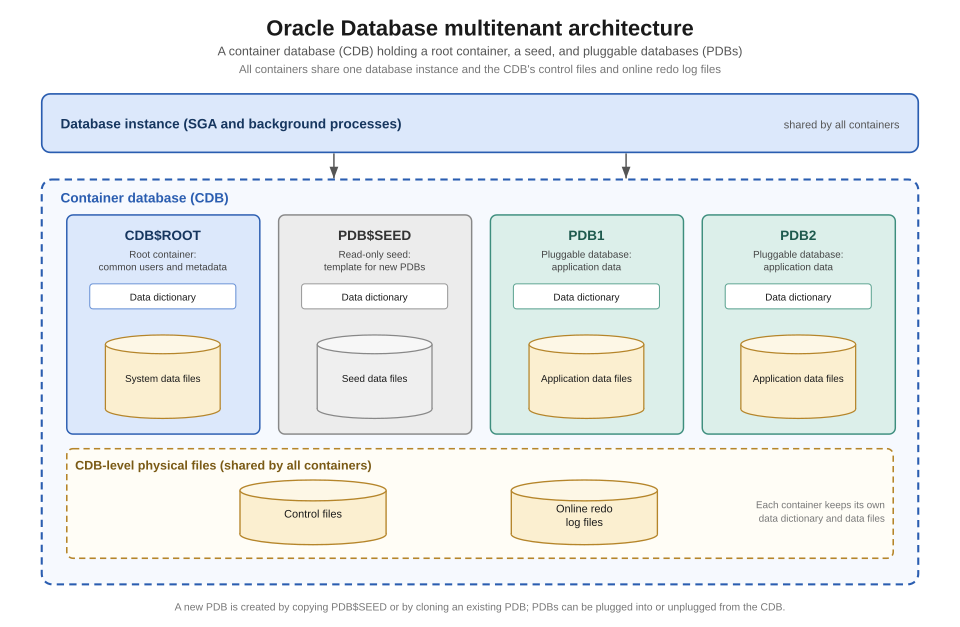 A labeled diagram showing CDB$ROOT, PDB$SEED, and multiple PDBs. (Image: Brickcompass, CC BY 4.0, via Wikimedia Commons)
Based on the TU BIT syllabus for Database Administration (BIT352), unit 12.
Discussion
Loading…