NET Centric ComputingUnit 16 min read
Language Preliminaries: Syntax, Semantics, Parsing & Compilation
Unit 1 of NET Centric Computing introduces foundational concepts of programming languages—syntax, semantics, parsing, compilation, and execution models—essential for understanding how ASP.NET Core and modern web applications process code before runtime.
Core Concepts of Programming Languages
Programming languages are the bridge between human logic and machine execution. To build ASP.NET Core applications, you must understand how languages are structured, processed, and executed.
1. Syntax vs. Semantics
- Syntax defines the grammar of a language (rules for writing valid code).
- Semantics defines the meaning of code (what it does when executed).
Example:
// Valid syntax (correct grammar) but invalid semantics (logical error)
int result = 5 / 0; // Syntax is correct, but semantics cause a runtime error.
Comparison Table:
| Feature | Syntax | Semantics |
|---|---|---|
| Definition | Rules for writing code | Meaning of the written code |
| Example | if (x > 0) |
x must be greater than 0 |
| Error Type | Compile-time error | Runtime/logic error |
2. Language Classification
Programming languages are categorized based on their paradigm (style of programming) and level (abstraction).
A. Language Paradigms
mindmap
  root((Programming Paradigms))
    Imp["Imperative"]
      Def["Step-by-step instructions"]
      Ex["C, C#, Java"]
    Dec["Declarative"]
      Func["Functional (e.g., Haskell, F#)"]
      Log["Logical (e.g., Prolog)"]
    OO["Object-Oriented"]
      Ex["C#, Java, Python"]
    Pro["Procedural"]
      Ex["C, Pascal"]
B. Language Levels
Low-Level (Machine Code/Assembly)
- Directly executed by CPU.
- Example:
MOV AX, 5(x86 Assembly). - Use Case: System programming (OS, drivers).
High-Level (C#, Python, JavaScript)
- Abstracted from hardware.
- Example:
int x = 5;(C#). - Use Case: Application development (ASP.NET Core).
3. Parsing and Compilation
Before execution, code must be parsed (checked for syntax) and compiled/interpreted.
A. Parsing (Syntax Analysis)
- Converts source code into an Abstract Syntax Tree (AST).
- Detects syntax errors (e.g., missing semicolons, mismatched braces).
Example (C#):
if (x > 0) // Parsed into AST nodes: "if", ">", "0"
{
    Console.WriteLine("Positive");
}
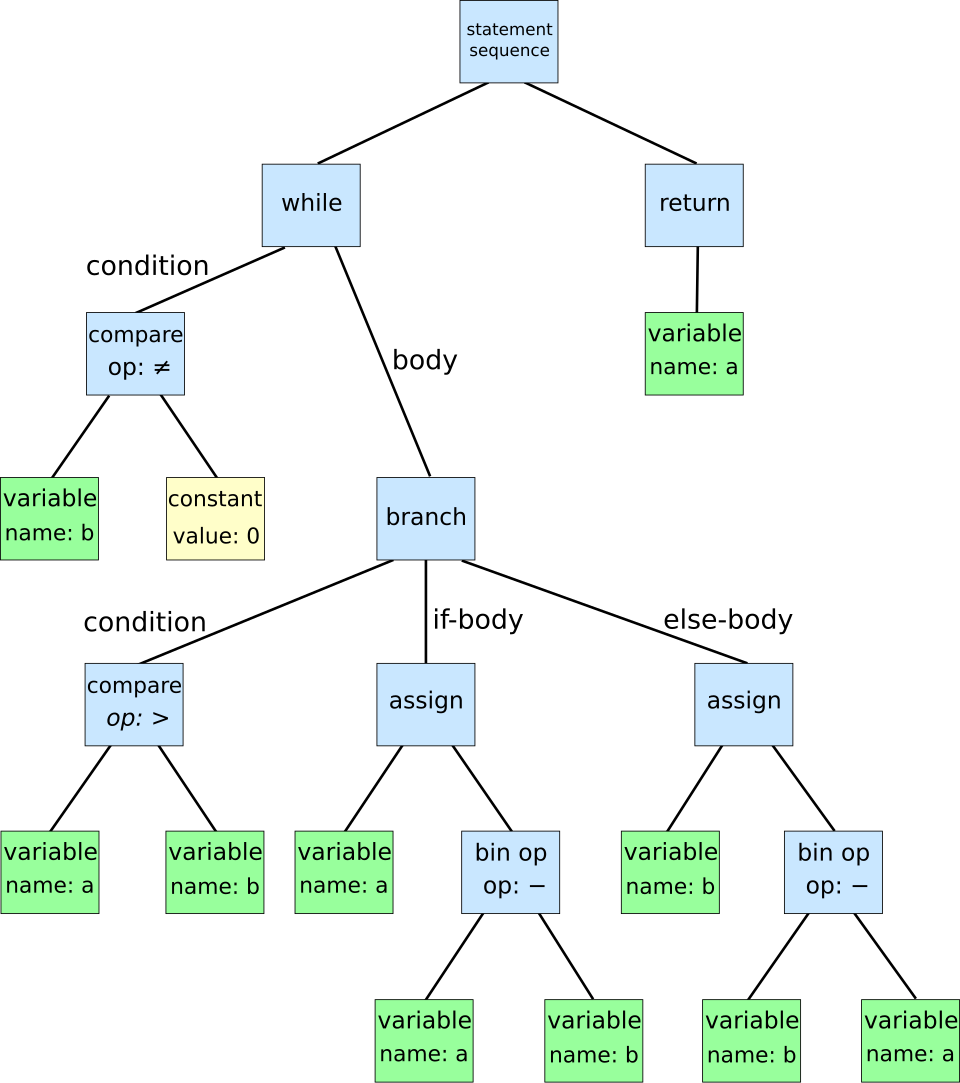 Shows how `if (x > 0)` breaks into nodes. (Image: Dcoetzee, CC0, via Wikimedia Commons)
B. Compilation vs. Interpretation
| Feature | Compilation (C#, Java) | Interpretation (Python, JavaScript) |
|---|---|---|
| Execution | Compiled to machine code first | Executed line-by-line |
| Speed | Faster (optimized binary) | Slower (runtime parsing) |
| Portability | Platform-dependent (e.g., .NET) | Platform-independent (e.g., JS) |
Real-World Example:
- ASP.NET Core (C#) → Compiled to Intermediate Language (IL) → Executed by .NET Runtime.
- Node.js (JavaScript) → Interpreted line-by-line by V8 Engine.
4. Execution Models
A. Compiled Languages (C#, Java)
- Source Code → Compiler → Machine Code → CPU Execution.
- Pros: Faster execution, better performance.
- Cons: Platform-dependent (e.g.,
.exefor Windows).
B. Interpreted Languages (Python, JavaScript)
- Source Code → Interpreter → Line-by-Line Execution.
- Pros: Portable, easier debugging.
- Cons: Slower than compiled languages.
Worked Example (C# Compilation):
// Program.cs
Console.WriteLine("Hello, ASP.NET Core!");
Compilation Steps:
csc Program.cs→ GeneratesProgram.exe.Program.exe→ Runs on Windows (or Linux via .NET Core).
5. Language Features in ASP.NET Core
ASP.NET Core primarily uses C#, a statically typed, object-oriented, compiled language.
Key C# Features for Web Dev:
| Feature | Example | Use in ASP.NET Core |
|---|---|---|
| Strong Typing | int age = 25; |
Prevents runtime errors |
| OOP (Classes) | public class User { ... } |
Models (e.g., UserModel) |
| Delegates/Events | event Action OnSubmit |
Handling HTTP requests |
| LINQ | var query = db.Users.Where(u => u.IsActive); |
Database queries |
In the Real World
eSewa (Nepal)
- Uses C# (ASP.NET Core) for backend services.
- Compilation: Source code → IL → Executed by .NET Runtime.
- Why? High performance for financial transactions.
Khalti (Payment Gateway)
- Uses JavaScript (Node.js) for real-time processing.
- Interpretation: V8 Engine executes JS dynamically.
- Why? Cross-platform compatibility for mobile/web.
NTC (Nepal Telecom) Billing System
- Database Queries (LINQ in C#):
var overdueUsers = db.Users.Where(u => u.LastPayment < DateTime.Now.AddMonths(-1)); - Use Case: Identifies users with unpaid bills.
- Database Queries (LINQ in C#):
Exam Tip
Syntax vs. Semantics:
- Syntax errors → Compile-time (e.g., missing
;). - Semantic errors → Runtime (e.g., division by zero).
- Syntax errors → Compile-time (e.g., missing
Compilation vs. Interpretation:
- ASP.NET Core (C#) → Compiled → Faster.
- Node.js (JavaScript) → Interpreted → Portable.
Key Terms to Remember:
- AST (Abstract Syntax Tree)
- IL (Intermediate Language in .NET)
- Strong vs. Weak Typing
Worked Example in Exams:
- Given a C# snippet, identify:
- Syntax errors (if any).
- Semantic issues (logical flaws).
- Compilation vs. interpretation steps.
- Given a C# snippet, identify:
Summary: Understanding language fundamentals (syntax, semantics, parsing, compilation) is crucial for debugging and optimizing ASP.NET Core applications. Real-world systems like eSewa (C#) and Khalti (JS) rely on these concepts for performance and scalability. Always distinguish between compile-time and runtime errors in exams!
Based on the TU BIT syllabus for NET Centric Computing (BIT351), unit 1.
Discussion
Loading…