NET Centric ComputingUnit 511 min read
Database Integration in ASP.NET Core: ADO.NET, EF Core, SQL, and State Management
Unit 5 of NET Centric Computing explores how ASP.NET Core applications interact with databases using ADO.NET, Entity Framework Core, SQL queries, and state management techniques, including connection handling, CRUD operations, migrations, and transaction management.
TAKEAWAYS:
- Understand ADO.NET (connection pooling, commands, data readers) and Entity Framework Core (DbContext, LINQ, migrations) as the two primary ways to connect ASP.NET Core to databases.
- Learn how to write SQL queries (SELECT, INSERT, UPDATE, DELETE) and map them to C# code using both ADO.NET and EF Core.
- Master database migrations (Add-Migration, Update-Database) to version-control database schema changes.
- Compare stored procedures vs. inline SQL in terms of performance, security, and maintainability.
- Implement transactions (ACID properties) to ensure data integrity in multi-step operations.
- Explore state management techniques (session state, caching) to optimize database interactions in web applications.
Core Concepts: Connecting ASP.NET Core to Databases
1. Why Databases Matter in Web Applications
Databases store and manage data persistently, enabling features like user authentication, product catalogs, and order history. In ASP.NET Core, databases are accessed via:
- ADO.NET: A low-level, direct approach using SQL commands.
- Entity Framework Core (EF Core): A high-level ORM (Object-Relational Mapper) that abstracts SQL into C# objects.
In the real world:
- eSewa uses databases to store transaction records, user profiles, and payment history. EF Core is likely used to map these records to C# objects for validation and processing.
- Khalti relies on SQL queries (via ADO.NET or EF Core) to handle real-time balance checks and fund transfers. Transactions ensure no double-spending occurs during transfers.
- Daraz’s order management system uses databases to track inventory, orders, and deliveries. A stored procedure might handle the "place order" workflow to deduct stock and log the order atomically.
2. ADO.NET: The Low-Level Approach
ADO.NET is a data access technology that allows .NET applications to connect to databases using SQL commands. It consists of:
- Connection: Establishes a link to the database (e.g.,
SqlConnectionfor SQL Server). - Command: Executes SQL queries (
SqlCommand). - DataReader: Reads data row-by-row (
SqlDataReader). - DataAdapter: Fills
DataTableobjects for disconnected scenarios.
How ADO.NET Works
- Open a connection to the database.
- Create a command with SQL or a stored procedure.
- Execute the command (e.g.,
ExecuteReader(),ExecuteNonQuery()). - Process the results (e.g., loop through
DataReader). - Close the connection (critical to avoid leaks).
flowchart TD
    A["Open Connection"] --> B["Create Command\n(SQL/Stored Proc)"]
    B --> C["Execute Command\n(ExecuteReader/NonQuery)"]
    C --> D["Process Results\n(DataReader/DataTable)"]
    D --> E["Close Connection"]
Worked Example: Fetching Products from Daraz
Assume Daraz stores products in a Products table. Here’s how ADO.NET would fetch products priced under $50:
using System.Data.SqlClient;

public List<Product> GetProductsUnder50()
{
    List<Product> products = new List<Product>();
    string connectionString = "Server=myServer;Database=DarazDB;User Id=myUser;Password=myPass;";

    using (SqlConnection connection = new SqlConnection(connectionString))
    {
        connection.Open();
        string sql = "SELECT * FROM Products WHERE Price < 50";
        SqlCommand command = new SqlCommand(sql, connection);
        SqlDataReader reader = command.ExecuteReader();

        while (reader.Read())
        {
            products.Add(new Product
            {
                Id = reader.GetInt32(0),
                Name = reader.GetString(1),
                Price = reader.GetDecimal(2)
            });
        }
        reader.Close();
    }
    return products;
}
Advantages and Disadvantages of ADO.NET
| Advantages | Disadvantages |
|---|---|
| Full control over SQL queries. | Boilerplate code (e.g., manual connection handling). |
| Direct performance optimization. | No built-in change tracking or migrations. |
| Works with any database supporting ODBC. | Error-prone for complex queries. |
3. Entity Framework Core (EF Core): The High-Level ORM
EF Core maps C# objects to database tables, reducing the need to write raw SQL. Key components:
- DbContext: Represents a session with the database (e.g.,
AppDbContext). - DbSet<T>: Represents a table (e.g.,
DbSet<Product>). - Migrations: Version-control database schema changes.
- LINQ: Query the database using C# syntax.
How EF Core Works
- Define entity classes (e.g.,
Product.cs). - Configure the DbContext to map entities to tables.
- Use LINQ or Fluent API to query/update data.
- Apply migrations to update the database schema.
classDiagram
    class Product {
        int Id
        string Name
        decimal Price
    }
    class AppDbContext {
        DbSet~Product~ Products
    }
    Product --> AppDbContext : "1"
Worked Example: Managing Orders in Pathao
Pathao’s order system might use EF Core to track rides. Here’s how to add a new order:
public void AddOrder(Order order)
{
    using (var context = new PathaoDbContext())
    {
        context.Orders.Add(order);
        context.SaveChanges(); // Executes INSERT
    }
}
LINQ Queries vs. SQL
| LINQ Query | Equivalent SQL |
|---|---|
db.Products.Where(p => p.Price < 50) |
SELECT * FROM Products WHERE Price < 50 |
db.Orders.OrderBy(o => o.Date) |
SELECT * FROM Orders ORDER BY Date |
Migrations: Version-Control Your Database
Migrations track schema changes (e.g., adding a Discount column to Products). Steps:
- Add a migration:
dotnet ef migrations add AddDiscountToProduct - Update the database:
dotnet ef database update - EF Core generates SQL like:
ALTER TABLE Products ADD Discount DECIMAL(5,2);
4. SQL Queries in ASP.NET Core
Even with EF Core, you’ll often need raw SQL for complex operations. Key queries:
CRUD Operations
| Operation | ADO.NET Example | EF Core Example |
|---|---|---|
| Create | command.ExecuteNonQuery() |
context.Products.Add(product); SaveChanges() |
| Read | SqlDataReader loop |
context.Products.Where(p => p.Price < 50).ToList() |
| Update | command.ExecuteNonQuery() with UPDATE SQL |
product.Price = 40; context.SaveChanges() |
| Delete | command.ExecuteNonQuery() with DELETE SQL |
context.Products.Remove(product); SaveChanges() |
Worked Example: NTC’s Traffic Fine System
NTC might use SQL to calculate fines based on speeding violations. Here’s a stored procedure to log a fine:
CREATE PROCEDURE LogFine
    @VehicleNumber NVARCHAR(50),
    @FineAmount DECIMAL(10,2),
    @OfficerId INT
AS
BEGIN
    INSERT INTO Fines (VehicleNumber, FineAmount, OfficerId, Date)
    VALUES (@VehicleNumber, @FineAmount, @OfficerId, GETDATE());
END
In C# (ADO.NET):
public void LogFine(string vehicleNumber, decimal amount, int officerId)
{
    using (SqlConnection connection = new SqlConnection(connectionString))
    {
        connection.Open();
        SqlCommand command = new SqlCommand("LogFine", connection);
        command.CommandType = CommandType.StoredProcedure;
        command.Parameters.AddWithValue("@VehicleNumber", vehicleNumber);
        command.Parameters.AddWithValue("@FineAmount", amount);
        command.Parameters.AddWithValue("@OfficerId", officerId);
        command.ExecuteNonQuery();
    }
}
5. Transactions: Ensuring Data Integrity
Transactions group multiple operations into a single unit of work (ACID properties):
- Atomicity: All or nothing (e.g., transfer money from Account A to B).
- Consistency: Database rules are preserved.
- Isolation: Concurrent transactions don’t interfere.
- Durability: Changes persist after commit.
Worked Example: Bank Transfer in NMB Bank
When transferring ₹5000 from Account A to Account B:
using (var transaction = context.Database.BeginTransaction())
{
    try
    {
        var accountA = context.Accounts.Find(1);
        accountA.Balance -= 5000;

        var accountB = context.Accounts.Find(2);
        accountB.Balance += 5000;

        context.SaveChanges();
        transaction.Commit(); // All changes are saved
    }
    catch
    {
        transaction.Rollback(); // Revert all changes
        throw;
    }
}
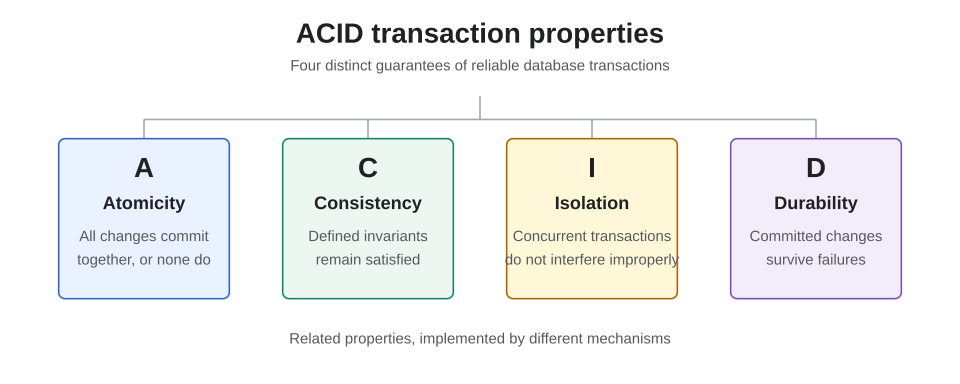 Venn diagram showing Atomicity, Consistency, Isolation, Durability (Image: FeedMeGrapes, CC BY-SA 4.0, via Wikimedia Commons)
6. State Management and Database Optimization
Session State vs. Database State
| Approach | Use Case | Example |
|---|---|---|
| Session State | Temporary user-specific data (e.g., shopping cart). | Storing cart items in HttpContext.Session. |
| Database State | Persistent data (e.g., user profiles). | Storing orders in Orders table. |
Caching Strategies
- In-Memory Caching: Store frequently accessed data (e.g., product categories) in
IMemoryCache. - Distributed Caching: Use Redis for shared caching across servers (e.g., YouTube’s trending videos).
// Cache product categories for 10 minutes
public List<ProductCategory> GetCachedCategories()
{
    var cacheKey = "ProductCategories";
    var categories = _cache.Get<List<ProductCategory>>(cacheKey);
    if (categories == null)
    {
        categories = context.ProductCategories.ToList();
        _cache.Set(cacheKey, categories, TimeSpan.FromMinutes(10));
    }
    return categories;
}
Exam Tip
This unit is heavily tested in TU exams with:
- Code snippets: Write ADO.NET or EF Core code for CRUD operations (20% weight).
- Example: "Write C# code to fetch all orders placed after 2023-01-01 using EF Core."
- SQL queries: Translate LINQ to SQL or vice versa (15% weight).
- Example: "Convert
db.Orders.Where(o => o.Status == "Delivered")to SQL."
- Example: "Convert
- Migrations: Explain the purpose of
Add-MigrationandUpdate-Database(10% weight).- Example: "What happens when you run
dotnet ef database update?"
- Example: "What happens when you run
- Transactions: Describe ACID properties and when to use
BeginTransaction(10% weight).- Example: "Why would you wrap a bank transfer in a transaction?"
- Real-world scenarios: Relate concepts to apps like eSewa, Daraz, or NTC (15% weight).
- Example: "How might Daraz use EF Core to manage inventory?"
- Short answers: Define terms like
DbContext,SqlDataReader, orstored procedure(10% weight).
Common pitfalls:
- Forgetting to
Dispose()SqlConnectionorSqlCommand(useusingblocks). - Not handling exceptions in database operations (wrap in
try-catch). - Confusing
ExecuteReader()(for SELECT) withExecuteNonQuery()(for INSERT/UPDATE/DELETE). - Ignoring connection strings (always use
appsettings.jsonfor security).
Based on the TU BIT syllabus for NET Centric Computing (BIT351), unit 5.
Discussion
Loading…