E CommerceUnit 412 min read
E-Payment Systems: Models, Security & Online Transactions
Unit 4 of E-Commerce explores how online payments work—from credit card transactions and SET protocols to digital wallets and Nepal’s e-payment ecosystem. Learn about security measures (dual signatures, non-repudiation), fraud risks (sniffing/spoofing), and real-world systems like Khalti, eSewa, and Ncell’s mobile bank
TAKEAWAYS:
- E-payment models (credit cards, digital wallets, bank transfers) differ in security, speed, and cost—Nepal’s SET protocol (Secure Electronic Transaction) uses dual signatures to authenticate buyers/sellers.
- Online credit card transactions follow a 4-step process: cardholder → merchant → acquirer → issuer, with PCI-DSS compliance mandatory for security.
- Digital wallets (eSewa, Khalti) reduce fraud but rely on biometric authentication (fingerprint/OTP) to prevent spoofing.
- Non-repudiation (via digital signatures) and encryption (SSL/TLS) protect against sniffing attacks (e.g., MITM in unsecured Wi-Fi).
- Nepal’s Electronic Transaction Act (2008) mandates dual signatures for high-value transactions (e.g., NEPSE stock trades).
- Real-world tie: Pathao’s ride payments use tokenization (replacing card numbers with tokens) to secure transactions.
1. Introduction to E-Payment Systems
E-payment systems enable electronic fund transfers between buyers and sellers without physical cash. Key components:
- Participants: Cardholders, merchants, banks (issuers/acquirers), payment gateways (e.g., Khalti Pay, eSewa).
- Security layers: Encryption (SSL/TLS), dual signatures (SET protocol), and PCI-DSS compliance (for merchants).
How Online Payments Work: A Step-by-Step Trace
flowchart TD
    A["Cardholder\n(Buyer)"] -->|"1. Enters card details"| B["Merchant\n(Website/App)"]
    B -->|"2. Sends encrypted data"| C["Payment Gateway\n(e.g., Khalti API)"]
    C -->|"3. Routes to Acquirer"| D["Acquirer Bank\n(Nabil, Global IME)"]
    D -->|"4. Requests Authorization"| E["Issuer Bank\n(Siddhartha, NMB)"]
    E -->|"5. Approves/Declines"| D
    D -->|"6. Completes Transaction"| B
    B -->|"7. Confirms Payment"| A
Worked Example: When you order from Daraz via Khalti:
- Khalti’s tokenization replaces your card number with a unique token.
- Daraz’s server sends the token to Global IME (acquirer).
- Global IME checks with your bank (issuer) for funds.
- If approved, Khalti deducts ₹500 and credits Daraz instantly.
2. Secure Electronic Transaction (SET) Protocol
SET is a secure payment protocol (now largely replaced by PCI-DSS) that uses dual signatures to prevent fraud.
SET Participants and Their Roles
| Participant | Role | Example in Nepal |
|---|---|---|
| Cardholder | Initiates payment with encrypted order info + payment details. | You buying a Ncell recharge via eSewa. |
| Merchant | Receives encrypted order; forwards payment request to acquirer. | NTC’s online bill payment. |
| Payment Gateway | Routes encrypted data between merchant and acquirer. | Khalti Pay API. |
| Acquirer Bank | Receives payment request; forwards to issuer. | Global IME (for Daraz). |
| Issuer Bank | Authorizes/declines transaction; deducts funds. | NMB Bank (your card issuer). |
| Certification Authority (CA) | Issues digital certificates for authentication. | Nepal Government’s CA for NEPSE. |
Dual Signature in SET
SET uses two digital signatures:
- Order Information (OI): Signed by the cardholder (proves you authorized the order).
- Payment Information (PI): Signed by the merchant (proves they didn’t alter the order).
How Dual Signatures Are Generated:
sequenceDiagram
    participant Cardholder as Cardholder
    participant Merchant as Merchant
    participant CA as Certification Authority
    Cardholder->>CA: Requests Digital Certificate
    CA-->>Cardholder: Issues Certificate (Public/Private Key)
    Cardholder->>Merchant: Sends OI + PI (both encrypted)
    Merchant->>CA: Verifies Merchant’s Certificate
    Merchant->>Cardholder: Returns Signed PI
    Cardholder->>Merchant: Sends Dual-Signed Message
    Merchant->>Cardholder: Confirms Payment
Real-World Use: NEPSE’s stock trading uses dual signatures to ensure traders can’t repudiate orders.
3. Online Credit Card Transactions
Credit cards are the most common e-payment method globally, but they require PCI-DSS compliance (12 security standards).
How Credit Card Transactions Work
- Cardholder enters details on a merchant’s site (e.g., Booking.com).
- Merchant’s server encrypts data using SSL/TLS and sends it to the payment gateway (e.g., PayPal, Khalti).
- Gateway routes the request to the acquirer bank (e.g., Global IME).
- Acquirer sends an authorization request to the issuer bank (e.g., Siddhartha Bank).
- Issuer checks funds and responds with approval/decline.
- Merchant receives confirmation and completes the sale.
Security Risks & Mitigations
| Risk | How It Happens | Mitigation |
|---|---|---|
| Sniffing (MITM) | Hacker intercepts unencrypted card data on public Wi-Fi. | Use SSL/TLS (HTTPS). |
| Spoofing | Fake merchant site steals card details. | Check for padlock icon (🔒). |
| Fraudulent Charges | Stolen card used for unauthorized purchases. | 3D Secure (3DS) authentication. |
| Phishing | Fake emails trick users into revealing CVV. | Never share CVV/OTP over email. |
Worked Example: Khalti’s 3D Secure Process
- You pay ₹2,000 on Daraz via Khalti.
- Khalti sends a one-time password (OTP) to your phone.
- You enter the OTP on Khalti’s app → transaction is 3D Secure verified.
4. Digital Wallets & Mobile Payments in Nepal
Digital wallets (eSewa, Khalti, IME Pay) dominate Nepal’s e-payment scene due to low internet penetration and high mobile usage.
Comparison: Credit Cards vs. Digital Wallets
| Feature | Credit Cards | Digital Wallets (eSewa/Khalti) |
|---|---|---|
| Setup Time | 15–30 mins (apply, activate, add funds) | 5 mins (register, verify via OTP). |
| Transaction Fees | 1–3% per transaction | 2–5% (but often waived for merchants). |
| Security | PCI-DSS, 3D Secure | Biometric (fingerprint), OTP, PIN. |
| Offline Use | ❌ No | ✅ Yes (via USSD: *123# for eSewa). |
| Use Case | High-value purchases (flights, hotels) | Daily expenses (recharge, bills). |
How eSewa/Khalti Work
- Registration: Link bank account via NPR 100–500 deposit.
- Top-Up: Transfer funds from bank to wallet.
- Payment: Scan QR or enter merchant’s ID (e.g., NTC bill payment).
- Confirmation: OTP/PIN verification → funds deducted.
Real-World Example: Pathao’s Ride Payments
- Uses tokenization (replaces card number with a token).
- No CVV required (reduces fraud).
- Instant settlement (Pathao gets money in 24 hours).
5. E-Payment Security: Non-Repudiation & Encryption
Non-repudiation ensures a party cannot deny an action (e.g., sending payment).
How Non-Repudiation Works
- Digital Signature: Cardholder signs the transaction with their private key.
- Verification: Merchant uses the public key to verify the signature.
- Evidence: If a dispute arises, the signature proves the transaction was authorized.
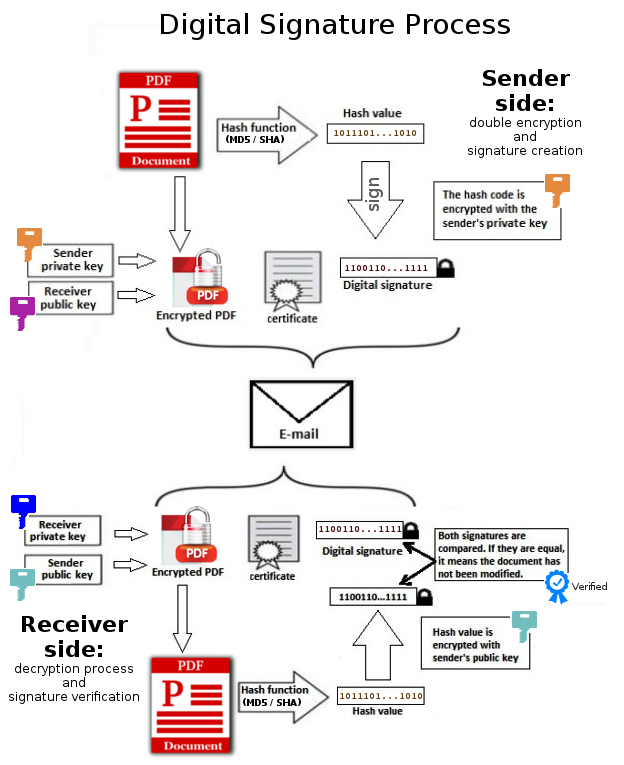 Steps: plaintext → hash → private key → signed hash → public key → verification (Image: Thiagocv, CC BY-SA 4.0, via Wikimedia Commons)
Encryption in E-Payments
| Encryption Type | Purpose | Example in Nepal |
|---|---|---|
| SSL/TLS | Secures data in transit (HTTPS). | eSewa’s website (https://esewa.com.np). |
| Tokenization | Replaces card numbers with tokens. | Khalti’s "Save Card" feature. |
| End-to-End Encryption | Only sender/receiver can decrypt. | WhatsApp Pay (if launched in Nepal). |
Worked Example: Ncell’s Mobile Banking Security
- Uses OTP + Biometric for login.
- Transaction limit: ₹5,000 without OTP (prevents unauthorized access).
6. Legal Framework: Electronic Transaction Act, 2008 (Nepal)
Nepal’s Electronic Transaction Act governs e-payments to ensure legal validity and fraud prevention.
Key Sections of the Act
| Section | Provision |
|---|---|
| Section 4 | Defines electronic signatures as legally valid. |
| Section 5 | Non-repudiation: Digital signatures cannot be denied. |
| Section 12 | Dual signatures required for high-value transactions (e.g., NEPSE trades). |
| Section 15 | Liability: Banks liable for unauthorized transactions if security breached. |
| Section 18 | Dispute resolution: E-filing complaints to the Nepal Rastra Bank (NRB). |
Real-World Tie: NEPSE’s Trading System
- Uses dual signatures to prevent traders from denying orders.
- NRB monitors for fraudulent activities.
7. Fraud in E-Payments: Sniffing & Spoofing
Sniffing Attacks (MITM)
- How it works: Hacker intercepts unencrypted data (e.g., public Wi-Fi at a café).
- Example: Stealing eSewa login credentials on an unsecured network.
- Prevention:
- Always use HTTPS (look for 🔒).
- Avoid public Wi-Fi for payments.
Spoofing Attacks
- How it works: Fake merchant site (e.g., fake "esewa.com.np") tricks users into entering card details.
- Example: Phishing email saying "Your Khalti account is locked—click here to verify."
- Prevention:
- Check URL spelling (eSewa = eSewa.com.np, not eSewanp.com).
- Never enter CVV/OTP on pop-ups.
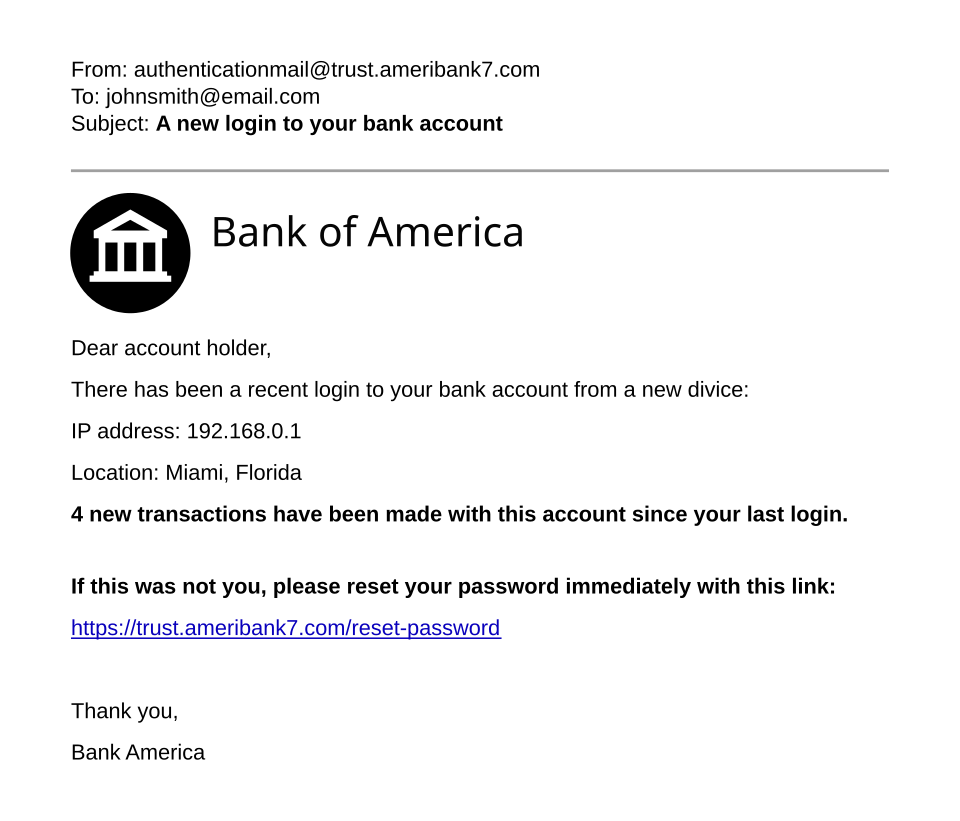 Highlighted: fake logo, suspicious URL, urgent language (Image: Original template by User:Isochrone, amended by User:Belbury, CC BY 4.0, via Wikimedia Commons)
## In the Real World
Khalti & eSewa
- Idea Used: Tokenization + Biometric Authentication
- How: When you "Save Card" in Khalti, your card number is replaced with a token. For payments, you authenticate via fingerprint or OTP—no need to re-enter CVV.
- Example: Paying ₹1,500 for a Pathao ride without sharing card details with the driver.
Ncell’s Mobile Banking
- Idea Used: Multi-Factor Authentication (MFA)
- How: To transfer ₹10,000, Ncell requires:
- PIN (something you know).
- Fingerprint (something you are).
- OTP (sent to registered number).
- Example: Prevents fraud if your phone is stolen.
Daraz’s PCI-DSS Compliance
- Idea Used: End-to-End Encryption
- How: When you buy a ₹5,000 laptop, Daraz’s payment gateway:
- Encrypts your card data with AES-256.
- Sends only a token to the bank (never raw card details).
- Example: Even if Daraz’s database is hacked, thieves get useless tokens.
## Exam Tip
- SET Protocol: Always explain dual signatures (OI + PI) and the 4 participants (cardholder, merchant, acquirer, issuer).
- Credit Card Flow: Draw the 6-step process (cardholder → merchant → gateway → acquirer → issuer → confirmation).
- Digital Wallets: Compare eSewa vs. Khalti in terms of fees, security, and offline use.
- Legal Act: Memorize Section 4 (e-signatures), Section 12 (dual signatures), and Section 18 (NRB disputes).
- Fraud Prevention: Link sniffing → unencrypted Wi-Fi and spoofing → fake URLs.
- Worked Examples: Use real Nepalese cases (eSewa, Khalti, Ncell) to explain concepts—examiners love local relevance.
Common Mistakes to Avoid:
- ❌ Forgetting PCI-DSS for credit card security.
- ❌ Mixing up SET’s dual signatures with digital signatures.
- ❌ Ignoring Nepal’s Electronic Transaction Act—always mention NRB’s role in disputes.
Final Note: E-payments are 90% security and 10% technology. Focus on how data flows securely (encryption, tokens, OTPs) and legal protections (non-repudiation, NRB). Use real examples (eSewa, Khalti, Ncell) to score full marks!
Based on the TU BIT syllabus for E Commerce (BIT403), unit 4.
Discussion
Loading…