Network SecurityUnit 310 min read
Transport Level Security: TLS/SSL, VPNs, Firewalls & Secure Protocols
Unit 3 of Network Security explores Transport Layer Security (TLS/SSL), Virtual Private Networks (VPNs), firewalls, and secure protocols like HTTPS, FTPS, and SSH, explaining their mechanisms, cryptographic foundations, and real-world applications in securing data in transit.
Core Concepts
Transport Layer Security (TLS/SSL)
TLS (Transport Layer Security) and its predecessor SSL (Secure Sockets Layer) are cryptographic protocols designed to provide secure communication over a computer network. They operate at the transport layer (Layer 5) of the OSI model, ensuring data confidentiality, integrity, and authentication between applications.
How TLS Works
TLS uses a combination of symmetric encryption (for speed) and asymmetric encryption (for key exchange) to secure data. The process involves four main phases:
- Handshake Phase: Establishes a secure connection.
- Key Exchange: Uses asymmetric encryption (e.g., RSA or Diffie-Hellman) to exchange a symmetric key.
- Authentication: Verifies the identity of the server (and optionally the client) using digital certificates.
- Data Transfer: Encrypts data using symmetric encryption (e.g., AES).
sequenceDiagram
    participant Client as Client (Browser)
    participant Server as Server (Website)
    Client->>Server: ClientHello (supports TLS 1.3, cipher suites)
    Server->>Client: ServerHello, Certificate, ServerKeyExchange
    Client->>Server: ClientKeyExchange, ChangeCipherSpec, Finished
    Server->>Client: ChangeCipherSpec, Finished
    Note over Client,Server: Symmetric key established\nSecure session begins
TLS Record Protocol
TLS encrypts data using the TLS Record Protocol, which:
- Compresses data (optional).
- Applies a Message Authentication Code (MAC) for integrity.
- Encrypts the data (e.g., using AES or ChaCha20).
- Transmits the result.
TLS Versions
| Version | Year | Key Features | Security Issues |
|---|---|---|---|
| SSL 3.0 | 1996 | First widely used, but insecure. | POODLE, BEAST attacks |
| TLS 1.0 | 1999 | Fixed SSL 3.0 vulnerabilities. | Weak cipher suites, outdated |
| TLS 1.1 | 2006 | Removed unsafe features (e.g., CBC mode without padding). | Still vulnerable to some attacks |
| TLS 1.2 | 2008 | Stronger cryptography, support for AEAD ciphers (e.g., GCM). | No major flaws (if configured properly) |
| TLS 1.3 | 2018 | Faster handshake, removed outdated features, mandatory forward secrecy. | Most secure to date |
Worked Example: HTTPS Connection (eSewa Payment)
When you log in to eSewa to make a payment:
- Your browser sends a
ClientHellotohttps://esewa.com.np. - The server responds with its digital certificate (issued by a trusted CA like DigiCert).
- Your browser verifies the certificate and negotiates a symmetric key using ECDHE (Elliptic Curve Diffie-Hellman Ephemeral).
- All subsequent data (login credentials, payment details) is encrypted with AES-256-GCM.
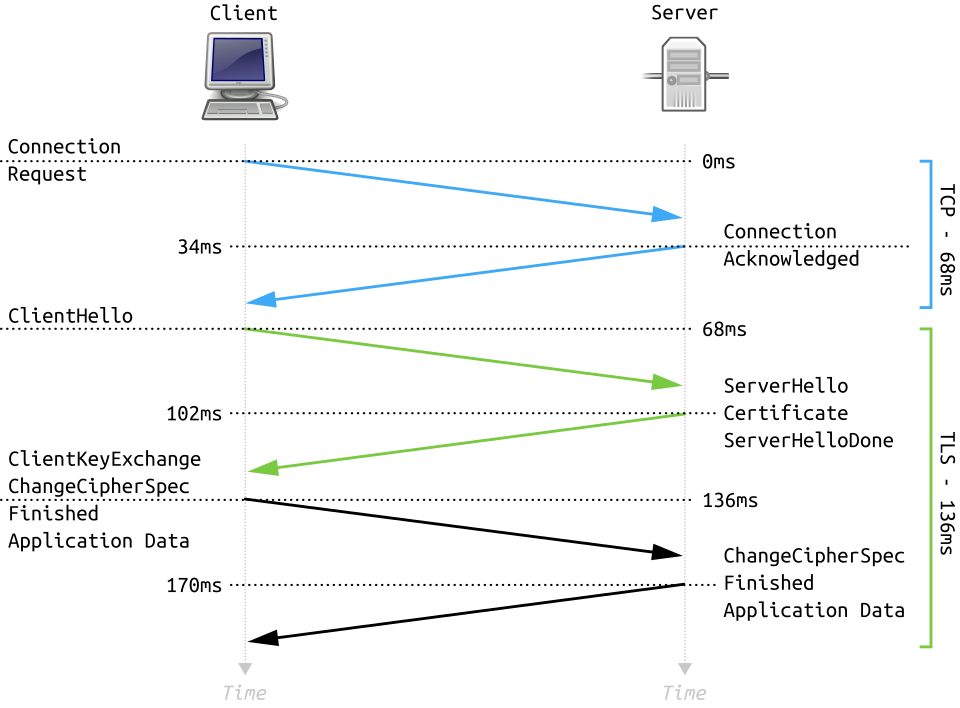 A visual breakdown of the TLS handshake phases. (Image: Fleshgrinder and The People from The Tango! Desktop Project., Public domain, via Wikimedia Commons)
Virtual Private Networks (VPNs)
VPNs create a secure, encrypted tunnel over an untrusted network (e.g., the internet) to protect data in transit. They are widely used by:
- Individuals: To bypass geo-restrictions (e.g., accessing Netflix US from Nepal).
- Businesses: To securely connect remote offices or employees (e.g., Ncell’s remote workforce).
- Governments: To secure diplomatic communications.
How VPNs Work
- Authentication: User authenticates via username/password, certificates, or biometrics.
- Tunnel Establishment: A secure tunnel is created using IPSec or OpenVPN.
- Encryption: All traffic is encrypted (e.g., using AES-256) and routed through a VPN server.
- Decryption: The VPN server decrypts and forwards traffic to the destination.
VPN Protocols
| Protocol | Port | Encryption | Use Case | Security Level |
|---|---|---|---|---|
| PPTP | 1723 | MPPE (weak) | Legacy systems (avoid) | Low |
| L2TP/IPsec | 1701 | AES, 3DES | Corporate networks | Medium |
| OpenVPN | 1194 | AES, ChaCha20 | General use (secure) | High |
| IKEv2/IPsec | 500/4500 | AES-GCM | Mobile devices (fast reconnect) | Very High |
| WireGuard | 51820 | ChaCha20/Poly1305 | Modern, lightweight | Very High |
Worked Example: Ncell Employee Accessing Corporate Network
An Ncell employee in Pokhara connects to the corporate network via VPN:
- The employee’s device connects to
vpn.ncell.comusing OpenVPN. - The VPN server authenticates the employee via RADIUS (username/password + 2FA).
- All traffic (emails, internal databases) is encrypted with AES-256.
- The employee accesses internal resources as if on the local network.
Firewalls
Firewalls act as a barrier between a trusted internal network and untrusted external networks (e.g., the internet). They filter traffic based on rules (e.g., IP addresses, ports, protocols).
Types of Firewalls
| Type | Description | Example Use Case |
|---|---|---|
| Packet Filtering | Filters based on IP/port (Layer 3/4). | Basic home router security. |
| Stateful Inspection | Tracks connection state (e.g., TCP handshake). | Corporate networks (e.g., NTC). |
| Application-Level (Proxy) | Inspects application data (e.g., HTTP headers). | Web filtering in schools. |
| Next-Gen (NGFW) | Combines firewall + IPS/IDS + sandboxing. | Banks (e.g., NMB Bank). |
Worked Example: Blocking Malicious Traffic to a Bank
A firewall at NMB Bank is configured to:
- Allow traffic on port 443 (HTTPS) to
bank.nmb.com. - Block all inbound traffic on port 22 (SSH) from external IPs (except whitelisted admins).
- Drop packets with malformed TCP flags (potential scans).
Secure Protocols
Several protocols ensure secure communication at the transport layer:
1. HTTPS (HTTP + TLS)
- Used for secure web browsing (e.g., Daraz, eSewa).
- Ensures confidentiality and integrity of web traffic.
2. FTPS (FTP Secure)
- Secures File Transfer Protocol (FTP) using TLS.
- Used by NTC to securely transfer network configuration files.
3. SSH (Secure Shell)
- Replaces insecure Telnet for remote access.
- Used by Nepal Stock Exchange (NEPSE) admins to manage servers.
4. SMTP with TLS (SMTPS)
- Secures email transmission (e.g., Gmail, Ncell Email).
Comparison Table: Secure vs. Insecure Protocols
| Protocol | Secure Version | Use Case | Risk if Unsecured |
|---|---|---|---|
| HTTP | HTTPS | Web browsing | Eavesdropping, MITM attacks |
| FTP | FTPS/SFTP | File transfers | Data leakage, unauthorized access |
| Telnet | SSH | Remote server access | Credential theft |
| SMTP | SMTPS | Email transmission | Email interception |
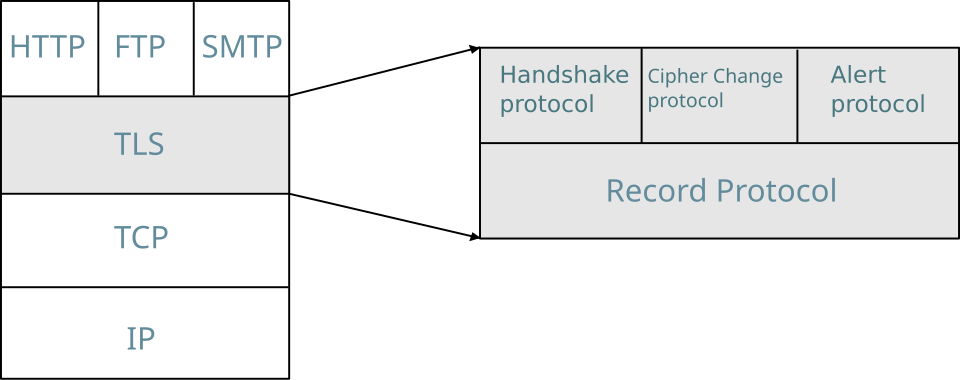 A layered diagram showing where TLS fits in the OSI model (between transport and application layers). (Image: Gorivero, CC BY 3.0, via Wikimedia Commons)
## In the real world
eSewa (HTTPS/TLS)
- When you pay bills via eSewa, TLS encrypts your card details and transaction ID to prevent man-in-the-middle (MITM) attacks. The site uses TLS 1.3 with ECDHE-RSA-AES256-GCM-SHA384, ensuring forward secrecy.
Ncell VPN for Remote Workers
- Ncell employees in rural areas use OpenVPN to securely access internal databases (e.g., customer records). The VPN enforces two-factor authentication (2FA) and logs all sessions for auditing.
Daraz’s Firewall Rules
- Daraz’s servers block SQL injection attempts by filtering malicious payloads at the firewall (e.g., dropping requests with
' OR 1=1 --). Their NGFW also scans for zero-day exploits in real time.
- Daraz’s servers block SQL injection attempts by filtering malicious payloads at the firewall (e.g., dropping requests with
NTC’s FTPS for Network Updates
- NTC technicians use FTPS to securely upload firmware updates to base stations. Without encryption, attackers could intercept and modify the firmware, disrupting services.
NEPSE’s SSH for Server Management
- NEPSE admins use SSH key pairs (not passwords) to log into trading servers. If an attacker steals a password, they cannot decrypt past sessions due to TLS’s forward secrecy.
## Exam Tip
Diagrams Are Key
- Draw the TLS handshake (ClientHello → ServerHello → Key Exchange → Finished).
- Sketch a VPN tunnel showing encryption/decryption at both ends.
- Label a firewall rule table with source/destination ports and actions (ALLOW/DROP).
Compare Protocols
- Memorize the differences between TLS 1.2 vs. 1.3 (e.g., 1.3 removes RSA key exchange, uses 0-RTT).
- Know when to use SSH vs. FTPS (SSH for remote access, FTPS for file transfers).
Real-World Scenarios
- Expect questions like:
- "How does eSewa prevent MITM attacks during login?" (Answer: TLS certificate pinning + HSTS).
- "Why does Ncell use OpenVPN instead of PPTP?" (Answer: PPTP is vulnerable to MS-CHAPv2 cracking).
- Always tie answers to Nepali companies (eSewa, Ncell, NTC, NEPSE).
- Expect questions like:
Weaknesses to Watch For
- POODLE (SSL 3.0), Heartbleed (OpenSSL), BEAST (CBC mode).
- VPN risks: Misconfigured firewalls, weak encryption (e.g., DES).
Maths for Marks
- Calculate TLS session resumption time savings (TLS 1.3’s 0-RTT).
- Estimate VPN overhead (e.g., 10% latency increase due to encryption).
Based on the TU BIT syllabus for Network Security, unit 3.
Discussion
Loading…