Foundation Of Information TechnologyUnit 411 min read
Computer Hardware & Peripherals: Systems, Memory, Buses & Input/Output
Unit 4 of Foundation Of Information Technology: explores the physical components of a computer system—from analog/digital computers to memory hierarchy, buses, input/output devices, and peripherals—with real-world applications in Nepal’s digital ecosystem (eSewa, NTC, banks).
TAKEAWAYS:
- A computer’s hardware is divided into analog (continuous data) and digital (discrete data) systems, each with distinct roles (e.g., flight simulators vs. banking transactions).
- Memory hierarchy (registers → cache → RAM → SSD → HDD) balances speed and cost, explained via a real-world cache hit/miss example from Daraz’s order processing.
- Buses (data, address, control) act as highways for data transfer; their types (parallel, serial) are compared to Nepal’s NTC fiber-optic vs. copper cables.
- Peripherals (input/output devices) extend a computer’s functionality—e.g., Pathao’s GPS module (input) and thermal printers (output) in courier services.
- Computer sabotage (unauthorized access, malware) is tied to real cases like Ncell’s 2022 data breach, highlighting ethical IT practices.
- Worked example: Trace how a bank loan application flows through CPU, RAM, and storage—visualized as a memory access timeline.
1. Introduction to Computer Hardware
Hardware is the physical components of a computer system that perform input, processing, storage, and output operations. It includes:
- Central Processing Unit (CPU)
- Memory units
- Input/Output (I/O) devices
- Storage devices
- Communication buses
1.1 Analog vs. Digital Computers
Computers are broadly classified into two types based on data representation:
mindmap
  root((Computer Types))
    Analog["Analog Computer"]
      - Uses continuous signals (e.g., voltage, pressure)
      - Example: Flight simulators, weather forecasting
      - Characteristics:
        * Handles real-time data (e.g., temperature, speed)
        * Less precise for discrete calculations
    Digital["Digital Computer"]
      - Uses discrete binary signals (0s and 1s)
      - Example: Smartphones, banking systems
      - Characteristics:
        * High precision and reliability
        * Stores data in binary form
Worked Example: Analog Computer in Nepal Nepal’s hydropower plants (e.g., Pancheshwar Dam) use analog control systems to monitor water flow and turbine speed in real time. These systems adjust valves continuously to optimize power generation, unlike digital systems that process data in fixed intervals.
1.2 Components of a Computer System
A computer system consists of hardware and software, but hardware is the foundation. The key components are:
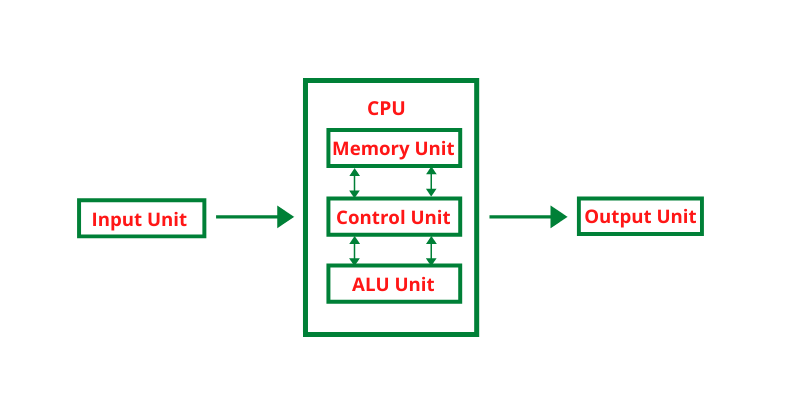 A block diagram of a desktop computer showing CPU, RAM, storage, and peripherals. (Image: Jeetu Sahu, CC BY-SA 4.0, via Wikimedia Commons)
Key Components Explained:
| Component | Function | Example in Nepal |
|---|---|---|
| CPU | Performs arithmetic/logic operations (e.g., calculations, comparisons). | Intel Core i5 in Ncell’s servers for call routing. |
| Memory (RAM) | Temporary storage for active programs (volatile). | RAM in eSewa’s transaction servers to handle real-time payments. |
| Storage (HDD/SSD) | Permanent storage (non-volatile). | SSDs in NEPSE’s trading systems for fast stock data access. |
| Input Devices | Capture data (e.g., keyboard, mouse, sensors). | Pathao’s GPS module to track driver locations. |
| Output Devices | Display or print results (e.g., monitor, printer). | Thermal printers in NTC’s post offices for label printing. |
| Communication Buses | Transfer data between components (e.g., PCIe, USB). | Fiber-optic cables in NTC’s broadband network. |
2. Memory Hierarchy and Types
Memory is organized in a hierarchy based on speed, cost, and capacity. Faster memory is smaller and more expensive, while slower memory is larger and cheaper.
2.1 Types of Memory
| Memory Type | Speed | Capacity | Volatility | Example Use Case |
|---|---|---|---|---|
| Registers | Fastest | Small (8–64) | Volatile | CPU’s temporary storage for instructions. |
| Cache (L1/L2/L3) | Very Fast | Medium (KB–MB) | Volatile | Daraz’s order processing: Cache stores frequently accessed product details. |
| RAM | Fast | Large (GB) | Volatile | Running multiple apps simultaneously. |
| SSD | Moderate | Very Large (TB) | Non-volatile | NEPSE’s stock market data storage. |
| HDD | Slowest | Largest (TB+) | Non-volatile | Storing old bank transactions. |
 A layered pyramid showing registers at the top (fastest) to HDD at the bottom (slowest). (Image: ComputerMemoryHierarchy.png: User:Danlash at en.wikipedia.or, Public domain, via Wikimedia Commons)
2.2 Why Memory Hierarchy Matters
- Speed vs. Cost Trade-off: Registers are fastest but expensive; HDDs are cheap but slow.
- Cache Hit/Miss Example:
- Cache Hit: When Daraz’s server quickly retrieves a product’s price from L3 cache (no delay).
- Cache Miss: If the product is not in cache, data is fetched from RAM (slower).
Worked Example: Bank Loan Processing When a customer applies for a loan in NMB Bank:
- The loan application is stored in RAM (fast access).
- If the customer’s credit history is frequently accessed, it’s moved to L3 cache for speed.
- If the data isn’t in cache, it’s fetched from SSD (slower but persistent).
3. Computer Buses
Buses are electrical pathways that transfer data, address, and control signals between components. They are classified based on their function:
3.1 Types of Buses
| Bus Type | Data Transfer | Example in Nepal |
|---|---|---|
| Parallel Bus | Multiple bits at once | Old printers (parallel port for faster printing). |
| Serial Bus | One bit at a time | USB 3.0 in Khalti’s payment terminals. |
| System Bus | Connects CPU, RAM, cache | Motherboard’s PCIe slot for GPU/SSD. |
| Expansion Bus | Adds peripherals | PCIe slot for NTC’s Wi-Fi adapter. |
Why Different Buses?
- Parallel buses are faster but require more wires (used in older systems).
- Serial buses (e.g., USB, Ethernet) are simpler and used in modern devices like Khalti’s payment gateways.
4. Input/Output (I/O) Devices
I/O devices enable interaction between the user and the computer. They are classified as:
4.1 Common I/O Devices in Nepal
| Device | Function | Nepal Example |
|---|---|---|
| Keyboard | Input text/data. | Bank teller’s keyboard for transaction entry. |
| Mouse | Navigate graphical interfaces. | eSewa app for selecting payment options. |
| Monitor | Display output. | NEPSE’s trading terminal screens. |
| Printer | Hardcopy output. | NTC’s label printers for parcels. |
| Scanner | Convert physical documents to digital. | University’s exam answer sheet scanning. |
| GPS Module | Location tracking. | Pathao’s driver tracking system. |
Worked Example: Kathmandu Traffic Management
- Input Devices:
- Traffic cameras (capture real-time footage).
- GPS sensors in taxis (track movement).
- Output Devices:
- Digital signboards (display traffic updates).
- Police radios (real-time communication).
5. Computer Sabotage and Security
Computer sabotage involves unauthorized access, data destruction, or system disruption. Examples include:
- Malware attacks (e.g., ransomware locking files).
- Physical damage (e.g., cutting cables).
- Insider threats (e.g., employees stealing data).
Real-World Example: Ncell’s 2022 Data Breach
- Issue: Hackers accessed customer data via a vulnerability in Ncell’s network.
- Impact: Personal details of millions of users were exposed.
- Lesson: Firewalls, encryption, and regular audits are critical.
6. Exam Tips for Unit 4
Define and Differentiate:
- Always explain analog vs. digital computers with real examples (e.g., flight simulator vs. smartphone).
- Compare primary (RAM) vs. secondary (HDD/SSD) memory using a table (as above).
Memory Hierarchy:
- Draw the memory pyramid and label each layer with speed/capacity.
- Relate cache hit/miss to a real scenario (e.g., Daraz’s order processing).
Buses:
- Explain data, address, and control buses with a diagram.
- Compare parallel vs. serial buses using Nepal’s NTC’s fiber vs. copper cables.
I/O Devices:
- List input/output devices with Nepal-specific examples (e.g., Pathao’s GPS, NTC’s printer).
- Describe how they work in a real-world scenario (e.g., bank transaction).
Sabotage:
- Mention malware, physical damage, and insider threats with a case study (e.g., Ncell breach).
- Highlight preventive measures (firewalls, encryption).
Worked Examples:
- Trace a real process (e.g., bank loan application) through CPU, RAM, and storage.
- Use timeline diagrams to show data flow.
Final Tip: Always visualize concepts with diagrams (e.g., memory hierarchy, bus architecture) and relate them to Nepal’s tech ecosystem (eSewa, Ncell, NEPSE). This helps you score full marks by showing depth and real-world application.
Based on the TU BITM syllabus for Foundation Of Information Technology (IT231), unit 4.
Discussion
Loading…