Foundation Of Information TechnologyUnit 112 min read
Computer Systems & IT Foundations: Definitions, Roles & Components
Unit 1 of Foundation Of Information Technology: Explores core definitions (computer, IT, analog/digital systems), classifies information systems, dissects computer hardware/software layers, and maps IT’s role in business—with real-world examples from Nepal’s eSewa and global platforms.
TAKEAWAYS:
- A computer is an electronic device that processes data via hardware/software, with analog (continuous) and digital (discrete) systems serving distinct roles.
- Information Technology (IT) integrates hardware, software, and networks to store/process data, while Information Systems (IS) classify as TPS, MIS, DSS, and ESS, each serving unique business needs.
- Computer systems consist of hardware (CPU, memory, I/O) and software (OS, applications), with memory hierarchy (registers → cache → RAM → disk) optimizing speed/cost trade-offs.
- Operating systems manage resources (CPU, memory, storage) via processes, threads, and security mechanisms, while analog computers (e.g., flight simulators) solve continuous problems.
- IT in business enables automation (eSewa payments), decision-making (DSS), and security (Ncell network encryption), tying technology to revenue and efficiency.
- Ethical IT balances innovation with privacy (e.g., NEPSE’s data protection) and sustainability (green data centers).
1. Definitions: The IT and Computer Basics
1.1 What is a Computer?
A computer is an electronic device that accepts input, processes data via algorithms, stores results, and produces output—enabling automation, calculation, and decision-making.
Key Characteristics:
- Electronic: Uses transistors/circuits for fast computation.
- Programmable: Executes instructions from software.
- Automatic: Performs tasks without human intervention (post-input).
- Versatile: Handles data, text, images, and complex simulations.
Analog vs. Digital Computers
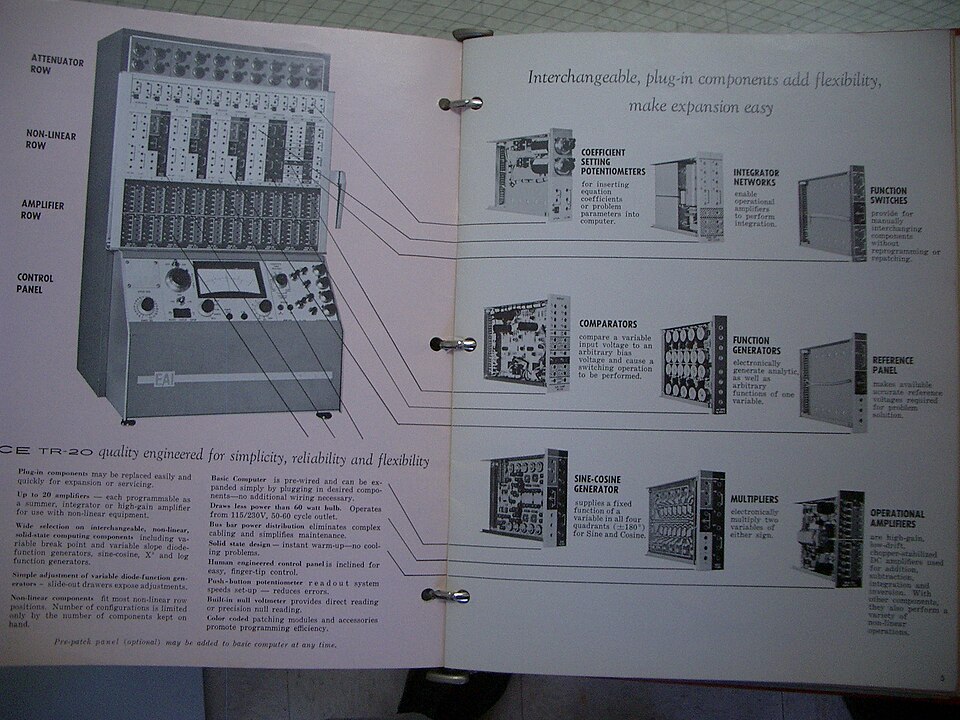 A slide-rule analog computer from the 1950s, showing mechanical gears and dials for solving differential equations. (Image: jurvetson, CC BY 2.0, via Wikimedia Commons)
Worked Example: An air traffic control system uses analog computers to model aircraft trajectories in real-time, adjusting for wind and speed continuously. Digital systems (e.g., radar processing) then validate and display the data.
1.2 What is Information Technology (IT)?
IT is the application of computers, networks, and software to store, retrieve, transmit, and manipulate data—enabling digital transformation.
Core Components of IT:
| Component | Description | Example in Nepal |
|---|---|---|
| Hardware | Physical devices (CPU, RAM, servers). | NTC’s fiber-optic backbone |
| Software | Programs/apps (OS, databases, apps). | Khalti’s mobile payment SDK |
| Networks | Connectivity (Wi-Fi, 5G, VPNs). | Pathao’s rider-app GPS network |
| Data | Structured/unstructured information (text, images, logs). | Daraz’s inventory databases |
2. Types of Information Systems (IS)
Information Systems classify by purpose and user level:
Worked Example (DSS in Action): NEPSE’s trading platform uses a DSS to analyze stock trends, risk factors, and historical data. Traders input parameters (e.g., "Show me stocks with P/E < 15"), and the system generates ranked recommendations—reducing human bias.
3. Computer Systems: Hardware and Software Layers
3.1 Hardware Components
A computer’s hardware includes:
Memory Hierarchy (Speed vs. Cost):
| Memory Type | Speed | Capacity | Volatility | Example Use Case |
|---|---|---|---|---|
| Registers | Nanoseconds | 64–256 bits | Non-volatile | CPU’s immediate data storage |
| Cache (L1/L2) | Picoseconds | KB–MB | Volatile | Frequently accessed instructions |
| RAM | Microseconds | GB | Volatile | Running applications |
| SSD | Milliseconds | TB | Non-volatile | Operating system storage |
| HDD | Seconds | TB | Non-volatile | Archival data |
Why Hierarchy Matters:
- Locality Principle: Programs reuse data (e.g., loops), so cache reduces CPU waits.
- Trade-off: SSDs are faster than HDDs but costlier per GB.
Worked Example (Cache Hit): When you open eSewa, your phone’s L3 cache stores frequently used app data (e.g., login credentials). If the data is in cache, the CPU accesses it in nanoseconds; otherwise, it fetches from RAM (microseconds), slowing the app.
3.2 Software Components
Software divides into:
- System Software: Manages hardware (OS, drivers, utilities).
- Application Software: End-user tools (word processors, games).
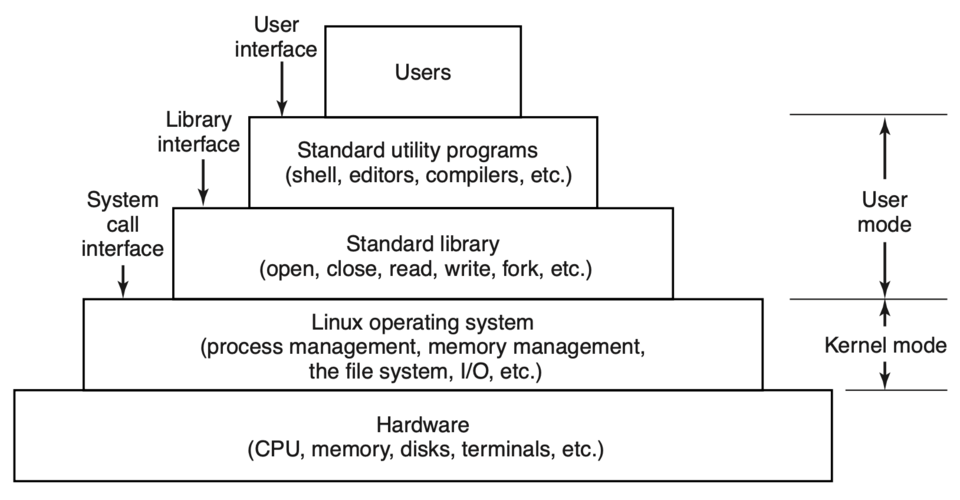 A stack showing hardware → BIOS → OS kernel → device drivers → applications. (Image: Andrew S. Tanenbaum, Herbert Bos, Public domain, via Wikimedia Commons)
Operating System (OS) Functions:
Worked Example (Process Scheduling): On a Nepalese bank’s server, the OS schedules processes like:
- High priority: Real-time transaction validation (must complete in <100ms).
- Low priority: Nightly backup jobs (can wait hours).
4. Analog Computers: Legacy and Modern Use
Definition: Computers that process continuous analog signals (e.g., voltage, temperature) to solve differential equations.
Characteristics:
- Analog: Uses physical quantities (e.g., rotating shafts, electrical currents).
- No Binary: No 0/1 representation.
- Precision Limits: Drift over time; requires calibration.
Modern Analog Use Cases:
- Medical Devices: Pacemakers use analog circuits to regulate heartbeats.
- Robotics: Analog sensors (e.g., pressure gauges) in industrial robots.
- Weather Forecasting: Supercomputers (e.g., ECMWF) combine analog/digital models.
Disadvantage:
- No Digital Storage: Cannot save results for later use (unlike digital computers).
5. IT in Business: Real-World Applications
5.1 eSewa and Khalti: Payment Systems
How IT Enables:
- Database Systems: Store user accounts, transaction logs.
- Networking: Secure HTTPS connections for data transfer.
- DSS: Fraud detection algorithms flag unusual transactions.
Worked Example (Queue Management): During Dashain, eSewa’s servers handle 10,000+ transactions/sec. The OS uses round-robin scheduling to distribute CPU time evenly, preventing delays.
5.2 Daraz: E-Commerce Logistics
IT Roles:
- MIS: Tracks inventory across warehouses.
- DSS: Recommends restocking based on sales trends.
- Cloud Computing: Scales servers during festivals (e.g., Janai Purnima).
5.3 NTC/Ncell: Network Infrastructure
IT Components:
- Hardware: Fiber-optic cables, cell towers.
- Software: Routing protocols (e.g., OSPF) to manage data paths.
- Security: Firewalls to block DDoS attacks.
Worked Example (Traffic Routing): When you send a WhatsApp message to a friend in Pokhara, Ncell’s network uses OSPF to:
- Check the shortest path (e.g., Kathmandu → Pokhara via fiber).
- Split data into packets (to avoid congestion).
- Reassemble at the destination.
6. Information Security Principles
Core Principles:
- Confidentiality: Only authorized users access data (e.g., NEPSE’s trader logins).
- Integrity: Data remains unaltered (e.g., blockchain for transaction records).
- Availability: Systems are operational (e.g., NTC’s 99.9% uptime SLA).
- Authentication: Verify users (e.g., Ncell’s SIM PIN + biometrics).
Threats and Countermeasures:
| Threat | Example | Countermeasure |
|---|---|---|
| Phishing | Fake eSewa login emails | Multi-factor authentication (MFA) |
| Malware | Ransomware on bank PCs | Firewalls + regular software updates |
| Unauthorized Access | SQL injection on Daraz | Input validation + encryption |
In the Real World
eSewa’s Payment Processing:
- IT Idea: Distributed databases (sharding) to handle high transaction volumes during festivals.
- How: Data splits across servers (e.g., Kathmandu, Pokhara, Biratnagar) to prevent overload.
Pathao’s Ride-Matching Algorithm:
- IT Idea: Priority queues (FIFO/LIFO) to match riders with nearest drivers.
- How: The app’s backend sorts requests by proximity, reducing wait times.
NEPSE’s Trading Platform:
- IT Idea: Real-time analytics (DSS) to flag market anomalies.
- Example: If stock X’s price drops 20% in 5 minutes, the system alerts traders to potential pump-and-dump schemes.
Exam Tip
Focus Areas for Full Marks:
- Definitions: Memorize analog computer, IT, DSS, and OS functions (5–6 marks each).
- Comparisons: Draw tables for memory hierarchy or IS types (3–4 marks).
- Real-World Links: Tie concepts to Nepalese examples (eSewa, NTC) or global apps (WhatsApp, Google).
- Diagrams: Always include hardware layers, OS functions, or network models (2–3 marks).
- Applications: Explain how IT solves a problem (e.g., "Why does Daraz use cloud computing?").
Common Pitfalls:
- Mixing analog/digital: Analog systems cannot store data digitally.
- Ignoring memory hierarchy: Always justify why cache is faster than HDD.
- Overlooking ethics: Security principles (confidentiality/integrity) are non-negotiable in exams.
Sample Question Breakdown:
- Define analog computer (2 marks) → "Processes continuous signals; used in flight simulators."
- Explain IT in business (8 marks) →
- Define IT (1).
- List 3 IS types (2).
- Example of DSS in NEPSE (2).
- Role of networking in eSewa (2).
- Security principle for Ncell (1).
- Diagram (2 marks) → Draw OS layers or memory hierarchy.
Final Note: This unit is 50% definitions + 50% applications. Always visualize (draw diagrams) and relate to real-world tools students use daily (eSewa, WhatsApp). For full marks, combine theory with worked examples (e.g., "How does NTC’s network use OSPF?").
Based on the TU BITM syllabus for Foundation Of Information Technology (IT231), unit 1.
Discussion
Loading…