Foundation Of Information TechnologyUnit 107 min read
Multimedia & Graphics: Types, Formats, Tools & Business Apps
Unit 10 of Foundation Of Information Technology: Explores multimedia components (text, audio, video, graphics), file formats, compression techniques, and tools like Adobe Photoshop/Illustrator, while linking to real-world apps like Daraz’s product images and Pathao’s ride-sharing videos.
TAKEAWAYS:
- Multimedia integrates text, audio, video, and graphics to create engaging content for business and entertainment.
- File formats like JPEG (images), MP3 (audio), and MP4 (video) use compression to balance quality and file size.
- Vector graphics (e.g., logos) scale infinitely, while raster graphics (e.g., photos) lose quality when enlarged.
- Tools like Adobe Photoshop (editing) and GIMP (free alternative) enable professional graphic design.
- Businesses use multimedia for marketing (e.g., eSewa’s transaction animations), training, and customer support.
- Lossy compression (e.g., MP3) reduces file size by discarding data, while lossless (e.g., PNG) preserves quality.
1. Introduction to Multimedia
Multimedia combines multiple media types—text, audio, video, graphics, and animations—to deliver interactive and immersive experiences. It is widely used in education, entertainment, marketing, and business.
1.1 Types of Multimedia
Multimedia is classified into two broad categories:
Key Difference:
| Raster Graphics | Vector Graphics |
|---|---|
| Pixels-based (e.g., JPEG) | Mathematical paths (e.g., SVG) |
| Loses quality when scaled up | Scales infinitely without loss |
| Used for photos, screenshots | Used for logos, icons, diagrams |
2. Multimedia File Formats
File formats define how multimedia data is stored and compressed. Common formats include:
2.1 Image Formats
| Format | Type | Compression | Best For |
|---|---|---|---|
| JPEG | Raster | Lossy | Photos, web images |
| PNG | Raster | Lossless | Graphics, logos, transparency |
| SVG | Vector | Lossless | Scalable logos, icons |
| GIF | Raster | Lossy | Simple animations, icons |
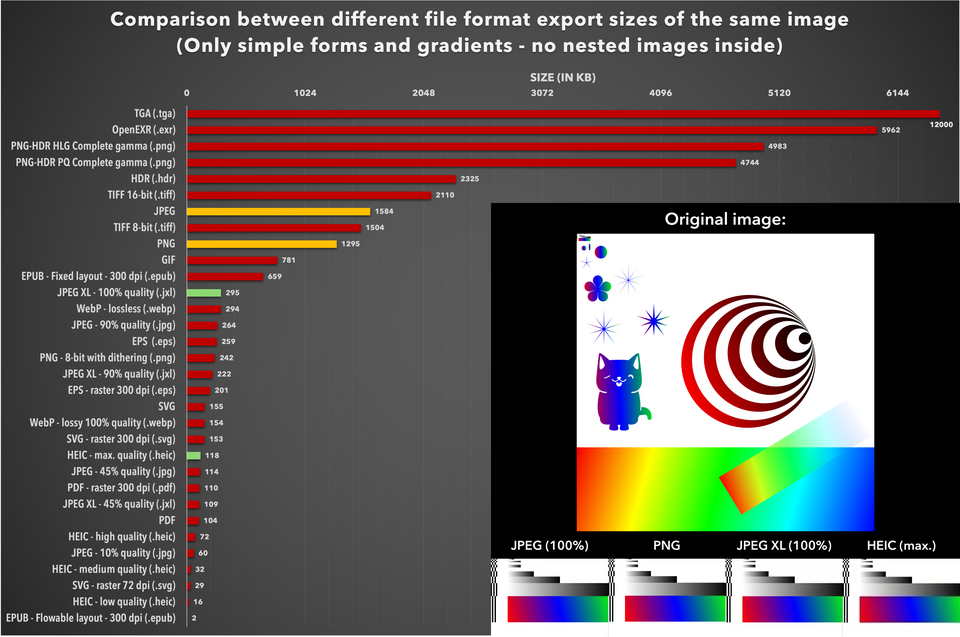 Differences in compression and use cases (Image: LucaLindholm, CC BY 4.0, via Wikimedia Commons)
2.2 Audio Formats
| Format | Compression | Quality | Best For |
|---|---|---|---|
| MP3 | Lossy | Medium | Music streaming |
| WAV | Lossless | High | Professional audio editing |
| AAC | Lossy | High | Apple devices, streaming |
2.3 Video Formats
| Format | Compression | Best For |
|---|---|---|
| MP4 | Lossy | Web videos, YouTube |
| AVI | Lossy | High-quality video editing |
| WebM | Lossy | Web-based streaming |
3. Multimedia Compression
Compression reduces file size without significant quality loss. Two types:
3.1 Lossy Compression
- Discards non-critical data (e.g., MP3, JPEG).
- Reduces file size significantly but may lose some quality.
- Example: Converting a high-resolution photo (10MB) to JPEG (2MB).
3.2 Lossless Compression
- Preserves all original data (e.g., PNG, ZIP).
- No quality loss but smaller size reduction compared to lossy.
- Example: Compressing a vector logo (SVG) for web use.
4. Multimedia Tools and Software
Tools enable creation, editing, and sharing of multimedia content.
4.1 Graphic Design Tools
- Adobe Photoshop: Industry-standard for photo editing and manipulation.
- Adobe Illustrator: Vector graphics design (logos, icons).
- GIMP: Free alternative to Photoshop for raster editing.
- Inkscape: Free vector graphics editor (SVG).
4.2 Video Editing Tools
- Adobe Premiere Pro: Professional video editing.
- Final Cut Pro: Apple’s video editor for macOS.
- OpenShot: Free and open-source video editor.
4.3 Audio Editing Tools
- Audacity: Free audio recording and editing.
- Adobe Audition: Professional audio mixing and mastering.
5. Multimedia in Business
Businesses leverage multimedia for marketing, training, and customer engagement.
5.1 Business Applications
- Marketing: Animated ads (e.g., Daraz’s product videos), social media content.
- Training: Interactive e-learning modules (e.g., NTC’s digital training).
- Customer Support: Video tutorials (e.g., eSewa’s transaction guides).
- Presentations: PowerPoint with embedded videos/audio.
5.2 Case Study: Pathao’s Ride-Sharing App
Pathao uses multimedia in multiple ways:
- Video Ads: Short promotional videos for new services.
- Driver Profiles: Photos and short videos to build trust.
- Customer Support: Video FAQs for troubleshooting.
Worked Example: Pathao’s app shows a 15-second video of a driver’s vehicle upon booking. This reduces customer anxiety and increases trust, leading to higher bookings.
6. Emerging Trends in Multimedia
- Virtual Reality (VR): Immersive experiences (e.g., gaming, training simulations).
- Augmented Reality (AR): Overlaying digital content on the real world (e.g., IKEA’s AR furniture preview).
- 3D Graphics: Used in gaming (e.g., Fortnite) and product design (e.g., NEPSE stock market visualizations).
In the Real World
eSewa’s Transaction Animations
- Idea Used: Video + Animation
- How: When users complete a payment, eSewa shows a short animated sequence confirming the transaction. This reduces confusion and builds trust.
- Real Impact: Lower customer support calls and higher user satisfaction.
Khalti’s Payment Tutorials
- Idea Used: Video + Audio
- How: Khalti provides step-by-step video guides for first-time users on how to link bank accounts or make payments. This lowers the learning curve for digital transactions.
- Real Impact: Increased adoption of digital payments in rural Nepal.
Daraz’s Product Images and Videos
- Idea Used: Raster Graphics + Video
- How: Daraz uses high-resolution product photos and short video previews to showcase items. This helps customers make informed purchase decisions.
- Real Impact: Higher conversion rates and reduced return rates.
Exam Tip
- Focus on Definitions: Clearly explain multimedia, raster vs. vector graphics, and compression types.
- Business Linkages: Always tie multimedia to real-world examples (e.g., eSewa, Daraz).
- Tools vs. Formats: Differentiate between file formats (JPEG, MP4) and software tools (Photoshop, Audacity).
- Worked Examples: Practice explaining how a business (e.g., Pathao) uses multimedia to solve a problem (e.g., customer trust).
- Comparison Tables: Use tables to compare formats (e.g., JPEG vs. PNG) or compression types (lossy vs. lossless).
- Visuals: Always include diagrams (e.g., raster vs. vector) or real-world screenshots (e.g., eSewa’s animation) to score full marks.
Based on the TU BITM syllabus for Foundation Of Information Technology (IT231), unit 10.
Discussion
Loading…