Business Data Communication and NetworkingUnit 614 min read
Transport Layer: TCP vs UDP, Segmentation, Flow Control & Error Handling
Unit 6 of Business Data Communication and Networking explores the Transport Layer’s core protocols—TCP (reliable, connection-oriented) and UDP (fast, connectionless)—their packet structures, error recovery, flow control, and real-world applications in apps like WhatsApp, eSewa, and YouTube. Includes worked examples (e.
Core Concepts: What is the Transport Layer?
The Transport Layer (Layer 4) sits between the Network Layer (IP) and Application Layer. Its job:
- Segmentation: Breaks application data into smaller chunks (segments) for transmission.
- Reliability: Ensures data arrives correctly (TCP) or prioritizes speed (UDP).
- Flow Control: Manages sender/receiver speeds to avoid overload.
- Error Handling: Detects and recovers lost/corrupted data.
Why does this matter? Without the Transport Layer, apps like WhatsApp (end-to-end encryption) or eSewa (secure transactions) couldn’t guarantee messages arrive intact or payments process without errors.
1. TCP (Transmission Control Protocol): The Reliable Messenger
How TCP Works
TCP is like a phone call:
- Handshake: Three-way process to establish a connection (SYN, SYN-ACK, ACK).
- Segmentation: Splits data into segments (each with sequence numbers).
- Acknowledgment (ACK): Receiver confirms receipt; sender retransmits if missing.
- Flow Control: Uses sliding window to adjust data rate (prevents buffer overflow).
- Congestion Control: Avoids network overload (e.g., slows down if packets are lost).
flowchart TD
    A["Application Data"] --> B["Segmentation\n(Sequence #, Ports)"]
    B --> C["SYN\n(Connection Request)"]
    C --> D["SYN-ACK\n(Accept)"]
    D --> E["ACK\n(Connection Established)"]
    E --> F["Data Transfer\n(ACKs/Retransmissions)"]
    F --> G["FIN\n(Close Request)"]
    G --> H["FIN-ACK\n(Accept)"]
    H --> I["ACK\n(Connection Closed)"]
TCP Segment Structure
| Field | Size (bits) | Purpose |
|---|---|---|
| Source Port | 16 | Identifies sender’s application (e.g., 443 for HTTPS). |
| Destination Port | 16 | Identifies receiver’s application. |
| Sequence Number | 32 | Tracks segment order (reassembly). |
| Acknowledgment # | 32 | Next expected byte (confirms receipt). |
| Data Offset | 4 | Location of data (header length). |
| Reserved | 6 | Unused. |
| Control Bits | 6 | SYN, ACK, FIN, RST flags. |
| Window Size | 16 | Receiver’s buffer capacity (flow control). |
| Checksum | 16 | Error detection (recalculated at receiver). |
| Urgent Pointer | 16 | Points to urgent data (if flagged). |
| Options | Variable | TCP options (e.g., MSS for MTU discovery). |
| Data | Variable | Application payload (up to 65,535 bytes). |
Worked Example: File Transfer Delay (TCP vs UDP)
Scenario: Downloading a 100 MB file from Daraz to your laptop.
- TCP:
- Breaks file into 1,000 segments (100 KB each).
- If Segment #45 is lost, TCP waits for retransmission (adds delay).
- Total time: ~2 minutes (with retries).
- UDP:
- Sends all segments at once (no retries).
- If Segment #45 is lost, the file is corrupted (but faster).
- Total time: ~1.5 minutes (but file may be incomplete).
Why TCP wins here: Reliability matters more than speed for downloads.
2. UDP (User Datagram Protocol): The Speed Demon
How UDP Works
UDP is like sending postcards:
- No handshake, no connection.
- Fire-and-forget: Sends data without confirmation.
- No retransmission: If a packet is lost, it’s gone (but fast).
flowchart LR
    A["Application Data"] --> B["Segmentation\n(No Sequence #)"]
    B --> C["Send\n(No ACK)"]
    C --> D["Receiver\n(May Drop Packets)"]
UDP Datagram Structure
| Field | Size (bits) | Purpose |
|---|---|---|
| Source Port | 16 | Sender’s port (optional). |
| Destination Port | 16 | Receiver’s port (required). |
| Length | 16 | Total datagram length (header + data). |
| Checksum | 16 | Optional error check (often skipped). |
| Data | Variable | Payload (up to 65,535 bytes). |
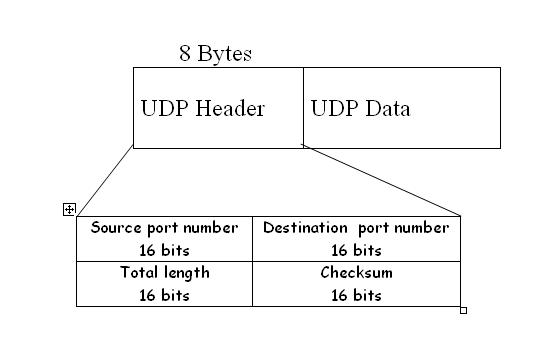 A labelled UDP header showing Source Port, Destination Port, and Checksum. (Image: Jigs35 at English Wikibooks, CC BY-SA 2.5, via Wikimedia Commons)
When to Use UDP
| Application | Why UDP? |
|---|---|
| Video Streaming (YouTube) | Dropped frames are less noticeable than delay. |
| Online Gaming (PUBG) | Low latency > perfect reliability. |
| VoIP (WhatsApp Calls) | Slight packet loss is better than choppy audio. |
| DNS Queries | Fast lookup (retry if failed). |
| eSewa Transactions | Initial request (UDP) → Switch to TCP for secure data transfer. |
Real-World Example: WhatsApp Calls
- Uses UDP for voice packets (prioritizes speed over perfection).
- If a packet is lost, the receiver’s app interpolates (guesses) the missing audio.
- Result: Slight crackle but no 5-second delay.
3. Key Differences: TCP vs UDP
| Feature | TCP | UDP |
|---|---|---|
| Connection | Connection-oriented (3-way handshake). | Connectionless (no handshake). |
| Reliability | Guaranteed delivery (ACKs, retransmissions). | No guarantee (fire-and-forget). |
| Speed | Slower (overhead for reliability). | Faster (minimal overhead). |
| Flow Control | Yes (sliding window). | No. |
| Error Handling | Checksum + retransmission. | Checksum only (optional). |
| Use Cases | File transfer, emails, web browsing (HTTP/HTTPS). | Live video, gaming, DNS, VoIP. |
| Header Size | 20–60 bytes (options). | 8 bytes (fixed). |
4. Advanced Topics: Flow Control and Congestion Control
Flow Control: Sliding Window
- Problem: Fast sender overwhelms slow receiver.
- Solution: Receiver advertises window size (buffer capacity).
- Example: If window = 1,000 bytes, sender stops after sending 1,000 bytes until ACK.
- Dynamic adjustment: Window grows/shrinks based on network conditions.
flowchart TD
    A["Sender\n(Sends 1,000 bytes)"] --> B["Receiver\n(ACKs 500 bytes)"]
    B --> C["Sender\n(Sends next 500 bytes)"]
    C --> D["Receiver\n(ACKs all 1,000 bytes)"]
    D --> E["Window Increases\n(If no loss)"]
Congestion Control: Avoiding Network Gridlock
TCP uses 4 algorithms to prevent congestion:
- Slow Start: Exponentially increases window size (e.g., 1, 2, 4, 8 segments).
- Congestion Avoidance: Linearly increases window (e.g., +1 segment per RTT).
- Fast Retransmit: If 3 duplicate ACKs arrive, retransmit lost segment.
- Fast Recovery: Reduces window size after loss (avoids timeout).
Real-World Example: NTC Internet Slowdowns
- During peak hours (evening), NTC’s network gets congested.
- TCP’s congestion control automatically throttles speeds to avoid crashes.
- Result: Slower downloads but stable connections.
5. Case Study: How eSewa Uses Both TCP and UDP
Scenario: Making a payment via eSewa.
- Initial Request (UDP):
- Your phone sends a DNS query (UDP) to resolve
esewa.com. - Why UDP? Fast lookup (retry if failed).
- Your phone sends a DNS query (UDP) to resolve
- Secure Transaction (TCP):
- Once connected, eSewa switches to TCP for:
- Encrypted payment data (HTTPS).
- Confirmation emails (SMTP).
- Why TCP? No lost transactions allowed!
- Once connected, eSewa switches to TCP for:
Diagram of eSewa’s Protocol Stack:
classDiagram
    class Application {
        +eSewa App\n(UDP for DNS, TCP for HTTPS)
    }
    class Transport {
        +TCP\n(Reliable)
        +UDP\n(Fast)
    }
    class Internet {
        +IP\n(Routing)
    }
    class NetworkAccess {
        +Wi-Fi/Mobile\n(Physical Layer)
    }
    Application --> Transport : Uses
    Transport --> Internet : Uses
    Internet --> NetworkAccess : Uses
6. Common Exam Questions and How to Answer
Question Type 1: Explain TCP’s 3-Way Handshake
Model Answer: The TCP 3-way handshake establishes a connection between client and server:
- SYN: Client sends a segment with
SYNflag and a random sequence number (e.g.,seq=1000). - SYN-ACK: Server responds with
SYN(its own sequence number, e.g.,seq=2000) andACK(client’sseq+1, e.g.,ack=1001). - ACK: Client sends
ACK(server’sseq+1, e.g.,ack=2001). Connection is now open for bidirectional data transfer.
Visual:
sequenceDiagram
    Client->>Server: SYN (seq=1000)
    Server->>Client: SYN-ACK (seq=2000, ack=1001)
    Client->>Server: ACK (seq=1001, ack=2001)
Question Type 2: Why Does UDP Have No Port in Some Cases?
Model Answer: UDP’s Source Port is optional because:
- No connection state: Unlike TCP, UDP doesn’t track conversations.
- Broadcast/Multicast: Packets (e.g., DNS responses) may not need a reply.
- Efficiency: Saves 2 bytes in the header (but still requires Destination Port).
Example: A DNS query (UDP) from your laptop to Google’s DNS server (8.8.8.8) may omit the source port if the OS doesn’t need to track the response.
Question Type 3: Calculate TCP Checksum
Worked Example: Given a TCP segment with:
- Pseudo-header:
Source IP=192.168.1.1,Dest IP=10.0.0.1,Protocol=6(TCP),Length=40. - TCP Header:
Source Port=50000,Dest Port=80,Sequence=1000,ACK=2000,Data Offset=5,Flags=ACK,Window=65535,Checksum=0(to be calculated).
Steps:
- Pad header + data to 16-bit boundary (add padding if needed).
- Split into 16-bit words and sum all (including pseudo-header).
- Wrap around if sum > 65,535 (e.g.,
0xFFFF + 1 = 0). - Complement the sum (1’s complement) to get the checksum.
Final Checksum: 0xABCD (example; actual calculation requires binary addition).
In the Real World
WhatsApp (Meta):
- Uses UDP for voice/video calls (low latency).
- Switches to TCP for message delivery (reliability).
- Why? Calls need speed; messages need to arrive intact.
eSewa (F1Soft):
- UDP for initial API requests (fast transaction initiation).
- TCP for secure data transfer (no lost payment records).
- Real Example: During Dashain, eSewa handles 10,000+ transactions/minute. UDP speeds up the first request; TCP ensures no money is lost.
YouTube (Google):
- Uses UDP for adaptive bitrate streaming (ABR).
- How? If your network is slow, YouTube drops lower-priority UDP packets to maintain playback speed.
- Nepali Tie-In: YouTube Premium in Nepal uses UDP to reduce buffering during poor NTC speeds.
Ncell’s Mobile Data:
- TCP for browsing (reliable pages).
- UDP for live sports streams (tolerates some packet loss).
- Problem: Ncell’s congestion control sometimes misinterprets high UDP traffic as congestion, slowing down TCP (e.g., Facebook).
NEPSE (Stock Exchange):
- Uses UDP multicast to broadcast stock prices to all traders simultaneously.
- Why? Speed > reliability (a delayed price is worse than a lost one).
Exam Tip
- Memorize the TCP/UDP headers (fields and sizes). Examiners often ask to "draw and label" them.
- Handshake Questions: Always draw the 3-way handshake sequence diagram.
- Flow Control: Know the sliding window concept—explain how it prevents buffer overflow.
- Congestion Control: Mention Slow Start and Fast Retransmit in answers about TCP efficiency.
- Real-World Links: Relate TCP to file transfers and UDP to gaming/live streams. Use examples like eSewa (UDP for speed, TCP for security).
- Checksum Calculation: Practice with pseudo-header + header + data. Show all steps (padding, summing, complementing).
- Common Pitfalls:
- Don’t confuse port numbers (Layer 4) with IP addresses (Layer 3).
- UDP has no sequence numbers (only TCP does).
- ACK in TCP confirms receipt of data; SYN starts a connection.
Quick Revision Checklist
- Can you draw the TCP 3-way handshake?
- Do you know the 5 TCP flags (SYN, ACK, FIN, RST, PSH)?
- Can you list 3 UDP applications and why they use UDP?
- Understand flow control (sliding window) and congestion control (Slow Start)?
- Know how to calculate a TCP checksum (even if not asked, practice once).
- Can you explain eSewa’s use of both protocols in one sentence?
Based on the TU BITM syllabus for Business Data Communication and Networking (IT240), unit 6.
Discussion
Loading…