Operating SystemUnit 116 min read
OS Basics: Definitions, Functions, Services & Evolution
Unit 1 of Operating System introduces the core concepts of operating systems, including their definitions, functions, services, and historical evolution, along with their role in modern computing systems.
TAKEAWAYS:
- An operating system (OS) is a system software that acts as an intermediary between hardware and user applications, managing resources efficiently.
- The five primary functions of an OS are process management, memory management, file management, device management, and system calls.
- OS provides services like user interface, program execution, I/O operations, file system management, error detection, and resource allocation.
- The evolution of OS from batch processing to real-time systems reflects advancements in hardware and user demands.
- Types of OS (batch, time-sharing, distributed, network, real-time) are designed for specific use cases, each with unique advantages and limitations.
- Modern OS like Linux, Windows, and macOS incorporate multitasking, multithreading, and virtualization to optimize performance.
1. Definition of an Operating System (OS)
An Operating System (OS) is a system software that manages computer hardware and software resources, providing common services for computer programs. It acts as an interface between the user and the hardware, ensuring efficient execution of programs.
Key Roles of an OS
- Resource Allocator: Decides which program gets system resources (CPU, memory, I/O devices).
- Control Program: Controls execution of programs to prevent errors and improper use of resources.
- User Interface: Provides a platform for users to interact with the computer (CLI, GUI, or batch).
Why is an OS Necessary?
Without an OS, programs would directly interact with hardware, leading to:
- Inefficient resource usage (e.g., two programs trying to use the printer simultaneously).
- Hardware conflicts (e.g., two programs accessing the same memory location).
- No user-friendly interaction (users would need to write low-level commands).
2. Functions of an Operating System
An OS performs five primary functions to ensure smooth operation:
| Function | Description | Example |
|---|---|---|
| Process Management | Creates, schedules, and terminates processes to ensure efficient CPU usage. | Windows Task Manager showing running applications. |
| Memory Management | Allocates and deallocates memory to processes, preventing conflicts. | Linux free command showing memory usage. |
| File Management | Organizes and manages files and directories for storage and retrieval. | Windows File Explorer or Linux ls command. |
| Device Management | Controls I/O devices (printers, keyboards, disks) via device drivers. | Printing a document using a printer driver. |
| System Calls | Provides an interface for programs to request OS services. | A C program using open(), read(), write() system calls. |
3. Services Provided by an OS
An OS offers services to both users and applications:
A. User-Oriented Services
- User Interface: CLI (Command Line Interface) or GUI (Graphical User Interface).
- Example: Windows GUI vs. Linux Terminal.
- Program Execution: Loading and running programs.
- Example: Double-clicking an
.exefile in Windows.
- Example: Double-clicking an
- I/O Operations: Managing input/output devices.
- Example: Reading from a USB drive or printing a document.
- File System Management: Creating, deleting, and modifying files.
- Example: Saving a document in Google Docs (stored on cloud).
- Error Detection & Recovery: Handling system crashes and data corruption.
- Example: Windows Blue Screen of Death recovery.
- Accounting: Keeping track of resource usage (e.g., CPU time, memory).
- Example: Billing in cloud services (AWS, Google Cloud).
B. System-Oriented Services
- Resource Allocation: Assigning CPU, memory, and I/O devices to processes.
- Security: Protecting system resources from unauthorized access.
- Example: Password protection in Windows or Linux.
- Protection & Isolation: Preventing one process from interfering with another.
- Example: Running multiple apps in different windows without crashes.
4. Evolution of Operating Systems
The development of OS has evolved through five generations, each improving efficiency and user experience:
| Generation | Era | Key Features | Example OS |
|---|---|---|---|
| 1st Gen | 1940s-1950s | Machine language, no OS; direct hardware interaction. | None (Early computers) |
| 2nd Gen | 1950s-1960s | Assembly language, batch processing. | IBM OS/360 |
| 3rd Gen | 1960s-1970s | Multiprogramming, time-sharing, GUI introduction. | Unix, MS-DOS |
| 4th Gen | 1970s-1980s | Personal computers, multitasking, networking. | Windows 1.0, macOS |
| 5th Gen | 1990s-Present | Distributed OS, cloud computing, AI integration. | Linux, Windows 10/11, ChromeOS |
5. Types of Operating Systems
Different OS types are designed for specific use cases:
| Type | Description | Advantages | Disadvantages | Example |
|---|---|---|---|---|
| Batch OS | Executes jobs in batches without user interaction. | Efficient for large-scale processing. | No real-time interaction. | Early IBM Mainframes |
| Time-Sharing OS | Multiple users share CPU time via multitasking. | Interactive, supports multiple users. | Requires high memory and CPU. | Unix, Linux |
| Distributed OS | Manages multiple CPUs across a network as a single system. | High reliability, load balancing. | Complex implementation. | Google File System (GFS) |
| Network OS | Connects multiple computers to share resources (files, printers). | Resource sharing, scalability. | Security risks, dependency on network. | Windows Server, Novell NetWare |
| Real-Time OS (RTOS) | Ensures deterministic response times for critical tasks. | Used in embedded systems. | High cost, limited flexibility. | QNX, VxWorks |
| Mobile OS | Optimized for smartphones and tablets. | Touch-friendly, power-efficient. | Limited hardware resources. | Android, iOS |
6. Structure of an Operating System
An OS is organized in layers, where each layer provides services to the layer above it.
Layered Approach
- User Applications: Programs like browsers, games, or office suites.
- System Calls Interface: API for applications to request OS services.
- Kernel: Core OS component handling process, memory, and file management.
- Device Drivers: Software that controls hardware (printers, GPUs, etc.).
- Hardware: Physical components (CPU, RAM, disk).
Monolithic vs. Microkernel Architecture
| Feature | Monolithic Kernel | Microkernel |
|---|---|---|
| Structure | All OS components in a single memory space. | Only essential services in kernel; others run as user processes. |
| Performance | Faster (less context switching). | Slower due to inter-process communication. |
| Security | Less secure (bug in kernel crashes system). | More secure (crashes isolated). |
| Example | Linux, Windows NT | macOS (Darwin), QNX |
7. Booting Process in an OS
When a computer starts, the OS undergoes a booting process to load and initialize:
sequenceDiagram
    participant BIOS
    participant MBR
    participant OS
    participant Kernel
    participant Services

    BIOS->>MBR: Power On Self Test (POST)
    MBR->>OS: Load Bootloader (GRUB)
    OS->>Kernel: Initialize Hardware
    Kernel->>Services: Load Device Drivers
    Services->>OS: Start User Interface
    OS->>User: Ready for Input
Steps in Booting
- BIOS/UEFI: Checks hardware and loads the bootloader.
- Bootloader (GRUB): Loads the OS kernel into memory.
- Kernel Initialization: Sets up hardware and loads drivers.
- User Interface: Loads GUI or CLI for user interaction.
8. System Calls
System calls are APIs that allow programs to request OS services. Common categories include:
| Category | System Calls | Example |
|---|---|---|
| Process Control | fork(), exec(), exit() |
Creating a child process in Linux. |
| File Management | open(), read(), write(), close() |
Reading a file in C (FILE *fp = fopen(...)). |
| Device Management | ioctl(), read(), write() |
Controlling a printer via ioctl(). |
| Information Maintenance | getpid(), time() |
Getting current process ID (getpid()). |
| Communications | pipe(), socket(), send() |
Networking in Python (socket module). |
In the Real World
eSewa (Nepal)
- Idea Used: Process Management & Multitasking
- How? eSewa’s backend runs multiple processes simultaneously (user authentication, payment processing, SMS notifications) without conflicts, thanks to the OS’s process scheduling and memory isolation.
Khalti (Digital Payments)
- Idea Used: Real-Time OS (RTOS) & File System Management
- How? Khalti’s servers use real-time processing to handle thousands of transactions per second. The OS ensures low-latency responses and secure file storage for transaction logs.
Pathao (Ride-Hailing App)
- Idea Used: Distributed OS & Network OS
- How? Pathao’s backend runs on a distributed system (multiple servers) managed by an OS that handles load balancing and fault tolerance. Drivers and riders interact via a network OS that synchronizes real-time location data.
NTC (Nepal Telecom) & Ncell
- Idea Used: Device Management & System Calls
- How? Telecom networks rely on OS-driven device drivers to manage modems, routers, and switches. System calls ensure efficient data transmission (e.g.,
send()for SMS routing).
Banking (Nabil Bank, Global IME)
- Idea Used: Multitasking & Security Services
- How? Banks use OS multitasking to run multiple services (ATM transactions, loan processing, fraud detection) simultaneously. Security services (encryption, access control) prevent unauthorized transactions.
Worked Example: Bank Loan Interest Calculation (OS Role)
Scenario: A bank processes loan applications where each application is a process managed by the OS.
| OS Function | Bank Loan Process |
|---|---|
| Process Management | Each loan application runs as a separate process. The OS schedules them fairly. |
| Memory Allocation | The OS assigns memory to store applicant data (e.g., credit score, income details). |
| File System | Loan documents are stored in a structured file system (e.g., /loans/2024/). |
| I/O Operations | The bank’s server reads/writes data to databases (MySQL, Oracle) via system calls. |
| Security | The OS enforces access control (only authorized staff can view sensitive data). |
Example Calculation: If a loan process takes 5 CPU cycles to compute interest and there are 10 loans, the OS’s scheduler ensures each gets 0.5 CPU time slices (round-robin scheduling).
Exam Tip
How This Unit is Examined
Definitions & Short Answers (2-5 marks)
- Expect questions like:
- "Define an operating system and list its three primary functions."
- "Differentiate between batch OS and time-sharing OS."
- Key Points to Remember:
- OS = Resource allocator + Control program.
- Five functions: Process, memory, file, device, system calls.
- Types: Batch, time-sharing, distributed, network, RTOS.
- Expect questions like:
Diagrams & Flowcharts (5-10 marks)
- Draw:
- Layered OS structure (user apps → kernel → hardware).
- Booting process (BIOS → bootloader → kernel → UI).
- System call categories (process control, file management, etc.).
- Tip: Label every box and arrow clearly.
- Draw:
Comparisons (5-8 marks)
- Compare:
- Monolithic vs. Microkernel (structure, security, performance).
- Batch vs. Time-Sharing OS (interactivity, efficiency).
- Use tables (as shown above) for structured answers.
- Compare:
Scenario-Based Questions (8-10 marks)
- Example: "A hospital management system runs on an OS. Explain how the OS ensures that patient records are securely stored and accessed only by authorized doctors."
- Approach:
- File system management (structured storage).
- Security services (access control, encryption).
- Process isolation (preventing unauthorized access).
Real-World Applications (3-5 marks)
- Link OS concepts to Nepali companies (eSewa, Khalti, NTC) or global tech (Google, WhatsApp).
- Example:
"How does WhatsApp use an OS to handle millions of messages simultaneously?"
- Answer: Uses multitasking (process management) and distributed OS (cloud servers).
Common Mistakes to Avoid
- Vague Definitions: Instead of "OS manages hardware," say "OS allocates CPU, memory, and I/O devices via scheduling and memory management."
- Incorrect Comparisons: Always use a table for side-by-side comparisons (e.g., batch vs. time-sharing).
- Ignoring Real-World Examples: Exams often ask for applications—relate OS concepts to eSewa, Khalti, or banking systems.
- Skipping Diagrams: If a question asks for a flowchart (e.g., booting process), always draw it—even if not explicitly asked.
Quick Revision Checklist
Before the exam, ensure you can: ✅ Define OS and list its five functions. ✅ Differentiate between batch, time-sharing, and real-time OS. ✅ Explain the layered structure of an OS (user → kernel → hardware). ✅ Describe the booting process in steps. ✅ Compare monolithic vs. microkernel architectures. ✅ Relate OS concepts to eSewa, Khalti, or banking systems. ✅ Draw system call categories and booting sequence diagrams.
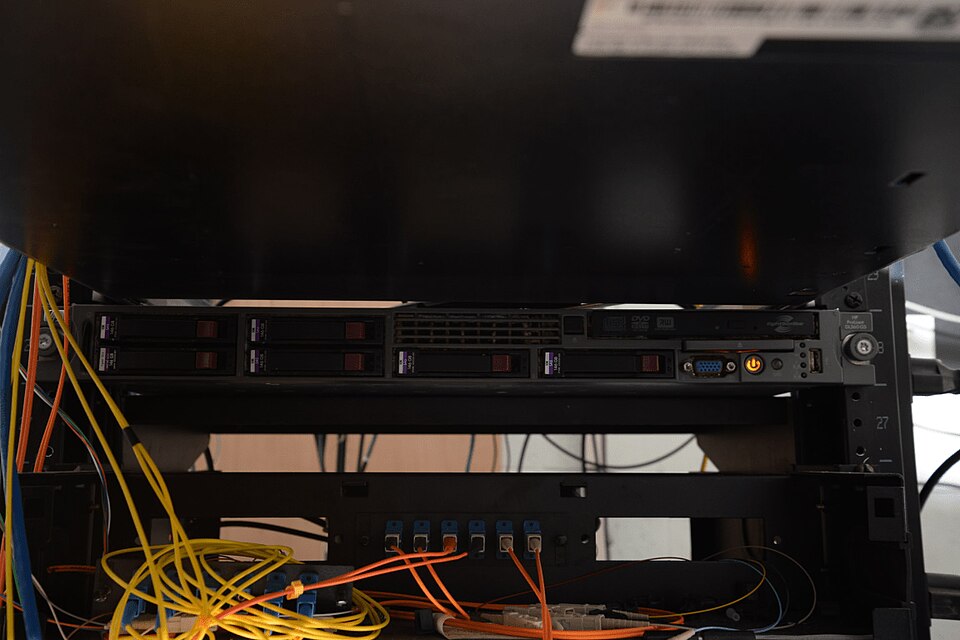 A real picture of a data center server rack (to visualize where OS runs in real-world systems like eSewa or Khalti). (Image: Federal Bureau of Investigation, Public domain, via Wikimedia Commons)
Based on the TU BITM syllabus for Operating System (IT241), unit 1.
Discussion
Loading…