Information SecurityUnit 617 min read
Hash Functions & Digital Signatures: How Data Integrity & Authenticity Work
Unit 6 of Information Security explores hash functions (one-way hashing, collision resistance, cryptographic vs. non-cryptographic hashes) and digital signatures (RSA-based, DSA, ECDSA), their mathematical foundations, real-world applications in blockchain and secure communications, and how they prevent tampering and v
TAKEAWAYS:
- Hash functions convert input data into a fixed-size "fingerprint" (hash) that is unique, irreversible, and collision-resistant, enabling data integrity checks.
- Digital signatures use asymmetric cryptography (private key signing + public key verification) to authenticate messages and documents without sharing secrets.
- Common hash algorithms like SHA-256 (used in Bitcoin) and MD5 (now insecure) differ in security strength and collision resistance.
- Digital signatures rely on hash functions to sign only the hash (not the entire document), improving efficiency.
- Real-world uses include blockchain (Bitcoin), software updates (Windows), and secure email (S/MIME).
- Attacks like collision attacks and preimage attacks exploit weaknesses in weak hash functions.
1. Hash Functions: The Digital Fingerprint
1.1 What is a Hash Function?
A hash function is a mathematical algorithm that:
- Takes an input (message, file, or data) of any size.
- Produces a fixed-size output (hash value or digest) of a specific length (e.g., 256 bits for SHA-256).
- Is deterministic: the same input always produces the same hash.
- Is one-way: it is computationally infeasible to reverse the hash to get the original input.
- Is collision-resistant: it is hard to find two different inputs that produce the same hash.
1.2 Properties of a Cryptographic Hash Function
| Property | Explanation | Example Attack if Violated |
|---|---|---|
| Deterministic | Same input → same hash. | None (but useful for consistency checks). |
| Quick Computation | Fast to compute for any input size. | Brute-force attacks become feasible. |
| Preimage Resistance | Given a hash, it’s hard to find the original input. | Preimage attack: Recover original data from hash. |
| Second Preimage Resistance | Given an input, it’s hard to find another input with the same hash. | Birthday attack: Find two files with same hash. |
| Collision Resistance | It’s hard to find any two inputs with the same hash. | Collision attack: Fake documents with same hash. |
1.3 Types of Hash Functions
| Type | Example Algorithms | Security Level | Use Cases |
|---|---|---|---|
| Non-Cryptographic | CRC32, MD2, MD4 | Weak (not secure) | Error detection (e.g., file checksums). |
| Cryptographic | MD5, SHA-1, SHA-256, SHA-3 | Strong (secure) | Digital signatures, blockchain, passwords. |
Why MD5 and SHA-1 are insecure today?
- MD5: Collisions found in 2004 (e.g., two different PDFs with the same hash).
- SHA-1: Broken in 2017 (Google demonstrated a collision attack).
- SHA-256/SHA-3: Currently considered secure (used in Bitcoin, TLS, and secure communications).
1.4 How Hash Functions Work: A Worked Example
Scenario: You download a software update from a company’s website. How do you verify it hasn’t been tampered with?
- The company provides:
- The software file (
update.exe). - A precomputed hash of the file (e.g.,
SHA-256: a3f5...).
- The software file (
- Your system computes the hash of the downloaded file.
- You compare the computed hash with the provided hash.
- If they match → file is intact.
- If they don’t match → file is corrupted or tampered with.
Example with SHA-256:
# Python example (using hashlib)
import hashlib

file_path = "update.exe"
with open(file_path, "rb") as f:
    file_hash = hashlib.sha256(f.read()).hexdigest()

print(f"SHA-256 hash: {file_hash}")
Output:
SHA-256 hash: a3f5b5d3... (64-character hex string)
Real-World Example: eSewa Transaction Verification
- When you pay via eSewa, the app computes a hash of your transaction details (amount, phone number, timestamp).
- The hash is sent to the server for verification.
- If the hash matches the server’s record → transaction is valid.
- If not → fraud alert (someone may have altered the transaction).
2. Digital Signatures: Proving Authenticity Without Sharing Secrets
2.1 What is a Digital Signature?
A digital signature is a mathematical scheme that:
- Uses asymmetric cryptography (private key for signing, public key for verification).
- Proves the authenticity of a message/document.
- Ensures the message has not been altered (integrity).
- Is non-repudiation: the signer cannot deny sending it.
How it works:
- The sender has a private key (kept secret) and a public key (shared openly).
- The sender:
- Computes the hash of the message.
- Encrypts the hash with their private key → digital signature.
- Sends the message + signature to the receiver.
- The receiver:
- Computes the hash of the received message.
- Decrypts the signature with the sender’s public key to get the sender’s hash.
- Compares the two hashes:
- If they match → message is authentic and untampered.
- If they don’t match → message is altered or forged.
sequenceDiagram
    participant Sender as Alice (Private Key)
    participant Receiver as Bob (Public Key)
    Sender->>Receiver: Message (M) + Digital Signature (Sig)
    Receiver->>Receiver: Compute Hash(H) of M
    Receiver->>Receiver: Decrypt Sig with Alice's Public Key → H'
    alt H == H'
        Receiver->>Receiver: "Message is authentic!"
    else H != H'
        Receiver->>Receiver: "Message is tampered or forged!"
    end
2.2 Types of Digital Signature Schemes
| Scheme | Algorithm Example | Key Size (bits) | Use Cases |
|---|---|---|---|
| RSA | RSA-2048, RSA-4096 | 2048–4096 | SSL/TLS, code signing, email (S/MIME). |
| DSA | DSA (Digital Signature Algorithm) | 1024–3072 | U.S. government standards (FIPS 186). |
| ECDSA | ECDSA (Elliptic Curve) | 256–521 | Bitcoin, mobile apps (smaller key sizes). |
Why use digital signatures?
- Authentication: Proves the sender is who they claim to be.
- Integrity: Ensures the message hasn’t been changed.
- Non-repudiation: The signer cannot deny sending the message.
2.3 How Digital Signatures Work: A Worked Example
Scenario: You receive an email from your bank asking you to transfer money to a new account. How do you verify it’s really from the bank?
- The bank has:
- A private key (kept secure).
- A public key (published on their website).
- The bank:
- Writes an email:
"Please transfer NPR 50,000 to account XYZ." - Computes the hash of the email (e.g., SHA-256).
- Encrypts the hash with their private key → digital signature.
- Sends the email + signature to you.
- Writes an email:
- You:
- Download the bank’s public key from their website.
- Compute the hash of the received email.
- Decrypt the signature with the bank’s public key → get the bank’s hash.
- Compare the two hashes:
- If they match → email is authentic (from the bank).
- If they don’t match → phishing attempt (fake email).
Real-World Example: Ncell App Updates
- When you update the Ncell app, the app checks the digital signature of the new version.
- The signature is verified using Ncell’s public key (embedded in the app).
- If the signature is invalid → app blocks the update (preventing malware).
3. Hash Functions vs. Digital Signatures: Key Differences
| Feature | Hash Function | Digital Signature |
|---|---|---|
| Purpose | Data integrity (checks for tampering) | Authentication + integrity |
| Key Used | None (just a function) | Private key (signing), public key (verification) |
| Reversibility | One-way (cannot recover input) | One-way (signature cannot be reversed to get private key) |
| Security | Depends on collision resistance | Depends on asymmetric cryptography |
| Example Use | File checksums, passwords | Email (S/MIME), code signing, blockchain |
4. Attacks on Hash Functions and Digital Signatures
4.1 Attacks on Hash Functions
| Attack Type | Description | Example |
|---|---|---|
| Preimage Attack | Given a hash, find the original input. | Cracking a password hash (e.g., MD5). |
| Second Preimage Attack | Given an input, find another input with the same hash. | Creating a malicious file with same hash as a legitimate one. |
| Collision Attack | Find any two inputs that produce the same hash. | Fake certificates (e.g., MD5 collisions in SSL). |
| Birthday Attack | Exploit hash collisions to find matches (statistical). | Brute-forcing passwords in rainbow tables. |
Example of a Collision Attack:
- In 2005, researchers created two different PDF files with the same MD5 hash.
- This could be used to trick systems into accepting a malicious file as a legitimate one.
4.2 Attacks on Digital Signatures
| Attack Type | Description | Example |
|---|---|---|
| Replay Attack | Capture and resend a valid signature to trick the system. | Man-in-the-middle (MITM) attacks. |
| Key Compromise | If the private key is stolen, an attacker can forge signatures. | Phishing to steal private keys. |
| Chosen-Plaintext Attack | Attacker gets signatures on chosen messages to deduce the private key. | Weak implementations of DSA. |
Real-World Example: Bitcoin Double-Spending Attack (Theoretical)
- If an attacker could find a collision in the hash function used in Bitcoin (SHA-256), they could create two different transactions with the same hash, spending the same coins twice.
- However, SHA-256 is so secure that this is computationally infeasible today.
5. Real-World Applications
In the Real World
Bitcoin and Blockchain (SHA-256)
- What it uses: SHA-256 hash function to create blocks in the blockchain.
- How it works:
- Each transaction is hashed, and the hash is included in the next block.
- Miners compete to find a "nonce" that makes the block’s hash start with a certain number of zeros (Proof of Work).
- This ensures tamper-proofing (changing one transaction would require re-mining the entire chain).
- Example: When you send Bitcoin to a friend, the transaction is hashed and added to the blockchain. If someone tries to alter it, the hash changes, and the network rejects it.
eSewa and Khalti (Digital Signatures for Payments)
- What it uses: Digital signatures (RSA/ECDSA) to authenticate payment requests.
- How it works:
- When you pay via eSewa, the app signs the transaction details (amount, phone number, timestamp) with your private key.
- The merchant’s system verifies the signature using eSewa’s public key.
- If the signature is valid → payment is processed.
- If invalid → fraud detected.
- Example: If someone tries to alter your eSewa transaction (e.g., change the amount from NPR 1000 to NPR 1,000,000), the digital signature will fail verification, and the bank will reject it.
Windows and Software Updates (Hash Verification)
- What it uses: SHA-256 hashes to verify software integrity.
- How it works:
- Microsoft provides the hash of each update (e.g.,
SHA-256: a1b2c3...). - Your system downloads the update and computes its hash.
- If the hashes match → update is safe to install.
- If not → update is corrupted or malicious (e.g., a fake Windows update with malware).
- Microsoft provides the hash of each update (e.g.,
- Example: When you download an update from Microsoft’s official site, Windows checks the hash before installing it. This prevents fake updates like those used in ransomware attacks.
NEPSE (Nepal Stock Exchange) Secure Transactions
- What it uses: Digital signatures (ECDSA) for trading orders.
- How it works:
- When you place a stock trade on NEPSE’s online platform, your order is signed with your digital certificate (private key).
- The exchange verifies the signature using your public key (stored in the system).
- This prevents fake orders and insider trading.
- Example: If a hacker tries to place a fake sell order for NEPSE shares using your account, the digital signature will fail, and the order will be rejected.
WhatsApp End-to-End Encryption (Signal Protocol)
- What it uses: Hash functions (SHA-256) + digital signatures (ECDSA) for secure messaging.
- How it works:
- When you send a message, WhatsApp computes its hash and signs it with your private key.
- The recipient verifies the signature using your public key.
- If the hash matches → message is from you and untampered.
- If not → message may be from an imposter or altered.
- Example: If someone forwards a fake "WhatsApp support" message asking for your login details, you can check the digital signature. If it’s invalid → scam alert.
6. Practical Example: Verifying a Signed Email
Scenario: You receive an email from your university claiming a "scholarship opportunity." How do you verify it’s real?
Check the Digital Signature:
- The email has a digital signature (often shown as a padlock icon or "Signed by [University]").
- You download the university’s public key from their official website.
- Your email client (e.g., Outlook, Thunderbird) verifies the signature using the public key.
Hash Verification:
- The email client computes the hash of the email body.
- It decrypts the signature with the university’s public key to get the university’s hash.
- If the hashes match → email is authentic.
- If not → phishing attempt (fake email).
What if the signature is invalid?
- The email client will show a warning like:
"This message was not signed by the claimed sender."
- Action: Do not click any links or provide personal information.
7. Exam Tip
This unit is highly theoretical but focuses on applications and attacks. Expect:
Short Definitions:
- Define hash function, digital signature, collision resistance, preimage attack.
- Example question: "What is the difference between SHA-256 and MD5?"
Worked Examples:
- Given a message, compute its hash (SHA-256) and explain how it ensures integrity.
- Given a scenario (e.g., eSewa payment), explain how digital signatures prevent fraud.
Comparison Tables:
- Compare RSA, DSA, and ECDSA in terms of key size and use cases.
- Compare cryptographic vs. non-cryptographic hash functions.
Attack Scenarios:
- "How would an attacker exploit a weak hash function like MD5?"
- "What is a replay attack, and how can digital signatures prevent it?"
Real-World Applications:
- "How does Bitcoin use hash functions?"
- "How does eSewa verify transactions using digital signatures?"
Common Mistakes to Avoid:
- Confusing hash functions (one-way) with encryption (two-way).
- Forgetting that digital signatures use asymmetric cryptography (private/public keys).
- Mixing up collision attacks (two inputs → same hash) with preimage attacks (given hash → find input).
High-Score Strategy:
- Draw sequence diagrams for digital signature processes.
- Use tables to compare hash functions and signature schemes.
- Relate every concept to real-world examples (Bitcoin, eSewa, WhatsApp).
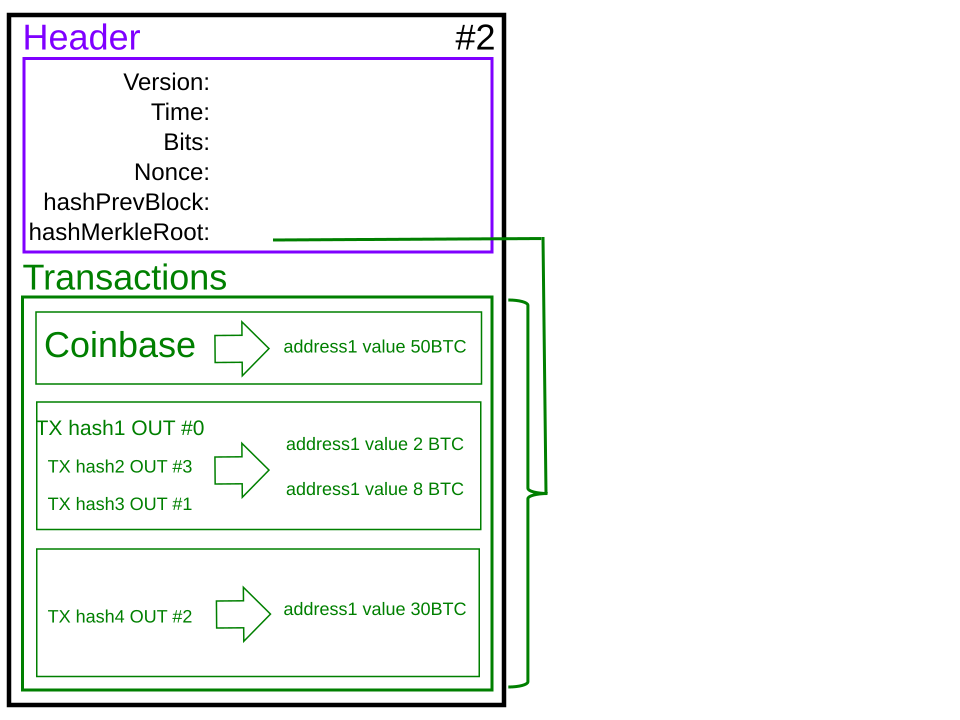 Showing how transactions are hashed and linked in a block. (Image: Wargo, CC BY-SA 4.0, via Wikimedia Commons)
Based on the TU BITM syllabus for Information Security (IT244), unit 6.
Discussion
Loading…