Cloud ComputingUnit 720 min read
Containers & Orchestration: Docker, Kubernetes, CI/CD Pipelines
Unit 7 of Cloud Computing explores how containers package applications with their dependencies, how orchestration tools like Kubernetes manage containerized workloads at scale, and how CI/CD pipelines automate deployment. Covers Docker architecture, container networking, Kubernetes components, Helm charts, and real-wor
What are Containers?
Containers are lightweight, standalone, executable software packages that include everything needed to run an application: code, runtime, system tools, libraries, and settings. Unlike virtual machines (VMs), containers share the host OS kernel, making them more efficient in terms of resource usage and startup time.
How Containers Work
Containers use containerization technology to isolate applications from their environment. This isolation ensures that an application runs consistently across different environments (development, testing, production). The key components of a container are:
- Container Image: A read-only template used to create containers. Images are built from a Dockerfile (a text document with instructions on how to build the image).
- Container Runtime: Software that runs containers (e.g., Docker, containerd, CRI-O).
- Container Engine: Manages the creation and execution of containers (e.g., Docker Engine).
classDiagram
    class ContainerImage {
        +Read-only template
        +Built from Dockerfile
    }
    class ContainerRuntime {
        +Runs containers
        +Examples: Docker, containerd
    }
    class ContainerEngine {
        +Manages containers
        +Examples: Docker Engine
    }
    ContainerImage --> ContainerRuntime : "Used to create"
    ContainerRuntime --> ContainerEngine : "Powered by"
Docker: The Most Popular Container Runtime
Docker is the leading platform for developing, shipping, and running containers. It provides tools to automate the deployment of applications using containers.
Docker Architecture
Docker follows a client-server architecture with the following components:
| Component | Description |
|---|---|
| Docker Client | CLI tool to interact with Docker daemon. |
| Docker Daemon | Background service that manages Docker objects (containers, images, networks). |
| Docker Registry | Stores and distributes container images (e.g., Docker Hub, private registries). |
| Docker Images | Immutable templates used to create containers. |
| Docker Containers | Running instances of Docker images. |
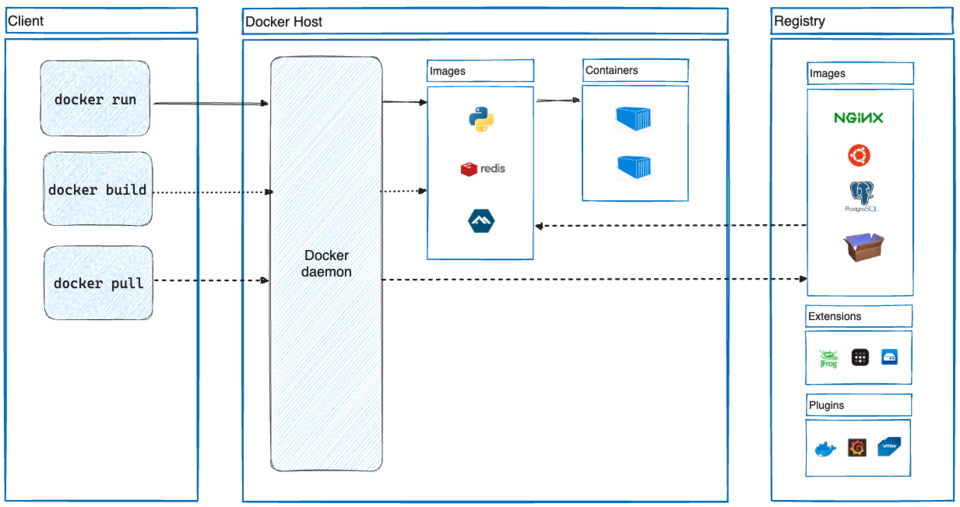 A labelled diagram showing Docker Client, Docker Daemon, Docker Registry, Docker Images, and Docker Containers. (Image: dc, CC BY-SA 4.0, via Wikimedia Commons)
Dockerfile: Building Container Images
A Dockerfile is a text file that contains instructions for building a Docker image. Example:
# Use an official base image
FROM ubuntu:20.04

# Set the working directory
WORKDIR /app

# Copy source code into the container
COPY . .

# Install dependencies
RUN apt-get update && apt-get install -y python3

# Define the command to run the application
CMD ["python3", "app.py"]
Docker Commands
| Command | Description |
|---|---|
docker build -t myapp . |
Builds an image from a Dockerfile. |
docker run myapp |
Runs a container from the image. |
docker ps |
Lists running containers. |
docker stop <id> |
Stops a running container. |
docker rm <id> |
Removes a stopped container. |
docker images |
Lists all images. |
docker rmi <image> |
Removes an image. |
Container Orchestration: Managing Containers at Scale
As applications grow, managing individual containers becomes complex. Container orchestration automates the deployment, scaling, and management of containerized applications. The most popular orchestration tool is Kubernetes (K8s).
Why Orchestration?
- Scalability: Automatically scale containers up or down based on demand.
- High Availability: Ensure applications are always available by restarting failed containers.
- Load Balancing: Distribute network traffic across containers.
- Self-Healing: Automatically replace containers that fail.
- Rollbacks: Revert to a previous version if a deployment fails.
Kubernetes: The Leading Orchestration Platform
Kubernetes is an open-source system for automating deployment, scaling, and operations of application containers. It groups containers that make up an application into logical units for easy management.
Kubernetes Architecture
Kubernetes follows a master-worker architecture with the following components:
classDiagram
    class MasterNode {
        +API Server
        +Scheduler
        +Controller Manager
        +etcd (Key-Value Store)
    }
    class WorkerNode {
        +Kubelet
        +Kube-Proxy
        +Container Runtime (e.g., Docker)
    }
    class Pod {
        +Smallest deployable unit
        +Contains one or more containers
    }
    class Service {
        +Exposes Pods to the network
        +Load balancing
    }
    class Deployment {
        +Manages Pod replicas
        +Ensures desired state
    }
    MasterNode --> WorkerNode : "Controls"
    WorkerNode --> Pod : "Hosts"
    Pod --> Service : "Connected to"
    Deployment --> Pod : "Manages"
Key Kubernetes Components
| Component | Description |
|---|---|
| Master Node | Manages the cluster (API Server, Scheduler, Controller Manager, etcd). |
| Worker Node | Runs containerized applications (Kubelet, Kube-Proxy, Container Runtime). |
| Pod | Smallest deployable unit (contains one or more containers). |
| Service | Exposes Pods to the network (load balancing, service discovery). |
| Deployment | Manages Pod replicas and ensures desired state. |
| Ingress | Manages external access to services (HTTP/HTTPS routing). |
| ConfigMap | Stores configuration data separately from application code. |
| Secret | Stores sensitive data (e.g., passwords, API keys). |
Kubernetes Workflow Example: Deploying a Web Application
- Define a Deployment: Specify the number of Pod replicas, container image, and other configurations.
apiVersion: apps/v1 kind: Deployment metadata: name: webapp spec: replicas: 3 selector: matchLabels: app: webapp template: metadata: labels: app: webapp spec: containers: - name: webapp ports: - containerPort: 80 - Expose the Deployment as a Service: Create a Service to expose the Pods to the network.
apiVersion: v1 kind: Service metadata: name: webapp-service spec: selector: app: webapp ports: - protocol: TCP port: 80 targetPort: 80 type: LoadBalancer - Apply the Configurations: Use
kubectlto apply the YAML files.kubectl apply -f deployment.yaml kubectl apply -f service.yaml - Verify the Deployment: Check the status of Pods and Services.
kubectl get pods
kubectl get services
Containers vs. Virtual Machines (VMs)
Containers and VMs both provide isolation, but they differ in how they achieve it. Below is a comparison table:
| Feature | Containers | Virtual Machines (VMs) |
|---|---|---|
| Isolation Layer | OS-level (shares host OS kernel) | Hardware-level (runs full OS) |
| Performance | Faster startup, lower overhead | Slower startup, higher overhead |
| Resource Usage | Lightweight (MBs of RAM) | Heavyweight (GBs of RAM) |
| Portability | High (runs anywhere Docker runs) | Lower (depends on hypervisor) |
| Security | Process-level isolation | Hardware-level isolation |
| Use Cases | Microservices, DevOps, CI/CD | Legacy apps, full OS environments |
Helm: Package Manager for Kubernetes
Helm is a package manager for Kubernetes that simplifies the deployment of applications. It uses charts (collections of YAML files) to define, install, and upgrade Kubernetes applications.
Helm Architecture
classDiagram
    class HelmClient {
        +CLI tool to interact with Helm
    }
    class HelmServer {
        +Tiller (deprecated in Helm 3)
    }
    class Chart {
        +Collection of YAML files
        +Contains templates, values, and charts
    }
    class Repository {
        +Stores Helm charts
        +Examples: Artifact Hub, private repos
    }
    HelmClient --> Chart : "Installs/Upgrades"
    Chart --> Repository : "Stored in"
Helm Commands
| Command | Description |
|---|---|
helm create mychart |
Creates a new chart. |
helm install mychart |
Installs a chart into a Kubernetes cluster. |
helm upgrade mychart |
Upgrades a chart to a new version. |
helm list |
Lists installed releases. |
helm repo add <name> <url> |
Adds a chart repository. |
helm search hub <keyword> |
Searches for charts in Artifact Hub. |
CI/CD Pipelines with Containers
Continuous Integration/Continuous Deployment (CI/CD) pipelines automate the process of building, testing, and deploying applications. Containers play a crucial role in CI/CD by ensuring consistency across environments.
CI/CD Pipeline Stages
- Code Commit: Developers push code to a version control system (e.g., GitHub, GitLab).
- Build: Code is compiled and a container image is built (using Docker).
- Test: Automated tests are run inside containers.
- Deploy: Container images are pushed to a registry (e.g., Docker Hub) and deployed to Kubernetes.
- Monitor: Application performance and logs are monitored.
flowchart TD
    A["Code Commit"] --> B["Build Container Image"]
    B --> C["Run Tests in Container"]
    C --> D["Push Image to Registry"]
    D --> E["Deploy to Kubernetes"]
    E --> F["Monitor Application"]
Example: CI/CD Pipeline for a Web App
- GitHub Action Workflow (
.github/workflows/cicd.yml):name: CI/CD Pipeline on: [push] jobs: build: runs-on: ubuntu-latest steps: - uses: actions/checkout@v2 - name: Build Docker Image run: docker build -t mywebapp . - name: Run Tests run: docker run mywebapp pytest - name: Login to Docker Hub run: echo "${{ secrets.DOCKER_PASSWORD }}" | docker login -u "${{ secrets.DOCKER_USERNAME }}" --password-stdin - name: Push to Docker Hub run: docker push mywebapp deploy: needs: build runs-on: ubuntu-latest steps: - name: Deploy to Kubernetes run: | kubectl apply -f deployment.yaml kubectl apply -f service.yaml
In the Real World
Containers and orchestration are widely used in modern cloud-native applications. Here are some concrete examples:
eSewa (Nepal)
- Idea Used: Container Orchestration (Kubernetes)
- How: eSewa uses Kubernetes to manage its microservices architecture, ensuring high availability and scalability during peak transaction times (e.g., Dashain and Tihar festivals). Containers host individual services like payment processing, user authentication, and notification systems, allowing independent scaling and updates.
Pathao (Nepal)
- Idea Used: Docker Containers + CI/CD Pipelines
- How: Pathao’s backend services (e.g., ride matching, driver tracking, and payment processing) run in Docker containers. Their CI/CD pipeline automatically builds, tests, and deploys updated container images whenever code is pushed to GitHub. This ensures that new features (like cashless payments or new ride categories) are rolled out quickly without downtime.
Google Cloud Run
- Idea Used: Serverless Containers
- How: Google Cloud Run allows developers to deploy containerized applications without managing servers. It automatically scales the number of container instances based on incoming requests. For example, a Nepalese startup using Cloud Run for its e-commerce backend (like Daraz) can handle sudden traffic spikes during sales events without manual intervention.
Ncell’s Customer Support Chatbot
- Idea Used: Containerized Microservices
- How: Ncell’s AI-powered chatbot for customer queries (e.g., checking balance, activating services) runs in Docker containers. Each microservice (NLP processing, database queries, SMS gateway) is containerized and orchestrated by Kubernetes. This isolation ensures that a failure in one service (e.g., SMS gateway) doesn’t crash the entire chatbot.
NEPSE’s Trading Platform
- Idea Used: Helm Charts for Kubernetes Deployments
- How: During high-volume trading days (e.g., Dasain), NEPSE’s platform uses Helm to quickly scale containerized trading services. Helm charts define the exact number of Pods needed for order matching, user authentication, and real-time data feeds, allowing operators to deploy updates in minutes.
Worked Example: Scaling a Daraz Order Queue with Kubernetes
Scenario: Daraz experiences a 500% traffic spike during the annual "Daraz Big Billion Days" sale. Orders must be processed in real-time, but the current monolithic application struggles under load.
Solution: Containerize and Orchestrate
Break Down the Monolith:
- Split the application into microservices:
- Order Service: Handles order creation and validation.
- Payment Service: Processes payments via Khalti/eSewa.
- Inventory Service: Checks stock levels.
- Notification Service: Sends SMS/email confirmations.
- Split the application into microservices:
Containerize Each Service:
- Write a
Dockerfilefor each microservice (e.g.,order-service):FROM python:3.9-slim WORKDIR /app COPY requirements.txt . RUN pip install -r requirements.txt COPY . . CMD ["gunicorn", "--bind", "0.0.0.0:8000", "order_app.wsgi:application"] - Build and push images to a private Docker registry:
docker build -t daraz/order-service:v1 .
docker push daraz/order-service:v1
- Write a
Deploy to Kubernetes:
- Define a
Deploymentfor theorder-service:apiVersion: apps/v1 kind: Deployment metadata: name: order-service spec: replicas: 10 # Scale to 10 instances during peak hours selector: matchLabels: app: order-service template: metadata: labels: app: order-service spec: containers: - name: order-service ports: - containerPort: 8000 resources: requests: cpu: "100m" memory: "256Mi" limits: cpu: "500m" memory: "512Mi" - Expose the service using a
Service:apiVersion: v1 kind: Service metadata: name: order-service spec: selector: app: order-service ports: - protocol: TCP port: 80 targetPort: 8000 type: LoadBalancer - Apply the configurations:
kubectl apply -f order-deployment.yaml
kubectl apply -f order-service.yaml
- Define a
Autoscale with Horizontal Pod Autoscaler (HPA):
- Configure HPA to automatically adjust the number of Pods based on CPU usage:
apiVersion: autoscaling/v2
kind: HorizontalPodAutoscaler
metadata:
  name: order-service-hpa
spec:
  scaleTargetRef:
    apiVersion: apps/v1
    kind: Deployment
    name: order-service
  minReplicas: 2
  maxReplicas: 50
  metrics:
  - type: Resource
    resource:
      name: cpu
      target:
        type: Utilization
        averageUtilization: 70
- Configure HPA to automatically adjust the number of Pods based on CPU usage:
Monitor and Optimize:
- Use Kubernetes Dashboard or Prometheus to monitor Pod health, CPU/memory usage, and request rates.
- During the sale, HPA scales the
order-servicefrom 2 to 40 Pods as CPU usage exceeds 70%, ensuring orders are processed in under 2 seconds.
Advantages and Disadvantages of Containers and Orchestration
Advantages of Containers
- Portability: Run anywhere Docker runs (on-premises, cloud, hybrid).
- Efficiency: Share the host OS kernel, reducing overhead compared to VMs.
- Isolation: Process-level isolation ensures consistency across environments.
- Scalability: Easy to scale horizontally by adding more containers.
- Cost-Effective: Lower resource usage compared to VMs.
Disadvantages of Containers
- Security Risks: Containers share the host OS, so a vulnerability in the kernel can affect all containers.
- Complexity: Managing hundreds of containers requires orchestration tools like Kubernetes.
- State Management: Containers are stateless by design; persistent data requires external storage (e.g., volumes, databases).
- Networking: Complex networking setups may be needed for multi-container applications.
Advantages of Kubernetes
- Automation: Automates deployment, scaling, and operations.
- Self-Healing: Restarts failed containers and reschedules them if nodes die.
- Load Balancing: Distributes traffic across Pods.
- Rollbacks: Revert to previous versions if a deployment fails.
- Extensibility: Supports custom controllers and operators for advanced use cases.
Disadvantages of Kubernetes
- Steep Learning Curve: Complex architecture requires significant expertise.
- Resource Overhead: Master nodes consume resources for orchestration.
- Operational Complexity: Managing clusters at scale can be challenging.
- Cost: Running large clusters can incur high cloud costs.
Exam Tip
For the Cloud Computing (IT277) exam, focus on the following key areas when answering questions on Containers and Orchestration:
Definitions and Concepts:
- Clearly define containers, containerization, orchestration, and Kubernetes.
- Explain the difference between containers and VMs with examples.
Docker Deep Dive:
- Be able to write a simple
Dockerfileand explain each instruction. - Know common Docker commands (
docker build,docker run,docker ps, etc.). - Understand Docker’s client-server architecture and how images/registries work.
- Be able to write a simple
Kubernetes Components:
- Draw and label the Kubernetes architecture (Master Node, Worker Node, Pod, Service, Deployment).
- Explain the role of etcd, Kubelet, and Scheduler.
- Know how to deploy a simple application using YAML manifests.
Orchestration Challenges:
- Discuss why orchestration is needed (scalability, high availability, self-healing).
- Compare Kubernetes with other orchestration tools (e.g., Docker Swarm, Nomad).
Real-World Applications:
- Relate containers to CI/CD pipelines (e.g., GitHub Actions, Jenkins).
- Explain how Helm charts simplify Kubernetes deployments.
- Use worked examples (e.g., scaling Daraz orders with HPA, eSewa’s microservices) to illustrate concepts.
Diagrams and Visuals:
- The exam may ask you to draw Docker/Kubernetes architectures or CI/CD pipelines. Practice sketching these quickly.
- Be ready to compare containers vs. VMs in a table or explain trade-offs.
Short Answer vs. Long Answer:
- For short questions (2-5 marks), focus on definitions, commands, or component roles.
- For long questions (10+ marks), provide a step-by-step workflow (e.g., deploying an app with Docker and Kubernetes) and include YAML snippets or Mermaid diagrams where possible.
Pro Tip: Memorize the Kubernetes control plane components (API Server, Scheduler, Controller Manager, etcd) and their roles. Examiners love questions like: "Explain how a Deployment ensures high availability in Kubernetes." (Answer: By maintaining the desired number of Pod replicas and restarting failed Pods.)
Based on the TU BITM syllabus for Cloud Computing (IT277), unit 7.
Discussion
Loading…