Introduction to Information TechnologyUnit 68 min read
Computer Networks & Protocols: Topologies, Media, OSI, TCP/IP
Unit 6 of Introduction to Information Technology covers how computers connect via networks (LAN/WAN), the physical media (cables, wireless) and protocols (OSI 7-layer model, TCP/IP), plus real-world examples like eSewa’s secure transactions and Ncell’s mobile data routing.
TAKEAWAYS:
- Networks connect devices (LAN/WAN) using topologies (star, mesh, bus) and media (twisted pair, fiber, Wi-Fi).
- The OSI model (7 layers) and TCP/IP (4 layers) define how data travels reliably via protocols like HTTP/HTTPS.
- Protocols (rules) ensure devices communicate—e.g., TCP for error-free delivery, IP for addressing.
- Real-world use: eSewa uses HTTPS (OSI Layer 5+7) for secure payments; Ncell’s 4G relies on TCP/IP (Layer 3/4) for data packets.
- Exam focus: Compare topologies, trace data through OSI layers, and explain protocols like TCP vs. UDP.
1. What is a Computer Network?
A computer network is a system where multiple devices (computers, smartphones, servers) share resources (files, internet, printers) via communication links (cables, Wi-Fi). Networks enable:
- Resource sharing (printers, databases).
- Communication (email, video calls).
- Cost efficiency (centralized servers instead of individual hardware).
Types of Networks by Size
| Type | Scope | Example | Speed |
|---|---|---|---|
| LAN | Small area (home/office) | eSewa’s office network | 1–10 Gbps |
| MAN | City-wide | Kathmandu’s fiber-optic backbone | 10–100 Mbps |
| WAN | Global | Internet (Ncell’s mobile network) | Varies (Mbps+) |
2. Network Topologies: How Devices Connect
Topology = physical/logical arrangement of devices. Choose based on cost, scalability, fault tolerance.
Common Topologies
graph LR
    A["Bus Topology"] -->|"All devices share 1 cable"| B["Terminators at ends"]
    C["Star Topology"] -->|"Central hub (switch/router)"| D["Each device connects directly"]
    E["Mesh Topology"] -->|"Every device connected to every other"| F["Fully connected (expensive)"]
G["Ring Topology"] -->|"Devices in a closed loop"| H["Token-passing (old networks)"]| Topology | Pros | Cons | Real-World Use |
|---|---|---|---|
| Bus | Cheap, easy to install | Single point of failure | Old school networks (rare now) |
| Star | Easy to manage, scalable | Depends on central hub | Homes/offices (Wi-Fi router) |
| Mesh | Redundant paths, fault-tolerant | High cost, complex setup | Military, smart cities (IoT sensors) |
| Ring | Equal access, no collisions | Slow if one node fails | Token Ring (obsolete, but used in FDDI) |
Worked Example: NTC’s Fiber-Optic Network NTC uses a mesh topology for its backbone to ensure:
- If one fiber cable fails, data reroutes automatically.
- High speed (100+ Gbps) for nationwide calls/internet.
3. Data Transmission Media: Wires vs. Wireless
Media = physical path for data. Choose based on speed, distance, cost.
A. Guided (Wired) Media
| Type | Speed | Use Case | Example |
|---|---|---|---|
| Twisted Pair | 1–10 Gbps | Ethernet (LAN) | Home Wi-Fi router cables |
| Coaxial Cable | 10–100 Mbps | Cable TV, old internet | NTC’s early broadband |
| Fiber Optic | 100+ Gbps | Long-distance, high security | Ncell’s 4G/5G backbone |
B. Unguided (Wireless) Media
| Type | Frequency | Range | Example |
|---|---|---|---|
| Wi-Fi | 2.4/5 GHz | 30–100m | Home networks (802.11ac) |
| Bluetooth | 2.4 GHz | 10–100m | Wireless headsets |
| Satellite | Microwave | Global | Ncell’s rural 4G coverage |
Real-World Tie-In: Pathao’s Delivery System Pathao uses:
- Wi-Fi/4G (unguided) for rider-app communication.
- GPS (wireless) to track delivery routes in real time.
4. Communication Protocols: Rules for Data Exchange
Protocols = agreed-upon rules for devices to communicate. Two key models:
A. OSI Model (7 Layers)
classDiagram
    class Layer7["Application (HTTP, FTP)"] {Handles user interfaces}
    class Layer6["Presentation (SSL, JPEG)"] {Encrypts/compresses data}
    class Layer5["Session (NetBIOS)"] {Manages connections}
    class Layer4["Transport (TCP, UDP)"] {Ensures delivery (ports)}
    class Layer3["Network (IP, ICMP)"] {Routing (IP addresses)}
    class Layer2["Data Link (Ethernet, Wi-Fi)"] {MAC addresses, frames}
    class Layer1["Physical (Cables, Signals)"] {Bits (0s/1s)}

    Layer7 --> Layer6 : Uses
    Layer6 --> Layer5 : Uses
    Layer5 --> Layer4 : Uses
    Layer4 --> Layer3 : Uses
    Layer3 --> Layer2 : Uses
    Layer2 --> Layer1 : Uses
Worked Example: Loading YouTube on a Smartphone
- Layer 7 (Application): YouTube app sends HTTP request.
- Layer 4 (Transport): TCP splits data into packets, adds port numbers.
- Layer 3 (Network): IP routes packets via Ncell’s servers.
- Layer 1 (Physical): Fiber optic cables transmit bits as light pulses.
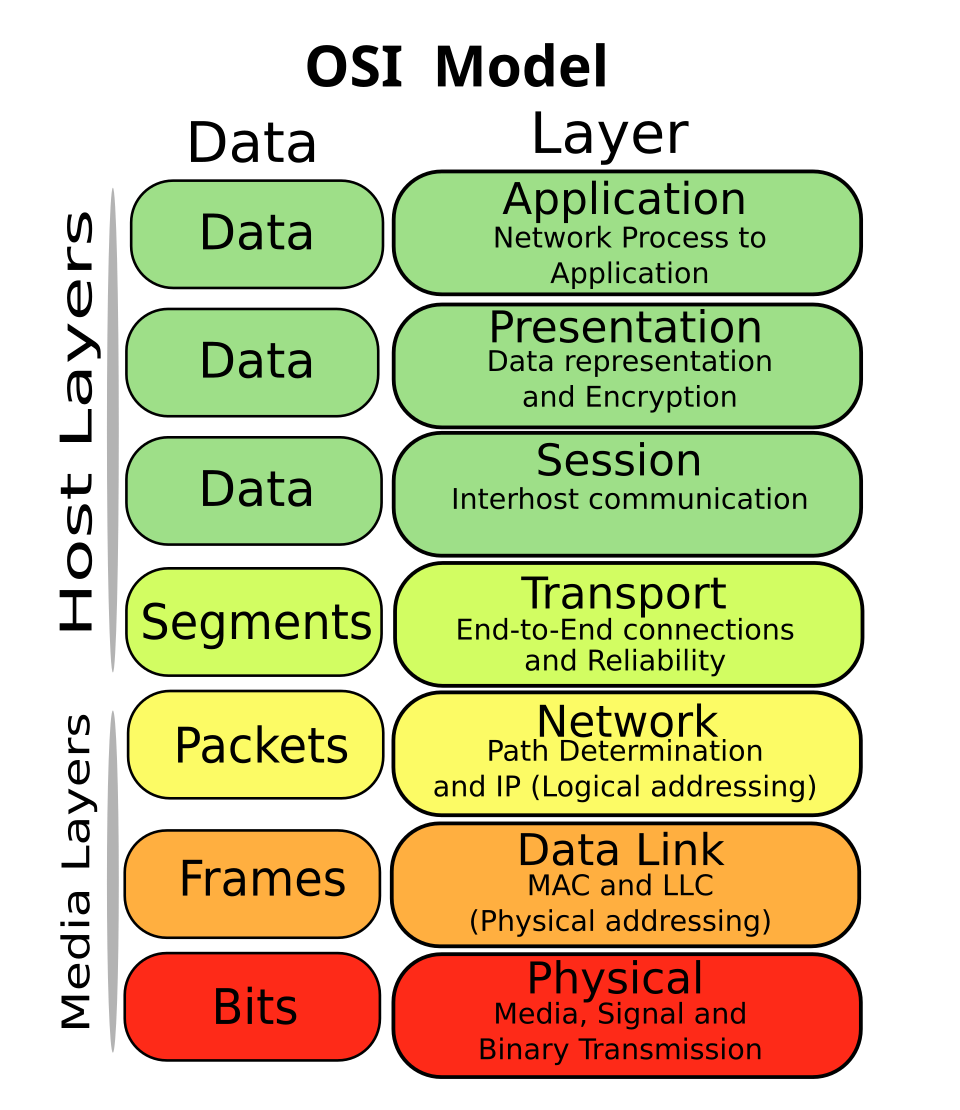 Shows each layer’s role with icons (e.g., HTTP for Layer 7). (Image: SVG edition: Gorivero, CC BY-SA 3.0, via Wikimedia Commons)
B. TCP/IP Model (4 Layers)
Simpler than OSI, used in the internet. Key protocols:
- TCP (Layer 4): Reliable, connection-oriented (e.g., file downloads).
- UDP (Layer 4): Fast, no error-checking (e.g., video calls).
- IP (Layer 3): Addresses devices (IPv4/IPv6).
| OSI Layer | TCP/IP Equivalent | Protocol Example |
|---|---|---|
| 7 (App) | Application | HTTP, SMTP, DNS |
| 4 (Transport) | Transport | TCP, UDP |
| 3 (Network) | Internet | IP, ICMP |
| 1–2 (Physical/Data Link) | Network Access | Ethernet, Wi-Fi |
Real-World Tie-In: eSewa Payments
- HTTPS (Layer 7): Encrypts your card details.
- TCP (Layer 4): Ensures no data is lost during transfer.
- IP (Layer 3): Routes your payment to Nabil Bank’s server.
5. Network Security Threats & Protocols
A. Common Threats
| Threat | Description | Example |
|---|---|---|
| Virus | Malicious code attached to files | Fake "Nepal Police" email |
| Phishing | Fake login pages to steal credentials | "Your eSewa account is locked!" |
| DDoS | Overwhelms a server with traffic | Attack on NEPSE website |
B. Security Protocols
| Protocol | Layer | Purpose | Example Use |
|---|---|---|---|
| SSL/TLS | 5–6 | Encrypts data (HTTPS) | eSewa, Google |
| VPN | 3 | Secure remote access | Ncell’s corporate networks |
| Firewall | 3–4 | Blocks unauthorized access | Home routers |
In the Real World
eSewa’s Secure Transactions
- Uses HTTPS (OSI Layers 5–7) to encrypt your payment data.
- TCP/IP (Layer 4) ensures your money transfer isn’t lost mid-transaction.
Ncell’s 4G Network
- Mesh topology for backup paths if a tower fails.
- TCP/IP (Layer 3) routes your data packets to the nearest server.
Daraz’s Order Fulfillment
- Star topology: All warehouse devices connect to a central server.
- Wi-Fi (Layer 1–2): Scanners communicate with inventory systems.
Exam Tip
- Topologies: Always compare star vs. mesh in terms of cost/fault tolerance.
- OSI Layers: Memorize Layer 4 (TCP/UDP) and Layer 7 (HTTP/FTP).
- Real-World Links: Relate eSewa to HTTPS, Ncell to TCP/IP, and NTC to fiber optics.
- Diagrams: Draw OSI model or network topologies if asked to "explain."
- Shortcuts:
- TCP = Reliable (like a phone call).
- UDP = Fast (like shouting).
- IP = Addresses (like a home address).
Key Formula to Remember:
Throughput (Mbps) = Bandwidth (Hz) × Number of bits per symbol × Efficiency
Example: A 10 MHz Wi-Fi channel with 64-QAM (6 bits/symbol) and 50% efficiency:
Throughput = 10 × 10⁶ × 6 × 0.5 = **30 Mbps**
Based on the TU BSc CSIT syllabus for Introduction to Information Technology (CSC114), unit 6.
Discussion
Loading…