Multimedia ComputingUnit 27 min read
Digital Image Representation & Processing: Pixels, Formats, and Techniques
Unit 2 of Multimedia Computing: Explores how digital images are stored as pixel data, compressed for efficiency, and processed using algorithms—key for apps like Daraz’s product photos, Pathao’s driver dashboards, and NEPSE’s stock charts.
TAKEAWAYS:
- Digital images are represented as pixel grids (2D arrays of RGB values) with resolution measured in DPI/PPI.
- Image formats (JPEG, PNG, BMP) use lossy/lossless compression to balance quality and file size.
- Image processing techniques (filtering, morphing, segmentation) enable editing tools in apps like eSewa’s transaction receipts.
- Color models (RGB, CMYK, HSV) determine how images are displayed or printed.
- Compression (lossy vs. lossless) is critical for bandwidth (e.g., NTC’s live video feeds).
- Real-world applications range from medical imaging (X-rays) to e-commerce (Daraz product images).
1. Digital Image Representation: From Analog to Pixels
Digital images are mathematical representations of real-world scenes captured by sensors (e.g., camera CCDs). Unlike analog photos, they are stored as discrete pixel values in a grid.
How Images Are Digitized
- Sampling: The analog scene is divided into a grid of pixels (picture elements).
- Resolution is measured in DPI (dots per inch) or PPI (pixels per inch).
- Higher DPI = sharper image but larger file size.
- Quantization: Each pixel’s color is mapped to a finite number of values (e.g., 8 bits per channel = 256 shades).
- Encoding: Pixel data is stored in a structured format (e.g., BMP, JPEG).
graph TD
    A["Analog Scene"] --> B["Camera Sensor"]
    B --> C["Sampling: Divide into Pixels"]
    C --> D["Quantization: Assign RGB Values"]
    D --> E["Encoding: Store as Binary Data"]
Pixel Grid and Color Depth
- A pixel is typically represented by 3 bytes (RGB) or 4 bytes (RGBA, including alpha transparency).
- Color depth determines the number of colors:
- 8-bit: 256 colors (e.g., black & white).
- 24-bit: 16.7 million colors (full color).
- 32-bit: 16.7M colors + transparency.
Worked Example: Calculating File Size Problem: A 2000×3000 pixel image with 24-bit color. Solution:
- Total pixels = 2000 × 3000 = 6,000,000 pixels.
- Bytes per pixel = 3 (RGB).
- Total size = 6,000,000 × 3 = 18,000,000 bytes (≈17.15 MB).
2. Image File Formats: How Data Is Stored
Different formats optimize for compression, quality, or editing:
| Format | Type | Compression | Use Case | Example |
|---|---|---|---|---|
| BMP | Lossless | None | Raw editing, archival | Windows default format |
| JPEG | Lossy | High | Web, photos (e.g., Daraz product images) | .jpg |
| PNG | Lossless | Medium | Graphics, transparency (e.g., logos) | .png |
| GIF | Lossless | Low | Simple animations (e.g., loading spinners) | .gif |
| TIFF | Lossless | High | Professional printing (e.g., NEPSE reports) | .tif |
Why JPEG is Everywhere
- Uses lossy compression (discards "unimportant" data).
- Works well for photographic images (human eyes can’t detect small losses).
- Example: Daraz compresses product images to JPEG to reduce server load.
3. Image Processing Techniques
Processing alters pixel data for enhancement, editing, or analysis.
A. Basic Operations
- Brightness/Contrast Adjustment
- Changes pixel intensity (e.g., darkening a photo).
- Color Space Conversion
- RGB → HSV (for hue-based editing).
- Geometric Transformations
- Rotation, scaling, flipping (e.g., Pathao’s driver dashboard images).
B. Advanced Techniques
- Filtering
- Smoothing: Reduces noise (e.g., blurring a blurry camera shot).
- Edge Detection: Highlights boundaries (e.g., medical X-rays).
- Morphing
- Smoothly transitions between two images (e.g., animated logos).
- Segmentation
- Separates objects from background (e.g., OCR in bank checks).
Worked Example: Edge Detection in Traffic Surveillance
Scenario: NTC uses Canny edge detection to identify lane markings in live traffic camera feeds. Steps:
- Apply Gaussian blur to reduce noise.
- Compute gradients (Sobel operator).
- Threshold to highlight strong edges. Result: Clear lane detection for autonomous systems.
4. Color Models: How Computers Represent Color
Different models serve different purposes:
| Model | Channels | Use Case | Example |
|---|---|---|---|
| RGB | R, G, B | Digital screens, web images | Monitor displays |
| CMYK | C, M, Y, K | Printing (e.g., NEPSE annual reports) | Printers |
| HSV | H, S, V | Color-based editing (e.g., Photoshop) | Hue rotation |
| Grayscale | Luminance | Black & white images | Medical X-rays |
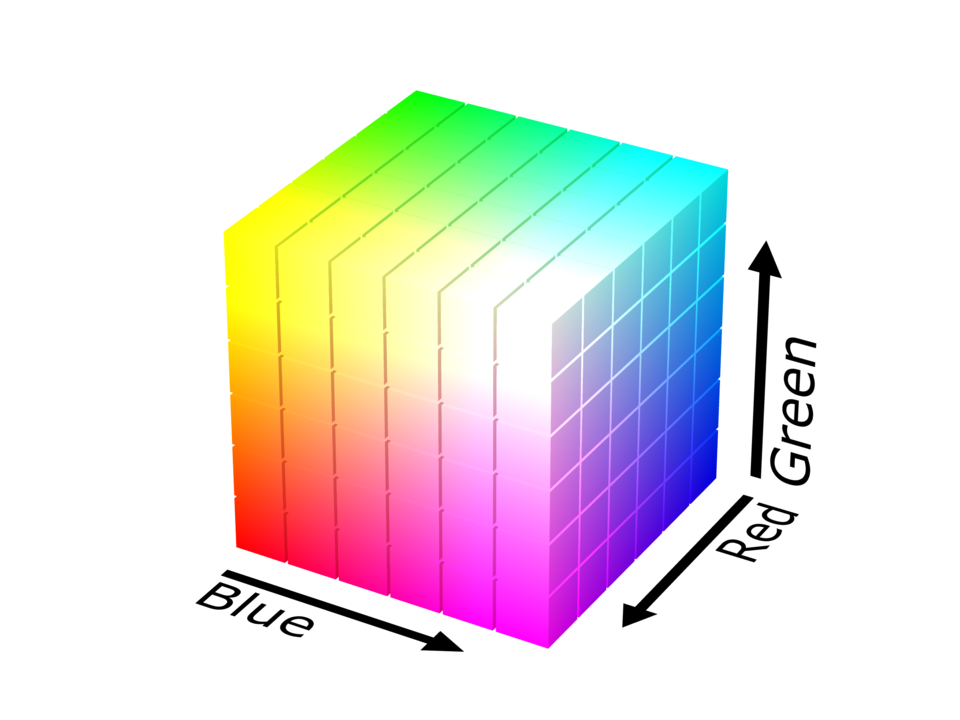 A 3D cube showing RGB primary colors and their mixtures. (Image: SharkD, CC BY-SA 4.0, via Wikimedia Commons)
RGB vs. CMYK: Why Printers Use CMYK
- RGB adds light (additive model).
- CMYK subtracts light (subtractive model).
- Example: A red shirt printed with CMYK uses 0% C, 100% M, 100% Y, 0% K.
5. Image Compression: Reducing File Size
Compression balances quality vs. size for storage/transmission.
A. Lossless Compression
- No data loss (e.g., PNG, ZIP).
- Methods:
- Run-Length Encoding (RLE): Compresses repeated pixels (e.g., black & white scans).
- Huffman Coding: Assigns shorter codes to frequent pixels.
B. Lossy Compression
- Discards "unimportant" data (e.g., JPEG).
- Methods:
- DCT (Discrete Cosine Transform): Blocks of pixels are transformed into frequency components.
- Quantization: Reduces precision of coefficients.
Worked Example: Compressing a Selfie for WhatsApp
Problem: A 4000×6000 pixel selfie (24-bit) is 72 MB. Solution:
- Resize to 1000×1500 (reduces pixels by 4×).
- Apply JPEG compression (quality = 80%).
- Final size: ~5 MB (fits WhatsApp’s 10 MB limit).
6. Real-World Applications
In the Real World
Daraz Product Images
- Idea: JPEG compression for fast loading.
- How: Product photos are resized and compressed to <500 KB for mobile users.
Pathao Driver Dashboard
- Idea: Real-time image processing (edge detection for lane marking).
- How: Cameras feed live video to detect traffic rules violations.
NEPSE Stock Charts
- Idea: SVG vector graphics for scalability.
- How: Charts render crisply at any resolution (unlike raster images).
eSewa Transaction Receipts
- Idea: PNG format for transparency (logo overlay).
- How: Receipts use 24-bit PNG to display QR codes clearly.
Exam Tip
- Focus on:
- Pixel representation (DPI, color depth, file size calculations).
- Format differences (JPEG vs. PNG trade-offs).
- Processing techniques (filtering, segmentation, morphing).
- Color models (RGB for screens, CMYK for print).
- Compression (lossy vs. lossless, DCT in JPEG).
- Common Pitfalls:
- Confusing DPI (physical resolution) with PPI (digital resolution).
- Forgetting that JPEG is lossy while PNG is lossless.
- Not linking real-world apps (e.g., Daraz, Pathao) to techniques.
- Question Patterns:
- Define terms (e.g., "What is DCT?").
- Compare formats (e.g., "Why use PNG over JPEG for icons?").
- Apply processing (e.g., "How would you detect edges in a traffic camera image?").
Final Note: Always visualize pixel grids, compression blocks, and color models in exams—draw them if needed!
Based on the TU BSc CSIT syllabus for Multimedia Computing (CSC319), unit 2.
Discussion
Loading…