Web TechnologyUnit 915 min read
HTTP Protocol, JSON & Advanced HTML Elements
Unit 9 of Web Technology covers the HTTP protocol (requests/responses, status codes, methods), JSON data format (syntax, parsing, APIs), and advanced HTML5 elements (canvas, audio/video, semantic tags) with practical examples and exam-focused techniques.
TAKEAWAYS:
- HTTP is a stateless, client-server protocol using methods (GET, POST, etc.) and status codes (200, 404, 500) to exchange data over port 80/443.
- JSON is a lightweight text-based format for structured data (key-value pairs, arrays) used in APIs like REST and WebSockets.
- Advanced HTML5 elements (
<canvas>,<audio>,<video>) enable interactive media without plugins, while semantic tags (<header>,<article>) improve accessibility and SEO. - HTTP headers (e.g.,
Content-Type,Authorization) control request/response behavior, and CORS manages cross-origin resource sharing. - Exam tip: Always include doctype declaration, proper indentation, and comments in code submissions. Use real-world examples (e.g., eSewa API calls) to justify answers.
1. HTTP Protocol: The Backbone of Web Communication
HTTP (HyperText Transfer Protocol) is the foundation of data exchange on the web. It operates on a request-response model between clients (browsers, apps) and servers.
sequenceDiagram
    participant Client as Browser
    participant Server as eSewa API
    Client->>Server: POST /api/payment (JSON Body)
    Server-->>Client: HTTP/1.1 200 OK (Transaction ID)
    Client->>Server: GET /api/status (Transaction ID)
    Server-->>Client: HTTP/1.1 200 OK (Payment Confirmed)
    Note right of Server: Status codes: 200 (Success), 401 (Unauthorized), 500 (Server Error)
eSewa Payment Flow with HTTP Methods and Status CodesKey Concepts
1.1 HTTP Methods (Verbs)
HTTP defines methods to perform actions on resources (URLs). The most common are:
| Method | Purpose | Example Use Case |
|---|---|---|
GET |
Retrieve data | Loading a webpage (GET /home) |
POST |
Send data to create/update | Submitting a form (POST /login) |
PUT |
Replace a resource | Updating a user profile |
DELETE |
Remove a resource | Deleting a blog post |
HEAD |
Get headers only (no body) | Checking if a resource exists without downloading it |
OPTIONS |
Describe available methods | CORS preflight requests |
Worked Example: eSewa Payment Flow When you pay a bill via eSewa, the app sends:
POST /api/payment HTTP/1.1
Host: esewa.com.np
Content-Type: application/json
Authorization: Bearer <token>

{
  "amount": 500,
  "phone": "98XXXXXXXX",
  "service": "electricity"
}
The server responds with:
HTTP/1.1 200 OK
Content-Type: application/json

{
  "status": "success",
  "transactionId": "ESW123456",
  "url": "https://esewa.com.np/payment/ESW123456"
}
Visual: HTTP Request-Response Cycle
sequenceDiagram
    Client->>Server: GET /home (HTTP Request)
    Server-->>Client: HTTP/1.1 200 OK (HTML Response)
    Client->>Server: POST /login (Form Data)
    Server-->>Client: HTTP/1.1 302 Redirect (Session Cookie)
1.2 HTTP Status Codes
Servers use status codes to indicate success/failure. Critical ones for exams:
| Code | Class | Meaning | Example |
|---|---|---|---|
| 200 | Success | OK | Page loaded successfully |
| 201 | Success | Created | Resource added (e.g., new user) |
| 301 | Redirect | Moved Permanently | https://old.url → https://new.url |
| 400 | Client Error | Bad Request | Malformed URL |
| 401 | Client Error | Unauthorized | Missing login credentials |
| 403 | Client Error | Forbidden | No permission to access |
| 404 | Client Error | Not Found | Page doesn’t exist |
| 500 | Server Error | Internal Server Error | Server crashed |
Real-World Example: Daraz Order Status When you check your Daraz order, the API returns:
HTTP/1.1 200 OK
{
  "orderId": "DAR12345",
  "status": "shipped",
  "trackingUrl": "https://daraz.com.np/track/DAR12345"
}
If the order doesn’t exist:
HTTP/1.1 404 Not Found
{
  "error": "Order not found"
}
1.3 HTTP Headers
Headers provide metadata for requests/responses. Key ones:
Content-Type: Defines data format (application/json,text/html).Authorization: For authentication (e.g.,Bearer <token>).Cookie/Set-Cookie: Session management (e.g.,PHPSESSID).CORS: Cross-Origin Resource Sharing (e.g.,Access-Control-Allow-Origin: *).
Example: WhatsApp Web Login
- Browser sends:
GET /auth HTTP/1.1 Host: web.whatsapp.com Origin: https://web.whatsapp.com - Server responds with:
HTTP/1.1 200 OK
Access-Control-Allow-Origin: https://web.whatsapp.com
Set-Cookie: qr=abc123; Secure; HttpOnly
1.4 HTTP vs. HTTPS
| Feature | HTTP | HTTPS |
|---|---|---|
| Security | No encryption (plaintext) | Encrypted (TLS/SSL) |
| Port | 80 | 443 |
| Use Case | Local testing | Production (e.g., eSewa, banks) |
| URL Prefix | http:// |
https:// |
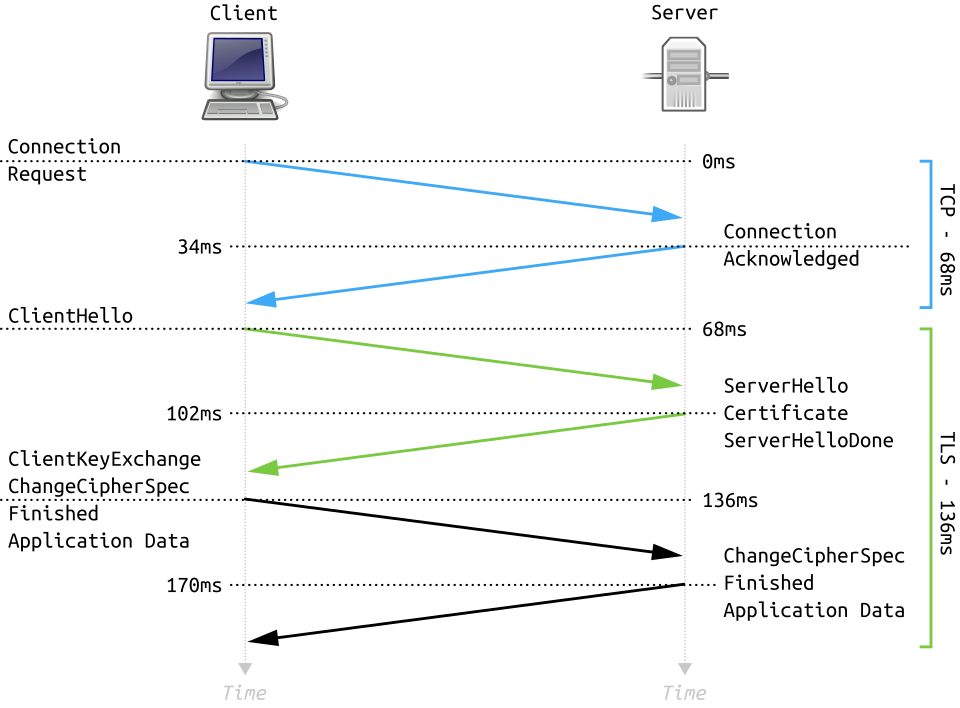 How HTTPS secures data between client and server (Image: Fleshgrinder and The People from The Tango! Desktop Project., Public domain, via Wikimedia Commons)
(Search: "TLS handshake diagram" for a real flow of SYN, ClientHello, ServerHello, etc.)
How HTTPS secures data between client and server (Image: Fleshgrinder and The People from The Tango! Desktop Project., Public domain, via Wikimedia Commons)
(Search: "TLS handshake diagram" for a real flow of SYN, ClientHello, ServerHello, etc.)
2. JSON: The Universal Data Format
JSON (JavaScript Object Notation) is a lightweight, text-based format for structured data. It’s used in:
- APIs (REST, GraphQL)
- Configuration files
- NoSQL databases (MongoDB)
JSON Syntax Rules
- Data Types:
- Strings (
"name"), numbers (42), booleans (true/false),null, arrays ([1, 2, 3]), objects ({}).
- Strings (
- Structure:
- Key-value pairs in double quotes (
"key": value). - Commas separate items (
[1, 2, 3]). - No trailing commas.
- Key-value pairs in double quotes (
Valid JSON Example:
{
  "user": {
    "id": 101,
    "name": "Ramesh Adhikari",
    "hobbies": ["coding", "hiking"],
    "isActive": true
  }
}
JSON vs. XML
| Feature | JSON | XML |
|---|---|---|
| Syntax | Lightweight, curly braces | Verbose, tags (<user>...</user>) |
| Size | Smaller payload | Larger payload |
| Parsing | Faster (native in JavaScript) | Slower (requires DOM parsing) |
| Use Case | APIs, configs | Documents, complex data |
Worked Example: NEPSE Stock API When you check NEPSE stock prices via an API, the response might be:
{
  "symbol": "NEPSE",
  "price": 2100.50,
  "change": -12.30,
  "time": "2023-11-15T14:30:00"
}
Parsing JSON in JavaScript
// Example: Fetch and parse JSON from an API
fetch('https://api.esewa.com.np/balance')
  .then(response => response.json()) // Parse JSON
  .then(data => {
    console.log("Balance:", data.balance);
    document.getElementById("balance").textContent = data.balance;
  })
  .catch(error => console.error("Error:", error));
3. Advanced HTML5 Elements
HTML5 introduced semantic tags and media elements to improve structure and interactivity.
3.1 Semantic HTML5 Tags
Improve SEO and accessibility by describing content meaningfully.
| Tag | Purpose | Example |
|---|---|---|
<header> |
Introductory content | Page title, logo, navigation |
<nav> |
Navigation links | Menu bar |
<main> |
Primary content | Article, dashboard |
<article> |
Self-contained content | Blog post, news item |
<section> |
Thematic grouping | Chapter, tab |
<footer> |
Page footer | Copyright, contact info |
<aside> |
Sidebar content | Related links, ads |
Example: TU Exam Portal Structure
<!DOCTYPE html>
<html>
<head>
  <title>TU Exam Results</title>
</head>
<body>
  <header>
    <h1>Tribhuvan University</h1>
    <nav>
      <a href="/results">Results</a>
      <a href="/schedule">Exam Schedule</a>
    </nav>
  </header>
  <main>
    <article>
      <h2>CSIT 5th Sem Results 2023</h2>
      <p>Published on 15 Nov 2023.</p>
    </article>
  </main>
  <footer>
    <p>© 2023 TU. <a href="mailto:[email protected]">Contact</a></p>
  </footer>
</body>
</html>
3.2 Media Elements
Canvas API
Draw graphics dynamically using JavaScript. Used in:
- Games (e.g., Flappy Bird)
- Data visualization (charts)
- Interactive diagrams
Example: Drawing a Rectangle
<canvas id="mycanvas" width="300" height="200"></canvas>
<script>
  const canvas = document.getElementById("mycanvas");
  const ctx = canvas.getContext("2d");
  ctx.fillStyle = "blue";
  ctx.fillRect(10, 10, 100, 50); // (x, y, width, height)
</script>
(Search: "HTML5 Canvas API reference diagram")
Audio/Video Elements
Embed media without plugins (e.g., Flash).
Example: Playing a Sound
<audio id="alertSound" src="alert.mp3" preload="auto"></audio>
<script>
  document.getElementById("alertSound").play();
</script>
Example: YouTube-like Video Player
<video width="400" controls>
  <source src="lecture.mp4" type="video/mp4">
  Your browser does not support HTML5 video.
</video>
Geolocation API
Access user location (with permission). Used in:
- Pathao: Showing rider locations.
- Google Maps: Directions.
Example: Get User Location
if (navigator.geolocation) {
  navigator.geolocation.getCurrentPosition(
    position => {
      console.log("Latitude:", position.coords.latitude);
      console.log("Longitude:", position.coords.longitude);
    },
    error => console.error("Error:", error)
  );
}
4. HTTP in Real-World Applications
Example 1: eSewa API Calls
When you pay a bill, eSewa’s frontend sends:
- POST to
/api/initiate-payment(with amount, phone, service). - Server responds with a QR code URL (
200 OK). - After payment, POST to
/api/confirm-payment(with transaction ID). - Server returns receipt (
200 OK) or failure (402 Payment Required).
Example 2: Daraz Order Processing
- You place an order → POST to
/api/orders(with cart items). - Daraz checks stock → GET to
/api/inventory. - If stock is available → 201 Created (order confirmed).
- If out of stock → 400 Bad Request (error message).
Example 3: NTC Electricity Bill
When you check your NTC bill online:
- Browser sends GET to
https://ntc.gov.np/api/bill?customerId=12345. - Server responds with:
{ "customer": "Ramesh Adhikari", "billAmount": 1250, "dueDate": "2023-12-15", "paymentUrl": "https://ntc.gov.np/pay/12345" } - If the customer ID is invalid → 404 Not Found.
5. Common Exam Questions & Solutions
Question 1: Create a Canvas with a Div
Answer:
<!DOCTYPE html>
<html>
<head>
  <title>Canvas Example</title>
</head>
<body>
  <div id="dv1">
    <canvas id="mycanvas" width="300" height="200"></canvas>
  </div>
  <script>
    const canvas = document.getElementById("mycanvas");
    const ctx = canvas.getContext("2d");
    ctx.fillStyle = "green";
    ctx.fillRect(50, 50, 100, 100);
  </script>
</body>
</html>
Question 2: HTTP Request for a Bank Loan
Scenario: You submit a loan application to NMB Bank via their website. Request:
POST /api/loans HTTP/1.1
Host: nmb.com.np
Content-Type: application/json
Authorization: Bearer abc123

{
  "customerId": "CUST456",
  "amount": 500000,
  "tenure": 5,
  "purpose": "business"
}
Response (Approved):
HTTP/1.1 201 Created
Content-Type: application/json

{
  "loanId": "LOAN789",
  "status": "approved",
  "interestRate": 8.5,
  "emi": 10245,
  "disbursementDate": "2023-12-01"
}
Response (Rejected):
HTTP/1.1 400 Bad Request
{
  "error": "Insufficient credit score",
  "suggestions": ["Improve score by paying bills on time"]
}
Question 3: JSON to XSD Conversion
Given JSON:
{
  "student": {
    "id": "CSIT123",
    "name": "Sita Thapa",
    "courses": ["Web Tech", "DBMS"]
  }
}
Equivalent XSD:
<xs:schema xmlns:xs="http://www.w3.org/2001/XMLSchema">
  <xs:element name="student">
    <xs:complexType>
      <xs:sequence>
        <xs:element name="id" type="xs:string"/>
        <xs:element name="name" type="xs:string"/>
        <xs:element name="courses">
          <xs:complexType>
            <xs:sequence>
              <xs:element name="course" type="xs:string" maxOccurs="unbounded"/>
            </xs:sequence>
          </xs:complexType>
        </xs:element>
      </xs:sequence>
    </xs:complexType>
  </xs:element>
</xs:schema>
Exam Tip
For HTTP Questions:
- Always include method, headers, and status code in answers.
- Use real-world examples (e.g., "When you log in to eSewa, the server responds with a
302 Redirectto set a session cookie"). - Mention CORS if cross-origin requests are involved.
For JSON Questions:
- Validate syntax (e.g.,
"key": valuewith double quotes). - Show how to parse JSON in JavaScript (
response.json()).
- Validate syntax (e.g.,
For HTML5 Questions:
- Use semantic tags (
<header>,<article>) for structure. - For
<canvas>, include JavaScript to draw shapes. - For forms, validate client-side (JavaScript) and server-side (PHP).
- Use semantic tags (
Code Formatting:
- Indentation: Use 2-4 spaces for readability.
- Comments: Add
//or/* */to explain logic. - Doctype: Always declare
<!DOCTYPE html>at the top.
Final Note: HTTP and JSON are the unsung heroes of web apps. Master them, and you’ll ace questions on APIs, data exchange, and dynamic content. Practice with eSewa, Daraz, and NEPSE APIs to see real-world HTTP/JSON in action!
In the real world
- eSewa/Khalti: Uses
POSTHTTP method with JSON payloads for secure transactions (e.g.,{"amount":500,"phone":"98XXXXXXXX"}) and returns200 OKwith transaction details or401 Unauthorizedif authentication fails. - Daraz: Implements
GETrequests for product listings (e.g.,GET /products?category=electronics) and returns JSON with200 OKstatus, while404 Not Foundappears if the product is unavailable. - WhatsApp Web: Relies on
CORSheaders (Access-Control-Allow-Origin) to allow cross-origin requests fromweb.whatsapp.comto the WhatsApp server, enabling seamless login and message sync.
Based on the TU BSc CSIT syllabus for Web Technology (CSC318), unit 9.
Discussion
Loading…