Web TechnologyUnit 716 min read
XML, DTD, XSD: Structure, Validation, and Real-World Data Exchange
Unit 7 of Web Technology covers XML (Extensible Markup Language) fundamentals, its syntax rules, and how to define document structures using DTD (Document Type Definition) and XSD (XML Schema Definition). You’ll learn to create XML files with simple/complex types, attributes, and nested elements, then validate them wit
What is XML?
XML (Extensible Markup Language) is a markup language designed to store and transport structured data in a human- and machine-readable format. Unlike HTML, which defines how to display content, XML focuses on defining and structuring data. It is extensible because you can define your own tags (elements) based on your needs.
Key Features of XML
XML vs. HTML
| Feature | XML | HTML |
|---|---|---|
| Purpose | Store/transport data | Display content |
| Tags | User-defined (extensible) | Predefined (fixed) |
| Case-sensitivity | Yes (<Name> ≠ <name>) |
No (<P> = <p>) |
| Empty elements | Allowed (<br/>) |
Allowed (<img/>) |
| Validation | Requires DTD/XSD | Uses DOCTYPE (limited) |
| Example | <book><title>XML Guide</title></book> |
<h1>Welcome</h1> |
XML Document Structure Rules
An XML document must follow strict syntax rules to be valid. Below are the core rules with a visual breakdown:
1. XML Declaration
Every XML file starts with a declaration specifying the XML version and encoding:
<?xml version="1.0" encoding="UTF-8"?>
2. Root Element
- An XML document must have one root element that wraps all other elements.
- Example:
<root>
  <child>Content</child>
</root>
3. Elements and Tags
- Elements are defined using opening (
<tag>) and closing (</tag>) tags. - Nested elements must be properly closed (last open, first close).
- Empty elements use a forward slash:
<tag/>or<tag></tag>.
4. Attributes
- Attributes provide additional information about elements (e.g.,
id,type). - Must be quoted:
<element attribute="value">. - Example:
<person id="101" type="employee">
  <name>Ramesh Adhikari</name>
</person>
5. Text Content
- Text must be enclosed within tags and cannot contain unescaped special characters (
<,>,&,",'). - Escape sequences:
&→&<→<>→>"→"'→'
6. Comments
- Comments start with
<!--and end with-->. - Example:
<!-- This is a comment -->
Worked Example: XML Document with Simple/Complex Types
Scenario: Create an XML file for a NEPSE stock listing with:
- Simple elements (
symbol,price). - Complex elements (
companywith nestednameandsector). - An attribute (
last_updated).
<?xml version="1.0" encoding="UTF-8"?>
<stock_list last_updated="2023-11-15">
    <!-- Simple elements -->
    <stock>
        <symbol>NTC</symbol>
        <price>1250.50</price>
    </stock>

    <!-- Complex element with nested tags and attribute -->
    <company id="101">
        <name>Nepal Bank</name>
        <sector>Financial</sector>
        <stock>
            <symbol>NEBANK</symbol>
            <price>450.25</price>
        </stock>
    </company>
</stock_list>
Document Type Definition (DTD)
DTD defines the structure and legal elements of an XML document. It ensures data integrity by enforcing rules like:
- Required elements.
- Element order.
- Attribute values.
DTD Example for the Stock XML
<!-- DTD for stock_list.xml -->
<!ELEMENT stock_list (stock*, company*)>
<!ATTLIST stock_list last_updated CDATA #REQUIRED>

<!ELEMENT stock (symbol, price)>
<!ELEMENT symbol (#PCDATA)>
<!ELEMENT price (#PCDATA)>

<!ELEMENT company (name, sector, stock)>
<!ATTLIST company id ID #REQUIRED>
<!ELEMENT name (#PCDATA)>
<!ELEMENT sector (#PCDATA)>
<!ELEMENT stock (symbol, price)>
How DTD Works
- Element Declaration: Defines what elements can appear inside another.
stock_listcan containstockandcompany(zero or more).
- Attribute Declaration: Specifies allowed attributes and their types (
ID,CDATA, etc.). - Validation: An XML parser checks if the document matches the DTD.
XML Schema Definition (XSD)
XSD is a more powerful alternative to DTD for validating XML. It uses XML itself to define rules and supports:
- Data types (
string,integer,date). - Complex types (nested structures).
- Namespaces.
- Default values.
XSD Example for the Stock XML
<?xml version="1.0" encoding="UTF-8"?>
<xs:schema xmlns:xs="http://www.w3.org/2001/XMLSchema">
    <xs:element name="stock_list">
        <xs:complexType>
            <xs:sequence>
                <xs:element name="stock" maxOccurs="unbounded">
                    <xs:complexType>
                        <xs:sequence>
                            <xs:element name="symbol" type="xs:string"/>
                            <xs:element name="price" type="xs:decimal"/>
                        </xs:sequence>
                    </xs:complexType>
                </xs:element>
                <xs:element name="company" maxOccurs="unbounded">
                    <xs:complexType>
                        <xs:sequence>
                            <xs:element name="name" type="xs:string"/>
                            <xs:element name="sector" type="xs:string"/>
                            <xs:element name="stock" maxOccurs="unbounded">
                                <xs:complexType>
                                    <xs:sequence>
                                        <xs:element name="symbol" type="xs:string"/>
                                        <xs:element name="price" type="xs:decimal"/>
                                    </xs:sequence>
                                </xs:complexType>
                            </xs:element>
                        </xs:sequence>
                        <xs:attribute name="id" type="xs:ID" use="required"/>
                    </xs:complexType>
                </xs:element>
            </xs:sequence>
            <xs:attribute name="last_updated" type="xs:date" use="required"/>
        </xs:complexType>
    </xs:element>
</xs:schema>
DTD vs. XSD Comparison
| Feature | DTD | XSD |
|---|---|---|
| Language | SGML-based (limited) | XML-based (powerful) |
| Data Types | No (only text) | Yes (xs:string, xs:date) |
| Namespaces | No | Yes |
| Complex Types | Limited | Full support |
| Validation | Basic structure checks | Advanced (e.g., min/max length) |
| Example Use | Simple configs | Financial data (e.g., NEPSE feeds) |
XML Namespaces
Namespaces prevent element name conflicts when combining XML documents from different sources. Example:
- Two XML files use
<table>: one for database tables, another for HTML tables. - Solution: Assign unique prefixes (URIs) to elements.
Example: Namespace in XML
<root xmlns:db="http://example.com/db"
      xmlns:html="http://www.w3.org/1999/xhtml">
    <db:table>
        <db:name>Users</db:name>
    </db:table>
    <html:table>
        <html:tr>
            <html:td>Data</html:td>
        </html:tr>
    </html:table>
</root>
Why Namespaces?
- eSewa: Combines transaction data (
<eSewa:payment>) with user profiles (<user:profile>) without conflicts. - Ncell Billing: Uses
<billing:invoice>and<customer:details>in the same XML.
Transforming XML to HTML with XSLT
XSLT (Extensible Stylesheet Language Transformations) converts XML into other formats (e.g., HTML for display). Example:
XML Input (stock_list.xml)
<stock_list last_updated="2023-11-15">
    <stock>
        <symbol>NTC</symbol>
        <price>1250.50</price>
    </stock>
</stock_list>
XSLT Stylesheet (stock.xsl)
<?xml version="1.0" encoding="UTF-8"?>
<xsl:stylesheet version="1.0" xmlns:xsl="http://www.w3.org/1999/XSL/Transform">
    <xsl:template match="/">
        <html>
            <body>
                <h1>Stock Prices (Updated: <xsl:value-of select="@last_updated"/>)</h1>
                <table border="1">
                    <tr>
                        <th>Symbol</th>
                        <th>Price</th>
                    </tr>
                    <xsl:for-each select="stock_list/stock">
                        <tr>
                            <td><xsl:value-of select="symbol"/></td>
                            <td><xsl:value-of select="price"/></td>
                        </tr>
                    </xsl:for-each>
                </table>
            </body>
        </html>
    </xsl:template>
</xsl:stylesheet>
Output (HTML)
<html>
    <body>
        <h1>Stock Prices (Updated: 2023-11-15)</h1>
        <table border="1">
            <tr><th>Symbol</th><th>Price</th></tr>
            <tr><td>NTC</td><td>1250.50</td></tr>
        </table>
    </body>
</html>
In the Real World
XML is everywhere in Nepal’s tech ecosystem. Here’s how companies use it:
eSewa (Digital Payments)
- Use: XML validates transaction data (e.g.,
payment.xml) before processing. - Example:
<transaction id="TXN123"> <user>user123@example.com</user> <amount currency="NPR">500</amount> <status>completed</status> </transaction> - Why XML?: Ensures all fields (user, amount, status) are present and correctly formatted before the bank processes the payment.
- Use: XML validates transaction data (e.g.,
Ncell Billing System
- Use: XML schemas (
billing.xsd) define how monthly bills are structured (e.g.,customer,usage,total). - Example:
<bill customer_id="CUST456"> <usage type="data">10GB</usage> <total currency="NPR">1200</total> </bill> - Why XML?: Ncell’s backend systems parse this XML to generate PDF invoices and update customer databases.
- Use: XML schemas (
NEPSE (Stock Exchange)
- Use: XML feeds (
stock_feed.xml) transmit real-time stock prices to apps like Investment Board. - Example:
<stock symbol="NTC" last_trade="1250.50"> <change>+2.10</change> <volume>10000</volume> </stock> - Why XML?: Lightweight and easy to parse by trading platforms. XSD ensures no malformed data reaches traders.
- Use: XML feeds (
Khalti API Responses
- Use: APIs return payment statuses in XML/JSON. XML is used internally for validation.
- Example:
<payment_response> <transaction_id>KHALTI_789</transaction_id> <status>success</status> <amount>300</amount> </payment_response> - Why XML?: Khalti’s servers validate this against an XSD before updating merchant accounts.
NTC’s Network Configuration Files
- Use: XML stores router configurations (e.g.,
router_config.xml) for telecom networks. - Example:
<router id="ROUTER_01"> <interface name="eth0" ip="192.168.1.1"/> <route destination="10.0.0.0/24" gateway="192.168.1.2"/> </router> - Why XML?: NTC technicians use XSLT to generate human-readable configs from these files.
- Use: XML stores router configurations (e.g.,
Worked Example: Ncell Customer Data with DTD/XSD
Scenario: Model Ncell’s customer data with:
- Simple elements (
name,phone). - Complex element (
planwithtypeandexpiry). - Attribute (
customer_id).
XML Document (customer.xml)
<?xml version="1.0" encoding="UTF-8"?>
<customers>
    <customer customer_id="CUST101">
        <name>Sarita Khadka</name>
        <phone>9800123456</phone>
        <plan>
            <type>Unlimited Data</type>
            <expiry>2023-12-31</expiry>
        </plan>
    </customer>
</customers>
DTD for the XML
<!ELEMENT customers (customer*)>
<!ELEMENT customer (name, phone, plan)>
<!ATTLIST customer customer_id ID #REQUIRED>
<!ELEMENT name (#PCDATA)>
<!ELEMENT phone (#PCDATA)>
<!ELEMENT plan (type, expiry)>
<!ELEMENT type (#PCDATA)>
<!ELEMENT expiry (#PCDATA)>
XSD for the XML
<xs:schema xmlns:xs="http://www.w3.org/2001/XMLSchema">
    <xs:element name="customers">
        <xs:complexType>
            <xs:sequence>
                <xs:element name="customer" maxOccurs="unbounded">
                    <xs:complexType>
                        <xs:sequence>
                            <xs:element name="name" type="xs:string"/>
                            <xs:element name="phone" type="xs:string"/>
                            <xs:element name="plan">
                                <xs:complexType>
                                    <xs:sequence>
                                        <xs:element name="type" type="xs:string"/>
                                        <xs:element name="expiry" type="xs:date"/>
                                    </xs:sequence>
                                </xs:complexType>
                            </xs:element>
                        </xs:sequence>
                        <xs:attribute name="customer_id" type="xs:ID" use="required"/>
                    </xs:complexType>
                </xs:element>
            </xs:sequence>
        </xs:complexType>
    </xs:element>
</xs:schema>
Real-World Tie-In: Ncell’s backend systems use this XML to:
- Validate new customer registrations against the XSD.
- Generate monthly billing reports by transforming XML to PDF using XSLT.
- Sync data with third-party apps (e.g., Pathao for ride-hailing partnerships).
Advantages and Disadvantages of XML
Advantages
Disadvantages
Exam Tip
Based on past TU/PU/NEB questions, here’s how to score full marks:
XML Document Creation
- Always include:
- XML declaration (
<?xml version="1.0"?>). - One root element.
- At least one attribute and one nested element.
- Example:
<library>
    <book id="101">
        <title>XML Guide</title>
        <author>John Doe</author>
    </book>
</library>
- XML declaration (
- Always include:
DTD/XSD Questions
- For DTD:
- Use
!ELEMENTfor elements. - Use
!ATTLISTfor attributes with types (ID,CDATA). - Example:
<!ELEMENT book (title, author)>
<!ATTLIST book id ID #REQUIRED>
- Use
- For XSD:
- Use
<xs:element>and<xs:complexType>. - Specify data types (
xs:string,xs:integer). - Example:
<xs:element name="title" type="xs:string"/>
- Use
- For DTD:
XSLT Transformation
- Show the input XML, XSLT code, and output HTML.
- Use
<xsl:value-of>to extract data. - Example:
<xsl:template match="/">
    <html><body>
        <h1><xsl:value-of select="library/book/title"/></h1>
    </body></html>
</xsl:template>
XML vs. HTML
- Highlight that XML is for data, HTML for display.
- Example table (as shown earlier) is a must.
Namespaces
- Always use a real-world example (e.g., eSewa + user profiles).
- Show how prefixes resolve conflicts:
<eSewa:transaction>...</eSewa:transaction>
<user:profile>...</user:profile>
Common Pitfalls
- Forgetting the root element: XML without a single root is invalid.
- Unclosed tags: Always close elements in reverse order.
- Incorrect attribute syntax: Attributes must be quoted (
id="123"). - Special characters: Escape
&,<,>properly.
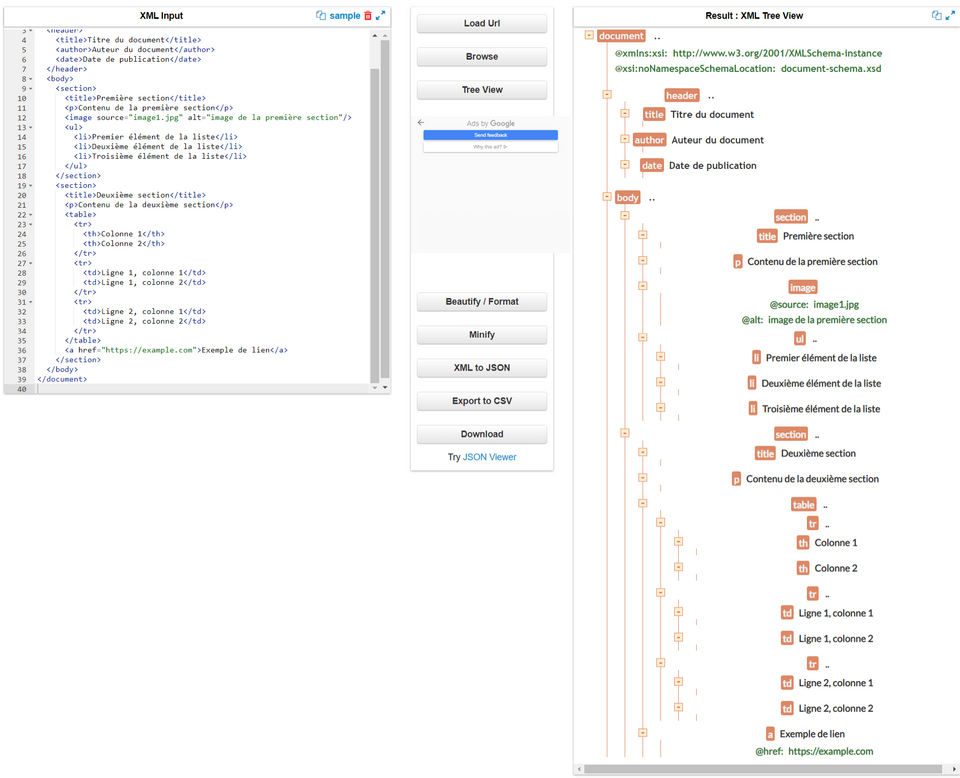 A labeled tree showing root, parent, child elements with attributes. (Image: Laetitia Victoria Emma, CC BY-SA 4.0, via Wikimedia Commons)
Based on the TU BSc CSIT syllabus for Web Technology (CSC318), unit 7.
Discussion
Loading…