NET Centric ComputingUnit 137 min read
ADO.NET: Database Connectivity, Commands, and Security
Unit 13 of NET Centric Computing covers ADO.NET architecture, its core classes (Connection, Command, DataReader, DataAdapter), database operations (CRUD), connection pooling, and security risks like SQL injection. It contrasts ADO.NET with Entity Framework Core and demonstrates real-world usage in banking, e-commerce,
Core Concepts of ADO.NET
What is ADO.NET?
ADO.NET (ActiveX Data Objects .NET) is a data access technology provided by Microsoft for connecting to databases, executing commands, and retrieving data in .NET applications. It is part of the System.Data namespace and enables communication between applications and databases using providers (e.g., SQL Server, Oracle, MySQL).
classDiagram
    class ADO.NET {
        +Connection
        +Command
        +DataReader
        +DataAdapter
        +DataSet
        +Connection Pooling
    }
    class Database {
        <<Database>>
        SQL Server
        Oracle
        MySQL
    }
    ADO.NET --> Database : "Connects to"
    Database --> ADO.NET : "Returns Data"
Key Components of ADO.NET
ADO.NET consists of two main components:
- Connected Architecture: Uses direct connections to databases (e.g.,
SqlConnection,OleDbConnection). - Disconnected Architecture: Uses
DataSetandDataAdapterto work with data offline.
1. Connection Class
The Connection class establishes a connection to a database. It supports connection pooling (reusing connections to improve performance).
// Example: Creating a SQL Server connection
using System.Data.SqlClient;

string connectionString = "Server=myServer;Database=myDB;User Id=myUser;Password=myPass;";
using (SqlConnection connection = new SqlConnection(connectionString))
{
    connection.Open(); // Opens the connection
    Console.WriteLine("Connection opened!");
    connection.Close(); // Closes the connection
}
2. Command Class
The Command class executes SQL commands (e.g., SELECT, INSERT, UPDATE, DELETE) against a database.
// Example: Executing a SELECT query
using (SqlCommand command = new SqlCommand("SELECT * FROM Customers", connection))
{
    SqlDataReader reader = command.ExecuteReader();
    while (reader.Read())
    {
        Console.WriteLine(reader["CustomerName"]);
    }
    reader.Close();
}
3. DataReader Class
The DataReader reads a forward-only, read-only stream of data from a database. It is lightweight and fast but does not support editing data.
4. DataAdapter Class
The DataAdapter fills a DataSet with data from a database and updates the database with changes made to the DataSet. It bridges connected and disconnected architectures.
flowchart TD
    A["Database"] -->|"SQL Query"| B["SqlCommand"]
    B --> C["SqlDataAdapter"]
    C --> D["DataSet"]
    D -->|"Changes"| C
    C -->|"Updates"| A
In the Real World
ADO.NET is widely used in Nepalese and global applications for secure and efficient database operations:
eSewa (Nepal)
- Use Case: ADO.NET handles bill payments, transaction logs, and user authentication in the backend.
- How? The
SqlConnectionandSqlCommandclasses securely process thousands of transactions per second while maintaining data integrity.
Ncell (Nepal)
- Use Case: Customer data management, call logs, and billing systems rely on ADO.NET for CRUD operations.
- How?
DataAdaptersynchronizes offline customer data (e.g., in mobile apps) with the central database.
Daraz (Global)
- Use Case: Order processing, inventory management, and user profiles use ADO.NET for high-performance database interactions.
- How? Connection pooling reduces latency during peak shopping hours (e.g., Dashain sales).
Worked Example: Bank Loan Interest Calculation
Scenario: A bank uses ADO.NET to calculate monthly loan interest for customers. The database stores loan details (principal, rate, term), and the application retrieves and processes this data.
// Example: Fetching loan data and calculating interest
string query = "SELECT Principal, Rate, Term FROM Loans WHERE CustomerID = @CustomerID";
using (SqlConnection connection = new SqlConnection(connectionString))
{
    SqlCommand command = new SqlCommand(query, connection);
    command.Parameters.AddWithValue("@CustomerID", customerId);
    connection.Open();
    SqlDataReader reader = command.ExecuteReader();

    while (reader.Read())
    {
        decimal principal = reader.GetDecimal(0);
        decimal rate = reader.GetDecimal(1);
        int term = reader.GetInt32(2);
        decimal monthlyInterest = (principal * rate / 100) / 12;
        Console.WriteLine($"Monthly Interest: {monthlyInterest}");
    }
}
ADO.NET vs. Entity Framework Core
| Feature | ADO.NET | Entity Framework Core (EF Core) |
|---|---|---|
| Purpose | Low-level database access | High-level ORM (Object-Relational Mapping) |
| Complexity | Requires manual SQL | Auto-generates SQL from C# code |
| Performance | Faster for simple queries | Slightly slower due to abstraction |
| Learning Curve | Steeper (manual SQL) | Easier (C#-based queries) |
| Use Case | High-performance apps | Rapid development, complex relationships |
Example:
- ADO.NET: Used in high-frequency trading systems where every millisecond counts.
- EF Core: Preferred for e-commerce platforms (e.g., Daraz) where developers need to focus on business logic.
Security in ADO.NET
SQL Injection Attacks
SQL injection occurs when malicious SQL code is inserted into a query. ADO.NET mitigates this using parameterized queries.
Vulnerable Code (SQL Injection Risk):
string query = "SELECT * FROM Users WHERE Username = '" + userInput + "'";
Secure Code (Parameterized Query):
string query = "SELECT * FROM Users WHERE Username = @Username";
SqlCommand command = new SqlCommand(query, connection);
command.Parameters.AddWithValue("@Username", userInput);
Real-World Impact:
- Nepal’s NEPSE: Uses ADO.NET with parameterized queries to prevent hackers from manipulating stock data.
- Khalti: Secures payment transactions by validating all database inputs.
Connection Pooling
ADO.NET uses connection pooling to reuse database connections, improving performance and reducing overhead.
flowchart LR
    A["Application"] --> B{"Connection Needed?"}
    B -->|"Yes"| C["Reuse from Pool"]
    B -->|"No"| D["Create New Connection"]
    C --> E["Return to Pool"]
D --> EExample:
- NTC (Nepal Telecom): Handles millions of SIM registrations efficiently using connection pooling.
- Pathao: Manages ride requests and driver data with minimal latency.
Exam Tip
- Understand the 4 Core Classes: Always explain how
Connection,Command,DataReader, andDataAdapterwork together. - Parameterized Queries: Never write raw SQL in exams—always use
@Parametersto avoid SQL injection. - Connection Pooling: Mention it in performance-related questions (e.g., "How does ADO.NET improve speed?").
- ADO.NET vs. EF Core: Compare them in terms of use cases, performance, and ease of use.
- Real-World Examples: Relate ADO.NET to Nepalese apps (eSewa, Ncell, Daraz) in descriptive answers.
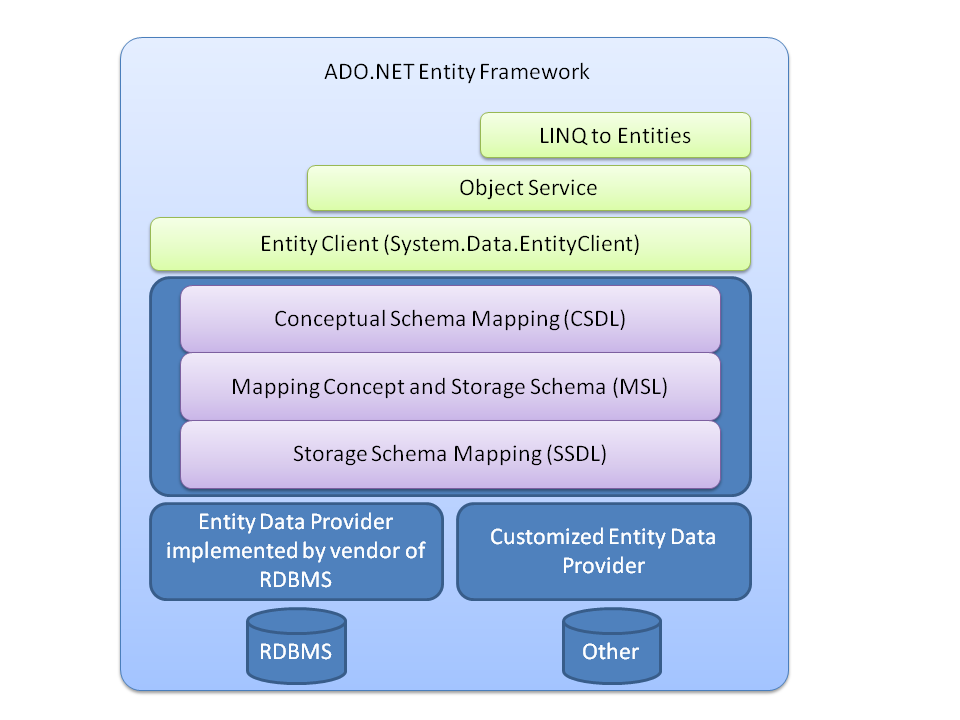 ADO.NET components and their interactions (Image: 小朱 at Chinese Wikipedia, Public domain, via Wikimedia Commons)
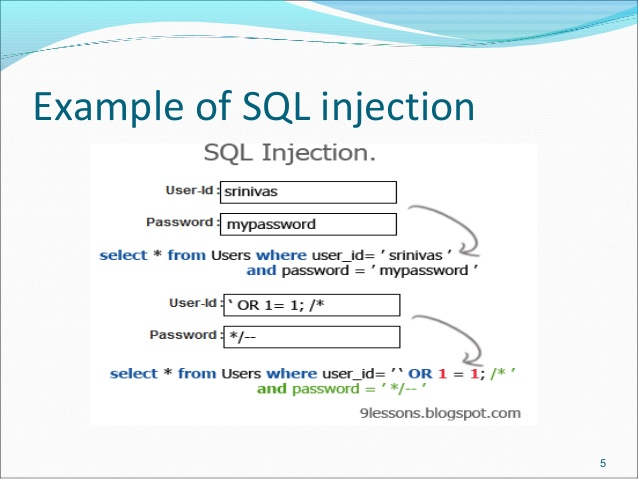 How malicious input exploits SQL queries (Image: Batka savemazaalai, CC BY-SA 4.0, via Wikimedia Commons)
Based on the TU BSc CSIT syllabus for NET Centric Computing (CSC367), unit 13.
Discussion
Loading…