NET Centric ComputingUnit 76 min read
Authentication & ASP.NET Core Identity: Roles, Claims, Identity Framework
Unit 7 of NET Centric Computing covers ASP.NET Core Identity—how to implement secure user authentication (login, registration, role-based access), claims-based identity, and integration with external providers (Google, Facebook) using Identity Framework. Learn about Identity models, password hashing, cookie-based auth,
---

## **Core Concepts: Authentication vs. Authorization**
Authentication is the process of verifying a user’s identity (e.g., username/password, biometrics). Authorization determines what an authenticated user can access (e.g., admin vs. regular user).

```figure
{"type":"tree","root":{"v":"Authentication & Authorization","children":[{"v":"Authentication","children":[{"v":"What it is","children":[{"v":"Verifies identity (e.g., username/password, OAuth)"}]},{"v":"How it works","children":[{"v":"1. User submits credentials"},{"v":"2. System validates against stored data"},{"v":"3. Grants access if valid"}]},{"v":"Types","children":[{"v":"Password-based"},{"v":"Multi-factor (MFA)"},{"v":"External (Google, Facebook)"},{"v":"Certificate-based"}]}]},{"v":"Authorization","children":[{"v":"What it is","children":[{"v":"Determines access rights (e.g., admin vs. user)"}]},{"v":"How it works","children":[{"v":"1. Checks user roles/claims"},{"v":"2. Grants/denies permissions"},{"v":"3. Logs access for auditing"}]}]}]},"caption":"Hierarchical comparison of Authentication vs. Authorization"}
ASP.NET Core Identity Framework
Identity Framework is a built-in library for managing users, roles, and claims. It includes:
- User Store: Stores user data (username, email, hashed passwords).
- Role Store: Manages role assignments (e.g.,
Admin,Customer). - Claim Store: Stores user attributes (e.g.,
Email,FullName). - Password Hasher: Securely hashes passwords (never store plaintext).
Key Classes
| Class | Purpose |
|---|---|
UserManager<TUser> |
Manages user creation, login, and password updates. |
RoleManager<TRole> |
Manages role creation and assignment. |
SignInManager<TUser> |
Handles login/logout and external logins (e.g., Google, Facebook). |
ClaimsPrincipal |
Represents the authenticated user and their claims. |
How Authentication Works in ASP.NET Core
User Registration:
- Client submits
Username,Email,Password. UserManager.CreateAsync()hashes the password and saves the user.
var user = new ApplicationUser { UserName = "john.doe", Email = "john@example.com" }; var result = await _userManager.CreateAsync(user, "Secure@Pass123");- Client submits
User Login:
- Client submits credentials →
SignInManager.PasswordSignInAsync()validates them. - If valid, a cookie (or token) is issued with user claims.
- Client submits credentials →
Role Assignment:
- Admins assign roles using
RoleManager:
await _roleManager.CreateAsync(new IdentityRole("Admin")); await _userManager.AddToRoleAsync(user, "Admin");- Admins assign roles using
Authorization:
- Use
[Authorize(Roles = "Admin")]on controllers/actions to restrict access.
- Use
Real-World Example: eSewa’s User Authentication
eSewa uses ASP.NET Core Identity (or a similar framework) to:
- Register users with email/phone verification.
- Authenticate via OTP or password.
- Assign roles (e.g.,
Customer,Merchant,Admin). - Authorize actions like transferring money (only
Admincan freeze accounts).
Claims-Based Identity
Claims are key-value pairs describing user attributes (e.g., Email, IsAdmin). Example:
var claims = new List<Claim>
{
    new Claim(ClaimTypes.Email, "user@example.com"),
    new Claim(ClaimTypes.Name, "John Doe"),
    new Claim("Department", "IT")
};
var identity = new ClaimsIdentity(claims, "CustomAuth");
var principal = new ClaimsPrincipal(identity);
Use Case: A bank app might use claims to show different menus:
IsAdmin=true→ Admin dashboard.Department=Finance→ Finance-specific features.
External Login Providers (Google, Facebook)
ASP.NET Core supports OAuth for external logins:
services.AddAuthentication()
    .AddGoogle(options =>
    {
        options.ClientId = "your-client-id";
        options.ClientSecret = "your-client-secret";
    });
How it works:
- User clicks "Login with Google."
- Redirects to Google’s OAuth endpoint.
- Google returns a token → ASP.NET validates it and creates a local user if needed.
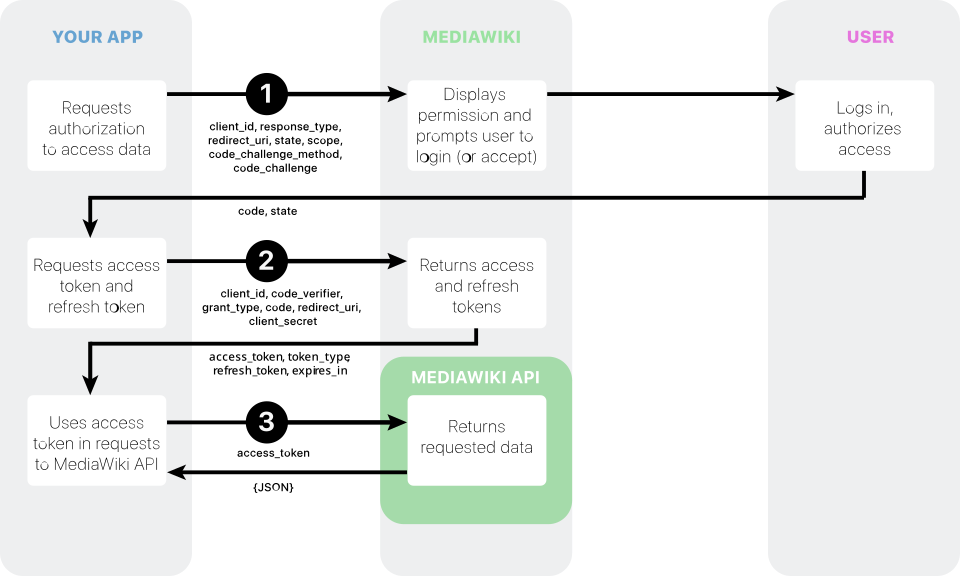 Authorization code grant process (Image: Premeditated, CC0, via Wikimedia Commons)
Security Threats & Mitigations
| Threat | Description | Mitigation in ASP.NET Core Identity |
|---|---|---|
| Brute Force Attacks | Repeated login attempts. | Lockout after failed attempts (LockoutEnabled). |
| Password Leaks | Plaintext passwords stored. | Use PasswordHasher (PBKDF2/SHA256). |
| CSRF | Fake login forms stealing cookies. | Use [ValidateAntiForgeryToken] and AntiForgery. |
| Session Hijacking | Stolen session cookies. | Use SameSite cookies and HTTPS. |
Exam Tip
- Differentiate Authentication vs. Authorization:
- Authentication = "Who are you?" (login).
- Authorization = "What can you do?" (roles/claims).
- ASP.NET Core Identity Components:
- Memorize
UserManager,RoleManager, andSignInManager.
- Memorize
- External Logins:
- Know OAuth flow (Authorization Code Grant).
- Security:
- Always hash passwords, use
[Authorize], and enable HTTPS.
- Always hash passwords, use
- Practical Questions:
- Expect code snippets for registration/login (e.g.,
CreateAsync,PasswordSignInAsync). - Be ready to explain role-based access control (RBAC) with
[Authorize(Roles = "Admin")].
- Expect code snippets for registration/login (e.g.,
Based on the TU BSc CSIT syllabus for NET Centric Computing (CSC367), unit 7.
Discussion
Loading…