Advanced Java ProgrammingUnit 49 min read
Java Packages, Exception Handling & Error Management
Unit 4 of Advanced Java Programming covers Java’s package system (imports, access modifiers, and package hierarchies) alongside exception handling (checked vs. unchecked, custom exceptions, and the `try-catch-finally` mechanism). It explains how to structure code modularly, handle runtime errors gracefully, and use Jav
Core Concepts
1. Java Packages: Organization and Access Control
Definition and Purpose
- A package is a namespace that groups related classes/interfaces to avoid naming conflicts and control access.
- Why use packages?
- Modularity: Logical grouping (e.g.,
java.util,javax.swing). - Access control:
public,protected,default, andprivatemodifiers restrict visibility. - Versioning: Packages allow library updates without breaking existing code.
- Modularity: Logical grouping (e.g.,
Package Declaration and Structure
- Declare at the top of a file:
package com.example.utils; // Standard convention: reverse domain + module - Directory structure must match the package name:
src/ └── com/ └── example/ └── utils/ └── MathOperations.java - Import statements:
import java.util.*; // Wildcard import (use sparingly)
import com.example.utils.MathOperations; // Specific import
Access Modifiers and Package Visibility
| Modifier | Within Class | Within Package | Subclass (any package) | Anywhere |
|---|---|---|---|---|
public |
✅ | ✅ | ✅ | ✅ |
protected |
✅ | ✅ | ✅ | ❌ |
default |
✅ | ✅ | ❌ | ❌ |
private |
✅ | ❌ | ❌ | ❌ |
Creating and Using Custom Packages
Example: Create a package geometry with a Circle class.
// File: src/geometry/Circle.java
package geometry;
public class Circle {
    public double radius;
    public Circle(double r) { radius = r; }
    public double area() { return Math.PI * radius * radius; }
}
Usage:
import geometry.Circle;
public class Main {
    public static void main(String[] args) {
        Circle c = new Circle(5.0);
        System.out.println("Area: " + c.area());
    }
}
Static Imports
- Import static members directly (avoids prefixing with class name):
Example:import static java.lang.Math.PI; import static java.lang.System.out;out.println("Value of PI: " + PI);
2. Exception Handling: Errors vs. Exceptions
Definitions
- Error: Severe system-level issues (e.g.,
OutOfMemoryError,StackOverflowError). Cannot be caught or recovered. - Exception: Runtime or checked issues (e.g.,
NullPointerException,FileNotFoundException). Can be handled.
Exception Hierarchy
classDiagram
    class Throwable {
        <<abstract>>
        +String getMessage()
    }
    class Error {
        <<extends Throwable>>
        +OutOfMemoryError
        +StackOverflowError
    }
    class Exception {
        <<extends Throwable>>
        +RuntimeException
        +IOException
    }
    class RuntimeException {
        <<extends Exception>>
        +NullPointerException
        +ArrayIndexOutOfBoundsException
    }
    class IOException {
        <<extends Exception>>
        +FileNotFoundException
    }
    Throwable <|-- Error
    Throwable <|-- Exception
    Exception <|-- RuntimeException
    Exception <|-- IOException
Checked vs. Unchecked Exceptions
| Feature | Checked Exception | Unchecked Exception (RuntimeException) |
|---|---|---|
| Inheritance | Extends Exception |
Extends RuntimeException |
| Compilation | Must be declared or handled | No compilation requirement |
| Examples | IOException, SQLException |
NullPointerException, ArrayIndexOutOfBoundsException |
| Recovery | Expected to be handled | Often programming errors |
Handling Exceptions: try-catch-finally
try {
    // Code that may throw an exception
    FileReader file = new FileReader("nonexistent.txt");
} catch (FileNotFoundException e) {
    // Handle the exception
    System.err.println("File not found: " + e.getMessage());
} finally {
    // Always executes (cleanup)
    System.out.println("Execution complete.");
}
Custom Exceptions
Example: Create InvalidAgeException for age validation.
// Custom exception
class InvalidAgeException extends Exception {
    public InvalidAgeException(String message) {
        super(message);
    }
}

// Usage
public class AgeValidator {
    public static void validate(int age) throws InvalidAgeException {
        if (age < 18) {
            throw new InvalidAgeException("Age must be 18+");
        }
    }
}
3. Keywords: throws vs. throw
| Keyword | Usage | Example |
|---|---|---|
throw |
Explicitly throws an exception | throw new ArithmeticException("Divide by zero"); |
throws |
Declares exceptions in method signature | public void readFile() throws IOException { ... } |
When to Use finally?
- Critical for resource cleanup (e.g., closing files, database connections).
- Example:
FileInputStream file = null;
try {
    file = new FileInputStream("data.txt");
    // Read data
} catch (IOException e) {
    System.err.println(e);
} finally {
    if (file != null) {
        file.close(); // Ensures resource is released
    }
}
4. Best Practices and Common Pitfalls
Do’s and Don’ts
- Do:
- Catch specific exceptions (avoid catching
Exceptiongenerically). - Use
finallyfor cleanup (e.g., closing streams). - Document exceptions with
@throwsin Javadoc.
- Catch specific exceptions (avoid catching
- Don’t:
- Swallow exceptions silently (
catch (Exception e) {}). - Use exceptions for flow control (e.g.,
throw new Exception("Invalid input");). - Ignore
finallyblocks in critical sections.
- Swallow exceptions silently (
Common Exception Scenarios
| Scenario | Exception Type | Solution |
|---|---|---|
| File not found | FileNotFoundException |
Check file path; handle gracefully. |
| Invalid user input | NumberFormatException |
Validate input before parsing. |
| Database connection failure | SQLException |
Implement retry logic or fallback. |
| Null reference access | NullPointerException |
Initialize objects properly. |
Exam Tip
High-Weightage Topics
Package Structure:
- Explain the difference between
path(where JVM looks for.classfiles) andclasspath(list of directories/JARs for loading classes). - Example Question: "How would you compile and run a program with classes in
com.examplepackage?" Answer:javac -d . com/example/Main.java # Compiles to ./com/example/Main.class java com.example.Main # Runs with classpath set
- Explain the difference between
Exception Handling:
- Differentiate
throws(declaration) andthrow(execution). - Example Question: "When is the
finallyblock skipped?" Answer: Only if the JVM exits abruptly (e.g.,System.exit()or fatal error).
- Differentiate
Custom Exceptions:
- Write a program to validate user input (e.g., email format) using custom exceptions.
- Example:
class InvalidEmailException extends Exception {}
public void validateEmail(String email) throws InvalidEmailException {
    if (!email.contains("@")) throw new InvalidEmailException("Invalid email");
}
Access Modifiers in Packages:
- Example Question: "Can a
protectedmethod in Package A be accessed by a class in Package B?" Answer: Only if the class in Package B is a subclass of the class in Package A.
- Example Question: "Can a
Common Mistakes to Avoid
- Forgetting to declare exceptions in method signatures (e.g.,
throws IOException). - Catching
ExceptionorThrowabletoo broadly (use specific exceptions). - Not closing resources in
finally(use try-with-resources in Java 7+):try (FileInputStream file = new FileInputStream("data.txt")) { // Auto-closes file } catch (IOException e) { e.printStackTrace(); }
Past Exam Patterns
- Short Answer (2-4 marks):
- Define
throwsvs.throw. - List 3 checked exceptions.
- Explain the purpose of
finally.
- Define
- Programming (6-10 marks):
- Write a program to handle
ArithmeticExceptionfor division by zero. - Create a custom exception for invalid login attempts.
- Demonstrate package usage with a
MathUtilsclass incom.mathpackage.
- Write a program to handle
- Theory (5-8 marks):
- Compare
pathandclasspath. - Explain the hierarchy of
Throwablewith examples. - Describe how to structure a large project using packages.
- Compare
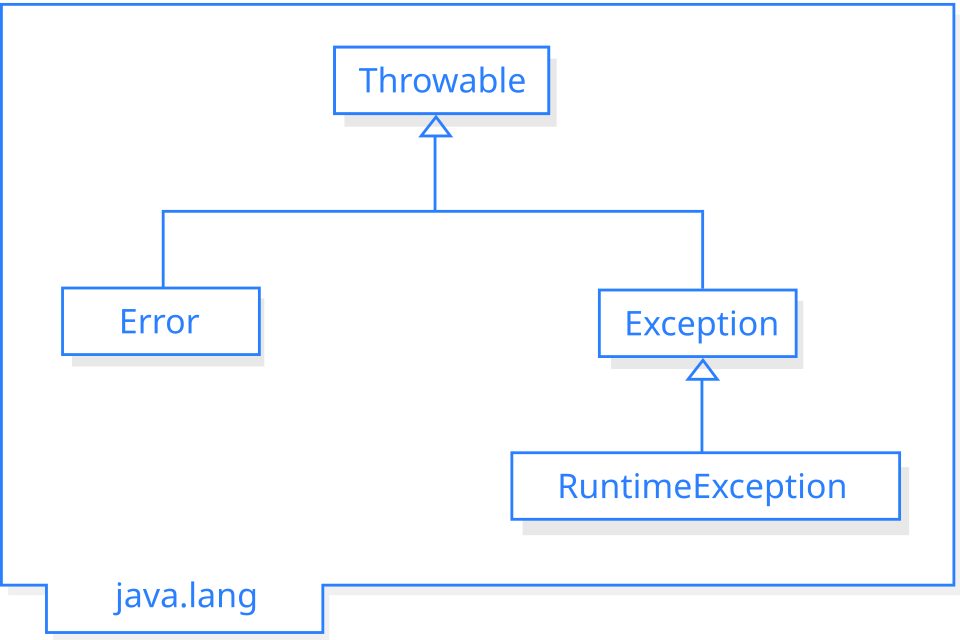 Hierarchy of `Throwable`, `Error`, `Exception`, and subclasses (Image: Arunreginald, CC BY-SA 3.0, via Wikimedia Commons)
mindmap
  root((Exception Handling))
    Checked
      IOException
      SQLException
    Unchecked
      RuntimeException
      NullPointerException
      ArrayIndexOutOfBoundsException
    Custom
      InvalidAgeException
      InvalidInputException
    Keywords
      throw
      throws
      try-catch-finally
    Best Practices
      Specific catches
      Resource cleanup
      Documentation
Based on the TU BSc CSIT syllabus for Advanced Java Programming (CSC409), unit 4.
Discussion
Loading…