Database AdministrationUnit 111 min read
DBA Roles, DBMS Architecture, Security & Oracle Basics
Unit 1 of Database Administration covers the core responsibilities of a Database Administrator (DBA), the layered architecture of Oracle DBMS, fundamental security concepts (privileges, auditing), and real-world backup/recovery policies—essential for managing enterprise databases like those used by Ncell or NEPSE.
TAKEAWAYS:
- A DBA’s role spans database design, security, performance tuning, and disaster recovery, with specialized tasks like multiplexing and flashback technology.
- Oracle’s three-layer architecture (physical, logical, memory) maps to files like
control01.ctlandsystem01.dbf, visible in theV$DATAFILEview. - Security is enforced via privileges (e.g.,
SELECT ANY TABLEvs.EXECUTE), with auditing tracking actions likeDROP TABLEin theDBA_AUDIT_TRAIL. - Backup policies (full, incremental, RMAN) must align with RPO/RTO—e.g., Ncell’s 24-hour recovery target for customer data.
- Flashback Database lets you revert to a past state (e.g., undo a mistaken
UPDATEon NEPSE’s stock records) usingFLASHBACK DATABASE TO TIMESTAMP. - Startup/shutdown modes (e.g.,
RESTRICTEDmode) control access during maintenance, critical for banks like NMB processing end-of-day transactions.
1. What is a Database Administrator (DBA)?
A DBA is the guardian of an organization’s data, responsible for ensuring availability, integrity, and security of databases. Their tasks range from designing schemas to recovering from failures—think of them as the IT equivalent of a hospital’s chief medical officer, but for data.
Key Roles of a DBA
mindmap
  root((DBA Roles))
    Design
      Schema Design
      Normalization (1NF–5NF)
      Data Modeling (ER Diagrams)
    Administration
      User Management
      Backup & Recovery
      Performance Tuning
    Security
      Privilege Assignment
      Auditing
      Encryption
    Maintenance
      Patching
      Upgrades
      Monitoring (AWR Reports)
Real-world example: At Ncell, DBAs manage the customer billing database (storing ~10M subscribers). Their tasks include:
- Designing tables for call logs, usage records, and promotions (e.g.,
CUSTOMER,SERVICE_PLAN). - Securing data by revoking
DELETEprivileges from call-center agents (onlySELECTallowed). - Recovering from failures if a power outage corrupts transaction logs during peak hours.
2. Database Management System (DBMS) and Oracle Architecture
Oracle DBMS is built on a three-layer architecture, each layer serving a distinct purpose:
Layered Architecture of Oracle DBMS
Key Files in Oracle Database
| File Type | Purpose | Example Filename | Location |
|---|---|---|---|
| Datafile | Stores user data (tables, indexes) | users01.dbf |
$ORACLE_BASE/oradata/ |
| Redo Log | Records all changes (for recovery) | redo01.log |
$ORACLE_BASE/redo/ |
| Control File | Metadata (tablespace locations, etc.) | control01.ctl |
$ORACLE_BASE/ |
| Parameter File | Configuration settings | init.ora or spfile |
$ORACLE_HOME/dbs/ |
Worked Example:
When you run CREATE TABLE employee (id NUMBER, name VARCHAR2(50)) in NEPSE’s stock database, Oracle:
- Allocates space in the
USERStablespace (logical layer). - Writes the table definition to the control file (
control01.ctl). - Stores the actual data in a datafile (e.g.,
users01.dbf).
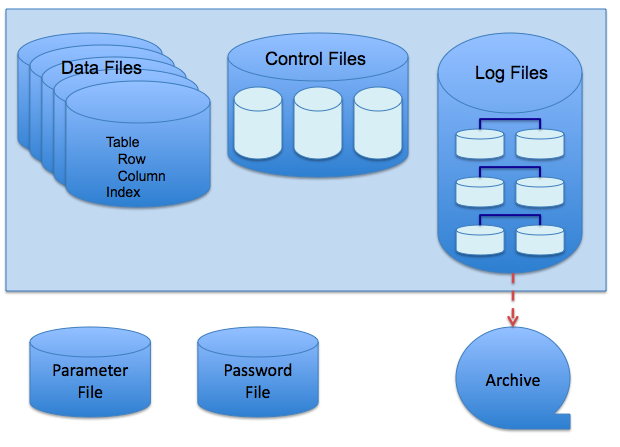 Physical layout of Oracle datafiles, redo logs, and control files in a server rack (Image: Scifipete, CC BY-SA 3.0, via Wikimedia Commons)
3. Database Security: Privileges and Auditing
Security in Oracle is managed via privileges (permissions) and auditing (tracking actions).
Types of Privileges
| Privilege Type | Examples | Use Case |
|---|---|---|
| System Privileges | CREATE SESSION, DROP ANY TABLE |
Granted to roles like DBA. |
| Object Privileges | SELECT, INSERT on a table |
Granted to users (e.g., HR can SELECT from EMPLOYEE). |
Example:
-- Grant SELECT on NEPSE's stock table to analysts
GRANT SELECT ON stock_prices TO analyst_role;

-- Revoke DELETE from call-center agents at Ncell
REVOKE DELETE ON customer_data FROM call_center_agent;
Auditing in Oracle
Auditing records who did what, when, and from where. Two types:
- Standard Auditing: Tracks SQL statements (e.g.,
DROP TABLE). - Fine-Grained Auditing (FGA): Tracks row-level changes (e.g., who updated a salary in the
EMPLOYEEtable).
Example Audit Trail:
-- Enable auditing for DROP operations
AUDIT DROP ANY TABLE BY user_id;

-- Query audit logs
SELECT username, sql_text, timestamp
FROM dba_audit_trail
WHERE sql_text LIKE '%DROP%';
Real-world tie-in: Khalti uses auditing to track:
- Who initiated a transaction reversal (e.g.,
UPDATE transactions SET status = 'REVERSED'). - Failed login attempts (e.g.,
INSERT INTO login_attempts VALUES (..., 'FAILED')).
4. Backup, Restore, and Recovery
A backup is a copy of database files; restore brings it back; recovery applies redo logs to fix corruption.
Types of Backups
| Backup Type | Description | When to Use |
|---|---|---|
| Full Backup | Copies all datafiles. | Weekly (e.g., Ncell’s Sunday midnight backup). |
| Incremental Backup | Copies only changed blocks. | Daily (reduces backup window). |
| Differential Backup | Copies all changes since last full backup. | Used with full backups for faster recovery. |
| RMAN Backup | Oracle’s tool for efficient backups. | Preferred for large databases (e.g., NEPSE). |
Backup Policy Example (Ncell):
- Full Backup: Every Sunday at 2 AM (RPO: 24 hours).
- Incremental Backup: Every 6 hours (reduces recovery time).
- Offsite Storage: Backups sent to a disaster-recovery site in Chitwan.
Recovery Process
- Restore datafiles from backup.
- Recover using redo logs (
RECOVER DATABASE). - Open the database (
ALTER DATABASE OPEN).
Worked Example: If Daraz’s order database crashes during Black Friday:
- Restore from the last full backup (Sunday).
- Apply incremental backups (Monday–Thursday).
- Replay redo logs to catch up to the crash time.
5. Flashback Database
Flashback Database lets you rewind the entire database to a past point in time (e.g., before a mistaken UPDATE).
Steps to Enable Flashback
- Set retention period:
ALTER DATABASE FLASHBACK RETENTION GOAL 2 DAYS; - Enable flashback mode:
ALTER DATABASE FLASHBACK ON; - Revert to a past time:
FLASHBACK DATABASE TO TIMESTAMP TO_TIMESTAMP('2023-11-15 14:30:00', 'YYYY-MM-DD HH24:MI:SS');
Real-world use: NMB Bank uses Flashback to:
- Revert a failed batch job that updated all loan interest rates incorrectly.
- Roll back to the state before a hacker deleted 100 customer records.
6. Database Startup and Shutdown Modes
Oracle databases can start/stop in different modes to control access and maintenance.
Startup Modes
| Mode | Description | Use Case |
|---|---|---|
| NOMOUNT | No control file is read. | Manual recovery (e.g., after control file corruption). |
| MOUNT | Control file is read; database is not open. | Before backup or recovery. |
| OPEN | Database is fully operational. | Normal operation (e.g., NEPSE’s trading system). |
| RESTRICTED | Only users with RESTRICTED SESSION privilege can connect. |
Maintenance (e.g., dropping a tablespace). |
Shutdown Modes
| Mode | Description | Use Case |
|---|---|---|
| NORMAL | Waits for transactions to complete. | Planned shutdown (e.g., weekly maintenance). |
| TRANSACTIONAL | Waits for current transactions to finish. | Urgent shutdown (e.g., hardware failure). |
| IMMEDIATE | Terminates all sessions abruptly. | Emergency (e.g., data corruption). |
| ABORT | Crashes the instance (no cleanup). | Critical failures (last resort). |
Example: Before upgrading Pathao’s ride-hailing database, the DBA:
- Shuts down in NORMAL mode to ensure no active rides are lost.
- Applies the patch.
- Starts in RESTRICTED mode to test queries.
In the Real World
Ncell’s Billing System
- Idea Used: Backup & Recovery
- How: Ncell’s DBAs take hourly incremental backups of call logs and usage data. If a power outage corrupts records during peak hours, they restore from the last clean backup and replay redo logs to recover lost transactions.
NEPSE’s Stock Database
- Idea Used: Flashback Database + Auditing
- How: During volatile market days, NEPSE’s DBAs enable Flashback Database to revert to the state before a mistaken
UPDATEaltered stock prices. Auditing tracks which analyst executed the command.
Khalti’s Payment Gateway
- Idea Used: Privileges + Fine-Grained Auditing
- How: Only the fraud team has
UPDATEprivileges on transaction records. Fine-grained auditing logs every change (e.g.,SET status = 'DISPUTED'), helping detect fraudulent reversals.
Exam Tip
Define vs. Explain: For questions like “Explain the term backup, restore, and recovery”, always include:
- Backup: Copy of datafiles.
- Restore: Bringing back from backup.
- Recovery: Applying redo logs to fix corruption.
- Example: “Ncell restores from Sunday’s full backup and recovers using hourly redo logs.”
Privileges Table: For “Explain system and object privileges”, draw a comparison table (like above) and give one real example (e.g.,
GRANT SELECT ON stock_prices TO analyst).Startup/Shutdown Modes: Memorize the 4 startup modes and 4 shutdown modes with one use case each. Example:
- “A DBA would use
SHUTDOWN TRANSACTIONALbefore a patch to avoid losing active customer orders in Daraz’s database.”
- “A DBA would use
Flashback Steps: For “Explain Flashback Database”, list the 3 steps (
FLASHBACK RETENTION,FLASHBACK ON,FLASHBACK TO TIMESTAMP) and tie it to a real scenario (e.g., “NMB Bank reverted a failed loan interest update using Flashback.”).Backup Policy: If asked to “design a backup policy”, structure it as:
- RPO (Recovery Point Objective): Max data loss (e.g., 24 hours for Ncell).
- RTO (Recovery Time Objective): Max downtime (e.g., 4 hours for NEPSE).
- Backup Types: Full (weekly), incremental (daily), offsite storage.
- Tools: RMAN for Oracle databases.
Final Visual Summary
Based on the TU BSc CSIT syllabus for Database Administration (CSC414), unit 1.
Discussion
Loading…