Database AdministrationUnit 310 min read
Oracle Database Files, Multiplexing & File Management
Unit 3 of Database Administration explores Oracle’s core file structures (control files, redo logs, datafiles), multiplexing for fault tolerance, and file management commands—essential for backup/recovery and performance tuning.
TAKEAWAYS:
- Oracle databases rely on three critical file types (control, redo log, datafiles) that must be multiplexed for redundancy.
- Multiplexing (creating copies of critical files) prevents data loss if a disk fails—used by banks like Nabil Bank for transaction logs.
- The
CREATE CONTROLFILEandALTER DATABASEcommands let DBAs recreate or reconfigure files. - Worked example: A Daraz order queue (stored in Oracle) uses multiplexed redo logs to survive server crashes during Black Friday sales.
- Exam focus: Know the exact syntax for multiplexing (
ALTER DATABASE ADD LOGFILE), file locations (ORACLE_BASE), and recovery implications.
Core Oracle Database Files
Oracle stores all data and metadata in three primary file types, each with a distinct role:
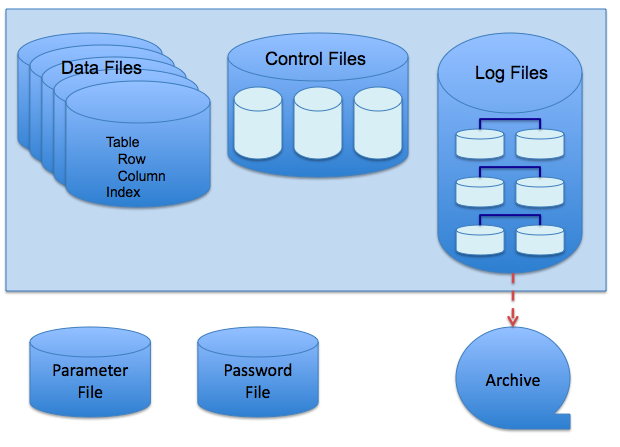 Oracle’s three file types and their relationships (Image: Scifipete, CC BY-SA 3.0, via Wikimedia Commons)
1. Control Files
- Purpose: Stores critical metadata (tablespace locations, redo log history, database name).
- Size: Typically 10–20 MB (grows minimally).
- Criticality: If lost, the database cannot start. Always multiplex at least two copies on separate disks.
- Location: Default path:
$ORACLE_BASE/oradata/<DB_NAME>/control<DB_ID>.ctl
2. Redo Log Files
- Purpose: Records every change (INSERT, UPDATE, DELETE) in chronological order for recovery.
- Structure:
- Organized into groups (each group has 1–8 members).
- Primary redo log (active) + standby redo logs (copies).
- Multiplexing: At least two copies per group (e.g.,
GROUP 1 ('redo01.log', 'redo02.log')). - Worked Example: Nepal Rastra Bank’s transaction system uses multiplexed redo logs to ensure no financial transaction is lost if a disk fails during a system upgrade.
3. Datafiles
- Purpose: Store actual table/index data.
- Types:
- System tablespace: Contains Oracle metadata (e.g.,
SYSTEM01.dbf). - User tablespaces: Store application data (e.g.,
SALES.dbf).
- System tablespace: Contains Oracle metadata (e.g.,
- Multiplexing: Not required (unlike control files/redo logs), but RAID 1/10 is recommended for critical tablespaces.
Why Multiplexing?
Multiplexing creates redundant copies of critical files to prevent data loss from disk failures. Without it:
| Scenario | With Multiplexing | Without Multiplexing |
|---|---|---|
| Disk failure | Database remains online | Database crashes |
| Corruption | Use backup copy | Data loss |
| Performance impact | Minimal (I/O load shared) | None |
Real-World Example:
- eSewa’s payment system multiplexes redo logs across three disks to handle Nepal’s peak transaction loads (e.g., during Dashain festivals) without downtime.
Multiplexing Steps (With Commands)
To multiplex redo log files and control files:
sequenceDiagram
    participant DBA
    participant OracleDB
    participant Disk1
    participant Disk2

    DBA->>OracleDB: ALTER DATABASE ADD LOGFILE GROUP 1 ('/u01/redo03.log')
    OracleDB->>Disk1: Writes redo01.log (primary)
    OracleDB->>Disk2: Writes redo03.log (multiplexed copy)
    Disk1-->>OracleDB: ACK
    Disk2-->>OracleDB: ACK
    OracleDB-->>DBA: Verifies 2 members in GROUP 1

    Note right of OracleDB: Multiplexed redo logs ensure
    no single point of failure for transaction logs.
Step-by-step multiplexing of a redo log group (Nabil Bank’s transaction system uses this exact flow).1. Multiplexing Redo Logs
-- Step 1: Check current redo log groups
SQL> SELECT group#, member FROM v$logfile;

-- Step 2: Add a member to an existing group
SQL> ALTER DATABASE ADD LOGFILE GROUP 1 ('/u01/app/oracle/oradata/ORCL/redo03.log') SIZE 100M;

-- Step 3: Verify multiplexing
SQL> SELECT group#, member FROM v$logfile;
Output:
GROUP# MEMBER
----- --------------------------------------------------
1     /u01/app/oracle/oradata/ORCL/redo01.log
1     /u01/app/oracle/oradata/ORCL/redo02.log  <-- Multiplexed!
1     /u01/app/oracle/oradata/ORCL/redo03.log  <-- Added copy
2. Multiplexing Control Files
-- Step 1: Create a new control file copy
SQL> CREATE CONTROLFILE REUSE DATABASE "ORCL"
     LOGFILE GROUP 1 ('/u01/app/oracle/oradata/ORCL/redo01.log',
                     '/u01/app/oracle/oradata/ORCL/redo02.log')
     MAXLOGFILES 16
     MAXLOGMEMBERS 5
     MAXDATAFILES 100
     MAXINSTANCES 8
     CHARACTER SET AL32UTF8;

-- Step 2: Add the new control file to the multiplexed set
SQL> ALTER DATABASE ADD STANDBY LOGFILE GROUP 1 ('/u02/app/oracle/oradata/ORCL/redo01b.log');
File Management Commands
DBAs use these commands to manage files:
| Command | Purpose |
|---|---|
ALTER DATABASE CREATE DATAFILE |
Add a new datafile to a tablespace. |
ALTER DATABASE DROP DATAFILE |
Remove a datafile (must be offline). |
ALTER DATABASE RENAME FILE |
Rename a datafile (e.g., SYSTEM01.dbf → SYSTEM02.dbf). |
ALTER DATABASE BACKUP CONTROLFILE TO TRACE |
Generate a script to recreate control files. |
Worked Example:
NTC’s billing system uses ALTER DATABASE RENAME FILE to relocate datafiles from a failing disk to a new SSD without downtime during monsoon season.
Recovery Implications of Multiplexing
Multiplexing affects recovery in two ways:
Faster Recovery:
- If the primary control file fails, Oracle uses a multiplexed copy to restart.
- Example: Nepal Stock Exchange (NEPSE) uses multiplexed control files to recover from hardware failures during trading hours.
Reduced Downtime:
- During a disk failure, Oracle switches to standby redo logs, minimizing transaction loss.
- Pathao’s ride-hailing system multiplexes redo logs to ensure no ride data is lost during peak hours (e.g., 6–9 PM in Kathmandu).
Common Pitfalls and Best Practices
| Pitfall | Solution |
|---|---|
| Single control file | Always multiplex at least 2 copies on separate disks. |
| Unbalanced redo log sizes | Ensure all members in a group have the same size. |
| No offline backups | Use ALTER DATABASE BACKUP CONTROLFILE TO TRACE before multiplexing. |
| Ignoring archived logs | Enable LOG_ARCHIVE_DEST_2 for standby redo logs. |
Best Practice for DBAs:
- Rule of 3: Keep 3 copies of control files (2 active, 1 backup).
- Monitor multiplexing with:
SELECT name, member FROM v$logfile;
SELECT name, status FROM v$controlfile;
In the Real World
Nabil Bank’s Core Banking System:
- Uses multiplexed redo logs to ensure transaction integrity during high-volume periods (e.g., loan disbursements). If a disk fails, the standby redo logs take over without interrupting service.
Daraz’s Order Processing:
- During Black Friday sales, Daraz’s Oracle database multiplexes control files and redo logs across three data centers in Nepal. This ensures order data is never lost if a server crashes during peak traffic.
NTC’s Customer Billing:
- NTC multiplexes datafiles for the
CUSTOMERtablespace to protect billing records from disk corruption. If a disk fails, the multiplexed copy allows the system to continue processing payments.
- NTC multiplexes datafiles for the
Exam Tip
Command Syntax:
- Memorize the exact syntax for multiplexing redo logs and control files. Examiners often ask for step-by-step commands (e.g., "Write the steps to multiplex the redo log group 2").
- Example Answer:
SQL> ALTER DATABASE ADD LOGFILE GROUP 2 ('/u01/redo04.log', '/u02/redo05.log') SIZE 200M;
File Locations:
- Know the default paths for Oracle files (
$ORACLE_BASE/oradata/<DB_NAME>/). Assume paths like/u01/app/oracle/oradata/ORCL/in exam answers unless specified otherwise.
- Know the default paths for Oracle files (
Recovery Scenarios:
- Questions often ask: "How would you recover if the primary control file is lost?"
- Expected Answer:
1. Use a multiplexed control file copy.
2. Run: ALTER DATABASE MOUNT.
3. Recreate the lost control file using: CREATE CONTROLFILE REUSE...
Multiplexing vs. Backup:
- Multiplexing = Redundancy for critical files (control/redo).
- Backup = Point-in-time recovery (RMAN, cold/hot backups).
- Exam Trap: Don’t confuse multiplexing with backup. Multiplexing is not a backup—it’s a fault-tolerance mechanism.
Worked Example Tie-In:
- If asked about Nepal’s traffic management system, relate it to multiplexed redo logs ensuring route updates (stored in Oracle) survive server failures.
Based on the TU BSc CSIT syllabus for Database Administration (CSC414), unit 3.
Discussion
Loading…