Database AdministrationUnit 88 min read
Oracle Multitenant Architecture: CDB, PDB, and Container Databases
Unit 8 of Database Administration explores Oracle’s Multitenant Architecture, covering Container Databases (CDB), Pluggable Databases (PDB), their relationship, benefits, and real-world applications like cloud hosting and SaaS platforms. Learn how to manage multiple databases efficiently under a single container, optim
Core Concepts: CDB and PDB Defined
1. What is a Container Database (CDB)?
A Container Database (CDB) is the root database in Oracle’s Multitenant Architecture. It acts as a host for multiple Pluggable Databases (PDBs). Think of it as a master database that contains:
- Metadata (data dictionary, users, roles, privileges)
- Common users (shared across all PDBs)
- PDBs (logically isolated databases)
classDiagram
class CDB {
+ Contains PDBs
+ Shared metadata
+ Common users
+ Single control file
}
class PDB {
+ Logically isolated
+ Own schema objects
+ Independent storage
}
CDB "1" *-- "N" PDB : Contains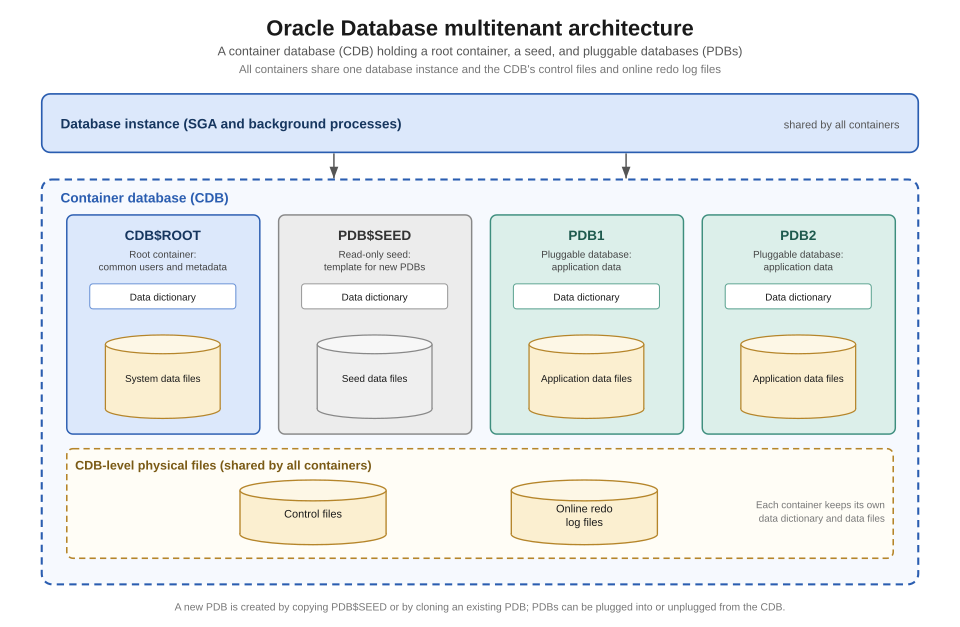 Oracle Multitenant Architecture: CDB (root) and PDBs (plugged in) (Image: Brickcompass, CC BY 4.0, via Wikimedia Commons)
2. What is a Pluggable Database (PDB)?
A Pluggable Database (PDB) is a portable, self-contained database that runs inside a CDB. Key features:
- Logical isolation: Each PDB behaves like a standalone database.
- Resource sharing: PDBs share the CDB’s memory, processes, and storage.
- Plug-and-play: Can be unplugged from one CDB and plugged into another without downtime.
Real-world analogy:
Imagine a hotel (CDB) with multiple rooms (PDBs). Each room has its own furniture (schema objects) but shares the hotel’s utilities (memory, storage).
How CDB and PDB Work Together
3. Relationship Between CDB and PDB
| Feature | CDB (Container Database) | PDB (Pluggable Database) |
|---|---|---|
| Role | Host for PDBs | Logical database inside CDB |
| Storage | Single control file | Independent tablespaces |
| Users | Common users (shared) | Local users (PDB-specific) |
| Backup/Recovery | Managed at CDB level | Can be backed up independently |
| Resource Usage | Shared across all PDBs | Allocated dynamically |
4. Key Components of a CDB
A CDB consists of:
- Root Container (
CDB$ROOT)- Contains metadata for all PDBs.
- Cannot be dropped or unplugged.
- Seed PDB (
PDB$SEED)- Template for creating new PDBs.
- Cannot be dropped or modified.
- User-Created PDBs
- Custom databases plugged into the CDB.
stateDiagram-v2
    [*] --> CDB$ROOT: Startup
    CDB$ROOT --> PDB$SEED: Template
    PDB$SEED --> PDB1: Clone
    PDB$SEED --> PDB2: Clone
    PDB1 --> [*]: Operational
    PDB2 --> [*]: Operational
Why Use Oracle Multitenant Architecture?
5. Advantages of CDB/PDB
✅ Resource Efficiency
- Multiple PDBs share the same SGA (System Global Area) and background processes, reducing overhead.
✅ Isolation & Security
- PDBs are logically separated, preventing cross-contamination.
- Role-based access control can restrict users to specific PDBs.
✅ Simplified Management
- Single backup/recovery for the entire CDB (or per-PDB).
- Patch and upgrade all PDBs at once.
✅ Portability
- PDBs can be moved between CDBs without downtime.
✅ Cloud & SaaS Readiness
- Ideal for multi-tenant SaaS applications (e.g., eSewa, Daraz).
6. Disadvantages & Limitations
❌ Learning Curve
- Requires understanding of CDB vs. non-CDB modes.
❌ Storage Overhead
- CDB uses additional metadata for managing PDBs.
❌ Not All Features Supported
- Some legacy Oracle features (e.g., Oracle Streams) may not work in PDBs.
Real-World Applications in Nepal & Globally
## In the real world
eSewa (Nepal)
- Uses Oracle Multitenant to host multiple customer databases under a single CDB.
- Each user account (PDB) is isolated for security, while sharing the same backend infrastructure.
Ncell (Nepal)
- Manages billings, customer data, and network logs in separate PDBs within a CDB.
- Backup policy: Daily snapshots of the CDB, with critical PDBs (e.g., billing) backed up hourly.
Google Cloud & AWS (Global)
- Oracle Autonomous Database (a CDB) hosts thousands of PDBs for SaaS customers like Salesforce and Workday.
- Example: A single Google Cloud CDB may contain PDBs for 100+ companies, each with their own schema.
Worked Example: Daraz Order Processing
Suppose Daraz uses a CDB with PDBs for:
PDB_SALES(order transactions)
PDB_INVENTORY(product stock)
PDB_CUSTOMER(user profiles)Backup Strategy:
- Daily full backup of the CDB (12 AM).
- Incremental backups for
PDB_SALESevery 2 hours (high transaction volume).- Point-in-time recovery used if a sale is lost (e.g., Flashback Database).
Managing CDB and PDB: Key Operations
7. Creating a PDB
-- Step 1: Create a PDB from the seed template
CREATE PLUGGABLE DATABASE pdb_daraz
ADMIN USER pdb_admin IDENTIFIED BY password
FILE_NAME_CONVERT=('/old_location/', '/new_location/');

-- Step 2: Open the PDB
ALTER PLUGGABLE DATABASE pdb_daraz OPEN;
8. Plugging/Unplugging a PDB
-- Unplug a PDB (creates a transportable set)
ALTER PLUGGABLE DATABASE pdb_daraz UNPLUG INTO '/backup/pdb_daraz' DIRECTORY backup_dir;

-- Plug a PDB into another CDB
CREATE PLUGGABLE DATABASE pdb_daraz USING '/backup/pdb_daraz' FILE_NAME_CONVERT=('/old_path/', '/new_path/');
9. Switching Between CDB and Non-CDB Modes
-- Convert a non-CDB to CDB (requires downtime)
ALTER DATABASE CONVERT TO CONTAINER DATABASE;

-- Convert a CDB to non-CDB (not recommended for production)
ALTER DATABASE CONVERT TO NONCONTAINER DATABASE;
Performance & Security Considerations
10. Resource Management in CDB
- Resource Plans: Use Database Resource Manager (DBRM) to allocate CPU/memory per PDB.
BEGIN DBMS_RESOURCE_MANAGER.CREATE_PLAN_DIRECTIVE( plan => 'shared_pool_plan', group_or_subplan => 'PDB_DARAZ', comment => 'Limit PDB_DARAZ to 40% CPU', mgmt_p1 => 40); END; - Memory Allocation:
- Shared Pool (SQL, PL/SQL cache) is shared.
- Large Pool (for I/O operations) can be configured per PDB.
11. Security in Multitenant Architecture
| Security Feature | How It Works in CDB/PDB |
|---|---|
| Common Users | Shared across PDBs (e.g., SYS, SYSTEM). |
| Local Users | Created inside a PDB (e.g., pdb_admin). |
| Roles | Can be common (shared) or local (PDB-specific). |
| Privileges | CREATE SESSION, CREATE TABLE can be restricted to PDBs. |
| Network Isolation | PDBs can have separate listener ports. |
Example: Restricting Access to a PDB
-- Grant a common user access to a specific PDB
ALTER USER common_user SET CONTAINER_DATA=pdb_daraz;
Exam Tip: How This Unit is Tested
This unit is heavily tested in TU exams with:
Definitions & Concepts (5-10 marks)
- Explain CDB vs. PDB, root vs. seed PDB, pluggable vs. non-pluggable.
- Common pitfalls:
- ❌ Saying PDBs are physically isolated (they are logically isolated).
- ❌ Confusing CDB$ROOT with a regular PDB.
Commands & Operations (10-15 marks)
- Must memorize:
CREATE PLUGGABLE DATABASEALTER PLUGGABLE DATABASE ... UNPLUG/PLUGALTER DATABASE CONVERT TO CONTAINER
- Worked example: Given a scenario, write commands to create a PDB for a bank’s loan system.
- Must memorize:
Real-World Scenarios (10 marks)
- Expected questions:
- "How would you design a CDB for a SaaS company like eSewa?"
- "Explain how Daraz would use PDBs for order processing and inventory."
- Key points to include:
- Isolation (security)
- Backup strategy (CDB vs. per-PDB)
- Resource allocation (CPU/memory limits)
- Expected questions:
Comparison Tables (5 marks)
- Always draw a table comparing:
- CDB vs. Non-CDB
- PDB vs. Standalone Database
- Common Users vs. Local Users
- Always draw a table comparing:
Pro Tip:
If asked about backup/recovery, relate it to PDB-level vs. CDB-level backups. Example: "For Daraz’s
PDB_SALES, we’d use incremental backups every 2 hours, while the entire CDB is backed up daily."
Based on the TU BSc CSIT syllabus for Database Administration (CSC414), unit 8.
Discussion
Loading…