Airlines Ticketing and GDSUnit 615 min read
Electronic Ticketing: e-Tickets, Barcodes, e-Docs & GDS Integration
Unit 6 of Airlines Ticketing and GDS explores the shift from paper tickets to electronic tickets, including e-ticket formats, barcode technology, document types (e-DOCs), and how GDS systems like Amadeus and Sabre process e-tickets. It covers validation, security, and the role of IATA standards in modern air travel.
What is Electronic Ticketing?
Electronic ticketing (e-ticketing) is the paperless issuance and management of airline tickets using digital records stored in Global Distribution Systems (GDS). Unlike traditional paper tickets, e-tickets are invisible—they exist only as data entries in airline databases and passenger records. The passenger receives a confirmation (e-receipt) with a record locator (PNR number) and a barcode for validation.
Key Components of e-Ticketing
- Record Locator (PNR Number): A unique 6-character code (e.g.,
ABC123) assigned to a booking. - Passenger Name Record (PNR): The digital profile of a passenger’s booking, including flight details, fare, and passenger info.
- e-Ticket Number: A 13-character alphanumeric code (e.g.,
123-456789012) linked to the PNR. - Barcode: A machine-readable code (PDF417 format) printed on the e-receipt for validation at check-in and boarding.
How e-Ticketing Works: Step-by-Step Process
flowchart TD
    A["1. Passenger Books Flight\n(Online/GDS Agent)"] --> B["2. GDS Creates PNR\n(Amadeus/Sabre/Worldspan)"]
    B --> C["3. Airline Issues e-Ticket\n(Stored in GDS & Airline DB)"]
    C --> D["4. Passenger Receives e-Receipt\n(Email/SMS with Barcode)"]
    D --> E["5. Airline Validates Barcode\n(Check-in & Boarding Gates)"]
    E --> F["6. Flight Data Updated\n(GDS & Airline Systems Sync)"]
Step 1: Booking & PNR Creation
- When a passenger books a flight (via an online portal, travel agent, or GDS), the system generates a PNR (Passenger Name Record).
- The PNR contains:
- Passenger details (name, passport, contact).
- Flight details (route, date, class).
- Fare and payment info.
- Record Locator (6-digit code).
Step 2: e-Ticket Issuance
- The GDS (Amadeus, Sabre, Travelport) sends the PNR data to the airline’s central system.
- The airline creates an e-ticket (13-character code) and stores it in:
- GDS database (for agent access).
- Airline’s internal system (for validation).
- The passenger does not receive a physical ticket—only an e-receipt with a barcode.
Step 3: e-Receipt & Barcode Generation
The e-receipt includes:
- e-Ticket number (e.g.,
123-456789012). - Barcode (PDF417 format) – scans at check-in and boarding.
- Passenger details (name, flight, date).
- Check-in instructions (online/airport).
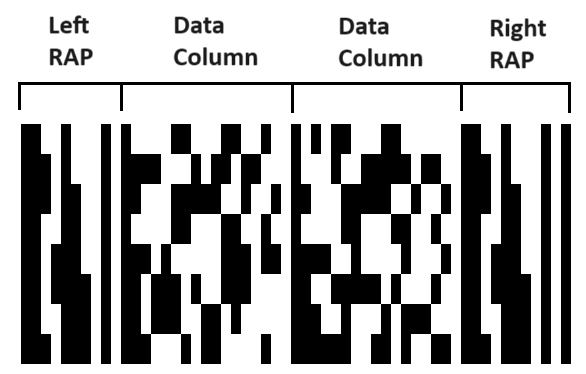 PDF417 barcode structure for e-tickets (Image: Alexandr.gavriluk, CC0, via Wikimedia Commons)
Step 4: Validation at Check-in & Boarding
- At the airport: The passenger’s barcode is scanned at:
- Self-service kiosks.
- Check-in counters.
- Boarding gates.
- The system verifies the barcode against the GDS and airline database.
- If valid, the passenger is checked in and allowed to board.
Types of Electronic Documents (e-DOCs)
e-DOCs are digital versions of traditional travel documents issued via e-ticketing. They include:
| e-DOC Type | Description | Example |
|---|---|---|
| e-Ticket | Digital flight ticket (no paper). | AirAsia e-receipt with barcode. |
| e-Board Pass | Digital boarding pass (sent via SMS/email). | Qatar Airways mobile boarding pass. |
| e-Itinerary | Digital flight plan (shows all segments). | Lufthansa e-itinerary with flight details. |
| e-Confirmation | Proof of booking (sent after payment). | Nepal Airlines email confirmation. |
| e-Invoice | Digital receipt of payment. | United Airlines e-invoice for fare. |
| e-Visas | Digital visas (issued electronically). | e-Visa for India/Nepal tourism. |
Advantages of Electronic Ticketing
✅ Environmentally Friendly – No paper waste. ✅ Faster Processing – Instant issuance and validation. ✅ Reduced Errors – Less manual data entry. ✅ Cost-Effective – No printing, handling, or storage costs. ✅ Global Accessibility – Available 24/7 via mobile/online. ✅ Enhanced Security – Encrypted data, fraud detection. ✅ Seamless Integration – Works with GDS, airlines, and airports.
Disadvantages & Challenges
❌ Technical Dependence – Requires internet, GDS, and airline systems to work. ❌ Security Risks – Hacking, data breaches, or system failures can disrupt travel. ❌ Limited Access – Offline areas may not support e-ticket validation. ❌ Passenger Confusion – Some travelers prefer physical tickets. ❌ Regulatory Compliance – Must follow IATA, ICAO, and government rules.
How Airlines & GDS Systems Work Together
Airlines rely on GDS (Global Distribution Systems) to manage e-tickets. The top 4 GDS providers are:
| GDS Provider | Market Share | Key Airlines Using It | Key Features |
|---|---|---|---|
| Amadeus | ~40% | Air France, Lufthansa, Cathay Pacific | Strong in Europe & Asia. |
| Sabre | ~30% | United, American Airlines, JetBlue | Dominates US market. |
| Travelport | ~20% | British Airways, Qantas, Emirates | Merged Galileo & Worldspan. |
| Worldspan | ~10% | Delta, Alaska Airlines | Strong in US domestic flights. |
How an e-Ticket Moves Through the System
- Booking Agent (travel agency or online portal) enters flight details into GDS.
- GDS sends request to airline’s central reservation system (CRS).
- Airline CRS checks availability, applies fare rules, and creates e-ticket.
- GDS updates the PNR with e-ticket number.
- Passenger receives e-receipt (email/SMS).
- Airport systems validate barcode at check-in/boarding.
Worked Example: Booking a Flight via Amadeus GDS
Scenario: A travel agent in Kathmandu books a flight from Kathmandu (KTM) to Singapore (SIN) on Singapore Airlines via Amadeus GDS.
Step 1: Create PNR in Amadeus
- Agent enters:
- Passenger: Mr. ABC, Nepalese passport #12345678
- Flight: KTM → SIN, 15 May 2024, Economy, 1P
- Fare: $450 (Y-class)
- Amadeus generates:
- PNR Number:
ABC123 - Record Locator:
ABC123
- PNR Number:
Step 2: Issue e-Ticket
- Amadeus sends data to Singapore Airlines CRS.
- Airline issues:
- e-Ticket Number:
123-456789012 - Barcode: PDF417 (printed on e-receipt).
- e-Ticket Number:
Step 3: Passenger Receives e-Receipt
- Email/SMS sent to Mr. ABC:
Dear Mr. ABC,
Your e-ticket for KTM-SIN (15 May 2024) is confirmed.
e-Ticket: 123-456789012
Barcode: [PDF417 image]
Check-in: Online or at KTM Airport.
Step 4: Validation at Airport
- Mr. ABC scans barcode at Singapore Airlines check-in kiosk.
- System verifies:
- PNR exists in Amadeus.
- e-Ticket matches PNR.
- Passenger is not no-show.
- Boarding pass issued.
Security Measures in e-Ticketing
To prevent fraud and unauthorized access, airlines and GDS use:
| Security Feature | How It Works | Example |
|---|---|---|
| Encrypted Data | PNR and e-ticket data are encrypted during transmission. | TLS/SSL encryption in Amadeus. |
| Two-Factor Authentication | Agents need login credentials + token to access PNRs. | Sabre’s dual-auth for high-value bookings. |
| Barcode Validation | Barcode must match PNR and airline database. | PDF417 scanners at airport gates. |
| Fraud Detection | AI monitors unusual bookings (e.g., same name, multiple tickets). | Amadeus Fraud Prevention Module. |
| Audit Logs | Every change to a PNR is logged and tracked. | Travelport’s compliance records. |
| Biometric Checks | Some airlines use fingerprint/face recognition at check-in. | Emirates’ biometric boarding gates. |
In the Real World
1. eSewa & Ncell (Nepal) – Digital Payments for Air Tickets
- How it works: Passengers book flights via eSewa or Ncell apps (e.g., Nepal Airlines, Biman).
- e-Ticketing role:
- After payment, the GDS (Amadeus/Travelport) issues an e-ticket.
- The passenger gets an SMS with barcode (no paper ticket).
- At TIA (Tribhuvan International Airport), the barcode is scanned at self-service kiosks.
- Why it matters: Reduces counter queues and paper waste.
2. Pathao & Daraz (Nepal) – Digital Itineraries for Travelers
- Pathao (ride-hailing) and Daraz (e-commerce) use digital receipts—similar to e-tickets.
- How e-ticketing applies:
- Pathao sends a digital ride confirmation (like an e-board pass).
- Daraz uses tracking numbers (like e-ticket numbers) for order status.
- Lesson: e-Ticketing is part of digital transformation in all industries.
3. Google Flights & Kayak – Online Booking with e-Tickets
- How it works:
- User books via Google Flights/Kayak → payment processed → e-ticket issued via GDS.
- Passenger gets an email with barcode (no agent needed).
- Real-world impact:
- Faster bookings (no travel agent).
- Lower costs (no commission for agents).
- Global reach (works for any airline).
4. NEPSE & Stock Market Trading – Similar to e-Ticketing
- NEPSE (Nepal Stock Exchange) uses digital share certificates—just like e-tickets.
- How it’s similar:
- No paper shares → only digital records.
- Unique transaction IDs (like e-ticket numbers).
- Validation via online systems (like barcode scanning).
- Key takeaway: e-Ticketing is a digital record-keeping system, used in finance, travel, and logistics.
Common Errors & How to Avoid Them
| Error | Cause | Solution |
|---|---|---|
| Barcode doesn’t scan | Printed incorrectly or damaged. | Use high-resolution PDF417 barcode from airline’s official site. |
| PNR not found in GDS | Typo in record locator or system glitch. | Double-check PNR number and contact airline support. |
| Fare mismatch | Wrong fare class selected. | Verify fare rules in GDS before booking. |
| No e-receipt received | Spam folder or wrong email. | Check junk mail or request a resend via airline. |
| Check-in failed at airport | Baggage not linked to PNR. | Pre-check baggage online before arrival. |
Exam Tip
What Examiners Look For
✔ Define e-ticketing clearly (digital vs. paper). ✔ Explain the role of GDS (Amadeus, Sabre, Travelport). ✔ Describe the e-ticket number format (13 characters). ✔ Compare e-tickets with paper tickets (advantages/disadvantages). ✔ Explain barcode validation (PDF417, scanning process). ✔ Discuss security measures (encryption, fraud detection). ✔ Relate to real-world examples (eSewa, Google Flights, NEPSE).
Common Mistakes to Avoid
❌ Confusing PNR with e-ticket number (PNR = 6 digits, e-ticket = 13 digits). ❌ Ignoring fare rules (e-tickets must follow IATA fare construction). ❌ Not mentioning GDS (always link e-ticketing to Amadeus/Sabre). ❌ Describing paper tickets as e-tickets (e-tickets are invisible). ❌ Forgetting security (always mention encryption, fraud checks).
Expected Questions in TU/PU Exams
"Explain the process of e-ticket issuance with a diagram." → Draw a flowchart (like the Mermaid one above) and explain each step.
"What are the advantages of e-ticketing over paper tickets?" → List 5+ points (environmental, speed, cost, etc.).
"How does Amadeus GDS validate an e-ticket at the airport?" → Explain barcode scanning → PNR check → boarding pass issuance.
"Discuss the security measures used in e-ticketing." → Cover encryption, fraud detection, audit logs, biometrics.
"Compare e-tickets with traditional paper tickets." → Use a table (like the one above) for clarity.
Quick Revision Table
| Topic | Key Points |
|---|---|
| e-Ticket Definition | Digital ticket stored in GDS, no paper. |
| PNR Number | 6-digit code (e.g., ABC123). |
| e-Ticket Number | 13-character code (e.g., 123-456789012). |
| Barcode Type | PDF417 (machine-readable). |
| GDS Providers | Amadeus, Sabre, Travelport, Worldspan. |
| e-DOC Types | e-Ticket, e-Board Pass, e-Itinerary, e-Confirmation. |
| Security Features | Encryption, fraud detection, audit logs, biometrics. |
| Validation Process | Barcode scan → PNR check → boarding pass. |
Final Thought
Electronic ticketing has revolutionized air travel by making bookings faster, cheaper, and greener. Understanding how GDS, barcodes, and PNRs work is essential for:
- Travel agents (booking flights via Amadeus/Sabre).
- Airport staff (validating e-tickets at check-in).
- Passengers (using mobile boarding passes).
Remember: The next time you book a flight on eSewa or Google Flights, you’re using e-ticketing technology—just like airlines worldwide!
Based on the TU BTTM syllabus for Airlines Ticketing and GDS, unit 6.
Discussion
Loading…